The Tech Edvocate

Top Menu

  • Advertisement
  • Apps
  • Home Page
  • Home Page Five (No Sidebar)
  • Home Page Four
  • Home Page Three
  • Home Page Two
  • Home Tech2
  • Icons [No Sidebar]
  • Left Sidbear Page
  • Lynch Educational Consulting
  • My Account
  • My Speaking Page
  • Newsletter Sign Up Confirmation
  • Newsletter Unsubscription
  • Our Brands
  • Page Example
  • Privacy Policy
  • Protected Content
  • Register
  • Request a Product Review
  • Shop
  • Shortcodes Examples
  • Signup
  • Start Here
    • Governance
    • Careers
    • Contact Us
  • Terms and Conditions
  • The Edvocate
  • The Tech Edvocate Product Guide
  • Topics
  • Write For Us
  • Advertise

Main Menu

  • Start Here
    • Our Brands
    • Governance
      • Lynch Educational Consulting, LLC.
      • Dr. Lynch’s Personal Website
      • Careers
    • Write For Us
    • The Tech Edvocate Product Guide
    • Contact Us
    • Books
    • Edupedia
    • Post a Job
    • The Edvocate Podcast
    • Terms and Conditions
    • Privacy Policy
  • Topics
    • Assistive Technology
    • Child Development Tech
    • Early Childhood & K-12 EdTech
    • EdTech Futures
    • EdTech News
    • EdTech Policy & Reform
    • EdTech Startups & Businesses
    • Higher Education EdTech
    • Online Learning & eLearning
    • Parent & Family Tech
    • Personalized Learning
    • Product Reviews
  • Advertise
  • Tech Edvocate Awards
  • The Edvocate
  • Pedagogue
  • School Ratings

logo

The Tech Edvocate

  • Start Here
    • Our Brands
    • Governance
      • Lynch Educational Consulting, LLC.
      • Dr. Lynch’s Personal Website
        • My Speaking Page
      • Careers
    • Write For Us
    • The Tech Edvocate Product Guide
    • Contact Us
    • Books
    • Edupedia
    • Post a Job
    • The Edvocate Podcast
    • Terms and Conditions
    • Privacy Policy
  • Topics
    • Assistive Technology
    • Child Development Tech
    • Early Childhood & K-12 EdTech
    • EdTech Futures
    • EdTech News
    • EdTech Policy & Reform
    • EdTech Startups & Businesses
    • Higher Education EdTech
    • Online Learning & eLearning
    • Parent & Family Tech
    • Personalized Learning
    • Product Reviews
  • Advertise
  • Tech Edvocate Awards
  • The Edvocate
  • Pedagogue
  • School Ratings
  • Viaim Opennote Review: The AI Note-Taker That Disappears Into Your Daily Routine

  • A Visitors Guide to Long Beach (CA), United States

  • A Visitor’s Guide to Fresno (CA), United States

  • A Visitors Guide to New Orleans (LA), United States

  • A Visitors Guide to Sacramento (CA), United States

  • A Visitors Guide to Lyon, France

  • JisuLife Ultra2 Portable Fan: A Powerful Multi-Function Cooling Solution

  • A Visitors Guide to Viña del Mar, Chile

  • A Visitors Guide to Århus, Denmark

  • A Visitors Guide to Bakersfield (CA), United States

Digital & Mobile Technology
Home›Digital & Mobile Technology›How Does GM’s OnStar Service Work?

How Does GM’s OnStar Service Work?
By Matthew Lynch
June 10, 2023
0
Spread the love

General Motors’ OnStar service is a state-of-the-art communication system that provides drivers with a range of services, including emergency services, navigation assistance, remote start, and remote locking and unlocking of vehicles. Since its launch in 1996, OnStar has been evolving and today provides drivers with a suite of features that are designed to enhance their driving experience.

So how does this innovative service work?

OnStar is built into GM vehicles and is designed to give drivers access to a wide range of services that help to make their driving experience safer and more convenient. The OnStar service uses both GPS and cellular technology to communicate with drivers and provide real-time services.

First and foremost, OnStar provides emergency services to its subscribers. In the event of an accident, drivers can use OnStar to call for help. The emergency services team will then work to locate the vehicle and send appropriate emergency services. OnStar can also help locate a stolen vehicle and work with law enforcement to recover it.

OnStar also provides navigation services to drivers. The system can help drivers find their way to a destination, provide real-time traffic updates, and even offer turn-by-turn directions. OnStar can help locate nearby restaurants, gas stations, and other points of interest, making it easier for drivers to plan their trips.

One of the coolest features of OnStar is the ability to remotely start and lock or unlock the vehicle. This means that drivers can start their car from a distance and have it warmed up by the time they get to it, perfect for those cold winter mornings. Additionally, drivers can remotely lock or unlock their car doors in case they forget to do so when leaving the vehicle.

Another great feature of OnStar is the ability to run diagnostics on the vehicle, directly from a smartphone. This allows the user to quickly and easily check their vehicle’s oil level, tire pressure, and other important systems.

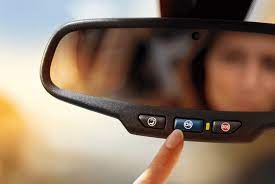
To use OnStar, drivers must have a subscription to the service. There are several subscription options available, and many come standard with new GM vehicles. Once the system is installed and the subscription is active, drivers can access all the features of OnStar by pressing a button located in the vehicle or through the smartphone app.

In conclusion, GM’s OnStar service is an amazing feature that has revolutionized the driving experience for millions of GM vehicle owners. It provides a wide range of services aimed at making driving safer, more efficient and more convenient. The system uses GPS and cellular technology to communicate with drivers, offering real-time services that help drivers stay informed, safe and in control. With its advanced technology and innovative features, there is no doubt that OnStar will continue to be a game-changer for drivers all over the world.

Previous Article

How to Use AirTags With Older iPhones

Next Article

Installing Windows 8/8.1 From USB Tutorial

Matthew Lynch

Related articles More from author

  • Digital & Mobile Technology

    Can You Use an Apple Watch With an Android Phone?

    August 5, 2023
    By Matthew Lynch
  • Digital & Mobile Technology

    How to Set up and Use Amazon Fire TV

    June 4, 2023
    By Matthew Lynch
  • Digital & Mobile Technology

    What is the Shutdown Command in Windows?

    June 2, 2023
    By Matthew Lynch
  • Digital & Mobile Technology

    How to Force Delete Stubborn Files in Windows 11

    July 31, 2023
    By Matthew Lynch
  • Digital & Mobile Technology

    What Is Capital One Shopping and How Does It Work?

    June 10, 2023
    By Matthew Lynch
  • Digital & Mobile Technology

    How to Use a Sprint Phone With Boost Mobile

    May 30, 2023
    By Matthew Lynch

Search

Login & Registration

  • Register
  • Log in
  • Entries feed
  • Comments feed
  • WordPress.org

Newsletter

Signup for The Tech Edvocate Newsletter and have the latest in EdTech news and opinion delivered to your email address!

About Us

Since technology is not going anywhere and does more good than harm, adapting is the best course of action. That is where The Tech Edvocate comes in. We plan to cover the PreK-12 and Higher Education EdTech sectors and provide our readers with the latest news and opinion on the subject. From time to time, I will invite other voices to weigh in on important issues in EdTech. We hope to provide a well-rounded, multi-faceted look at the past, present, the future of EdTech in the US and internationally.

We started this journey back in June 2016, and we plan to continue it for many more years to come. I hope that you will join us in this discussion of the past, present and future of EdTech and lend your own insight to the issues that are discussed.

Newsletter

Signup for The Tech Edvocate Newsletter and have the latest in EdTech news and opinion delivered to your email address!

Contact Us

The Tech Edvocate
910 Goddin Street
Richmond, VA 23231
(601) 630-5238
[email protected]

Copyright © 2025 Matthew Lynch. All rights reserved.