The Tech Edvocate

Top Menu

  • Advertisement
  • Apps
  • Home Page
  • Home Page Five (No Sidebar)
  • Home Page Four
  • Home Page Three
  • Home Page Two
  • Home Tech2
  • Icons [No Sidebar]
  • Left Sidbear Page
  • Lynch Educational Consulting
  • My Account
  • My Speaking Page
  • Newsletter Sign Up Confirmation
  • Newsletter Unsubscription
  • Our Brands
  • Page Example
  • Privacy Policy
  • Protected Content
  • Register
  • Request a Product Review
  • Shop
  • Shortcodes Examples
  • Signup
  • Start Here
    • Governance
    • Careers
    • Contact Us
  • Terms and Conditions
  • The Edvocate
  • The Tech Edvocate Product Guide
  • Topics
  • Write For Us
  • Advertise

Main Menu

  • Start Here
    • Our Brands
    • Governance
      • Lynch Educational Consulting, LLC.
      • Dr. Lynch’s Personal Website
      • Careers
    • Write For Us
    • The Tech Edvocate Product Guide
    • Contact Us
    • Books
    • Edupedia
    • Post a Job
    • The Edvocate Podcast
    • Terms and Conditions
    • Privacy Policy
  • Topics
    • Assistive Technology
    • Child Development Tech
    • Early Childhood & K-12 EdTech
    • EdTech Futures
    • EdTech News
    • EdTech Policy & Reform
    • EdTech Startups & Businesses
    • Higher Education EdTech
    • Online Learning & eLearning
    • Parent & Family Tech
    • Personalized Learning
    • Product Reviews
  • Advertise
  • Tech Edvocate Awards
  • The Edvocate
  • Pedagogue
  • School Ratings

logo

The Tech Edvocate

  • Start Here
    • Our Brands
    • Governance
      • Lynch Educational Consulting, LLC.
      • Dr. Lynch’s Personal Website
        • My Speaking Page
      • Careers
    • Write For Us
    • The Tech Edvocate Product Guide
    • Contact Us
    • Books
    • Edupedia
    • Post a Job
    • The Edvocate Podcast
    • Terms and Conditions
    • Privacy Policy
  • Topics
    • Assistive Technology
    • Child Development Tech
    • Early Childhood & K-12 EdTech
    • EdTech Futures
    • EdTech News
    • EdTech Policy & Reform
    • EdTech Startups & Businesses
    • Higher Education EdTech
    • Online Learning & eLearning
    • Parent & Family Tech
    • Personalized Learning
    • Product Reviews
  • Advertise
  • Tech Edvocate Awards
  • The Edvocate
  • Pedagogue
  • School Ratings
  • A Visitors Guide to Colorado Springs (CO), United States

  • 5 Pairs of Shoes That Will Instantly Step Your Shoe Game Up

  • Radiant Youthful Skin is the Perfect Christmas Gift

  • Give Your Loved One the Gift of Youthful, Radiant Skin this Christmas

  • Give Your Loved One the Gift of a Restful Night Sleep this Christmas

  • Nex Playground’s Holiday Sales Bring Active Play Indoors This Seaso

  • A Visitors Guide to Louisville (KY), United States

  • A Visitor’s Guide to Nashville-Davidson (TN), United States

  • A Visitors Guide to Portland (OR), United States

  • 7 Men’s Bruno Marc Shoes That Are the Perfect Christmas Gift

Digital & Mobile Technology
Home›Digital & Mobile Technology›How Does Cruise Control Work?

How Does Cruise Control Work?
By Matthew Lynch
June 21, 2023
0
Spread the love

Cruise control is an automobile feature that maintains a steady speed of a vehicle automatically, without needing the driver to constantly press on the accelerator pedal. This feature allows drivers to rest their legs and focus on other driving tasks, boosting comfort and convenience on long journeys. But how does cruise control work?

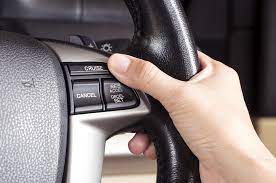
Cruise control systems consist of several components, including a speed sensor, a controller, an actuator, and various input mechanisms. The speed sensor is usually located near the drive wheels of the car and senses the speed of the vehicle. The controller uses the speed sensor information to maintain the speed set by the driver. Then, the actuator, which is typically a motor, adjusts the position of the throttle valve to increase or decrease the amount of fuel and air going into the engine. Finally, the input mechanisms, such as switches or buttons on or near the steering wheel, allow the driver to select and control the cruise control function.

To activate cruise control, drivers must first accelerate to their desired speed and then press the “set” button or otherwise engage the system. Once engaged, the controller monitors the vehicle’s speed and adjusts the throttle position to maintain the set speed. If the vehicle encounters an incline, the controller may signal the actuator to open the throttle valve and add more fuel and air to the engine to maintain the speed. Similarly, if the vehicle starts to slow down due to oncoming traffic or other factors, the controller may signal the actuator to close the throttle valve and reduce fuel and air intake.

In addition to maintaining speed, cruise control systems also have features that help keep the driver safe. One such feature is the “resume” button, which enables drivers to return to their previous cruising speed, if they slowed down or stalled. Another important safety feature is the “cancel” button, which disengages the system and disables the throttle control, allowing drivers to quickly slow down or accelerate as needed. Some newer models of cruise control also have crash avoidance features that automatically reduce speed or apply the brakes if the car gets too close to another vehicle or object.


Previous Article

How to Cancel a Stuck Print Job ...

Next Article

The Best Ad-Free Health and Fitness Apps ...

Matthew Lynch

Related articles More from author

  • Digital & Mobile Technology

    How to Block and Unblock Artists on Spotify

    September 8, 2023
    By Matthew Lynch
  • Digital & Mobile Technology

    The Best Torrent Clients for Android

    June 12, 2023
    By Matthew Lynch
  • Digital & Mobile Technology

    Best Free Alternatives to Fences for Windows Desktop Management

    June 23, 2023
    By Matthew Lynch
  • Digital & Mobile Technology

    What Is a Worm and How Does It Get on Your Computer?

    June 11, 2023
    By Matthew Lynch
  • Digital & Mobile Technology

    How to Fix Origin’s Installation Error Code 20:2 on Windows

    August 5, 2023
    By Matthew Lynch
  • Digital & Mobile Technology

    How to Sync Chrome Bookmarks

    July 6, 2023
    By Matthew Lynch

Search

Login & Registration

  • Register
  • Log in
  • Entries feed
  • Comments feed
  • WordPress.org

Newsletter

Signup for The Tech Edvocate Newsletter and have the latest in EdTech news and opinion delivered to your email address!

About Us

Since technology is not going anywhere and does more good than harm, adapting is the best course of action. That is where The Tech Edvocate comes in. We plan to cover the PreK-12 and Higher Education EdTech sectors and provide our readers with the latest news and opinion on the subject. From time to time, I will invite other voices to weigh in on important issues in EdTech. We hope to provide a well-rounded, multi-faceted look at the past, present, the future of EdTech in the US and internationally.

We started this journey back in June 2016, and we plan to continue it for many more years to come. I hope that you will join us in this discussion of the past, present and future of EdTech and lend your own insight to the issues that are discussed.

Newsletter

Signup for The Tech Edvocate Newsletter and have the latest in EdTech news and opinion delivered to your email address!

Contact Us

The Tech Edvocate
910 Goddin Street
Richmond, VA 23231
(601) 630-5238
[email protected]

Copyright © 2025 Matthew Lynch. All rights reserved.