The Tech Edvocate

Top Menu

  • Advertisement
  • Apps
  • Home Page
  • Home Page Five (No Sidebar)
  • Home Page Four
  • Home Page Three
  • Home Page Two
  • Home Tech2
  • Icons [No Sidebar]
  • Left Sidbear Page
  • Lynch Educational Consulting
  • My Account
  • My Speaking Page
  • Newsletter Sign Up Confirmation
  • Newsletter Unsubscription
  • Our Brands
  • Page Example
  • Privacy Policy
  • Protected Content
  • Register
  • Request a Product Review
  • Shop
  • Shortcodes Examples
  • Signup
  • Start Here
    • Governance
    • Careers
    • Contact Us
  • Terms and Conditions
  • The Edvocate
  • The Tech Edvocate Product Guide
  • Topics
  • Write For Us
  • Advertise

Main Menu

  • Start Here
    • Our Brands
    • Governance
      • Lynch Educational Consulting, LLC.
      • Dr. Lynch’s Personal Website
      • Careers
    • Write For Us
    • The Tech Edvocate Product Guide
    • Contact Us
    • Books
    • Edupedia
    • Post a Job
    • The Edvocate Podcast
    • Terms and Conditions
    • Privacy Policy
  • Topics
    • Assistive Technology
    • Child Development Tech
    • Early Childhood & K-12 EdTech
    • EdTech Futures
    • EdTech News
    • EdTech Policy & Reform
    • EdTech Startups & Businesses
    • Higher Education EdTech
    • Online Learning & eLearning
    • Parent & Family Tech
    • Personalized Learning
    • Product Reviews
  • Advertise
  • Tech Edvocate Awards
  • The Edvocate
  • Pedagogue
  • School Ratings

logo

The Tech Edvocate

  • Start Here
    • Our Brands
    • Governance
      • Lynch Educational Consulting, LLC.
      • Dr. Lynch’s Personal Website
        • My Speaking Page
      • Careers
    • Write For Us
    • The Tech Edvocate Product Guide
    • Contact Us
    • Books
    • Edupedia
    • Post a Job
    • The Edvocate Podcast
    • Terms and Conditions
    • Privacy Policy
  • Topics
    • Assistive Technology
    • Child Development Tech
    • Early Childhood & K-12 EdTech
    • EdTech Futures
    • EdTech News
    • EdTech Policy & Reform
    • EdTech Startups & Businesses
    • Higher Education EdTech
    • Online Learning & eLearning
    • Parent & Family Tech
    • Personalized Learning
    • Product Reviews
  • Advertise
  • Tech Edvocate Awards
  • The Edvocate
  • Pedagogue
  • School Ratings
  • Cybersecurity vs. Green Energy: Which Path Will Make You Richer in 2026?

  • Why These 10 Renewable Energy Certifications Are Quietly Reshaping Careers by 2026

  • Why Millions Are Rushing to Online Renewable Energy Certifications Right Now

  • August AI vs. USMLE: The Unsettling Future of Medical Licensing

  • One AI’s Perfect USMLE Score Just Blew Up Medical Education As We Know It

  • This AI Just Aced the USMLE: Why Your Medical Career Might Never Be the Same

  • The Quiet Exodus: Why Senior FinTech Developers Are Abandoning Corporate Life

  • The Quiet Revolution: Where Elite FinTech Developers Are Fleeing in 2026

  • The Quiet Exodus: Why Senior FinTech Developers Are Ditching Corporate Life

  • AI Governance Software: Pricing and Features Comparison

Tech Advice
Home›Tech Advice›Every Google Assistant Command for Your Nest Speaker or Display Available Now

Every Google Assistant Command for Your Nest Speaker or Display Available Now
By Matthew Lynch
July 10, 2023
0
Spread the love

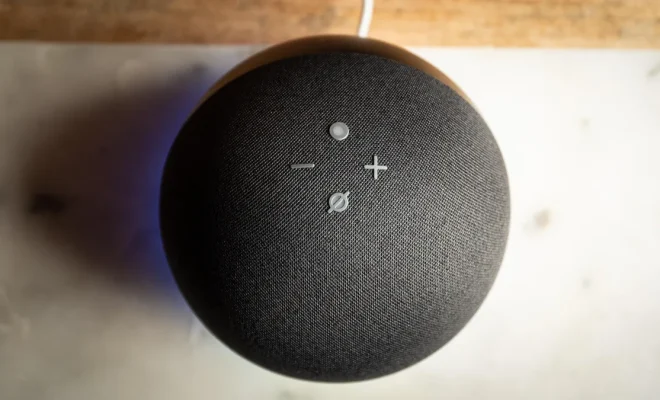
Google Assistant has come a long way since its inception, continually evolving and providing users with an ever-growing list of commands to help make life easier. If you own a Google Nest speaker or display, there are countless commands that you can use to control your smart home, get news updates, listen to music, and more. Here’s an extensive list of the Google Assistant commands available for your Nest speaker or display right now.

General Commands:

1. “Hey Google, what can you do?”
2. “Hey Google, help.”
3. “Hey Google, mute.”
4. “Hey Google, unmute.”
5. “Hey Google, turn up the volume.”
6. “Hey Google, turn down the volume.”

Weather and Time:

7. “Hey Google, what’s the weather like today?”
8. “Hey Google, will it rain tomorrow?”
9. “Hey Google, what’s the time?”

Search Queries:

10. “Hey Google, search for [keyword].”
11. “Hey Google, who won the [sports event] yesterday?”
12. “Hey Google, what’s the capital of [country]?”

Home Automation:

13. “Hey Google, turn on the lights.”
14. “Hey Google, turn off the lights.”
15. “Hey Google, dim the lights.”

Entertainment and Music Commands:

16. “Hey Google, play [song].”
17. “Hey Google, pause/resume music.”
18. “Hey Google, stop playback.”
19. “Hey Google, skip this song.”

Reminders and Alarms:

20. “Hey Google,set an alarm for [time].”
21. ” Hey Google,set a reminder [task name] at [time/date].”
22. ” HeyGoogle,set a timer for[duration].”

Communication:

23. ” HeyGoogle, senda text to[name] saying[message].”
24. ” HeyGoogle, call[name](Voice-only devices).”
25. ” HeyGoogle, senda voice message to[name].”

Translations:

26. “Hey Google, how do you say [phrase] in [language]?”

Games:

27. “Hey Google, let’s play a game.”
28. “Hey Google, tell me a joke.”
29. “Hey Google, give me a trivia question.”

Directions and Traffic:

30. “Hey Google, how long will it take me to get to [location]?”
31. “Hey Google, what’s the traffic like on my way to work?”

Cooking and Recipes:

32. “Hey Google, find me a recipe for [dish].”
33. “Hey Google, how many cups are in a quart?”

These are just a few of the countless commands available for your Nest speaker or display. With Google Assistant constantly improving and expanding its capabilities, there’s no limit to the assistance it can provide in your day-to-day life.


Previous Article

Introducing the GE Appliances’ New Kitchen Hub: ...

Next Article

Google Home Can Make Grocery Shopping Easier ...

Matthew Lynch

Related articles More from author

  • Tech Advice

    2024 Maserati GranTurismo Folgore Embraces the Sound of Silence

    August 11, 2023
    By Matthew Lynch
  • Tech Advice

    Galaxy A51 Review: Samsung Beats the iPhone SE in These Important Ways

    July 12, 2023
    By Matthew Lynch
  • Tech Advice

    iOS 14: 11 cool tricks your iPhone’s Shortcuts app can do for you now

    July 15, 2023
    By Matthew Lynch
  • Tech Advice

    How Is Car Insurance Calculated?

    August 19, 2023
    By Matthew Lynch
  • Tech Advice

    Driving Without Insurance in Indiana: Everything You Need to Know

    August 19, 2023
    By Matthew Lynch
  • Tech Advice

    Discover the Best Smart Ovens for Your Modern Home

    July 9, 2023
    By Matthew Lynch

Search

Login & Registration

  • Log in
  • Entries feed
  • Comments feed
  • WordPress.org

Newsletter

Signup for The Tech Edvocate Newsletter and have the latest in EdTech news and opinion delivered to your email address!

About Us

Since technology is not going anywhere and does more good than harm, adapting is the best course of action. That is where The Tech Edvocate comes in. We plan to cover the PreK-12 and Higher Education EdTech sectors and provide our readers with the latest news and opinion on the subject. From time to time, I will invite other voices to weigh in on important issues in EdTech. We hope to provide a well-rounded, multi-faceted look at the past, present, the future of EdTech in the US and internationally.

We started this journey back in June 2016, and we plan to continue it for many more years to come. I hope that you will join us in this discussion of the past, present and future of EdTech and lend your own insight to the issues that are discussed.

Newsletter

Signup for The Tech Edvocate Newsletter and have the latest in EdTech news and opinion delivered to your email address!

Contact Us

The Tech Edvocate
910 Goddin Street
Richmond, VA 23231
(601) 630-5238
[email protected]

Copyright © 2026 Matthew Lynch. All rights reserved.