The Tech Edvocate

Top Menu

  • Advertisement
  • Apps
  • Home Page
  • Home Page Five (No Sidebar)
  • Home Page Four
  • Home Page Three
  • Home Page Two
  • Home Tech2
  • Icons [No Sidebar]
  • Left Sidbear Page
  • Lynch Educational Consulting
  • My Account
  • My Speaking Page
  • Newsletter Sign Up Confirmation
  • Newsletter Unsubscription
  • Our Brands
  • Page Example
  • Privacy Policy
  • Protected Content
  • Register
  • Request a Product Review
  • Shop
  • Shortcodes Examples
  • Signup
  • Start Here
    • Governance
    • Careers
    • Contact Us
  • Terms and Conditions
  • The Edvocate
  • The Tech Edvocate Product Guide
  • Topics
  • Write For Us
  • Advertise

Main Menu

  • Start Here
    • Our Brands
    • Governance
      • Lynch Educational Consulting, LLC.
      • Dr. Lynch’s Personal Website
      • Careers
    • Write For Us
    • The Tech Edvocate Product Guide
    • Contact Us
    • Books
    • Edupedia
    • Post a Job
    • The Edvocate Podcast
    • Terms and Conditions
    • Privacy Policy
  • Topics
    • Assistive Technology
    • Child Development Tech
    • Early Childhood & K-12 EdTech
    • EdTech Futures
    • EdTech News
    • EdTech Policy & Reform
    • EdTech Startups & Businesses
    • Higher Education EdTech
    • Online Learning & eLearning
    • Parent & Family Tech
    • Personalized Learning
    • Product Reviews
  • Advertise
  • Tech Edvocate Awards
  • The Edvocate
  • Pedagogue
  • School Ratings

logo

The Tech Edvocate

  • Start Here
    • Our Brands
    • Governance
      • Lynch Educational Consulting, LLC.
      • Dr. Lynch’s Personal Website
        • My Speaking Page
      • Careers
    • Write For Us
    • The Tech Edvocate Product Guide
    • Contact Us
    • Books
    • Edupedia
    • Post a Job
    • The Edvocate Podcast
    • Terms and Conditions
    • Privacy Policy
  • Topics
    • Assistive Technology
    • Child Development Tech
    • Early Childhood & K-12 EdTech
    • EdTech Futures
    • EdTech News
    • EdTech Policy & Reform
    • EdTech Startups & Businesses
    • Higher Education EdTech
    • Online Learning & eLearning
    • Parent & Family Tech
    • Personalized Learning
    • Product Reviews
  • Advertise
  • Tech Edvocate Awards
  • The Edvocate
  • Pedagogue
  • School Ratings
  • A Visitor’s Guide to Fresno (CA), United States

  • A Visitors Guide to New Orleans (LA), United States

  • A Visitors Guide to Sacramento (CA), United States

  • A Visitors Guide to Lyon, France

  • JisuLife Ultra2 Portable Fan: A Powerful Multi-Function Cooling Solution

  • A Visitors Guide to Viña del Mar, Chile

  • A Visitors Guide to Århus, Denmark

  • A Visitors Guide to Bakersfield (CA), United States

  • A Visitors Guide to Aurora (CO), United States

  • A Visitor’s Guide to Toledo (OH), United States

Google ClassroomGoogle Classroom Tips
Home›Google Classroom›Can Parents Have Access to Google Classroom?

Can Parents Have Access to Google Classroom?

By Matthew Lynch
August 14, 2020
0
Spread the love

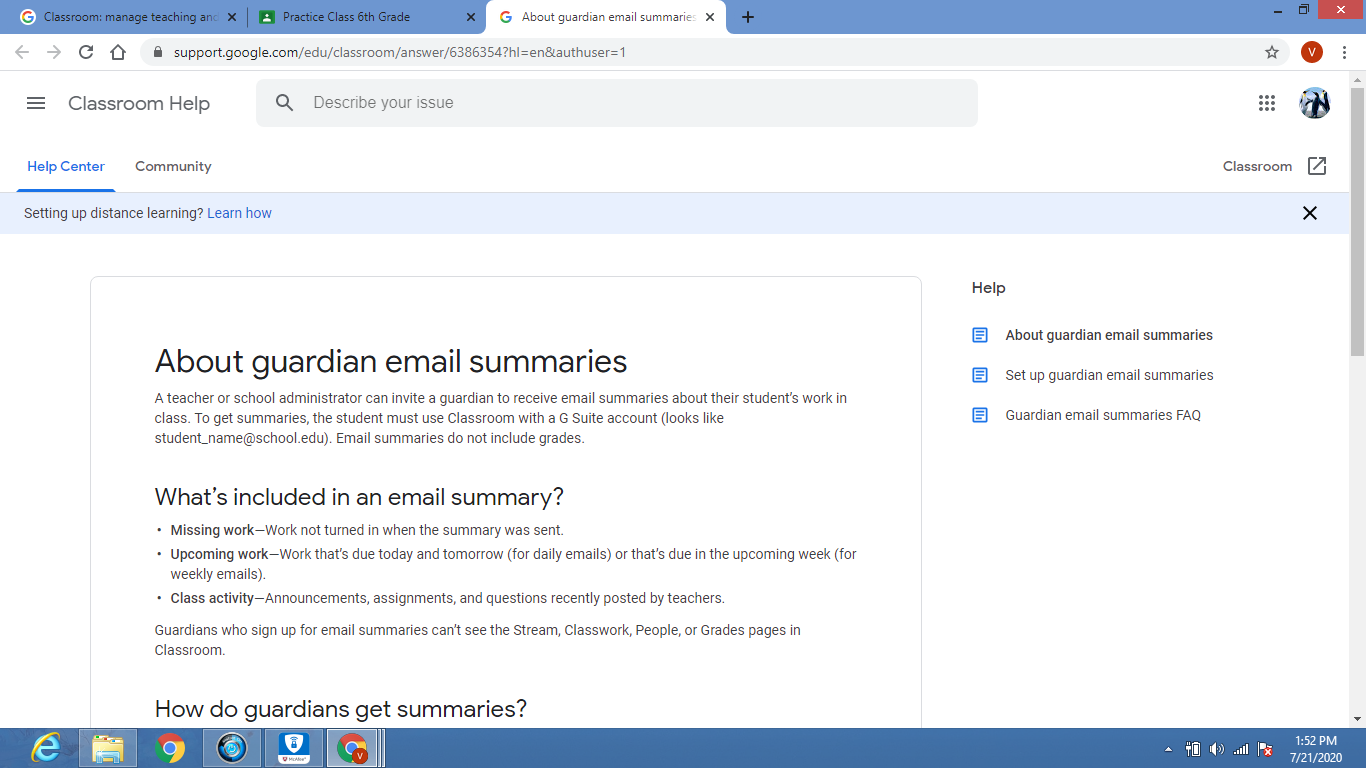
Parents can receive emails with information about their learner’s classwork. You can only add parents for learners using Classroom with a G Suite for Education account, not a personal account.  However, most school settings are using the G Suite version, so this should not be a problem for teachers who want to use this feature. It is a great way to keep parents in the loop so that they know what assignments their child has, as well as whether they are keeping up with their work. 

When parents join Classroom, they receive automatic email summaries for each of their learners. Parents choose the frequency of the emails (daily or weekly) and can unsubscribe at any time. The teacher must first invite the parent by adding their email address under their child’s name on Google Classroom. This can be done under the “People” tab. The parent will then receive an email and must accept the invitation to begin receiving the guardian email summaries.

Parent email summaries contain information about the following:

  • Missing work— Assignments that were late when the email was sent.
  • *Work that’s due today and tomorrow (for daily emails)  or work that’s due in the upcoming week (for weekly emails)
  • Class activity— Important announcements, assignments, and questions recently posted by educators

Guardian email summaries for your classes are turned off by default. Learn how to manage parent email summaries for your Class. It is important to note that parents cannot access any part of your Google Classroom or view your class stream.  Therefore, they do not have access to view their child’s grades.  Educators will need to find other ways to maintain a steady line of parent communication to keep them informed of their child’s progress and grades. 

To turn on Guardian summaries, click on the Settings icon (right-hand corner of the stream page) and scroll down to General. Where it says “Guardian summaries”, slide the grey button to the right, and it will turn green to indicate this feature has been turned on. 

Underneath “Guardian summaries”, it says “See example. Click on it for more information.
Previous Article

How to Improve Remote Learning

Next Article

Can I Use Slides Without Using Google ...

Matthew Lynch

Related articles More from author

  • Google ClassroomGoogle Classroom Tips

    How Do I Create a Spreadsheet of the Assignments and Grades From My Google Classroom?

    October 8, 2020
    By Matthew Lynch
  • Early Childhood & K-12 EdTechGoogle ClassroomHigher EducationHigher Education EdTech

    How to Use the Notification Feature in Google Classroom

    September 6, 2018
    By Matthew Lynch
  • Google ClassroomUncategorized

    Leveraging the Amazing Mobile Features of Google Classroom

    September 20, 2018
    By Matthew Lynch
  • Google Classroom Tips

    Google Classroom Tip #31: Using Videos to Boost Academic Achievement

    December 1, 2018
    By Matthew Lynch
  • Early Childhood & K-12 EdTechGoogle ClassroomHigher EducationHigher Education EdTech

    How Google is Taking Over the Classroom

    April 19, 2018
    By Matthew Lynch
  • Google ClassroomGoogle Classroom Tips

    What is G Suite for Education?

    August 4, 2020
    By Matthew Lynch

Search

Login & Registration

  • Register
  • Log in
  • Entries feed
  • Comments feed
  • WordPress.org

Newsletter

Signup for The Tech Edvocate Newsletter and have the latest in EdTech news and opinion delivered to your email address!

About Us

Since technology is not going anywhere and does more good than harm, adapting is the best course of action. That is where The Tech Edvocate comes in. We plan to cover the PreK-12 and Higher Education EdTech sectors and provide our readers with the latest news and opinion on the subject. From time to time, I will invite other voices to weigh in on important issues in EdTech. We hope to provide a well-rounded, multi-faceted look at the past, present, the future of EdTech in the US and internationally.

We started this journey back in June 2016, and we plan to continue it for many more years to come. I hope that you will join us in this discussion of the past, present and future of EdTech and lend your own insight to the issues that are discussed.

Newsletter

Signup for The Tech Edvocate Newsletter and have the latest in EdTech news and opinion delivered to your email address!

Contact Us

The Tech Edvocate
910 Goddin Street
Richmond, VA 23231
(601) 630-5238
[email protected]

Copyright © 2025 Matthew Lynch. All rights reserved.