The Tech Edvocate

Top Menu

  • Advertisement
  • Apps
  • Home Page
  • Home Page Five (No Sidebar)
  • Home Page Four
  • Home Page Three
  • Home Page Two
  • Home Tech2
  • Icons [No Sidebar]
  • Left Sidbear Page
  • Lynch Educational Consulting
  • My Account
  • My Speaking Page
  • Newsletter Sign Up Confirmation
  • Newsletter Unsubscription
  • Our Brands
  • Page Example
  • Privacy Policy
  • Protected Content
  • Register
  • Request a Product Review
  • Shop
  • Shortcodes Examples
  • Signup
  • Start Here
    • Governance
    • Careers
    • Contact Us
  • Terms and Conditions
  • The Edvocate
  • The Tech Edvocate Product Guide
  • Topics
  • Write For Us
  • Advertise

Main Menu

  • Start Here
    • Our Brands
    • Governance
      • Lynch Educational Consulting, LLC.
      • Dr. Lynch’s Personal Website
      • Careers
    • Write For Us
    • The Tech Edvocate Product Guide
    • Contact Us
    • Books
    • Edupedia
    • Post a Job
    • The Edvocate Podcast
    • Terms and Conditions
    • Privacy Policy
  • Topics
    • Assistive Technology
    • Child Development Tech
    • Early Childhood & K-12 EdTech
    • EdTech Futures
    • EdTech News
    • EdTech Policy & Reform
    • EdTech Startups & Businesses
    • Higher Education EdTech
    • Online Learning & eLearning
    • Parent & Family Tech
    • Personalized Learning
    • Product Reviews
  • Advertise
  • Tech Edvocate Awards
  • The Edvocate
  • Pedagogue
  • School Ratings

logo

The Tech Edvocate

  • Start Here
    • Our Brands
    • Governance
      • Lynch Educational Consulting, LLC.
      • Dr. Lynch’s Personal Website
        • My Speaking Page
      • Careers
    • Write For Us
    • The Tech Edvocate Product Guide
    • Contact Us
    • Books
    • Edupedia
    • Post a Job
    • The Edvocate Podcast
    • Terms and Conditions
    • Privacy Policy
  • Topics
    • Assistive Technology
    • Child Development Tech
    • Early Childhood & K-12 EdTech
    • EdTech Futures
    • EdTech News
    • EdTech Policy & Reform
    • EdTech Startups & Businesses
    • Higher Education EdTech
    • Online Learning & eLearning
    • Parent & Family Tech
    • Personalized Learning
    • Product Reviews
  • Advertise
  • Tech Edvocate Awards
  • The Edvocate
  • Pedagogue
  • School Ratings
  • Lawyaw vs Documate which is better

  • How to use Yelp for marketing

  • How many templates in Lawyaw

  • Can TripAdvisor reviews be edited

  • How to manage documents in Zola Suite

  • Filevine vs Litify features

  • Can MyCase accept credit card payments

  • Airbnb vs VRBO comparison

  • How to get TripAdvisor certificate of excellence

  • How much does Airbnb charge hosts

Digital & Mobile Technology
Home›Digital & Mobile Technology›Best shared grocery list apps to save you another trip to the store

Best shared grocery list apps to save you another trip to the store
By Matthew Lynch
April 11, 2023
0
Spread the love

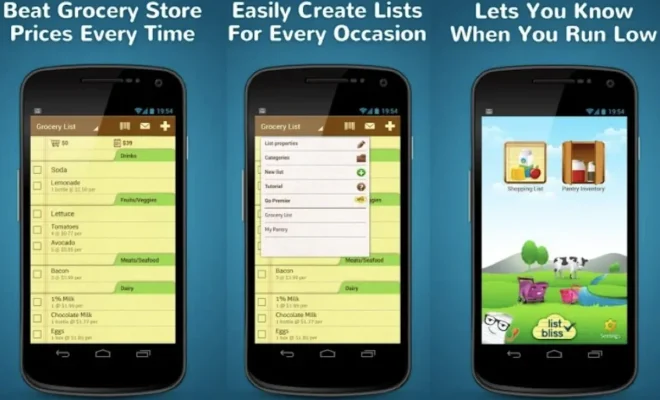
As we go through the pandemic, grocery delivery and pickup services have surged. But what about when there are items that don’t make the cut for pickup, or you remember too late that you’ve run out of something? This is where shared grocery list apps come in.

With the right app, you can easily create a list of items that you or your household members need, and add them to the same list. These apps reduce the need to make multiple trips to the store, as everyone can see what has been added and updated in real-time.

Here are some of the best shared grocery list apps that can help you to stay organized when shopping:

1. AnyList

This app allows you to create different lists for different stores, as well as adding items by category. You can also add notes or photos to help differentiate between similar items. With AnyList, you can share lists with others, assign them to different users, and even add recipes to your list.

2. OurGroceries

This app is simple to use and syncs lists across multiple devices, so everyone can access them easily. It allows you to categorize items by store and offers an option to add favorites for easy access later. OurGroceries also offers a voice recognition feature, enabling you to add items to your list without having to type.

3. Cozi

Cozi is a family-friendly app that offers shared calendars and to-do lists. Along with grocery lists, the app offers shopping and to-do lists. You can organize your grocery list by store, see your list history, and add notes to individual items. The app also offers a recipe box feature, which makes it a perfect app for busy families.

4. Out of Milk

Out of Milk allows you to create different lists for different stores, track inventory and add barcodes to items to simplify adding them to your list. This app offers a sharing feature, so you can share your lists across different devices. You can also add photos to items to make them easy to recognize at a glance.

5. Bring!

This app has a simple interface and allows you to sync your lists across different devices easily. The app works best for shared grocery lists as it allows multiple users to add or remove items in real-time. Bring! also offers a smartwatch app, so you can add items to your list on-the-go.

Conclusion

The shared grocery list apps listed above can save you time and money by helping you to stay organized when shopping. These apps allow for easy collaboration and help to prevent duplicate purchases or missed items. So, test out a few and find the one that works best for you and your household’s requirements

Previous Article

Best Record Player

Next Article

Best Ski Accessories: High-Tech Gear for the ...

Matthew Lynch

Related articles More from author

  • Digital & Mobile Technology

    WhatsApp Desktop Not Working on Windows? Tips to Fix It

    June 15, 2023
    By Matthew Lynch
  • Digital & Mobile Technology

    What Is a Meme?

    June 22, 2023
    By Matthew Lynch
  • Digital & Mobile Technology

    The 7 Best FPV Drones for Immersive Flying

    August 2, 2023
    By Matthew Lynch
  • Digital & Mobile Technology

    The Best Laptops for Architects

    June 10, 2023
    By Matthew Lynch
  • Digital & Mobile Technology

    What is a Backslash?

    April 16, 2023
    By Matthew Lynch
  • Digital & Mobile Technology

    How to Lock and Unlock the Function (Fn) Key in Windows

    August 3, 2023
    By Matthew Lynch

Search

Login & Registration

  • Log in
  • Entries feed
  • Comments feed
  • WordPress.org

Newsletter

Signup for The Tech Edvocate Newsletter and have the latest in EdTech news and opinion delivered to your email address!

About Us

Since technology is not going anywhere and does more good than harm, adapting is the best course of action. That is where The Tech Edvocate comes in. We plan to cover the PreK-12 and Higher Education EdTech sectors and provide our readers with the latest news and opinion on the subject. From time to time, I will invite other voices to weigh in on important issues in EdTech. We hope to provide a well-rounded, multi-faceted look at the past, present, the future of EdTech in the US and internationally.

We started this journey back in June 2016, and we plan to continue it for many more years to come. I hope that you will join us in this discussion of the past, present and future of EdTech and lend your own insight to the issues that are discussed.

Newsletter

Signup for The Tech Edvocate Newsletter and have the latest in EdTech news and opinion delivered to your email address!

Contact Us

The Tech Edvocate
910 Goddin Street
Richmond, VA 23231
(601) 630-5238
[email protected]

Copyright © 2026 Matthew Lynch. All rights reserved.