The Tech Edvocate

Top Menu

  • Advertisement
  • Apps
  • Home Page
  • Home Page Five (No Sidebar)
  • Home Page Four
  • Home Page Three
  • Home Page Two
  • Home Tech2
  • Icons [No Sidebar]
  • Left Sidbear Page
  • Lynch Educational Consulting
  • My Account
  • My Speaking Page
  • Newsletter Sign Up Confirmation
  • Newsletter Unsubscription
  • Our Brands
  • Page Example
  • Privacy Policy
  • Protected Content
  • Register
  • Request a Product Review
  • Shop
  • Shortcodes Examples
  • Signup
  • Start Here
    • Governance
    • Careers
    • Contact Us
  • Terms and Conditions
  • The Edvocate
  • The Tech Edvocate Product Guide
  • Topics
  • Write For Us
  • Advertise

Main Menu

  • Start Here
    • Our Brands
    • Governance
      • Lynch Educational Consulting, LLC.
      • Dr. Lynch’s Personal Website
      • Careers
    • Write For Us
    • The Tech Edvocate Product Guide
    • Contact Us
    • Books
    • Edupedia
    • Post a Job
    • The Edvocate Podcast
    • Terms and Conditions
    • Privacy Policy
  • Topics
    • Assistive Technology
    • Child Development Tech
    • Early Childhood & K-12 EdTech
    • EdTech Futures
    • EdTech News
    • EdTech Policy & Reform
    • EdTech Startups & Businesses
    • Higher Education EdTech
    • Online Learning & eLearning
    • Parent & Family Tech
    • Personalized Learning
    • Product Reviews
  • Advertise
  • Tech Edvocate Awards
  • The Edvocate
  • Pedagogue
  • School Ratings

logo

The Tech Edvocate

  • Start Here
    • Our Brands
    • Governance
      • Lynch Educational Consulting, LLC.
      • Dr. Lynch’s Personal Website
        • My Speaking Page
      • Careers
    • Write For Us
    • The Tech Edvocate Product Guide
    • Contact Us
    • Books
    • Edupedia
    • Post a Job
    • The Edvocate Podcast
    • Terms and Conditions
    • Privacy Policy
  • Topics
    • Assistive Technology
    • Child Development Tech
    • Early Childhood & K-12 EdTech
    • EdTech Futures
    • EdTech News
    • EdTech Policy & Reform
    • EdTech Startups & Businesses
    • Higher Education EdTech
    • Online Learning & eLearning
    • Parent & Family Tech
    • Personalized Learning
    • Product Reviews
  • Advertise
  • Tech Edvocate Awards
  • The Edvocate
  • Pedagogue
  • School Ratings
  • RayNeo iO Smart Glasses: A Comprehensive Review

  • Glo Skin Beauty: The Aesthetician-Backed Brand Taking 25% Off for October Prime Day

  • The Shocking Truth: ESG Training Programs Are Quietly Reshaping Your Career Path

  • Why Millions of People Are Switching to These Green Energy Certifications Right Now

  • The green skills gap in 2026: How to address this growing problem

  • The Shocking Truth: Your Degree Won’t Land You the Best IT Jobs in 2026

  • The Brutal Truth About Degrees: Why Micro-Credentials Are Quietly Dominating Careers by 2026

  • Why 96% of Employers Now Prefer Skills Over Degrees: The Micro-Credential Revolution

  • This Crucial Mistake With AI Is Stunting Student Minds: Here’s How to Fix It

  • The AI ‘Cognitive Surrender’ Crisis: 7 Tools Every Educator Needs NOW

Digital & Mobile Technology
Home›Digital & Mobile Technology›Best Free Alternatives to Fences for Windows Desktop Management

Best Free Alternatives to Fences for Windows Desktop Management
By Matthew Lynch
June 23, 2023
0
Spread the love

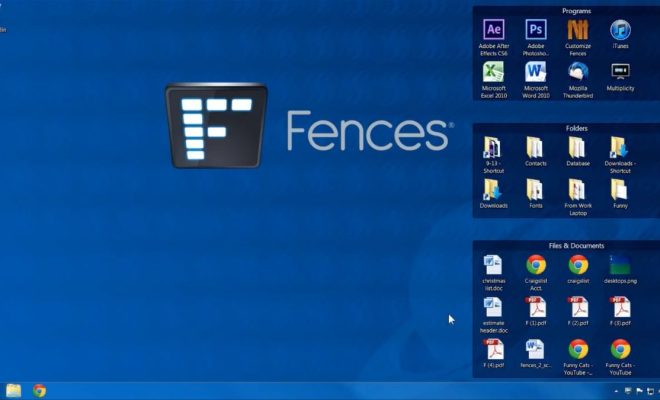
Windows Desktop Management has come a long way in the past few years, and Fences has been at the forefront of that evolution. It is a popular tool that lets users organize their desktop by creating custom containers and grouping similar icons in a neat and organized manner. However, Fences is not the only option for desktop management. In this article, we will explore some of the best free alternatives to Fences for Windows Desktop Management.

1. Nimi Places

Nimi Places is a free desktop organization tool that allows users to create customizable containers, sort icons, and create shortcuts for frequently used programs. It is quite similar to Fences and offers several customization options. Nimi Places also includes an option to dock folders to the desktop and quickly access them from a menu.

2. Stardock Groupy

Stardock Groupy is an excellent alternative to Fences if you are looking for a more advanced desktop organization tool. Groupy allows users to group applications, documents, and websites together in one tabbed interface. This feature is particularly useful for users who prefer to keep their workspace tidy and avoid cluttering their desktop.

3. DesktopOK

DesktopOK is a straightforward, lightweight desktop management tool that lets users save and restore the position of icons on their desktop. It has a clean and intuitive interface, and users can customize the icon size and color as well. Although DesktopOK does not offer as many features as Fences, it is an excellent option for those who want a simple and efficient solution for desktop organization.

4. WinOrganizer

WinOrganizer is a versatile desktop management tool that offers several organizational features for Windows users. It lets users group and categorize icons, files, and folders, and features a built-in calendar, password manager, and note-taking feature. WinOrganizer is a great option for users who prefer an all-in-one solution for desktop organization and productivity.

5. TaskbarX

TaskbarX is an open-source software that allows Windows users to customize their taskbar according to their preferences. It lets users center the taskbar icons, change their size, add animations, and many other features. While TaskbarX does not offer the level of customization that Fences does, it is a great option for users who want to personalize their taskbar without installing additional software.


Previous Article

How to Download Chrome for Mac

Next Article

How to Set Up and Use Siri ...

Matthew Lynch

Related articles More from author

  • Digital & Mobile Technology

    How to Use Samsung’s Do Not Disturb Mode

    July 29, 2023
    By Matthew Lynch
  • Digital & Mobile Technology

    Google Assistant Driving Mode vs. Android Auto: What’s the Difference?

    June 13, 2023
    By Matthew Lynch
  • Digital & Mobile Technology

    How to Transfer WhatsApp Data From Android to iPhone

    August 3, 2023
    By Matthew Lynch
  • Digital & Mobile Technology

    How to Update Audio Drivers on Windows

    June 8, 2023
    By Matthew Lynch
  • Digital & Mobile Technology

    How to Fix D3dx9_43.dll Not Found or Missing Errors

    June 4, 2023
    By Matthew Lynch
  • Digital & Mobile Technology

    What is a Query Optimizer?

    April 23, 2023
    By Matthew Lynch

Search

Login & Registration

  • Log in
  • Entries feed
  • Comments feed
  • WordPress.org

Newsletter

Signup for The Tech Edvocate Newsletter and have the latest in EdTech news and opinion delivered to your email address!

About Us

Since technology is not going anywhere and does more good than harm, adapting is the best course of action. That is where The Tech Edvocate comes in. We plan to cover the PreK-12 and Higher Education EdTech sectors and provide our readers with the latest news and opinion on the subject. From time to time, I will invite other voices to weigh in on important issues in EdTech. We hope to provide a well-rounded, multi-faceted look at the past, present, the future of EdTech in the US and internationally.

We started this journey back in June 2016, and we plan to continue it for many more years to come. I hope that you will join us in this discussion of the past, present and future of EdTech and lend your own insight to the issues that are discussed.

Newsletter

Signup for The Tech Edvocate Newsletter and have the latest in EdTech news and opinion delivered to your email address!

Contact Us

The Tech Edvocate
910 Goddin Street
Richmond, VA 23231
(601) 630-5238
[email protected]

Copyright © 2026 Matthew Lynch. All rights reserved.