The Tech Edvocate

Top Menu

  • Advertisement
  • Apps
  • Home Page
  • Home Page Five (No Sidebar)
  • Home Page Four
  • Home Page Three
  • Home Page Two
  • Home Tech2
  • Icons [No Sidebar]
  • Left Sidbear Page
  • Lynch Educational Consulting
  • My Account
  • My Speaking Page
  • Newsletter Sign Up Confirmation
  • Newsletter Unsubscription
  • Our Brands
  • Page Example
  • Privacy Policy
  • Protected Content
  • Register
  • Request a Product Review
  • Shop
  • Shortcodes Examples
  • Signup
  • Start Here
    • Governance
    • Careers
    • Contact Us
  • Terms and Conditions
  • The Edvocate
  • The Tech Edvocate Product Guide
  • Topics
  • Write For Us
  • Advertise

Main Menu

  • Start Here
    • Our Brands
    • Governance
      • Lynch Educational Consulting, LLC.
      • Dr. Lynch’s Personal Website
      • Careers
    • Write For Us
    • The Tech Edvocate Product Guide
    • Contact Us
    • Books
    • Edupedia
    • Post a Job
    • The Edvocate Podcast
    • Terms and Conditions
    • Privacy Policy
  • Topics
    • Assistive Technology
    • Child Development Tech
    • Early Childhood & K-12 EdTech
    • EdTech Futures
    • EdTech News
    • EdTech Policy & Reform
    • EdTech Startups & Businesses
    • Higher Education EdTech
    • Online Learning & eLearning
    • Parent & Family Tech
    • Personalized Learning
    • Product Reviews
  • Advertise
  • Tech Edvocate Awards
  • The Edvocate
  • Pedagogue
  • School Ratings

logo

The Tech Edvocate

  • Start Here
    • Our Brands
    • Governance
      • Lynch Educational Consulting, LLC.
      • Dr. Lynch’s Personal Website
        • My Speaking Page
      • Careers
    • Write For Us
    • The Tech Edvocate Product Guide
    • Contact Us
    • Books
    • Edupedia
    • Post a Job
    • The Edvocate Podcast
    • Terms and Conditions
    • Privacy Policy
  • Topics
    • Assistive Technology
    • Child Development Tech
    • Early Childhood & K-12 EdTech
    • EdTech Futures
    • EdTech News
    • EdTech Policy & Reform
    • EdTech Startups & Businesses
    • Higher Education EdTech
    • Online Learning & eLearning
    • Parent & Family Tech
    • Personalized Learning
    • Product Reviews
  • Advertise
  • Tech Edvocate Awards
  • The Edvocate
  • Pedagogue
  • School Ratings
  • A Visitor’s Guide to Fresno (CA), United States

  • A Visitors Guide to New Orleans (LA), United States

  • A Visitors Guide to Sacramento (CA), United States

  • A Visitors Guide to Lyon, France

  • JisuLife Ultra2 Portable Fan: A Powerful Multi-Function Cooling Solution

  • A Visitors Guide to Viña del Mar, Chile

  • A Visitors Guide to Århus, Denmark

  • A Visitors Guide to Bakersfield (CA), United States

  • A Visitors Guide to Aurora (CO), United States

  • A Visitor’s Guide to Toledo (OH), United States

Digital & Mobile Technology
Home›Digital & Mobile Technology›Best Chrome Flags You Should Enable on Android

Best Chrome Flags You Should Enable on Android
By Matthew Lynch
June 23, 2023
0
Spread the love

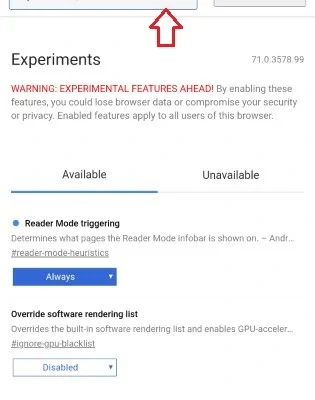
As the most popular web browser around the globe, Google Chrome has several flags that you can enable to improve your browsing experience. These flags are experimental features that may not be ready for prime time, but provide an opportunity to test new browser features before they are released to the general public. However, to access Chrome flags you must first enable developer options in your browser.

‘1. Smooth Scrolling

This flag improves scrolling by taking advantage of device hardware acceleration. It creates a smoother scrolling experience by using your device’s GPU to render content as you scroll. To enable Smooth Scrolling, go to chrome://flags and search for “Smooth Scrolling” and enable it.

2. Reader Mode

Reader Mode removes ads, popups, and other distracting elements from articles so that you can read them without any interruptions. It also modifies the text size, line spacing, and font to make it more readable, especially for long articles. To enable Reader Mode, go to chrome://flags and search for “Reader Mode” and enable it.

3. Tab Groups

Tab Groups allow users to group their tabs based on interest, work, or projects. It eliminates the need to search through cluttered tabs and makes it easier to organize and focus on the important tabs. To enable Tab Groups, go to chrome://flags and search for “Tab Groups” and enable it.

4. Parallel Downloading

Parallel Downloading allows Chrome to download multiple files at the same time, which significantly speeds up the download process. To enable Parallel Downloading, go to chrome://flags and search for “Parallel Downloading” and enable it.

5. Secure DNS Lookup

This flag encrypts all DNS lookup traffic to prevent data theft and man-in-the-middle attacks. Enabling this feature also improves page load times by using a faster DNS resolver. To enable Secure DNS Lookup, go to chrome://flags and search for “Secure DNS Lookups” and enable it.

6. Copy Link to Text

This flag allows you to copy a link in plain text format rather than the typical URL format. This enables you to easily share links with colleagues or friends. To enable Copy Link to Text, go to chrome://flags and search for “Copy Link to Text” and enable it.

7. GPU Accelerated Video Decode

This flag enhances video quality and reduces battery consumption by enabling hardware-accelerated video decoding on supported devices. It reduces CPU usage, making it less likely for the phone to overheat or slowdown. To enable GPU Accelerated Video Decode, go to chrome://flags and search for “GPU Accelerated Video Decode” and enable it.


Previous Article

How to Screenshot on Windows Without Print ...

Next Article

Awesome Linux Media Center Distros for Your ...

Matthew Lynch

Related articles More from author

  • Digital & Mobile Technology

    Android Camera Not Working? Common Issues and Their Solutions

    June 6, 2023
    By Matthew Lynch
  • Digital & Mobile Technology

    What to Do If Your Wii Is Unable to Read a Disc

    June 1, 2023
    By Matthew Lynch
  • Digital & Mobile Technology

    What Is the 802.11a Standard?

    July 6, 2023
    By Matthew Lynch
  • Digital & Mobile Technology

    How to Use Facebook Notes

    June 4, 2023
    By Matthew Lynch
  • Digital & Mobile Technology

    How to Lock Apps on Your iPhone With a Password, Face ID, and More

    June 8, 2023
    By Matthew Lynch
  • Digital & Mobile TechnologyGamification

    How to Play Multiplayer on a Meta (Oculus) Quest 2

    June 8, 2023
    By Matthew Lynch

Search

Login & Registration

  • Register
  • Log in
  • Entries feed
  • Comments feed
  • WordPress.org

Newsletter

Signup for The Tech Edvocate Newsletter and have the latest in EdTech news and opinion delivered to your email address!

About Us

Since technology is not going anywhere and does more good than harm, adapting is the best course of action. That is where The Tech Edvocate comes in. We plan to cover the PreK-12 and Higher Education EdTech sectors and provide our readers with the latest news and opinion on the subject. From time to time, I will invite other voices to weigh in on important issues in EdTech. We hope to provide a well-rounded, multi-faceted look at the past, present, the future of EdTech in the US and internationally.

We started this journey back in June 2016, and we plan to continue it for many more years to come. I hope that you will join us in this discussion of the past, present and future of EdTech and lend your own insight to the issues that are discussed.

Newsletter

Signup for The Tech Edvocate Newsletter and have the latest in EdTech news and opinion delivered to your email address!

Contact Us

The Tech Edvocate
910 Goddin Street
Richmond, VA 23231
(601) 630-5238
[email protected]

Copyright © 2025 Matthew Lynch. All rights reserved.