The Tech Edvocate

Top Menu

  • Advertisement
  • Apps
  • Home Page
  • Home Page Five (No Sidebar)
  • Home Page Four
  • Home Page Three
  • Home Page Two
  • Home Tech2
  • Icons [No Sidebar]
  • Left Sidbear Page
  • Lynch Educational Consulting
  • My Account
  • My Speaking Page
  • Newsletter Sign Up Confirmation
  • Newsletter Unsubscription
  • Our Brands
  • Page Example
  • Privacy Policy
  • Protected Content
  • Register
  • Request a Product Review
  • Shop
  • Shortcodes Examples
  • Signup
  • Start Here
    • Governance
    • Careers
    • Contact Us
  • Terms and Conditions
  • The Edvocate
  • The Tech Edvocate Product Guide
  • Topics
  • Write For Us
  • Advertise

Main Menu

  • Start Here
    • Our Brands
    • Governance
      • Lynch Educational Consulting, LLC.
      • Dr. Lynch’s Personal Website
      • Careers
    • Write For Us
    • The Tech Edvocate Product Guide
    • Contact Us
    • Books
    • Edupedia
    • Post a Job
    • The Edvocate Podcast
    • Terms and Conditions
    • Privacy Policy
  • Topics
    • Assistive Technology
    • Child Development Tech
    • Early Childhood & K-12 EdTech
    • EdTech Futures
    • EdTech News
    • EdTech Policy & Reform
    • EdTech Startups & Businesses
    • Higher Education EdTech
    • Online Learning & eLearning
    • Parent & Family Tech
    • Personalized Learning
    • Product Reviews
  • Advertise
  • Tech Edvocate Awards
  • The Edvocate
  • Pedagogue
  • School Ratings

logo

The Tech Edvocate

  • Start Here
    • Our Brands
    • Governance
      • Lynch Educational Consulting, LLC.
      • Dr. Lynch’s Personal Website
        • My Speaking Page
      • Careers
    • Write For Us
    • The Tech Edvocate Product Guide
    • Contact Us
    • Books
    • Edupedia
    • Post a Job
    • The Edvocate Podcast
    • Terms and Conditions
    • Privacy Policy
  • Topics
    • Assistive Technology
    • Child Development Tech
    • Early Childhood & K-12 EdTech
    • EdTech Futures
    • EdTech News
    • EdTech Policy & Reform
    • EdTech Startups & Businesses
    • Higher Education EdTech
    • Online Learning & eLearning
    • Parent & Family Tech
    • Personalized Learning
    • Product Reviews
  • Advertise
  • Tech Edvocate Awards
  • The Edvocate
  • Pedagogue
  • School Ratings
  • This One Privacy Camera Feature Could Change Smart Homes Forever

  • Unprecedented: White House Mandates AI Security Incident Reporting After Troubling Breaches

  • The AI Storm Tracker Predicting Viral Narratives Just Landed $7 Million – Here’s Why It Matters

  • This State Just Unleashed AI to Prescribe Meds — Are We Ready for the Future of Medicine?

  • Outrageous: YouTuber Loses Decade of Work to Single YouTube Channel Ban

  • The CyberLeek Saga: What This New GTA 6 Footage Means For Rockstar

  • The Startling Truth About AI’s Medical Revolution You Need to Know

  • This Crucial Shift in AI in Higher Education Could Upend Your Future

  • Bizarre CloudConnect CRM Vulnerability: Why Thousands of Businesses Are Now Exposed

  • HomeSecure Breach: This is How 5 Million Mortgages Got Hacked

Digital & Mobile Technology
Home›Digital & Mobile Technology›A Windows service is a type of software application designed to run in the background on a Windows operating system. Unlike standard desktop applications, services are not interactive and do not have graphical user interfaces. Instead, they run silently in the background, performing specific functions and tasks without any user intervention. Services are an integral part of the Windows operating system and are responsible for performing various functions, such as managing network connections, monitoring system performance, and providing security features. They can also be created by third-party software developers to perform custom tasks or functions specific to their applications. Windows services are built using the Service Control Manager (SCM) API, a system component that manages the lifecycle of services. The SCM is responsible for starting, stopping, and configuring services, as well as controlling their behavior and communication with other system components. When a Windows service is installed, it is registered with the SCM, which enables it to be started automatically when the system boots up. Services can also be started manually or configured to run at specific times or intervals. Services can run under different user accounts, such as the Local System account, which has full access to the system resources, or a user-defined account that has specific permissions to perform particular tasks. One of the significant advantages of using services is that they can run independently of any user login session. This means that services can be running even when no user is logged in, making them ideal for background tasks that need to run 24/7, such as monitoring network traffic or backing up the system. Another advantage is that services are immune to user error or unintended system shutdowns. Since they run in the background, they are less susceptible to crashes, and they can recover easily when the system restarts. However, services can also consume system resources, such as CPU cycles and memory, affecting the overall system performance. Therefore, it is essential to manage services and ensure that only necessary services are running to avoid unnecessary resource consumption. In conclusion, Windows services are an essential part of the Windows operating system, providing critical functions to manage and secure the system. They run in the background, allowing them to perform tasks independently of user interactions and system events, making them ideal for background tasks that need to run continuously. However, it is essential to manage services and ensure that only necessary services are running to avoid unnecessary resource consumption. Why You Should (or Maybe Shouldn’t) Switch to Edison’s OnMail 4:56 PM Edison’s OnMail is a new email service that aims to help users regain control and privacy over their emails. With its innovative features, it promises to solve longstanding problems with traditional email providers, such as spam, phishing, data mining, and unsecured communication. However, before you make the switch to Edison’s OnMail, there are several things that you should consider. In this article, we will weigh the advantages and disadvantages of using this service, and help you decide whether it is right for you. Advantages of Edison’s OnMail 1. Unsubscribe with one click One of the most annoying things about email is the endless stream of unwanted messages that flood our inboxes. With Edison’s OnMail, you can unsubscribe from emails with just one click, without any hassle or hidden fees. This feature saves you time, privacy, and sanity, and reduces the risk of getting scammed or hacked. 2. Block senders permanently Another common problem with email is the constant harassment from spammers, scammers, and stalkers. With Edison’s OnMail, you can block senders permanently, and prevent them from contacting you ever again. This feature eliminates the need for third-party software or complicated filters, and gives you peace of mind knowing that your messages are secure and private. 3. Protect your data and privacy One of the major concerns with traditional email providers is their lack of transparency and accountability regarding data mining and privacy policies. With Edison’s OnMail, you can rest assured that your data is protected and your privacy is respected. This service is committed to using open standards and encryption technologies, and to never sell or share your personal information with third parties.
A Windows service is a type of software application designed to run in the background on a Windows operating system. Unlike standard desktop applications, services are not interactive and do not have graphical user interfaces. Instead, they run silently in the background, performing specific functions and tasks without any user intervention. Services are an integral part of the Windows operating system and are responsible for performing various functions, such as managing network connections, monitoring system performance, and providing security features. They can also be created by third-party software developers to perform custom tasks or functions specific to their applications. Windows services are built using the Service Control Manager (SCM) API, a system component that manages the lifecycle of services. The SCM is responsible for starting, stopping, and configuring services, as well as controlling their behavior and communication with other system components. When a Windows service is installed, it is registered with the SCM, which enables it to be started automatically when the system boots up. Services can also be started manually or configured to run at specific times or intervals. Services can run under different user accounts, such as the Local System account, which has full access to the system resources, or a user-defined account that has specific permissions to perform particular tasks. One of the significant advantages of using services is that they can run independently of any user login session. This means that services can be running even when no user is logged in, making them ideal for background tasks that need to run 24/7, such as monitoring network traffic or backing up the system. Another advantage is that services are immune to user error or unintended system shutdowns. Since they run in the background, they are less susceptible to crashes, and they can recover easily when the system restarts. However, services can also consume system resources, such as CPU cycles and memory, affecting the overall system performance. Therefore, it is essential to manage services and ensure that only necessary services are running to avoid unnecessary resource consumption. In conclusion, Windows services are an essential part of the Windows operating system, providing critical functions to manage and secure the system. They run in the background, allowing them to perform tasks independently of user interactions and system events, making them ideal for background tasks that need to run continuously. However, it is essential to manage services and ensure that only necessary services are running to avoid unnecessary resource consumption. Why You Should (or Maybe Shouldn’t) Switch to Edison’s OnMail 4:56 PM Edison’s OnMail is a new email service that aims to help users regain control and privacy over their emails. With its innovative features, it promises to solve longstanding problems with traditional email providers, such as spam, phishing, data mining, and unsecured communication. However, before you make the switch to Edison’s OnMail, there are several things that you should consider. In this article, we will weigh the advantages and disadvantages of using this service, and help you decide whether it is right for you. Advantages of Edison’s OnMail 1. Unsubscribe with one click One of the most annoying things about email is the endless stream of unwanted messages that flood our inboxes. With Edison’s OnMail, you can unsubscribe from emails with just one click, without any hassle or hidden fees. This feature saves you time, privacy, and sanity, and reduces the risk of getting scammed or hacked. 2. Block senders permanently Another common problem with email is the constant harassment from spammers, scammers, and stalkers. With Edison’s OnMail, you can block senders permanently, and prevent them from contacting you ever again. This feature eliminates the need for third-party software or complicated filters, and gives you peace of mind knowing that your messages are secure and private. 3. Protect your data and privacy One of the major concerns with traditional email providers is their lack of transparency and accountability regarding data mining and privacy policies. With Edison’s OnMail, you can rest assured that your data is protected and your privacy is respected. This service is committed to using open standards and encryption technologies, and to never sell or share your personal information with third parties.


By Matthew Lynch
June 12, 2023
0
Spread the love

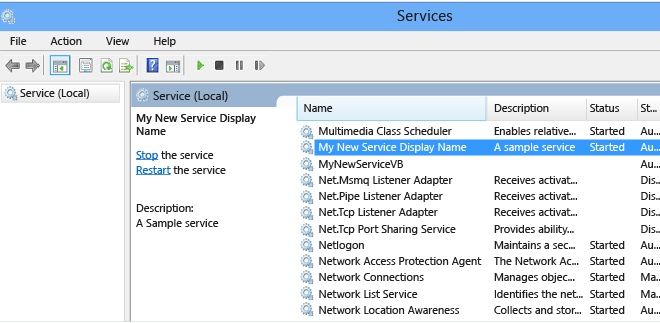
A Windows service is a type of software application designed to run in the background on a Windows operating system. Unlike standard desktop applications, services are not interactive and do not have graphical user interfaces. Instead, they run silently in the background, performing specific functions and tasks without any user intervention.

Services are an integral part of the Windows operating system and are responsible for performing various functions, such as managing network connections, monitoring system performance, and providing security features. They can also be created by third-party software developers to perform custom tasks or functions specific to their applications.

Windows services are built using the Service Control Manager (SCM) API, a system component that manages the lifecycle of services. The SCM is responsible for starting, stopping, and configuring services, as well as controlling their behavior and communication with other system components.

When a Windows service is installed, it is registered with the SCM, which enables it to be started automatically when the system boots up. Services can also be started manually or configured to run at specific times or intervals.

Services can run under different user accounts, such as the Local System account, which has full access to the system resources, or a user-defined account that has specific permissions to perform particular tasks.

One of the significant advantages of using services is that they can run independently of any user login session. This means that services can be running even when no user is logged in, making them ideal for background tasks that need to run 24/7, such as monitoring network traffic or backing up the system.

Another advantage is that services are immune to user error or unintended system shutdowns. Since they run in the background, they are less susceptible to crashes, and they can recover easily when the system restarts.

However, services can also consume system resources, such as CPU cycles and memory, affecting the overall system performance. Therefore, it is essential to manage services and ensure that only necessary services are running to avoid unnecessary resource consumption.

In conclusion, Windows services are an essential part of the Windows operating system, providing critical functions to manage and secure the system. They run in the background, allowing them to perform tasks independently of user interactions and system events, making them ideal for background tasks that need to run continuously. However, it is essential to manage services and ensure that only necessary services are running to avoid unnecessary resource consumption.

Why You Should (or Maybe Shouldn’t) Switch to Edison’s OnMail

Edison’s OnMail is a new email service that aims to help users regain control and privacy over their emails. With its innovative features, it promises to solve longstanding problems with traditional email providers, such as spam, phishing, data mining, and unsecured communication.

However, before you make the switch to Edison’s OnMail, there are several things that you should consider. In this article, we will weigh the advantages and disadvantages of using this service, and help you decide whether it is right for you.

Advantages of Edison’s OnMail

1. Unsubscribe with one click

One of the most annoying things about email is the endless stream of unwanted messages that flood our inboxes. With Edison’s OnMail, you can unsubscribe from emails with just one click, without any hassle or hidden fees. This feature saves you time, privacy, and sanity, and reduces the risk of getting scammed or hacked.

2. Block senders permanently

Another common problem with email is the constant harassment from spammers, scammers, and stalkers. With Edison’s OnMail, you can block senders permanently, and prevent them from contacting you ever again. This feature eliminates the need for third-party software or complicated filters, and gives you peace of mind knowing that your messages are secure and private.

3. Protect your data and privacy

One of the major concerns with traditional email providers is their lack of transparency and accountability regarding data mining and privacy policies. With Edison’s OnMail, you can rest assured that your data is protected and your privacy is respected. This service is committed to using open standards and encryption technologies, and to never sell or share your personal information with third parties.

Previous Article

How to Change Text Case in Excel ...

Next Article

How to Make Windows 10 Look Like ...

Matthew Lynch

Related articles More from author

  • Digital & Mobile Technology

    5 Ways to Fix the “An Unexpected Network Error Occurred” Issue on Windows

    August 1, 2023
    By Matthew Lynch
  • Digital & Mobile Technology

    What Is PayPal Credit and Where Can You Spend It?

    June 22, 2023
    By Matthew Lynch
  • Digital & Mobile Technology

    How to Apply for Netflix’s Squid Game: The Challenge

    June 5, 2023
    By Matthew Lynch
  • Digital & Mobile Technology

    Best Ways to Find a Cell Phone Number Online

    May 31, 2023
    By Matthew Lynch
  • Digital & Mobile Technology

    How to Insert a Graphic or Animation Into an Outlook Signature

    June 11, 2023
    By Matthew Lynch
  • Digital & Mobile Technology

    What is Windows Hardware Quality Labs (WHQL)?

    May 15, 2023
    By Matthew Lynch

Search

Login & Registration

  • Log in
  • Entries feed
  • Comments feed
  • WordPress.org

Newsletter

Signup for The Tech Edvocate Newsletter and have the latest in EdTech news and opinion delivered to your email address!

About Us

Since technology is not going anywhere and does more good than harm, adapting is the best course of action. That is where The Tech Edvocate comes in. We plan to cover the PreK-12 and Higher Education EdTech sectors and provide our readers with the latest news and opinion on the subject. From time to time, I will invite other voices to weigh in on important issues in EdTech. We hope to provide a well-rounded, multi-faceted look at the past, present, the future of EdTech in the US and internationally.

We started this journey back in June 2016, and we plan to continue it for many more years to come. I hope that you will join us in this discussion of the past, present and future of EdTech and lend your own insight to the issues that are discussed.

Newsletter

Signup for The Tech Edvocate Newsletter and have the latest in EdTech news and opinion delivered to your email address!

Contact Us

The Tech Edvocate
910 Goddin Street
Richmond, VA 23231
(601) 630-5238
[email protected]

Copyright © 2026 Matthew Lynch. All rights reserved.