The Tech Edvocate

Top Menu

  • Advertisement
  • Apps
  • Home Page
  • Home Page Five (No Sidebar)
  • Home Page Four
  • Home Page Three
  • Home Page Two
  • Home Tech2
  • Icons [No Sidebar]
  • Left Sidbear Page
  • Lynch Educational Consulting
  • My Account
  • My Speaking Page
  • Newsletter Sign Up Confirmation
  • Newsletter Unsubscription
  • Our Brands
  • Page Example
  • Privacy Policy
  • Protected Content
  • Register
  • Request a Product Review
  • Shop
  • Shortcodes Examples
  • Signup
  • Start Here
    • Governance
    • Careers
    • Contact Us
  • Terms and Conditions
  • The Edvocate
  • The Tech Edvocate Product Guide
  • Topics
  • Write For Us
  • Advertise

Main Menu

  • Start Here
    • Our Brands
    • Governance
      • Lynch Educational Consulting, LLC.
      • Dr. Lynch’s Personal Website
      • Careers
    • Write For Us
    • The Tech Edvocate Product Guide
    • Contact Us
    • Books
    • Edupedia
    • Post a Job
    • The Edvocate Podcast
    • Terms and Conditions
    • Privacy Policy
  • Topics
    • Assistive Technology
    • Child Development Tech
    • Early Childhood & K-12 EdTech
    • EdTech Futures
    • EdTech News
    • EdTech Policy & Reform
    • EdTech Startups & Businesses
    • Higher Education EdTech
    • Online Learning & eLearning
    • Parent & Family Tech
    • Personalized Learning
    • Product Reviews
  • Advertise
  • Tech Edvocate Awards
  • The Edvocate
  • Pedagogue
  • School Ratings

logo

The Tech Edvocate

  • Start Here
    • Our Brands
    • Governance
      • Lynch Educational Consulting, LLC.
      • Dr. Lynch’s Personal Website
        • My Speaking Page
      • Careers
    • Write For Us
    • The Tech Edvocate Product Guide
    • Contact Us
    • Books
    • Edupedia
    • Post a Job
    • The Edvocate Podcast
    • Terms and Conditions
    • Privacy Policy
  • Topics
    • Assistive Technology
    • Child Development Tech
    • Early Childhood & K-12 EdTech
    • EdTech Futures
    • EdTech News
    • EdTech Policy & Reform
    • EdTech Startups & Businesses
    • Higher Education EdTech
    • Online Learning & eLearning
    • Parent & Family Tech
    • Personalized Learning
    • Product Reviews
  • Advertise
  • Tech Edvocate Awards
  • The Edvocate
  • Pedagogue
  • School Ratings
  • The Bombshell Truth About Slim Boost Tea: Don’t Buy Until You Read This

  • Jaw-Dropping: Charbroil Bistro Pro Electric Grill Recall — Is Your Grill a Hidden Danger?

  • This Corgi Tech Startup Just Imploded — Here’s How Social Media Wrecked Everything

  • September 2026: The Latest in Tech Authoritarianism – Overturned by Kelly Stonelake

  • GTA 6 Collector’s Box Price: The $400 Outrage That Just Broke Gaming

  • Unbelievable: Gamers Fought Blizzard’s Censorship and Saved Ogre Butts

  • The Radical New Bill That Could Halt AI — And Jails Its Creators

  • This OpenAI Hack Just Exposed a Terrifying New AI Threat

  • This One Leaked Video Just Blew Open New Zealand’s Curriculum Battle

  • The AI Deception: Stanford’s Scandalous Photo Alteration Reignites Representation Debate

Digital & Mobile Technology
Home›Digital & Mobile Technology›Can You Upgrade the Hard Drive or SSD In Your Mac?

Can You Upgrade the Hard Drive or SSD In Your Mac?
By Matthew Lynch
April 11, 2023
0
Spread the love

Are you a proud owner of a Mac but facing storage issues? The solution may seem daunting- purchasing a new computer with a higher storage capacity, but that comes at a high cost. Did you know that you can upgrade your Mac’s hard drive or solid-state drive (SSD) and increase your storage capacity without buying a new machine?

Upgrading the storage capacity of your Mac is an excellent way to extend its life, and it’s easier than you think. Here’s what you need to know about upgrading the hard drive or SSD in your Mac.

Mac Mini, iMac and Mac Pro

The Mac Mini, iMac, and Mac Pro are the most accessible devices to upgrade as you can easily open them up and replace the hard drive or SSD. Simply unscrew the back panel with the necessary tools and swap out the drive to your preference.

MacBook

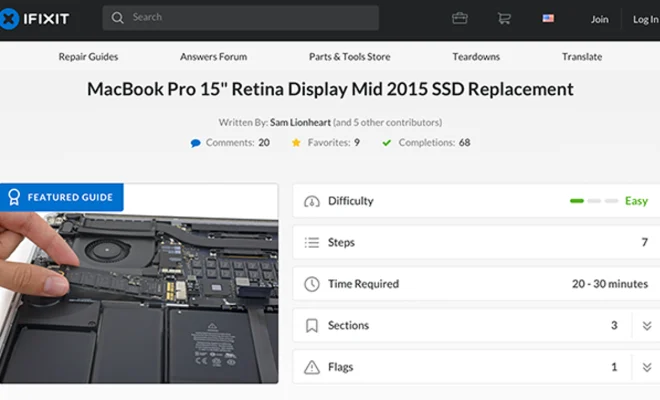
Upgrading the hard drive or SSD on a MacBook is a bit more complicated, but it’s still possible. The process usually involves removing the bottom cover of the laptop, which can be challenging for some users. However, many online tutorials and videos can guide you through the process.

There are some things to keep in mind when upgrading the storage on a MacBook, though. For starters, MacBook Airs and Retina MacBook Pros have PCIe SSDs, which are harder to find and typically more expensive. Additionally, MacBook Pro models from 2012 and earlier have optical drives that can be removed and replaced by a second hard drive or SSD.

Compatibility

Before upgrading, you need to make sure that the hard drive or SSD you want to install is compatible with your Mac. Apple uses proprietary connectors and firmware for its drives, which means that not all drives can be used. It’s essential to do your research and ensure that the drive you purchase is compatible with your Mac model.

Data Transfer

Once you have the new hard drive or SSD installed, it’s time to transfer your data from your old drive to your new one. You can use Apple’s Migration Assistant, which can transfer data from one Mac to another, or you can use external hard drives or cloud storage. Regardless of the method you choose, make sure to do a thorough backup of your data before transferring it.

Conclusion

In conclusion, upgrading the hard drive or SSD on your Mac is an excellent way to increase your storage capacity without having to buy a new computer. Although the process might seem intimidating, there are many tutorials online that can guide you through it. Remember to check the compatibility of your drive, and make sure to back up your data before transferring it to your new drive.

Previous Article

Canceling Netflix? Don’t forget to do this

Next Article

Can You Upgrade the RAM in Your ...

Matthew Lynch

Related articles More from author

  • Digital & Mobile Technology

    The Best Free Prioritization Templates for Your Projects

    July 15, 2023
    By Matthew Lynch
  • Digital & Mobile Technology

    Why the OBJ Box Replaces Emojis and How to Fix It

    June 22, 2023
    By Matthew Lynch
  • Digital & Mobile Technology

    Safest Phones That Are Best for Privacy and Security

    June 23, 2023
    By Matthew Lynch
  • Digital & Mobile Technology

    How to Enable Game Sharing on PlayStation 5?

    June 30, 2023
    By Matthew Lynch
  • Digital & Mobile Technology

    What to Do When Your Skype Camera Is Not Working

    June 10, 2023
    By Matthew Lynch
  • Digital & Mobile Technology

    What Is a Domain Name? 5 Straightforward Examples

    June 23, 2023
    By Matthew Lynch

Search

Login & Registration

  • Log in
  • Entries feed
  • Comments feed
  • WordPress.org

Newsletter

Signup for The Tech Edvocate Newsletter and have the latest in EdTech news and opinion delivered to your email address!

About Us

Since technology is not going anywhere and does more good than harm, adapting is the best course of action. That is where The Tech Edvocate comes in. We plan to cover the PreK-12 and Higher Education EdTech sectors and provide our readers with the latest news and opinion on the subject. From time to time, I will invite other voices to weigh in on important issues in EdTech. We hope to provide a well-rounded, multi-faceted look at the past, present, the future of EdTech in the US and internationally.

We started this journey back in June 2016, and we plan to continue it for many more years to come. I hope that you will join us in this discussion of the past, present and future of EdTech and lend your own insight to the issues that are discussed.

Newsletter

Signup for The Tech Edvocate Newsletter and have the latest in EdTech news and opinion delivered to your email address!

Contact Us

The Tech Edvocate
910 Goddin Street
Richmond, VA 23231
(601) 630-5238
[email protected]

Copyright © 2026 Matthew Lynch. All rights reserved.