How to check AirPods battery
“`html
Whether you’re a music lover, a podcast enthusiast, or just someone who enjoys the freedom of wireless audio, keeping your AirPods charged and ready to go is essential. One of the most crucial aspects of using AirPods is knowing how to check AirPods battery life, ensuring your listening experience is uninterrupted. In this comprehensive guide, we’ll explore various methods to check your AirPods battery, the importance of battery management, and tips for prolonging battery life.
1. Understanding AirPods Battery Basics
Before diving into how to check your AirPods battery, it’s important to understand how their battery works. AirPods come equipped with a rechargeable lithium-ion battery. Depending on the model—whether you have the original AirPods, AirPods Pro, or AirPods Max—the battery life varies. Generally, the original AirPods offer about five hours of listening time, while the Pro model can reach up to 4.5 hours with active noise cancellation.
Each AirPod charges in its case, which holds multiple charges for the earbuds, providing up to 24 hours of total listening time when you include the case’s battery. Understanding these basics helps you appreciate why regularly checking the battery is vital for optimal performance.
2. How to Check AirPods Battery on iOS Devices
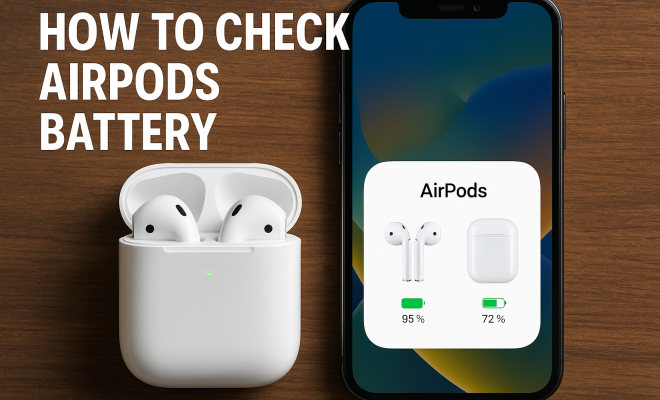
Checking the battery life of your AirPods on iOS devices is a seamless experience. Simply open the lid of your AirPods case near your iPhone or iPad, and a pop-up will appear on your screen, displaying the battery percentage for both the AirPods and the case. This feature takes advantage of Bluetooth connectivity, making it easy to stay informed.
Alternatively, you can check the battery status via the Bluetooth settings. Go to Settings > Bluetooth, and find your AirPods in the list of connected devices. Tapping on the “i” icon next to your AirPods will show you their battery percentage. If you have an Apple Watch, you can also check the battery level from the Control Center, making it convenient to manage your battery life while on the go.
3. Checking AirPods Battery on macOS
If you primarily use your AirPods with a Mac, checking the battery level is just as straightforward. First, make sure your AirPods are connected to your Mac. Click on the Bluetooth icon in the menu bar at the top-right corner of your screen, and you’ll see a dropdown list of connected devices. Your AirPods will be listed there with the current battery level displayed beside them.
For a more detailed view, you can access the System Preferences under Bluetooth. Here, you can manage connected devices and check the battery life of each one. Knowing how to check your AirPods battery on macOS is essential for those who often switch between devices for work or leisure.
4. Using the AirPods Case to Monitor Battery Life
The AirPods charging case itself provides several indicators for battery life. When you open the lid, a light indicator on the front of the case will display the current charge level: green means your AirPods and case are fully charged, while amber indicates that charging is needed. Keep in mind that knowing how to use this feature can save you from unexpected disconnections during use.
Additionally, if you ever find yourself without a device to check your battery life, you can still estimate the charge by simply placing one AirPod in your ear. If the sound quality is good, you still have enough battery for a listening session, although precise percentages will always be more reliable through your devices.
5. App Solutions to Monitor AirPods Battery
If you’re looking for more advanced battery monitoring solutions, consider downloading third-party apps designed to keep track of your AirPods battery life. Apps like AirBattery or PodBuddy not only show you the battery percentage of your AirPods but also provide notifications when your battery is low.
These apps can enhance your experience, especially if you frequently use your AirPods throughout the day. They can help you keep track of battery usage patterns, allowing you to plan your charging schedule more effectively. Plus, some apps offer widgets that display battery information directly on your home screen for quick access. (See: CDC on battery safety and management.)
6. Understanding Battery Life and Longevity
It’s essential to grasp how often you might need to check your AirPods battery life, especially if you’re a heavy user. Battery longevity is determined by various factors, including usage patterns, charging habits, and the age of the device. Over time, the lithium-ion battery in your AirPods will degrade, leading to reduced playtime.
Regularly checking the battery life can help you identify when your AirPods need charging. If you notice that the battery drains faster than usual, it might be time to look into replacement options. Apple provides battery service for AirPods, so if you’re experiencing significant performance issues, don’t hesitate to seek professional help.
7. Best Practices for Charging Your AirPods
To maximize your AirPods battery life, try to adopt best practices when charging. Always store your AirPods in their case when not in use, as it helps maintain the battery charge. Avoid letting them fully discharge regularly; instead, charge them when they hit around 20% to prolong their lifespan.
Additionally, be cautious about exposing your AirPods to extreme temperatures. Both heat and cold can negatively impact battery health. Keeping your AirPods in a moderate environment while not using them ensures they stay in optimal condition.
8. AirPods Pro and Battery Management Features
If you own AirPods Pro, you benefit from additional battery management features. The AirPods Pro offers a Low Power Mode that automatically activates when the battery reaches a critical level, extending playtime. To enable this feature, simply ensure you keep your AirPods updated with the latest firmware.
Furthermore, the AirPods Pro provide an option for listening controls, allowing you to toggle noise cancellation or transparency modes. These functions can affect battery life, so being mindful of how and when you use them can help you maintain a healthy charge.
9. Common Issues and Troubleshooting
Occasionally, you may encounter issues with checking your AirPods battery, such as inaccurate readings or connectivity problems. If your AirPods aren’t showing the correct battery percentage, try resetting them. To do this, place your AirPods in the charging case, close the lid, and wait for about 30 seconds. Then, remove them from the case and reconnect them to your device.
Another common issue arises when the battery appears to drain too quickly. If you’ve implemented best practices and still face this problem, consider reaching out to Apple Support or visiting an authorized service provider for diagnostics and potential battery replacement.
10. Staying Informed: Updates and New Features
Apple continuously improves its products, so staying informed about updates and new features is crucial. Occasionally, new firmware updates are released that enhance battery management or connectivity, and these updates can improve your overall experience. Make it a habit to check for updates regularly to ensure your AirPods are running the latest software.
11. Why Regular Battery Checks Are Important
So, why is it essential to check your AirPods battery regularly? For starters, understanding your battery level can prevent inconvenient interruptions during your favorite tunes or podcasts. Imagine being in the middle of a gripping audio story, and suddenly your AirPods cut out because of a dead battery. Regular checks can help you avoid such aggravating moments.
Additionally, a well-maintained battery not only prolongs the life of your AirPods but also maintains sound quality. A battery that drains too quickly can lead to distorted audio or even malfunctioning earbuds. Thus, keeping an eye on battery levels can enhance your overall listening experience.
12. Comparative Analysis of AirPods Models
There are several models of AirPods available, each with its own battery specifications and features. Let’s compare them:
- Original AirPods: These offer about 5 hours of listening time per charge and up to 24 hours with the charging case. They are the most basic model and are ideal for casual users.
- AirPods Pro: With features like active noise cancellation, the Pro version provides approximately 4.5 hours of listening time with ANC enabled. However, the case extends that to about 24 hours. Their silicone tips also ensure a custom fit, which can enhance audio quality.
- AirPods Max: The over-ear headphones offer up to 20 hours of listening time with noise cancellation activated. They boast high-fidelity audio and a luxurious design, making them suitable for audiophiles.
This comparison highlights that while the original AirPods are great for everyday use, those who value sound quality and additional features may prefer the Pro or Max versions. Thus, understanding your needs can help you choose the right model for optimal battery management.
13. Statistics on AirPods Usage
According to recent studies, AirPods have become one of the best-selling wireless earbuds globally, with Apple capturing a significant percentage of the market. As of 2023, reports indicated that Apple held over 35% of the wireless earbud market. Additionally, users tend to keep their AirPods for about 2-3 years before replacing them, often driven by battery life issues.
Furthermore, statistics show that over 70% of AirPods users regularly check their battery levels, demonstrating the importance placed on battery management. As consumers become more discerning about their audio devices, understanding and managing battery life will remain a critical aspect.
14. Expert Perspectives on AirPods Battery Management
Experts recommend that users should familiarize themselves with their device’s battery management settings. According to audio technology specialists, “Understanding your device’s battery health is as crucial as the sound quality itself.” Regularly checking battery levels not only enhances your listening experience but can also prolong the lifespan of your AirPods. With the right approach, you can enjoy your AirPods for years without significant performance degradation.
Several industry professionals advocate for the use of third-party apps for more detailed battery insights. They suggest that users should take advantage of technology to optimize their audio experience, emphasizing that awareness is power when it comes to battery management.
15. Frequently Asked Questions (FAQ)
1. How can I check AirPods battery on Android devices?
For Android users, checking AirPods battery can be less straightforward. However, you can download apps like AirBattery or use widgets that can help you see the battery levels of your AirPods. Alternatively, you can try connecting your AirPods to a device that supports Apple’s battery check feature.
2. What should I do if my AirPods battery drains quickly?
If you notice that your AirPods battery is draining quicker than usual, make sure to check for updates and ensure they are running the latest firmware. Also, try resetting your AirPods. If the issue persists, consider reaching out to Apple for a battery service.
3. Can I use my AirPods while charging?
No, you cannot use your AirPods while they are charging in the case. They must be in the case for charging, but you can use them while they are charging if you have a sufficient battery life.
4. How long do AirPods take to charge fully?
Typically, your AirPods will take about an hour to charge fully in the case. The case itself can take a couple of hours to reach a full charge, depending on its remaining battery.
5. Is it bad to leave AirPods charging overnight?
While AirPods are designed to stop charging once they’re full, it’s generally a good practice to avoid leaving them plugged in for extended periods. It’s best to charge them when needed and unplug them once they reach full charge to maximize battery longevity.
6. What is the lifespan of AirPods batteries?
The lifespan of AirPods batteries can vary based on use, but typically, they last around 2 to 3 years before significantly degrading. Factors like charging habits and storage conditions can impact this lifespan.
7. Can I replace AirPods batteries myself?
Replacing AirPods batteries yourself is not recommended as it requires specialized tools and expertise. If your AirPods battery is failing, it’s best to seek service from Apple or an authorized service provider.
8. How do I know when it’s time to replace my AirPods?
If you notice your AirPods battery drains very quickly, the audio quality diminishes, or frequent connectivity issues arise, it might be time for a replacement. Additionally, if they no longer hold a charge effectively, consider seeking a replacement.
16. AirPods Battery Health: Key Indicators
Understanding the indicators of your AirPods battery health can help you determine when it’s time to get a replacement. Key signs of battery degradation include:
- Rapid Battery Drain: If your AirPods are losing charge much faster than expected, it may indicate that the battery has aged significantly.
- Inconsistent Battery Levels: If the battery level fluctuates wildly or shows a charge when they are not used, this inconsistency is a red flag.
- Audio Quality Issues: If sound quality diminishes, it might be related to battery performance, where the power supply isn’t steady enough to maintain quality sound.
- Charging Case Not Holding Charge: If your charging case seems to deplete its battery quickly, it may affect your AirPods’ usability.
By noting these indicators, you can better evaluate when it’s time for a battery replacement or service.
17. Innovations in Future AirPods Models
As technology progresses, Apple is likely to introduce new features aimed at enhancing battery life. Future AirPods may include:
- Solar Charging Capabilities: Integrating solar panels could provide a sustainable charging option.
- More Advanced Battery Management Systems: A system that allows users to monitor health and performance through detailed analytics might be developed.
- Enhanced Noise Cancellation and Efficiency: Improvements in hardware could allow for better battery life even with advanced features turned on.
Staying updated on these innovations not only helps you understand potential future investments but also prepares you to maximize your current usage.
Final Thoughts
In summary, knowing how to check AirPods battery life is vital for maximizing your listening experience. By familiarizing yourself with the various methods available and following best practices for charging and maintenance, you can ensure your AirPods remain a reliable audio companion. Understanding battery management features, keeping abreast of updates, and utilizing available apps will make your AirPods experience even better, allowing you to enjoy your music and podcasts worry-free.
“`
Trending Now
Frequently Asked Questions
How do I check the battery percentage of my AirPods?
To check the battery percentage of your AirPods, simply open the lid of the charging case near your iPhone or iPad, and a pop-up will display the battery levels. Alternatively, you can go to Settings > Bluetooth, find your AirPods, and tap the 'i' icon to see the battery percentage.
What is the battery life of AirPods?
The battery life of AirPods varies by model. The original AirPods offer about five hours of listening time, while the AirPods Pro provide up to 4.5 hours with active noise cancellation. Including the charging case, you can get up to 24 hours of total listening time.
Can I check AirPods battery on an Apple Watch?
Yes, you can check the battery level of your AirPods on an Apple Watch. Swipe up on the watch face to access the Control Center, where you should find the battery widget that displays the battery percentage of connected devices, including your AirPods.
Why is it important to check AirPods battery?
Regularly checking your AirPods battery is crucial to ensure uninterrupted listening experiences. Knowing the battery status helps you manage charging and avoid unexpected shutdowns, especially during important calls or while enjoying music.
How can I prolong my AirPods battery life?
To prolong your AirPods battery life, avoid exposing them to extreme temperatures, keep them in their charging case when not in use, and disable features like active noise cancellation when unnecessary. Regularly updating your device's software can also help enhance battery performance.
What did we miss? Let us know in the comments and join the conversation.