How to use VPN on iPhone
“`html
In an age where privacy and security are paramount, understanding how to use a VPN for iPhone has become increasingly important. Whether you’re browsing at a coffee shop, accessing sensitive work documents, or just streaming your favorite show, a VPN (Virtual Private Network) can offer you the protection and freedom you need. This guide will walk you through everything you need to know about using a VPN on your iPhone, from its benefits to setup, and beyond.
1. What is a VPN and How Does it Work?
A VPN allows you to create a secure connection over the internet, encrypting your data and masking your IP address. By routing your internet traffic through a server operated by the VPN provider, it shields your online activities from prying eyes and protects your personal information.
This is particularly relevant for iPhone users, who often rely on public Wi-Fi networks that can be less secure. With a VPN, your data is encrypted, making it nearly impossible for hackers or other malicious actors to intercept your information.
2. Why Use a VPN for iPhone?
Using a VPN for iPhone offers several compelling benefits. Firstly, it enhances your online security, especially when connecting to public Wi-Fi networks. According to a study by Norton, nearly 70% of people have experienced some form of cybercrime when using public Wi-Fi.
Secondly, a VPN can bypass geo-restrictions imposed by streaming services and websites. For instance, if you’re traveling abroad and want to access your favorite shows on Netflix, a VPN can make it appear as if you are still in your home country.
3. Choosing the Right VPN for Your iPhone
Not all VPNs are created equal. When selecting a VPN for your iPhone, consider factors such as speed, security, ease of use, and customer support. Some popular options include ExpressVPN, NordVPN, and Surfshark, each offering unique features.
Look for a VPN that uses strong encryption protocols like OpenVPN or IKEv2, and make sure it has a no-logs policy to ensure your data remains private. Also, consider a free trial or money-back guarantee to test the service before committing.
4. How to Set Up a VPN on Your iPhone
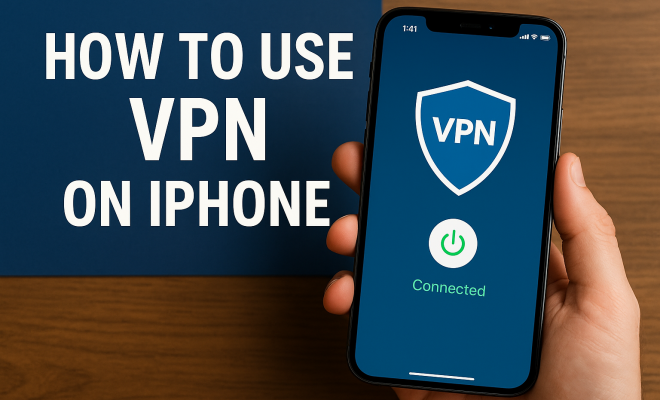
Setting up a VPN for iPhone is a straightforward process. Start by downloading the VPN app from the App Store. Once installed, sign in using your credentials. The app will guide you through the setup process, which typically involves granting permissions to create a VPN profile.
After setting up, you can usually select a server location to connect to. Once connected, you’ll see a VPN icon in your status bar, indicating that your connection is secure. Remember to disconnect the VPN when you no longer need it to avoid potential battery drain.
5. Using a VPN While Traveling
Traveling can expose you to a multitude of online threats, making a VPN for iPhone especially valuable. Before traveling, ensure your VPN is installed and functioning. While abroad, always connect to your VPN when using public Wi-Fi networks to enhance your security.
Additionally, a VPN can help you access content that may be restricted in the country you’re visiting. For example, if you’re in a country where certain websites or services are blocked, a VPN can help you navigate these hurdles by masking your location. (See: CDC on public Wi-Fi security.)
6. Common Issues and Troubleshooting
Like any technology, using a VPN can come with its own set of challenges. Common issues may include slow internet speeds, inability to connect to certain websites, or problems with app performance.
If you experience slow speeds, try switching servers or protocols within the app. If a specific website is blocked, consider using a different VPN server or contacting customer support. Most reputable VPN services offer 24/7 support to assist with these issues.
7. VPN and Streaming: What You Should Know
Many people use a VPN for iPhone to access streaming services like Netflix, Hulu, or BBC iPlayer from outside their home country. However, it’s essential to know that some streaming services actively block VPN traffic.
To avoid issues, look for VPNs known for their ability to bypass these restrictions. Additionally, consider the terms of service for each streaming service, as using a VPN may violate their policies.
8. Legal Considerations of Using a VPN
While using a VPN is legal in most countries, some places have specific regulations. For instance, in countries like China or Iran, the use of VPNs is heavily restricted. Before traveling, make sure to research local laws regarding VPN usage to avoid any legal repercussions.
If you’re using a VPN to engage in illegal activities, remember that while your data might be encrypted, your actions can still be traced back to you. Always use your VPN responsibly and within the bounds of the law.
9. Final Thoughts on Using a VPN for iPhone
In today’s digital age, protecting your online presence is essential. A VPN for iPhone not only secures your data but also provides you with the freedom to explore the internet without restrictions. By choosing the right VPN, setting it up correctly, and using it responsibly, you can enhance your online experience significantly.
So, whether you’re browsing at a café, streaming your favorite shows, or simply looking to enhance your security, a VPN is an invaluable tool that should be part of your digital toolkit. Equip yourself with the knowledge and the right tools, and stay safe online!
10. Understanding VPN Protocols
When selecting a VPN for iPhone, it’s crucial to understand the different protocols that these services use for encryption and data transmission. Here are some of the most common protocols:
- OpenVPN: Highly secure and versatile, OpenVPN is one of the most recommended protocols for VPNs. It supports various encryption methods and offers great speed and stability.
- IKEv2: Ideal for mobile devices, IKEv2 allows for quick reconnections and is resilient when switching networks, such as moving from Wi-Fi to cellular data.
- L2TP/IPsec: This protocol pairs Layer 2 Tunneling Protocol with Internet Protocol Security for enhanced security. However, it can be slower compared to others due to double encapsulation.
- WireGuard: A newer protocol known for its high performance and security, WireGuard is gaining popularity for its simplicity and efficiency.
Selecting a VPN that offers a variety of protocols allows you to switch based on your needs for speed or security.
11. How a VPN Improves Online Privacy
The internet is filled with trackers, advertisers, and potential threats that can compromise your privacy. Using a VPN for iPhone helps in several ways:
- IP Address Masking: A VPN replaces your real IP address with one from the VPN server, making it difficult for third parties to track your online activities.
- Encryption: By encrypting your internet traffic, a VPN makes your data unreadable to anyone who might intercept it, such as hackers or even your Internet Service Provider (ISP).
- Secure DNS Requests: Many VPNs provide secure DNS leak protection, which prevents your DNS requests from being exposed to your ISP, further enhancing your privacy.
These features make a VPN an essential tool for anyone concerned about their online footprint.
12. Real-World Scenarios: When to Use a VPN
You might wonder when exactly a VPN is necessary. Here are some real-world scenarios where using a VPN for iPhone can be particularly beneficial:
- Working Remotely: If you’re accessing sensitive company data from a public Wi-Fi network, a VPN can prevent unauthorized access.
- Traveling Abroad: You may find that your favorite services are geo-restricted in the country you’re visiting. A VPN allows you to virtually switch your location and access your usual content.
- Online Gaming: Gamers often use VPNs to reduce lag, protect against DDoS attacks, and access region-specific games or in-game content.
- Researching Sensitive Topics: If you’re researching topics that may be monitored or restricted in your region, a VPN can help you browse freely.
In these scenarios, having a reliable VPN can enhance both your security and your online experience.
13. VPN Performance: What to Expect
Understanding what to expect in terms of performance when using a VPN for iPhone is essential. While VPNs are designed to enhance security, they can sometimes lead to slower internet speeds due to the encryption process. Here are some factors that influence VPN performance:
- Server Location: The closer the VPN server is to your physical location, the faster your connection is likely to be. Connecting to a server on the other side of the world may lead to higher latency.
- Server Load: If too many users are connected to the same server, it can result in slower speeds. Opt for a VPN that offers multiple servers to choose from.
- Internet Connection: Your base internet speed will also affect your experience. A VPN can only work with the speed provided by your ISP.
Testing your speed with and without a VPN can help you gauge the performance impact.
14. Frequently Asked Questions about VPN for iPhone
1. Is using a VPN for iPhone safe?
Yes, using a VPN for iPhone is safe as long as you choose a reputable provider that uses strong encryption methods and has a solid privacy policy.
2. Can I use a free VPN for my iPhone?
While free VPNs are available, they often have limitations such as data caps, fewer server options, and potentially weaker security. It’s usually better to invest in a paid service.
3. Will a VPN slow down my internet speed?
Some slowdown can occur due to the encryption process, but a good VPN will minimize this impact. Test your speed with different servers to find the best performance.
4. Can I use a VPN to access Netflix or other streaming services?
Yes, a VPN allows you to access content available in different regions. Just make sure to choose a VPN known for bypassing geo-restrictions.
5. How do I know if my VPN is working?
You can check your IP address before and after connecting to the VPN. If your IP address changes to one from the VPN server, it’s working correctly.
6. Can I use a VPN on multiple devices?
Many VPN providers allow multiple simultaneous connections. You need to check the provider’s policy to see how many devices can be connected at once.
7. Does a VPN protect against malware?
A VPN primarily protects your data during transmission. To protect against malware, consider using it alongside antivirus software.
15. Understanding the Cost of VPN Services
When considering a VPN for iPhone, it’s important to understand the costs involved. While free VPNs exist, they often come with limitations and potential risks, such as weaker security protocols or data selling practices. Here’s a brief overview of typical pricing structures:
- Monthly Plans: Most VPN services offer monthly subscriptions that typically range from $5 to $12 per month.
- Annual Plans: Committing to a yearly plan can often result in significant savings, with prices ranging from $3 to $8 per month when billed annually.
- Multi-Year Plans: Some providers offer discounts for multi-year commitments, which can reduce costs to as low as $2 to $5 per month.
When weighing costs, consider the features and services being offered. A slightly higher price may be worth it for a VPN that offers better security, more servers, and quicker connection speeds.
16. Comparing VPN Providers: What to Look For
With so many options available, comparing different VPN providers can be a daunting task. Here are some key factors to focus on:
- Server Network: A larger server network means better speed and performance, as well as more options for bypassing geo-restrictions.
- Privacy Policy: Look for a provider with a transparent privacy policy that clearly states they do not log your data.
- Customer Support: Responsive customer support can be invaluable, especially if you encounter any issues while using the VPN.
- Compatibility: Ensure the VPN supports iOS and has a user-friendly app for seamless integration with your iPhone.
Utilizing comparison websites or user reviews can also provide insights into real-world performance and customer satisfaction.
17. The Future of VPN Technology
The landscape of VPN technology is constantly evolving. In the coming years, we can expect to see advancements in encryption standards, improved speed optimizations, and even more integrated security features. Here are a few trends to keep an eye on:
- AI and Machine Learning: These technologies may be used to enhance server management and improve threat detection, making VPNs more effective.
- Increased Focus on User Privacy: As users become more aware of privacy issues, VPN providers will likely continue adapting to meet these demands.
- Integration with Other Security Tools: Future VPNs may offer built-in malware protection, ad-blocking, or data breach alerts to provide a more comprehensive security solution.
Staying informed about these developments can help you choose a VPN that remains effective in the long run.
18. Conclusion: Empower Your iPhone Experience with a VPN
As digital privacy becomes more crucial, using a VPN for iPhone is a wise choice for anyone looking to enhance their online security and access global content. Understanding how VPNs work, the importance of choosing the right provider, and knowing when to use one can empower you to navigate the internet with confidence. Whether you’re at home or on the go, a VPN can help you stay safe and connected in our increasingly digital world.
“`
Trending Now
Frequently Asked Questions
What is a VPN and how does it work?
A VPN, or Virtual Private Network, creates a secure connection over the internet by encrypting your data and masking your IP address. It routes your internet traffic through a server operated by the VPN provider, protecting your online activities from prying eyes and ensuring your personal information remains confidential.
Why should I use a VPN on my iPhone?
Using a VPN on your iPhone enhances your online security, especially on public Wi-Fi networks, where cybercrime risks are higher. Additionally, a VPN allows you to bypass geo-restrictions, enabling you to access content from streaming services as if you were in your home country, even when traveling.
How do I choose the best VPN for my iPhone?
To choose the best VPN for your iPhone, consider factors such as speed, security features, ease of use, and customer support. Look for VPNs that use strong encryption protocols like OpenVPN or IKEv2, and read reviews to find one that best fits your needs, such as ExpressVPN or NordVPN.
Can a VPN protect my data on public Wi-Fi?
Yes, a VPN can significantly protect your data on public Wi-Fi. By encrypting your internet connection, a VPN makes it difficult for hackers or malicious actors to intercept your information, thereby enhancing your online security while using unsecured networks.
Will a VPN slow down my internet on iPhone?
Using a VPN may slow down your internet speed due to the encryption process and the distance to the VPN server. However, many high-quality VPN services optimize their connections to minimize speed loss, so choosing a reputable provider can help maintain better performance.
What’s your take on this? Share your thoughts in the comments below — we read every one.