How to calibrate monitor colors
“`html
In the world of digital design, photography, and even gaming, the accuracy of your monitor’s colors can drastically influence your work and overall experience. To calibrate monitor colors properly is to ensure that your screen displays colors as they are meant to be displayed, creating a more accurate and enjoyable visual experience. In this article, we’ll explore the essential steps and tools you need to achieve this, as well as the importance of color calibration in various fields.
1. Understanding Color Calibration
Color calibration is a process that adjusts the color output of your monitor to match a standard or reference point. The goal is to create a more accurate representation of colors so that what you see on your screen closely resembles how those colors appear in real life. Without calibration, monitors can display colors that are either overly saturated, too dull, or completely inaccurate.
This inaccuracy can lead to significant discrepancies in fields like graphic design and photography, where color fidelity is paramount. Designers want their creations to look the same across all platforms, and photographers need their images to reflect true colors for printing. Therefore, understanding the fundamentals of color calibration is the first step in ensuring consistent color accuracy.
2. Why You Should Calibrate Your Monitor
There are several compelling reasons for calibrating your monitor. First and foremost, accurate color representation is crucial for professionals who rely on visual fidelity. For example, if you’re a graphic designer working on branding materials, any mismatch in colors can result in miscommunication with clients and can even affect the project’s success.
Moreover, calibrating your monitor can help reduce eye strain and fatigue. Monitors that are improperly calibrated might emit colors that are harsh or excessive in brightness, leading to discomfort during long working hours. Regular calibration can also extend the lifespan of your monitor by reducing the wear and tear caused by incorrect settings.
3. Tools You’ll Need for Calibration
To calibrate monitor colors effectively, you’ll need a few essential tools. The most common are calibration software and hardware. Calibration software can range from built-in tools provided by your operating system to third-party applications. Depending on your needs, some popular options include DisplayCAL and CalMAN.
For those seeking even more precision, hardware calibration devices, such as colorimeters and spectrophotometers, are available. These devices directly measure the colors produced by your monitor and provide data that software uses to adjust settings accordingly. Brands like X-Rite and Datacolor offer some of the most reliable calibration tools on the market.
4. Setting Up Your Environment
A properly set-up environment is crucial for accurate calibration. Start by ensuring your workspace has consistent lighting, as ambient light can affect how you perceive colors on your screen. Ideally, you’ll want to calibrate your monitor in the same lighting conditions you’ll be using it in regularly.
Additionally, make sure that your monitor is warm enough before calibration. When first turned on, monitors can take up to 30 minutes to reach stable operating conditions. If you attempt calibration too soon, the colors may still be shifting, leading to inaccurate results.
5. Using Software for Calibration
Once your environment is prepared, it’s time to dive into software calibration. If you’re using Windows, you can access the built-in Display Color Calibration tool, found in the settings. For macOS users, the Display Calibrator Assistant serves a similar purpose. Both tools guide you through the calibration process, allowing you to adjust gamma, brightness, contrast, and color balance.
For those who prefer third-party software, options like DisplayCAL offer more in-depth features. This software provides a step-by-step wizard that not only walks you through the calibration process but also allows for more specific adjustments based on the type of work you do and the conditions of your workspace.
6. Employing Hardware Calibration
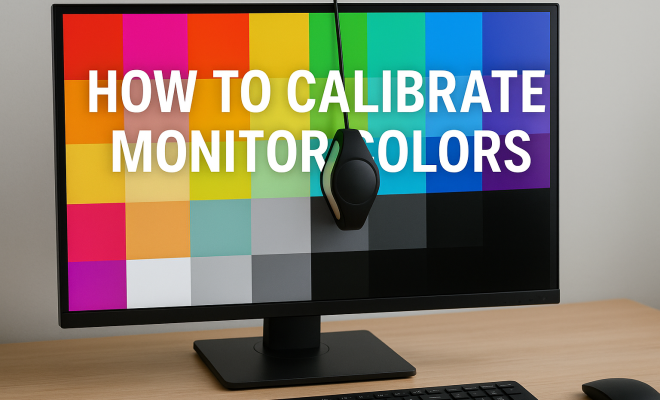
If you seek the highest accuracy, hardware calibration is the way to go. Using a colorimeter, you can measure and adjust your monitor’s output precisely. Begin by installing the calibration software that comes with your colorimeter, then connect the device to your computer and hang it over your monitor’s screen.
The software will typically run through a series of tests, measuring the colors displayed on your monitor and comparing them to the reference values. Based on this information, it will suggest adjustments to your monitor settings, which you can apply either manually or automatically, depending on the capabilities of your monitor. (See: understanding color management systems.)
7. Understanding Different Color Spaces
When you calibrate monitor colors, a crucial aspect to consider is the color space you wish to work with. Color spaces like sRGB, Adobe RGB, and DCI-P3 serve different purposes and provide varying color ranges. For web design and everyday applications, sRGB is the standard. However, if you’re working on high-quality prints or video production, you may want to utilize Adobe RGB or DCI-P3.
Choosing the right color space helps ensure that colors are represented accurately across different devices. When calibrating your monitor, make sure to select the appropriate profile that aligns with your needs. This attention to color space will make a significant difference in the final output of your projects.
8. Regular Maintenance and Recalibration
Calibrating your monitor is not a one-time event. Over time, monitor performance can shift, necessitating regular recalibration. Many professionals recommend calibrating your monitor every month or at least once every three months, depending on usage frequency and the sensitivity of the work you do.
Keep in mind that even minor changes in your environment, such as new lighting fixtures or changes in room decor, can impact color perception. Regular recalibration not only maintains color accuracy but also ensures that your work remains consistent in quality.
9. Common Calibration Mistakes to Avoid
While calibrating monitor colors may seem straightforward, many people make mistakes that can compromise the calibration process. One common error is neglecting to set the monitor to its native resolution before calibration. This step is crucial because using a non-native resolution can distort color accuracy.
Another mistake is calibrating with a monitor that is not properly warmed up. If the monitor hasn’t been on for an adequate amount of time, the colors may still be shifting, leading to inaccurate results. Lastly, don’t forget to disable any automatic brightness or contrast adjustments that your monitor may have, as these features can interfere with the calibration process.
10. The Future of Monitor Calibration
As technology advances, the methods and tools for calibrating monitor colors will continue to evolve. Emerging technologies, such as artificial intelligence and machine learning, are beginning to influence calibration processes, promising even more straightforward and accurate methods in the future. These advancements could simplify the calibration process, making it accessible to more users, regardless of their technical expertise.
Moreover, the increasing prevalence of high dynamic range (HDR) displays presents new challenges and opportunities for color calibration. As more professionals adopt HDR technology, calibration tools and methods will need to adapt accordingly to ensure that colors are displayed accurately across all formats.
Calibrating your monitor colors isn’t just about achieving a visual aesthetic; it’s about accuracy and consistency in your work. Whether you’re a graphic designer, a photographer, or an avid gamer, understanding how to calibrate your monitor correctly can enhance your overall experience and the quality of your projects.
11. Additional Tips for Effective Calibration
Beyond the basics of monitor calibration, there are several additional tips that can help you achieve even better results. One effective method is to utilize test images specifically designed for calibration. These images typically include a variety of colors and gradients and can help you visually assess your monitor’s performance during calibration. Using these images in conjunction with calibration software can provide a more comprehensive evaluation of your monitor’s color output.
It’s also beneficial to familiarize yourself with your monitor’s settings menu. Every monitor has different options, such as color temperature, gamma settings, and even presets for different use cases (e.g., graphic design, gaming, etc.). Understanding these settings and how they work can help you make more informed adjustments during the calibration process.
Finally, consider keeping a calibration log. Documenting the date of calibration, the settings used, and any observations can help you track changes over time. This log can serve as a valuable reference if you notice changes in color accuracy or performance in the future.
12. Real-World Examples of the Importance of Calibration
To illustrate the importance of monitor calibration, let’s look at a few real-world examples. In the world of fashion design, color accuracy is critical. Designers rely on precise color matching to ensure that the garments produced match the colors shown in their digital designs. A miscalibrated monitor could lead to mismatched colors, resulting in costly reprints or a loss of credibility with clients.
Similarly, in photography, many professionals face the challenge of ensuring that the colors they see on their monitors match the prints produced. A photographer may spend hours editing an image, and if their monitor is not calibrated, they may end up with prints that are drastically different from what they intended. This inconsistency can lead to dissatisfaction and financial loss. (See: importance of color accuracy in imaging.)
In gaming, players often invest in high-end monitors to enhance their experience. However, a monitor that displays inaccurate colors can affect gameplay. Whether it’s not being able to distinguish between shades in a critical moment or experiencing visual fatigue due to harsh colors, a calibrated monitor can provide a more immersive and enjoyable gaming experience.
13. Statistics on Color Accuracy in Various Industries
Understanding the impact of color accuracy can be further enhanced by looking at some statistics from various industries. A study from the International Color Consortium found that 75% of professionals in graphic design and photography reported that improper color representation led to client dissatisfaction or project failure. This statistic underscores the necessity of regular calibration to maintain industry standards.
Moreover, a survey conducted by the American Society of Cinematographers revealed that 83% of cinematographers believe that color accuracy is vital for storytelling in film and television. This highlights how crucial it is to have calibrated monitors in industries where visual storytelling is key.
In the gaming industry, another survey indicated that 67% of gamers claimed that visual fidelity directly impacts their enjoyment of a game. A well-calibrated monitor can therefore enhance the experience and keep players engaged.
14. Expert Perspectives on Calibration
Industry experts often emphasize the importance of monitor calibration. Renowned color scientist Dr. Mark Fairchild states that “the human eye is not very reliable when it comes to color perception; therefore, calibration is essential for achieving true color accuracy.” This perspective is echoed by many professionals who stress that relying solely on visual judgment can lead to significant discrepancies.
Graphic designer and educator Lisa O’Rourke also notes, “calibrating your monitor doesn’t just enhance color accuracy; it instills confidence in your work.” This sentiment resonates with many creative professionals who find that taking the time to calibrate allows them to produce work they can be proud of. The combination of technical precision and artistic integrity is something every designer strives for.
15. Comprehensive FAQ on Monitor Calibration
What is monitor calibration?
Monitor calibration is the process of adjusting your monitor’s color settings to ensure it displays colors accurately and consistently across various applications and devices.
How often should I calibrate my monitor?
It’s generally recommended to calibrate your monitor every month or at least once every three months, depending on how frequently you use it and the critical nature of your work.
Can I calibrate my monitor without a colorimeter?
Yes, you can use built-in calibration tools in your operating system or third-party software, but using a colorimeter will yield more accurate results.
How do I know if my monitor is calibrated properly?
You can assess calibration using test images and compare what you see on your screen against printed materials or calibrated reference images. If colors appear consistent across mediums, your monitor is likely calibrated properly.
What are the signs that my monitor needs recalibrating?
Signs include noticeable differences in color accuracy, visual fatigue, or when printed materials do not match what you see on your screen. If color shifting occurs over time, it’s a clear indication to recalibrate.
Is there a difference between hardware and software calibration?
Yes, hardware calibration uses a colorimeter for precise measurements and adjustments, while software calibration relies on visual adjustments which may not be as accurate. Hardware calibration is generally recommended for professional work.
What should I do if my monitor can’t be calibrated satisfactorily?
If you find that your monitor cannot be calibrated satisfactorily, it may be worth considering an upgrade to a higher-quality monitor designed for better color accuracy. It’s also important to check for any firmware updates or settings that may affect calibration. (See: monitor calibration and visual ergonomics.)
16. Advanced Calibration Techniques
While basic calibration methods can produce satisfactory results for most users, advanced techniques can further enhance color accuracy. For instance, advanced users can use 3D LUTs (Look-Up Tables) to achieve precise color grading. This technique is particularly popular among video editors and film producers, as it allows for more nuanced adjustments tailored to specific projects.
Additionally, some professionals employ multi-monitor setups where consistent calibration across all displays is crucial. It’s essential to calibrate each monitor to a similar standard, ensuring that colors appear the same regardless of which screen you are viewing. Tools like DisplayCAL can facilitate this process, allowing for simultaneous calibration across multiple displays.
17. Color Perception and the Human Eye
Understanding how the human eye perceives color can also provide insights into monitor calibration. The human eye is capable of perceiving millions of colors, but this perception can be affected by various factors, including ambient lighting, screen glare, and the color of surrounding objects. This means that two individuals may perceive the same color differently under varying conditions.
To mitigate these variations, it’s essential to calibrate your monitor in a controlled environment. Additionally, familiarity with color theory concepts such as hue, saturation, and brightness will help you make better-informed choices during calibration and when editing images or designs.
18. Professional Calibration Services
If you find that calibrating your monitor is too complex or time-consuming, you can always consider professional calibration services. Many companies offer calibration as a service, providing experts with specialized tools and knowledge to ensure the highest level of accuracy.
These professionals can also provide insights on maintaining your monitor’s performance over time. By investing in professional calibration, you can save time and guarantee that your monitor is accurately displaying colors, which can be especially beneficial for high-stakes projects.
19. Common Myths About Monitor Calibration
There are several common misconceptions about monitor calibration that can lead to confusion. One myth is that calibration is only necessary for professional users. While it’s true that professionals require high levels of accuracy, any user can benefit from calibration, as it improves overall viewing experiences.
Another myth is that once a monitor is calibrated, it never needs recalibrating. In reality, factors like aging monitors and changes in ambient lighting can affect color accuracy over time, making regular recalibration essential.
In summary, calibrating your monitor colors is essential for anyone who works with visual content. It improves accuracy, productivity, and satisfaction in various fields, from graphic design to photography and gaming. By following the outlined steps and utilizing the right tools, you can ensure your monitor displays colors as they were meant to be seen, enhancing your work and overall experience.
“`
Trending Now
Frequently Asked Questions
What is monitor color calibration?
Monitor color calibration is the process of adjusting your screen's color output to match a standard or reference point. This ensures that the colors displayed on your monitor accurately represent their real-life counterparts, which is especially important in fields like graphic design and photography.
Why is it important to calibrate your monitor?
Calibrating your monitor is essential for achieving accurate color representation, which is crucial for professionals in visual fields. It helps prevent miscommunication in design work and ensures that photographs reflect true colors, enhancing overall visual fidelity and reducing eye strain.
How often should I calibrate my monitor?
It's recommended to calibrate your monitor at least once a month, especially if you work in fields that require precise color accuracy, like graphic design or photography. Regular calibration helps maintain consistent color fidelity and can reduce eye strain during long work sessions.
What tools do I need to calibrate my monitor?
To calibrate your monitor effectively, you can use hardware calibration tools like colorimeters or spectrophotometers. Additionally, software tools are available that can guide you through the calibration process, allowing you to adjust settings for brightness, contrast, and color balance.
Can I calibrate my monitor without special tools?
Yes, you can calibrate your monitor without special tools by using built-in calibration settings in your operating system or monitor itself. However, using hardware calibration tools can provide more accurate results, especially for professional work that demands precise color accuracy.
What did we miss? Let us know in the comments and join the conversation.