The Tech Edvocate

Top Menu

  • Advertisement
  • Apps
  • Home Page
  • Home Page Five (No Sidebar)
  • Home Page Four
  • Home Page Three
  • Home Page Two
  • Home Tech2
  • Icons [No Sidebar]
  • Left Sidbear Page
  • Lynch Educational Consulting
  • My Account
  • My Speaking Page
  • Newsletter Sign Up Confirmation
  • Newsletter Unsubscription
  • Our Brands
  • Page Example
  • Privacy Policy
  • Protected Content
  • Register
  • Request a Product Review
  • Shop
  • Shortcodes Examples
  • Signup
  • Start Here
    • Governance
    • Careers
    • Contact Us
  • Terms and Conditions
  • The Edvocate
  • The Tech Edvocate Product Guide
  • Topics
  • Write For Us
  • Advertise

Main Menu

  • Start Here
    • Our Brands
    • Governance
      • Lynch Educational Consulting, LLC.
      • Dr. Lynch’s Personal Website
      • Careers
    • Write For Us
    • The Tech Edvocate Product Guide
    • Contact Us
    • Books
    • Edupedia
    • Post a Job
    • The Edvocate Podcast
    • Terms and Conditions
    • Privacy Policy
  • Topics
    • Assistive Technology
    • Child Development Tech
    • Early Childhood & K-12 EdTech
    • EdTech Futures
    • EdTech News
    • EdTech Policy & Reform
    • EdTech Startups & Businesses
    • Higher Education EdTech
    • Online Learning & eLearning
    • Parent & Family Tech
    • Personalized Learning
    • Product Reviews
  • Advertise
  • Tech Edvocate Awards
  • The Edvocate
  • Pedagogue
  • School Ratings

logo

The Tech Edvocate

  • Start Here
    • Our Brands
    • Governance
      • Lynch Educational Consulting, LLC.
      • Dr. Lynch’s Personal Website
        • My Speaking Page
      • Careers
    • Write For Us
    • The Tech Edvocate Product Guide
    • Contact Us
    • Books
    • Edupedia
    • Post a Job
    • The Edvocate Podcast
    • Terms and Conditions
    • Privacy Policy
  • Topics
    • Assistive Technology
    • Child Development Tech
    • Early Childhood & K-12 EdTech
    • EdTech Futures
    • EdTech News
    • EdTech Policy & Reform
    • EdTech Startups & Businesses
    • Higher Education EdTech
    • Online Learning & eLearning
    • Parent & Family Tech
    • Personalized Learning
    • Product Reviews
  • Advertise
  • Tech Edvocate Awards
  • The Edvocate
  • Pedagogue
  • School Ratings
  • Why Millions Are Rushing to These 7 Programs for AI Job Transition

  • The Revolut Data Breach: Why Your Digital Bank Isn’t as Safe as You Think

  • The Moon’s Gold Rush: Why Scientists Demand a Lunar Mining Moratorium Now

  • The Shocking Truth: Your Essential Services Are Under Attack — 9 Must-Have Cybersecurity Solutions for Industrial Control Systems

  • Has Global Warming Already Averted the Next Ice Age?

  • 100 Best Apps for Mental Models

  • 100 Best Apps for First Principles Thinking

  • 100 Best Apps for Systems Thinking

  • 100 Best Apps for Design Thinking

  • 100 Best Apps for Lateral Thinking

Early Childhood & K-12 EdTechGoogle ClassroomHigher EducationHigher Education EdTech
Home›Early Childhood & K-12 EdTech›How to Use the Notification Feature in Google Classroom

How to Use the Notification Feature in Google Classroom
By Matthew Lynch
September 6, 2018
0
Spread the love

Google Classroom’s notification feature is an efficient way to keep students, teachers, and guardians abreast of important information. Email and mobile notifications for students and teachers are turned on by default; however, guardian email summaries are not. Notification options vary by user type and device, but with a few setting changes, notifications can quickly be personalized.

Accessing Notification Settings on a Computer

After navigating to Google Classroom, click the triple bar menu on the top left in order to see the Classroom Main Menu. Then click the Settings gearwheel to navigate to Notification options.

Accessing Notifications on a Device

Accessing settings for notifications on a device is relatively similar to accessing them on a computer. Open the Classroom app, and navigate to the main menu by clicking the triple bar at the top left corner. Click Settings, and then click Notifications. The Notification Menu will appear with toggle buttons for personalizing notifications. 

Teacher Notification Options

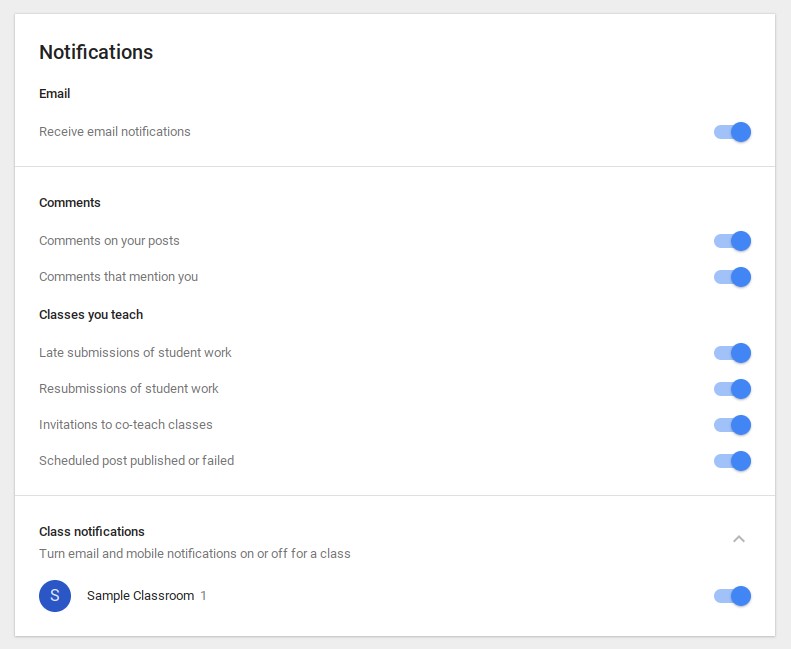
Options for teacher notifications are broken into various sections: Email, Comments, Classes You Teach, and Class Notifications. The Email option allows email notifications to be turned on or off while the Comments option gives the teacher the opportunity to receive notifications for comments made on teacher posts and comments which mention the teacher. When email notifications are turned off, all notifications are automatically turned off. Under the section for Classes You Teach, notifications can be set for late submissions or resubmissions of student work, invitations to co-teach classes, and status of scheduled posts. In addition, teachers can turn notifications on or off by individual class if using a computer. This option is not available on devices.
Student Notification Options

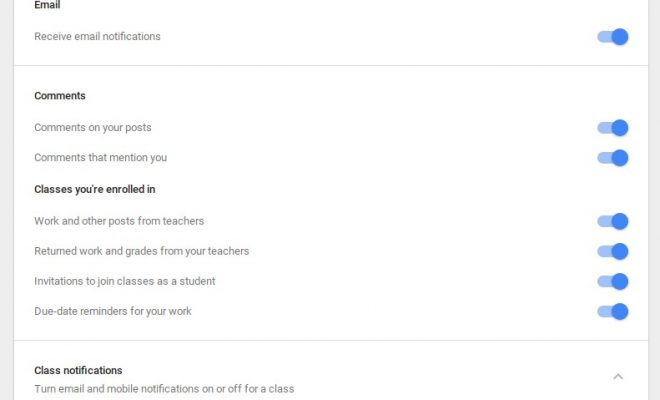
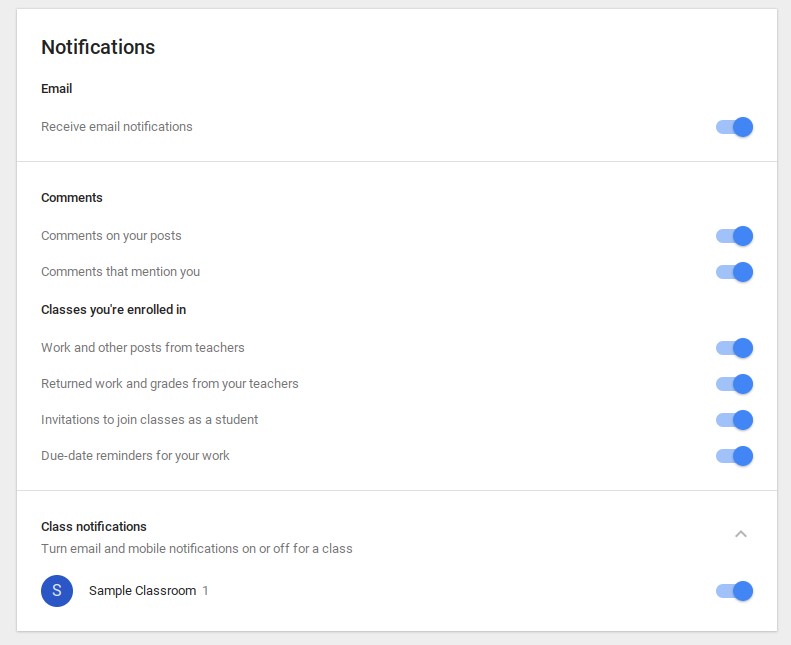
Student notifications are similar to teacher notifications; however, students have several different options. Students can be notified when the teacher posts assignments or announcements, returns work to the student, or submits grades for the student. Students can also get notified when they receive invitations to join a class and can set due-date reminders for their work. As with teacher notifications, students can select which classes they want to receive notifications for if accessing the menu through a computer.
Guardian Email Summaries

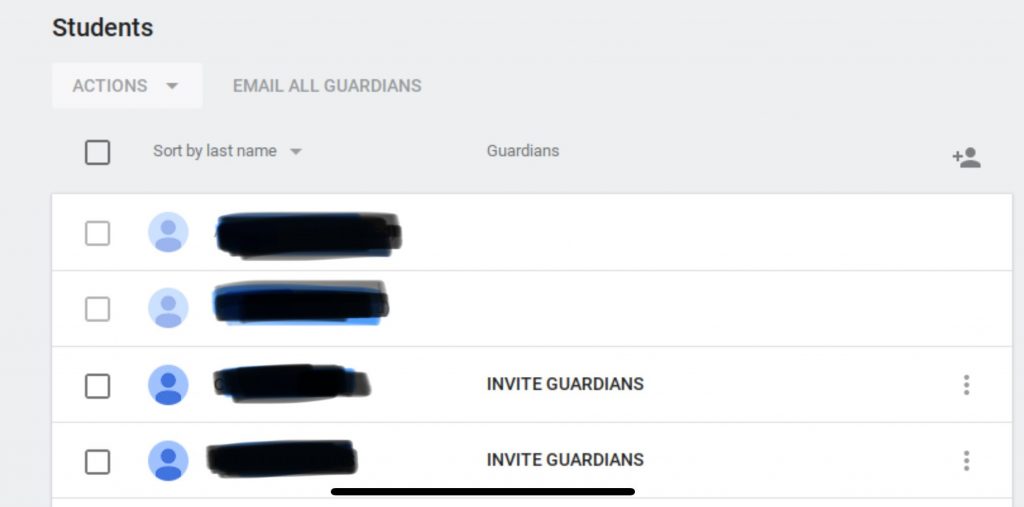
Teachers can set up guardian email summaries; however, this function is limited to schools using G-Suite for Education accounts. Administrators must also provide access before teachers can enable this feature for Classroom. Guardians can be invited from the People tab only if the student is a member of the class. Once the teacher inputs the guardian’s email address, the guardian must accept the invitation before email summaries will be received. Guardians will receive email summaries from all classes in which the student is enrolled; however, customization of email frequency is available, and guardians may unsubscribe at any time. Guardian email summaries inform guardians of late or missed assignments, upcoming due dates, and class activity. They cannot access the Stream or the Classroom.
Communication is the Key

Communication is a key component of educational systems. Real-time notifications from Google Classroom make communication between teachers, students, and parents efficient and effective when utilized to their fullest potential. Classroom notifications provide users with the flexibility to customize settings which can assist students in taking ownership of their learning.




Previous Article

6 Ways to Integrate Media Literacy in ...

Next Article

Why Libraries Should Be Leading the OER ...

Matthew Lynch

Related articles More from author

  • Early Childhood & K-12 EdTechFeaturedFresh

    An Insider’s View into the Edtech Market for Classroom/Behavior Management

    October 31, 2018
    By Matthew Lynch
  • Best of the Best ListsEarly Childhood & K-12 EdTech

    35 of the Best Apps for Kids in Preschool

    February 21, 2018
    By Matthew Lynch
  • Higher EducationHigher Education EdTech

    How to Make Your University Network Less Vulnerable

    May 3, 2018
    By Matthew Lynch
  • EdTech NewsHigher Education EdTech

    Schools must get the basics right before splashing out on technology

    June 27, 2016
    By Matthew Lynch
  • Early Childhood & K-12 EdTechHigher EducationHigher Education EdTechOnline Learning & eLearning

    10 Terms That Every Elearning Professional Should Know

    February 19, 2018
    By Matthew Lynch
  • Higher Education

    What Part Do Grades Play in College Admissions?

    November 20, 2023
    By Matthew Lynch

Search

Login & Registration

  • Log in
  • Entries feed
  • Comments feed
  • WordPress.org

Newsletter

Signup for The Tech Edvocate Newsletter and have the latest in EdTech news and opinion delivered to your email address!

About Us

Since technology is not going anywhere and does more good than harm, adapting is the best course of action. That is where The Tech Edvocate comes in. We plan to cover the PreK-12 and Higher Education EdTech sectors and provide our readers with the latest news and opinion on the subject. From time to time, I will invite other voices to weigh in on important issues in EdTech. We hope to provide a well-rounded, multi-faceted look at the past, present, the future of EdTech in the US and internationally.

We started this journey back in June 2016, and we plan to continue it for many more years to come. I hope that you will join us in this discussion of the past, present and future of EdTech and lend your own insight to the issues that are discussed.

Newsletter

Signup for The Tech Edvocate Newsletter and have the latest in EdTech news and opinion delivered to your email address!

Contact Us

The Tech Edvocate
910 Goddin Street
Richmond, VA 23231
(601) 630-5238
[email protected]

Copyright © 2026 Matthew Lynch. All rights reserved.