The Tech Edvocate

Top Menu

  • Advertisement
  • Apps
  • Home Page
  • Home Page Five (No Sidebar)
  • Home Page Four
  • Home Page Three
  • Home Page Two
  • Home Tech2
  • Icons [No Sidebar]
  • Left Sidbear Page
  • Lynch Educational Consulting
  • My Account
  • My Speaking Page
  • Newsletter Sign Up Confirmation
  • Newsletter Unsubscription
  • Our Brands
  • Page Example
  • Privacy Policy
  • Protected Content
  • Register
  • Request a Product Review
  • Shop
  • Shortcodes Examples
  • Signup
  • Start Here
    • Governance
    • Careers
    • Contact Us
  • Terms and Conditions
  • The Edvocate
  • The Tech Edvocate Product Guide
  • Topics
  • Write For Us
  • Advertise

Main Menu

  • Start Here
    • Our Brands
    • Governance
      • Lynch Educational Consulting, LLC.
      • Dr. Lynch’s Personal Website
      • Careers
    • Write For Us
    • The Tech Edvocate Product Guide
    • Contact Us
    • Books
    • Edupedia
    • Post a Job
    • The Edvocate Podcast
    • Terms and Conditions
    • Privacy Policy
  • Topics
    • Assistive Technology
    • Child Development Tech
    • Early Childhood & K-12 EdTech
    • EdTech Futures
    • EdTech News
    • EdTech Policy & Reform
    • EdTech Startups & Businesses
    • Higher Education EdTech
    • Online Learning & eLearning
    • Parent & Family Tech
    • Personalized Learning
    • Product Reviews
  • Advertise
  • Tech Edvocate Awards
  • The Edvocate
  • Pedagogue
  • School Ratings

logo

The Tech Edvocate

  • Start Here
    • Our Brands
    • Governance
      • Lynch Educational Consulting, LLC.
      • Dr. Lynch’s Personal Website
        • My Speaking Page
      • Careers
    • Write For Us
    • The Tech Edvocate Product Guide
    • Contact Us
    • Books
    • Edupedia
    • Post a Job
    • The Edvocate Podcast
    • Terms and Conditions
    • Privacy Policy
  • Topics
    • Assistive Technology
    • Child Development Tech
    • Early Childhood & K-12 EdTech
    • EdTech Futures
    • EdTech News
    • EdTech Policy & Reform
    • EdTech Startups & Businesses
    • Higher Education EdTech
    • Online Learning & eLearning
    • Parent & Family Tech
    • Personalized Learning
    • Product Reviews
  • Advertise
  • Tech Edvocate Awards
  • The Edvocate
  • Pedagogue
  • School Ratings
  • A Visitor’s Guide to Fresno (CA), United States

  • A Visitors Guide to New Orleans (LA), United States

  • A Visitors Guide to Sacramento (CA), United States

  • A Visitors Guide to Lyon, France

  • JisuLife Ultra2 Portable Fan: A Powerful Multi-Function Cooling Solution

  • A Visitors Guide to Viña del Mar, Chile

  • A Visitors Guide to Århus, Denmark

  • A Visitors Guide to Bakersfield (CA), United States

  • A Visitors Guide to Aurora (CO), United States

  • A Visitor’s Guide to Toledo (OH), United States

Digital & Mobile Technology
Home›Digital & Mobile Technology›11 Fun Linux Command-Line Programs You Should Try When Bored

11 Fun Linux Command-Line Programs You Should Try When Bored
By Matthew Lynch
July 31, 2023
0
Spread the love

As a Linux user, there are times when you might find yourself with some free time on your hands and want to do something fun and exciting on the command line. Linux has a wealth of command-line utilities that can help kill time or even teach you something new. Here are 11 fun Linux command-line programs you should try when bored.

1. cmatrix

cmatrix is a terminal emulator that simulates the iconic Matrix scrolling text effect. It’s a great way to relive the nostalgia of the early 2000s and impress your friends with your terminal skills.

2. cowsay

cowsay is a fun little program that displays a cow with a speech bubble containing a message of your choice. It’s a great way to add a little humor to your terminal sessions.

3. toilet

toilet is a program that lets you create text-based art in the terminal. You can create headings, banners, and other graphical art using ASCII characters.

4. figlet

figlet is a program that allows you to create text-based art using ASCII characters. It’s similar to toilet but more customizable and advanced.

5. fortune

fortune is a program that displays a random quote or saying every time you open a new terminal window. It’s a great way to start your day with a little inspiration or humor.

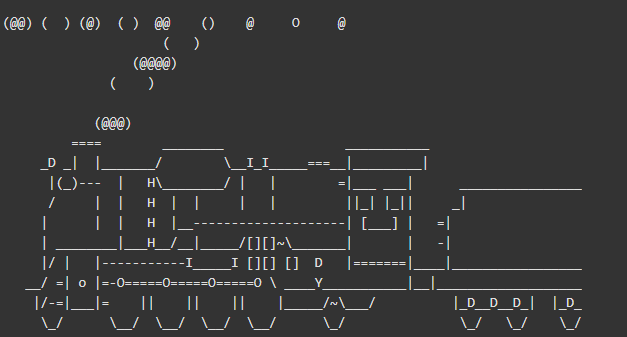
6. sl

sl (Steam Locomotive) is a fun little program that displays a moving ASCII art train in the terminal. It’s a great way to add a little excitement to your boring terminal sessions.

7. cmus

cmus is a music player for the terminal. It’s a lightweight and simple way to listen to your favorite music without the need for a GUI.

8. calcurse

calcurse is a calendar and scheduling application for the terminal. It’s a great way to stay organized and keep track of your appointments and commitments.

9. htop

htop is a process manager for the terminal that provides more information and features than the standard top command. It’s a great way to monitor system performance and troubleshoot issues.

10. nethack

nethack is a classic dungeon crawler game that can be played in the terminal. It’s a great way to kill time and test your skills.

11. slurm

slurm is a program that displays a real-time graph of system resource usage in the terminal. It’s a great way to visualize your system performance and identify potential bottlenecks.

In conclusion, Linux offers a wealth of fun command-line programs that can be used to kill time, add some humor to your sessions, or even learn new skills. These 11 programs are just the tip of the iceberg, and there are many more out there waiting to be discovered. So the next time you find yourself with some free time on your hands, fire up your terminal and give one of these programs a try.


Previous Article

What CPU Does a Car ECU Run ...

Next Article

The 10 Best Dark Comedies to Watch ...

Matthew Lynch

Related articles More from author

  • Digital & Mobile Technology

    Best Workout Log Apps of 2023

    May 31, 2023
    By Matthew Lynch
  • Digital & Mobile Technology

    Wise Care 365 v6.5.3

    June 9, 2023
    By Matthew Lynch
  • Digital & Mobile Technology

    Best Chrome Flags You Should Enable on Android

    June 23, 2023
    By Matthew Lynch
  • Digital & Mobile Technology

    Changing the Wallpaper and Theme on Your Google Chromebook

    June 3, 2023
    By Matthew Lynch
  • Digital & Mobile Technology

    Debugging in JavaScript: Logging to the Browser Console

    August 1, 2023
    By Matthew Lynch
  • Digital & Mobile Technology

    What Is AMD Smart Access Memory and Does It Make Gaming Better?

    August 2, 2023
    By Matthew Lynch

Search

Login & Registration

  • Register
  • Log in
  • Entries feed
  • Comments feed
  • WordPress.org

Newsletter

Signup for The Tech Edvocate Newsletter and have the latest in EdTech news and opinion delivered to your email address!

About Us

Since technology is not going anywhere and does more good than harm, adapting is the best course of action. That is where The Tech Edvocate comes in. We plan to cover the PreK-12 and Higher Education EdTech sectors and provide our readers with the latest news and opinion on the subject. From time to time, I will invite other voices to weigh in on important issues in EdTech. We hope to provide a well-rounded, multi-faceted look at the past, present, the future of EdTech in the US and internationally.

We started this journey back in June 2016, and we plan to continue it for many more years to come. I hope that you will join us in this discussion of the past, present and future of EdTech and lend your own insight to the issues that are discussed.

Newsletter

Signup for The Tech Edvocate Newsletter and have the latest in EdTech news and opinion delivered to your email address!

Contact Us

The Tech Edvocate
910 Goddin Street
Richmond, VA 23231
(601) 630-5238
[email protected]

Copyright © 2025 Matthew Lynch. All rights reserved.