The Tech Edvocate

Top Menu

  • Advertisement
  • Apps
  • Home Page
  • Home Page Five (No Sidebar)
  • Home Page Four
  • Home Page Three
  • Home Page Two
  • Home Tech2
  • Icons [No Sidebar]
  • Left Sidbear Page
  • Lynch Educational Consulting
  • My Account
  • My Speaking Page
  • Newsletter Sign Up Confirmation
  • Newsletter Unsubscription
  • Our Brands
  • Page Example
  • Privacy Policy
  • Protected Content
  • Register
  • Request a Product Review
  • Shop
  • Shortcodes Examples
  • Signup
  • Start Here
    • Governance
    • Careers
    • Contact Us
  • Terms and Conditions
  • The Edvocate
  • The Tech Edvocate Product Guide
  • Topics
  • Write For Us
  • Advertise

Main Menu

  • Start Here
    • Our Brands
    • Governance
      • Lynch Educational Consulting, LLC.
      • Dr. Lynch’s Personal Website
      • Careers
    • Write For Us
    • The Tech Edvocate Product Guide
    • Contact Us
    • Books
    • Edupedia
    • Post a Job
    • The Edvocate Podcast
    • Terms and Conditions
    • Privacy Policy
  • Topics
    • Assistive Technology
    • Child Development Tech
    • Early Childhood & K-12 EdTech
    • EdTech Futures
    • EdTech News
    • EdTech Policy & Reform
    • EdTech Startups & Businesses
    • Higher Education EdTech
    • Online Learning & eLearning
    • Parent & Family Tech
    • Personalized Learning
    • Product Reviews
  • Advertise
  • Tech Edvocate Awards
  • The Edvocate
  • Pedagogue
  • School Ratings

logo

The Tech Edvocate

  • Start Here
    • Our Brands
    • Governance
      • Lynch Educational Consulting, LLC.
      • Dr. Lynch’s Personal Website
        • My Speaking Page
      • Careers
    • Write For Us
    • The Tech Edvocate Product Guide
    • Contact Us
    • Books
    • Edupedia
    • Post a Job
    • The Edvocate Podcast
    • Terms and Conditions
    • Privacy Policy
  • Topics
    • Assistive Technology
    • Child Development Tech
    • Early Childhood & K-12 EdTech
    • EdTech Futures
    • EdTech News
    • EdTech Policy & Reform
    • EdTech Startups & Businesses
    • Higher Education EdTech
    • Online Learning & eLearning
    • Parent & Family Tech
    • Personalized Learning
    • Product Reviews
  • Advertise
  • Tech Edvocate Awards
  • The Edvocate
  • Pedagogue
  • School Ratings
  • A Visitor’s Guide to Fresno (CA), United States

  • A Visitors Guide to New Orleans (LA), United States

  • A Visitors Guide to Sacramento (CA), United States

  • A Visitors Guide to Lyon, France

  • JisuLife Ultra2 Portable Fan: A Powerful Multi-Function Cooling Solution

  • A Visitors Guide to Viña del Mar, Chile

  • A Visitors Guide to Århus, Denmark

  • A Visitors Guide to Bakersfield (CA), United States

  • A Visitors Guide to Aurora (CO), United States

  • A Visitor’s Guide to Toledo (OH), United States

Tech Advice
Home›Tech Advice›You Can Password-Protect Your Private Photos on Your iPhone. Here’s How

You Can Password-Protect Your Private Photos on Your iPhone. Here’s How
By Matthew Lynch
July 24, 2023
0
Spread the love

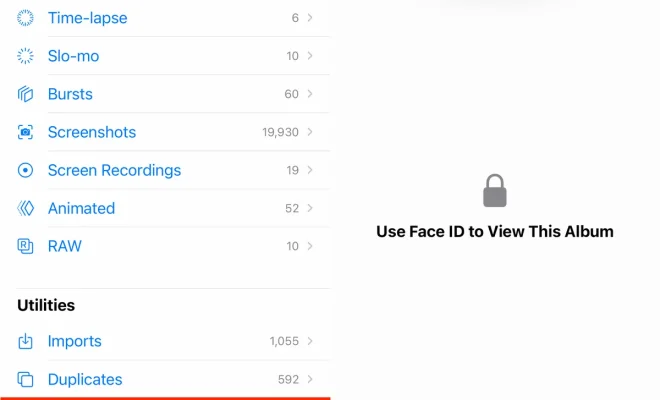
Privacy is a top concern for many smartphone users, especially when it comes to protecting personal photos from prying eyes. Fortunately, iPhone offers a built-in feature that allows you to password-protect your private photos and keep them secure within the device. If you’re looking for ways to safeguard your sensitive images, here’s how you can do it.

The Importance of Protecting Private Photos

In an era where smartphones have become our primary cameras and photo albums, ensuring the privacy of our personal moments has never been more crucial. By password-protecting your private photos on your iPhone, -you can prevent unauthorized access to these sensitive visual memories and maintain control over their visibility.

Using the Notes App for Photo Protection

While there isn’t a dedicated app solely for securing private photos on iPhones, the Notes app provides a convenient solution with its locking feature.

Here’s how you can utilize this method:

1. Open the Notes app on your iPhone.

2. Create a new note or open an existing one.

3. Tap the camera icon within the note—this will allow you to add photos directly.

4. Select any desired private photos from your Camera Roll or Albums by tapping “Choose Photo.”

5. After adding all relevant pictures, -tap anywhere outside

of the image area in Note view

-to exit editing mode.

Now that your private pictures are stored securely within a locked note, let’s proceed with setting up password protection.

1. Within the note view, -tap on the share icon,

which resembles an upward arrow,

-located at the top right corner.

2. From various sharing options available, select “Lock Note”—represented by a padlock symbol.

3. If it’s your first time using this feature, you’ll be prompted to set a password for unlocking the note. Enter a secure passcode or use Touch ID/Face ID if enabled.

4. After setting up the password, -your private photos are now safeguarded within the locked note.

Accessing and Viewing Protected Photos

Whenever you want to access your protected photos, simply follow these steps:

1. Open Notes on your iPhone.

2. Locate and tap on the locked note containing your private images.

3. You will be prompted to enter the password or verify with biometric authentication (Touch ID/Face ID).

4. Once authenticated, -you can view and interact

with your private photos within that specific note.

Remember to relock the note by tapping on “Lock Note” after viewing -to ensure continuous protection
of your sensitive visual content.

Additional Security Measures

While using the Notes app provides a convenient way to protect private photos on an iPhone, it is important to implement additional security measures for comprehensive photo privacy:

• Enable two-factor authentication (2FA) for Apple ID:

This adds an extra layer of protection when accessing iCloud services, including synced notes.

• Regularly update iOS software:

Keeping your device updated ensures you have access to essential security patches and bug fixes released by Apple.

• Consider utilizing third-party apps:

If you prefer more specialized features for protecting and managing private photo collections, there are numerous third-party apps available in the App Store that offer enhanced security options specifically designed for this purpose.

By combining these measures with locking photos in Notes, -you can maximize privacy
and maintain control over your personal image library.


Previous Article

Your iPhone Calls Can Sound Better. Here’s ...

Next Article

You Can Still Download Windows 10 for ...

Matthew Lynch

Related articles More from author

  • Tech Advice

    Apple Pay Later Lets You Finance Purchases Up to $1,000: How It Works

    July 15, 2023
    By Matthew Lynch
  • Tech Advice

    How to Fix a Jumpy or Inaccurate Laptop Touchpad

    July 24, 2023
    By Matthew Lynch
  • Tech Advice

    Common Tricks Burglars Use and How to Prevent Break-Ins

    July 9, 2023
    By Matthew Lynch
  • Tech Advice

    How to Invest in the FTSE 100 UK

    September 6, 2023
    By Matthew Lynch
  • Tech Advice

    Grill Like a Pro: 5 Tips to Serve Up Ultra-Juicy Meat This Summer

    July 10, 2023
    By Matthew Lynch
  • Tech Advice

    Today’s NYT Strands Hints, Answers and Help for Aug. 14, #164

    August 14, 2024
    By Matthew Lynch

Search

Login & Registration

  • Register
  • Log in
  • Entries feed
  • Comments feed
  • WordPress.org

Newsletter

Signup for The Tech Edvocate Newsletter and have the latest in EdTech news and opinion delivered to your email address!

About Us

Since technology is not going anywhere and does more good than harm, adapting is the best course of action. That is where The Tech Edvocate comes in. We plan to cover the PreK-12 and Higher Education EdTech sectors and provide our readers with the latest news and opinion on the subject. From time to time, I will invite other voices to weigh in on important issues in EdTech. We hope to provide a well-rounded, multi-faceted look at the past, present, the future of EdTech in the US and internationally.

We started this journey back in June 2016, and we plan to continue it for many more years to come. I hope that you will join us in this discussion of the past, present and future of EdTech and lend your own insight to the issues that are discussed.

Newsletter

Signup for The Tech Edvocate Newsletter and have the latest in EdTech news and opinion delivered to your email address!

Contact Us

The Tech Edvocate
910 Goddin Street
Richmond, VA 23231
(601) 630-5238
[email protected]

Copyright © 2025 Matthew Lynch. All rights reserved.