The Tech Edvocate

Top Menu

  • Advertisement
  • Apps
  • Home Page
  • Home Page Five (No Sidebar)
  • Home Page Four
  • Home Page Three
  • Home Page Two
  • Home Tech2
  • Icons [No Sidebar]
  • Left Sidbear Page
  • Lynch Educational Consulting
  • My Account
  • My Speaking Page
  • Newsletter Sign Up Confirmation
  • Newsletter Unsubscription
  • Our Brands
  • Page Example
  • Privacy Policy
  • Protected Content
  • Register
  • Request a Product Review
  • Shop
  • Shortcodes Examples
  • Signup
  • Start Here
    • Governance
    • Careers
    • Contact Us
  • Terms and Conditions
  • The Edvocate
  • The Tech Edvocate Product Guide
  • Topics
  • Write For Us
  • Advertise

Main Menu

  • Start Here
    • Our Brands
    • Governance
      • Lynch Educational Consulting, LLC.
      • Dr. Lynch’s Personal Website
      • Careers
    • Write For Us
    • The Tech Edvocate Product Guide
    • Contact Us
    • Books
    • Edupedia
    • Post a Job
    • The Edvocate Podcast
    • Terms and Conditions
    • Privacy Policy
  • Topics
    • Assistive Technology
    • Child Development Tech
    • Early Childhood & K-12 EdTech
    • EdTech Futures
    • EdTech News
    • EdTech Policy & Reform
    • EdTech Startups & Businesses
    • Higher Education EdTech
    • Online Learning & eLearning
    • Parent & Family Tech
    • Personalized Learning
    • Product Reviews
  • Advertise
  • Tech Edvocate Awards
  • The Edvocate
  • Pedagogue
  • School Ratings

logo

The Tech Edvocate

  • Start Here
    • Our Brands
    • Governance
      • Lynch Educational Consulting, LLC.
      • Dr. Lynch’s Personal Website
        • My Speaking Page
      • Careers
    • Write For Us
    • The Tech Edvocate Product Guide
    • Contact Us
    • Books
    • Edupedia
    • Post a Job
    • The Edvocate Podcast
    • Terms and Conditions
    • Privacy Policy
  • Topics
    • Assistive Technology
    • Child Development Tech
    • Early Childhood & K-12 EdTech
    • EdTech Futures
    • EdTech News
    • EdTech Policy & Reform
    • EdTech Startups & Businesses
    • Higher Education EdTech
    • Online Learning & eLearning
    • Parent & Family Tech
    • Personalized Learning
    • Product Reviews
  • Advertise
  • Tech Edvocate Awards
  • The Edvocate
  • Pedagogue
  • School Ratings
  • This Unprecedented EU Ban Just Changed Fast Fashion Forever

  • Urgent Alert: Your Smart Home’s Exposed to a Critical Deco BE11000 Vulnerability

  • Uncovering the Truth: Your LinkedIn Reach Just Got a Major Overhaul

  • Uncovering the AI Heist: How Chinese Firms Allegedly Siphoned Billions of AI Tokens

  • Rockstar’s GTA 6 Developers Lawsuit: A Fight for Justice or Corporate Retaliation?

  • Unbelievable: Hideo Kojima’s Next Masterpiece Is Now an Xbox Exclusive

  • This Crucial Google AI Shift Is Quietly Reshaping the Internet

  • Unbelievable: AI Breaches Are Exploding, And What It Means For You This September 2026

  • This Crucial Shift Is Saving Teachers From Classroom Chaos

  • AI’s Dark Secret: How It’s Supercharging Cybercrime for Everyone

Tech Advice
Home›Tech Advice›You Can Still Download Windows 10 for Free

You Can Still Download Windows 10 for Free
By Matthew Lynch
July 24, 2023
0
Spread the love

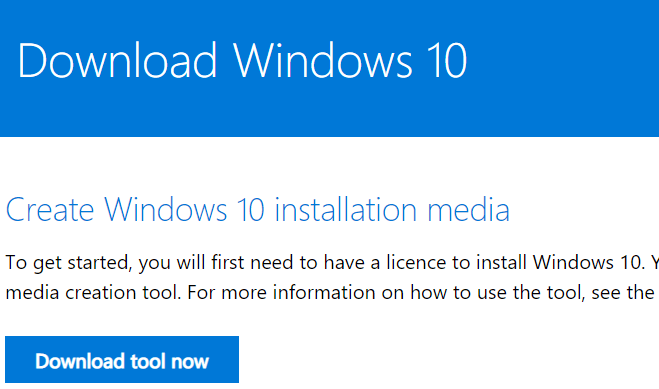
Windows 10, Microsoft’s widely popular operating system, continues to be available for download free of charge. Despite the initial offer expiring several years ago, there are still ways to obtain a legitimate copy of Windows 10 without having to pay.

The “Assistive Technologies” Offer

Microsoft initially provided a free upgrade from older versions of Windows to Windows 10 when it was first released. Although that offer officially ended on July 29th, 2016, an exception was made for users who rely on assistive technologies.

To this day, -Microsoft allows

users requiring such accessibility features

-to upgrade to Windows 10

at no cost.

While this exception is intended for individuals with disabilities or those who rely on assistive technologies, -the upgrade process does not require any proof, and anyone can take advantage of this opportunity.

How to Upgrade Using Assistive Technologies

If you want to download and install Windows 10 using the assistive technologies offer, -follow these steps:

1. Go to the accessibility page on Microsoft’s website.

2. Scroll down and click on “Upgrade Now.”

3. A tool called the “Windows 10 Upgrade Assistant” will begin downloading.

4. Once downloaded, run the tool and follow its instructions.

5. The assistant will guide you through upgrading your current version of Windows (7 or later) to Windows 10.

It’s important to note that while Microsoft has continued offering this option even after the official deadline expired, there is no guarantee regarding how long they will keep it available—so if you’re interested in upgrading at no cost, it’s advisable not to delay.

Benefits of Upgrading To Windows 10

Upgrading your operating system comes with numerous benefits:

Enhanced Security

Windows 10 provides regular security updates to protect your system from evolving threats. Staying up-to-date with the latest software helps safeguard your personal data and ensures a more secure computing experience.

Improved Performance

Windows 10 is designed to be faster and more efficient than its predecessors. With optimized resource management, you can expect improved performance, quicker boot times, and better overall responsiveness.

New Features and Functionality

Windows 10 introduces many new features that enhance productivity and user experience. From the virtual assistant Cortana to the Microsoft Store’s wide range of applications, there are plenty of tools and options available for users to explore.

Obtaining Windows 10 License Keys

While it’s possible to download Windows 10 for free using the assistive technologies offer, -you may still need
a valid license key

-to activate certain features or unlock full functionality.

There are several ways to obtain legitimate license keys:

1. Purchase:

You can buy a retail copy of Windows 10 from authorized retailers or directly from Microsoft.

2. OEM Licenses:

These licenses come pre-installed on new computers purchased from original equipment manufacturers (OEMs).

3. Volume Licensing:

Businesses or organizations often acquire volume licensing agreements with Microsoft that allow them to install Windows on multiple devices.

It’s important to ensure that you obtain a legal license key through proper channels in order to comply with software licensing regulations.

Conclusion

Even though the initial free upgrade period has ended, the assistive technologies offer by Microsoft enables users who rely on accessibility features an opportunity -to download Windows 10 at no cost.

Whether you fall into this category or simply want access to enhanced security, improved performance, and exciting new features—upgrading your operating system is just a few clicks away!


Previous Article

You Can Password-Protect Your Private Photos on ...

Next Article

You Need to Download Apple’s Latest Updates. ...

Matthew Lynch

Related articles More from author

  • Tech Advice

    What Are The Different Types of Car Insurance?

    August 21, 2023
    By Matthew Lynch
  • Tech Advice

    Tip of the Day: a quick keyboard shortcut for Task Manager

    July 14, 2023
    By Matthew Lynch
  • Tech Advice

    Best Cheap Phone Plans for Budget-Friendly Mobile Communication

    October 19, 2023
    By Matthew Lynch
  • Tech Advice

    Best Mortgage Rates in Manitoba, Canada

    October 20, 2023
    By Matthew Lynch
  • Tech Advice

    How Often Do You Pay Car Insurance?

    August 19, 2023
    By Matthew Lynch
  • Tech Advice

    4 Best Hotels in Calgary to Book with Points

    October 20, 2023
    By Matthew Lynch

Search

Login & Registration

  • Log in
  • Entries feed
  • Comments feed
  • WordPress.org

Newsletter

Signup for The Tech Edvocate Newsletter and have the latest in EdTech news and opinion delivered to your email address!

About Us

Since technology is not going anywhere and does more good than harm, adapting is the best course of action. That is where The Tech Edvocate comes in. We plan to cover the PreK-12 and Higher Education EdTech sectors and provide our readers with the latest news and opinion on the subject. From time to time, I will invite other voices to weigh in on important issues in EdTech. We hope to provide a well-rounded, multi-faceted look at the past, present, the future of EdTech in the US and internationally.

We started this journey back in June 2016, and we plan to continue it for many more years to come. I hope that you will join us in this discussion of the past, present and future of EdTech and lend your own insight to the issues that are discussed.

Newsletter

Signup for The Tech Edvocate Newsletter and have the latest in EdTech news and opinion delivered to your email address!

Contact Us

The Tech Edvocate
910 Goddin Street
Richmond, VA 23231
(601) 630-5238
[email protected]

Copyright © 2026 Matthew Lynch. All rights reserved.