The Tech Edvocate

Top Menu

  • Advertisement
  • Apps
  • Home Page
  • Home Page Five (No Sidebar)
  • Home Page Four
  • Home Page Three
  • Home Page Two
  • Home Tech2
  • Icons [No Sidebar]
  • Left Sidbear Page
  • Lynch Educational Consulting
  • My Account
  • My Speaking Page
  • Newsletter Sign Up Confirmation
  • Newsletter Unsubscription
  • Our Brands
  • Page Example
  • Privacy Policy
  • Protected Content
  • Register
  • Request a Product Review
  • Shop
  • Shortcodes Examples
  • Signup
  • Start Here
    • Governance
    • Careers
    • Contact Us
  • Terms and Conditions
  • The Edvocate
  • The Tech Edvocate Product Guide
  • Topics
  • Write For Us
  • Advertise

Main Menu

  • Start Here
    • Our Brands
    • Governance
      • Lynch Educational Consulting, LLC.
      • Dr. Lynch’s Personal Website
      • Careers
    • Write For Us
    • The Tech Edvocate Product Guide
    • Contact Us
    • Books
    • Edupedia
    • Post a Job
    • The Edvocate Podcast
    • Terms and Conditions
    • Privacy Policy
  • Topics
    • Assistive Technology
    • Child Development Tech
    • Early Childhood & K-12 EdTech
    • EdTech Futures
    • EdTech News
    • EdTech Policy & Reform
    • EdTech Startups & Businesses
    • Higher Education EdTech
    • Online Learning & eLearning
    • Parent & Family Tech
    • Personalized Learning
    • Product Reviews
  • Advertise
  • Tech Edvocate Awards
  • The Edvocate
  • Pedagogue
  • School Ratings

logo

The Tech Edvocate

  • Start Here
    • Our Brands
    • Governance
      • Lynch Educational Consulting, LLC.
      • Dr. Lynch’s Personal Website
        • My Speaking Page
      • Careers
    • Write For Us
    • The Tech Edvocate Product Guide
    • Contact Us
    • Books
    • Edupedia
    • Post a Job
    • The Edvocate Podcast
    • Terms and Conditions
    • Privacy Policy
  • Topics
    • Assistive Technology
    • Child Development Tech
    • Early Childhood & K-12 EdTech
    • EdTech Futures
    • EdTech News
    • EdTech Policy & Reform
    • EdTech Startups & Businesses
    • Higher Education EdTech
    • Online Learning & eLearning
    • Parent & Family Tech
    • Personalized Learning
    • Product Reviews
  • Advertise
  • Tech Edvocate Awards
  • The Edvocate
  • Pedagogue
  • School Ratings
  • Ramp’s Staggering $60 Billion Valuation: 8 Reasons Why Investors Are Piling In

  • Uncovering the Cost: Why This AI Startup’s Collapse Is a Troubling Sign for Tech

  • The Silent Crisis: Why Your Next Console Will Cost a Fortune

  • Advisers urged to steer clear of ‘hyperscale’ AI models

  • The Quiet Crisis: Is AI in Education Creating an ‘Illusion of Learning’?

  • 84% of Ransomware Attacks Use AI: This Is How Your Own Systems Are Turning Against You

  • The Staggering Truth About Healthcare Cyberattacks: 76.6 Million Records Exposed in 2026

  • This Crucial Deadline For Rogue AI Is Much Closer Than You Think

  • This RNA Breakthrough Could Rewrite Alzheimer’s Treatment

  • This One Thing Is Silently Crushing US Consumer Inflation — And Your Wallet

Digital & Mobile Technology
Home›Digital & Mobile Technology›Xbox 360 Backward Compatibility: Bringing Classic Games to Modern Gamers

Xbox 360 Backward Compatibility: Bringing Classic Games to Modern Gamers
By Matthew Lynch
June 23, 2023
0
Spread the love

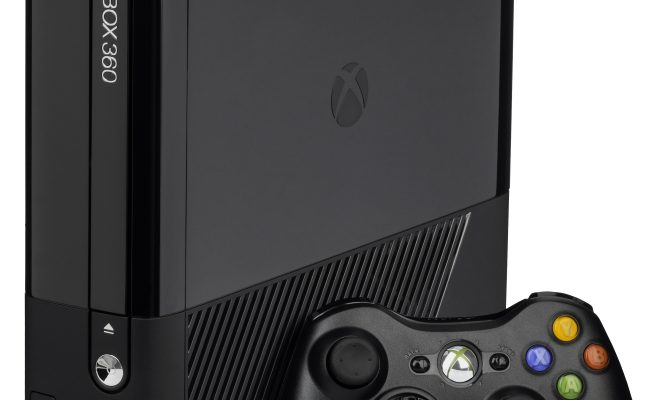
The Xbox 360 was one of the most popular gaming consoles of its generation, with a vast library of games that spanned a wide variety of genres. But what happens to those games when the console itself becomes outdated and is replaced by newer technology? With the introduction of Xbox 360 backward compatibility, classic games can now be enjoyed by a new generation of gamers on modern Xbox consoles.

What is Xbox 360 Backward Compatibility?

Xbox 360 backward compatibility is a feature that allows Xbox One and Xbox Series X/S consoles to play select games that were originally released on the Xbox 360. This feature was first introduced in 2015, and it has since been expanded to include hundreds of Xbox 360 games.

To use Xbox 360 backward compatibility, all you need is an Xbox One or Xbox Series X/S console, an internet connection, and a copy of the Xbox 360 game you want to play. Simply insert the game disc into your console, or download the game from the Xbox Store if it is available, and start playing.

Why is Xbox 360 Backward Compatibility Important?

One of the biggest benefits of Xbox 360 backward compatibility is that it allows gamers to revisit classic titles that they may have missed out on the first time around. Many of the games that are compatible with Xbox 360 backward compatibility are considered to be classics in their own right, and they still hold up well today.

In addition to giving gamers the opportunity to play classic games on modern consoles, Xbox 360 backward compatibility also helps to preserve the history of gaming. Many of the games that are compatible with Xbox 360 backward compatibility are no longer available for purchase, and some consoles may no longer be functional. By making these games playable on modern consoles, gamers can experience and appreciate the history of gaming in a new way.

Which Games are Compatible with Xbox 360 Backward Compatibility?

As of 2021, there are hundreds of Xbox 360 games that are compatible with Xbox 360 backward compatibility. Some of the most popular titles include:

1.Red Dead Redemption

2.Mass Effect Trilogy

3.Halo Reach

4.Gears of War 3

5.Assassin’s Creed II

6.Bioshock Infinite

The list of compatible games is constantly expanding, with new titles being added on a regular basis. To see a full list of compatible games, you can visit the Xbox website.

Conclusion

Xbox 360 backward compatibility is a feature that has been warmly welcomed by gamers around the world. By allowing classic games to be played on modern consoles, Xbox 360 backward compatibility helps to keep the history of gaming alive and gives gamers the opportunity to revisit classic titles that they may have missed out on the first time around. Whether you’re a fan of shooters, RPGs, or sports games, there’s something for everyone in the Xbox 360 backward compatibility library.

Previous Article

How to Archive Old Mail in Outlook ...

Next Article

How to Fix Libcurl.dll Not Found or ...

Matthew Lynch

Related articles More from author

  • Digital & Mobile Technology

    How to Use a GoPro as a Webcam

    June 3, 2023
    By Matthew Lynch
  • Digital & Mobile Technology

    Can Linux Run Windows EXE Files?

    June 22, 2023
    By Matthew Lynch
  • Digital & Mobile Technology

    How to Turn a PDF into a Word Document

    June 6, 2023
    By Matthew Lynch
  • Digital & Mobile Technology

    How to Share Spotify Song Lyrics on Social Media

    June 13, 2023
    By Matthew Lynch
  • Digital & Mobile Technology

    How to Mirror Your iPhone or iPad’s Screen on Your Windows PC

    April 30, 2023
    By Matthew Lynch
  • Digital & Mobile Technology

    How to Make an Apple Genius Bar Appointment

    May 30, 2023
    By Matthew Lynch

Search

Login & Registration

  • Log in
  • Entries feed
  • Comments feed
  • WordPress.org

Newsletter

Signup for The Tech Edvocate Newsletter and have the latest in EdTech news and opinion delivered to your email address!

About Us

Since technology is not going anywhere and does more good than harm, adapting is the best course of action. That is where The Tech Edvocate comes in. We plan to cover the PreK-12 and Higher Education EdTech sectors and provide our readers with the latest news and opinion on the subject. From time to time, I will invite other voices to weigh in on important issues in EdTech. We hope to provide a well-rounded, multi-faceted look at the past, present, the future of EdTech in the US and internationally.

We started this journey back in June 2016, and we plan to continue it for many more years to come. I hope that you will join us in this discussion of the past, present and future of EdTech and lend your own insight to the issues that are discussed.

Newsletter

Signup for The Tech Edvocate Newsletter and have the latest in EdTech news and opinion delivered to your email address!

Contact Us

The Tech Edvocate
910 Goddin Street
Richmond, VA 23231
(601) 630-5238
[email protected]

Copyright © 2026 Matthew Lynch. All rights reserved.