The Tech Edvocate

Top Menu

  • Advertisement
  • Apps
  • Home Page
  • Home Page Five (No Sidebar)
  • Home Page Four
  • Home Page Three
  • Home Page Two
  • Home Tech2
  • Icons [No Sidebar]
  • Left Sidbear Page
  • Lynch Educational Consulting
  • My Account
  • My Speaking Page
  • Newsletter Sign Up Confirmation
  • Newsletter Unsubscription
  • Our Brands
  • Page Example
  • Privacy Policy
  • Protected Content
  • Register
  • Request a Product Review
  • Shop
  • Shortcodes Examples
  • Signup
  • Start Here
    • Governance
    • Careers
    • Contact Us
  • Terms and Conditions
  • The Edvocate
  • The Tech Edvocate Product Guide
  • Topics
  • Write For Us
  • Advertise

Main Menu

  • Start Here
    • Our Brands
    • Governance
      • Lynch Educational Consulting, LLC.
      • Dr. Lynch’s Personal Website
      • Careers
    • Write For Us
    • The Tech Edvocate Product Guide
    • Contact Us
    • Books
    • Edupedia
    • Post a Job
    • The Edvocate Podcast
    • Terms and Conditions
    • Privacy Policy
  • Topics
    • Assistive Technology
    • Child Development Tech
    • Early Childhood & K-12 EdTech
    • EdTech Futures
    • EdTech News
    • EdTech Policy & Reform
    • EdTech Startups & Businesses
    • Higher Education EdTech
    • Online Learning & eLearning
    • Parent & Family Tech
    • Personalized Learning
    • Product Reviews
  • Advertise
  • Tech Edvocate Awards
  • The Edvocate
  • Pedagogue
  • School Ratings

logo

The Tech Edvocate

  • Start Here
    • Our Brands
    • Governance
      • Lynch Educational Consulting, LLC.
      • Dr. Lynch’s Personal Website
        • My Speaking Page
      • Careers
    • Write For Us
    • The Tech Edvocate Product Guide
    • Contact Us
    • Books
    • Edupedia
    • Post a Job
    • The Edvocate Podcast
    • Terms and Conditions
    • Privacy Policy
  • Topics
    • Assistive Technology
    • Child Development Tech
    • Early Childhood & K-12 EdTech
    • EdTech Futures
    • EdTech News
    • EdTech Policy & Reform
    • EdTech Startups & Businesses
    • Higher Education EdTech
    • Online Learning & eLearning
    • Parent & Family Tech
    • Personalized Learning
    • Product Reviews
  • Advertise
  • Tech Edvocate Awards
  • The Edvocate
  • Pedagogue
  • School Ratings
  • Miro vs Conceptboard for project management

  • How to use Teamwork for resource management

  • How much does Procore cost per month

  • How to organize Microsoft Planner buckets

  • Is Teamwork good for billable hours

  • Procore vs Buildertrend which is better

  • Airtable project management templates

  • Can Miro track project progress

  • How to use Basecamp for client work

  • Can Lucidchart create swimlane diagrams

Digital & Mobile Technology
Home›Digital & Mobile Technology›Windows 11: News, Release Date, Features, and More

Windows 11: News, Release Date, Features, and More
By Matthew Lynch
June 12, 2023
0
Spread the love

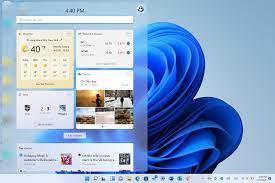
Microsoft has finally announced the release of its much-anticipated new operating system, Windows 11. With a range of new features, updated design, and enhanced security measures, Windows 11 promises to be a game-changer.

News:

The first major news about Windows 11 is that it will be a free upgrade for eligible Windows 10 users. To be eligible, your device must meet certain minimum requirements such as a 64-bit processor, 4GB of RAM, and 64GB of storage. Microsoft is expected to release Windows 11 to the public sometime towards the end of 2021.

Release Date:

Although Microsoft has not given an exact release date for Windows 11, it is expected to be released sometime in the latter half of 2021. Microsoft has also released a Windows 11 Insider Preview program for users who want to try out the new operating system before its official release.

Features:

Windows 11 comes with a range of new features and enhancements designed to make your computing experience smoother and more intuitive. Some of the notable features in Windows 11 include:

1. Redesigned Start Menu – The Start menu has been redesigned to be more streamlined and efficient, with a simplified layout and easy-to-access search bar.

2. Enhanced Taskbar – The Taskbar has been updated with new features such as customizable widgets, improved app management, and advanced multitasking capabilities.

3. New Touch Gestures – Windows 11 introduces new touch gestures to make it easier to navigate through your device. You can now swipe up to access the Task View and swipe down to access the desktop.

4. Better Virtual Desktop Management – With Windows 11, it’s easier to manage multiple virtual desktops, thanks to an improved Task View interface and easy-to-use keyboard shortcuts.

5. Snap Layouts and Snap Groups – Windows 11 comes with new snapping features that allow you to rearrange multiple apps and windows on your screen quickly and easily.

6. Improved Windows Store – The Windows Store has been revamped in Windows 11, with a new design and easier navigation. It now offers a range of apps, including Android apps that can be downloaded directly from the Microsoft Store.

7. Improved Gaming Performance – Windows 11 introduces a range of new features that improve gaming performance, such as DirectX 12 Ultimate, Auto HDR, and Direct Storage.

Security Measures:

In addition to the features mentioned above, Windows 11 also comes with advanced security measures to keep your device safe from malware and cyber-attacks. Some of the notable security features in Windows 11 include:

1. Trusted Platform Module 2.0 – Windows 11 supports TPM 2.0, a chip that provides an additional layer of

security to protect against advanced cyber-attacks.

2. Windows Hello – Windows 11 offers enhanced biometric authentication, using facial recognition or fingerprint scanning.

3. Device Encryption – Windows 11 includes new device encryption features that encrypt all data on your device, making it more difficult for hackers to access your files.

Conclusion:

Overall, Windows 11 promises to be a significant upgrade to the current Windows 10 operating system. With a new, streamlined design, enhanced features, and advanced security measures, Windows 11 is set to provide users with a more efficient, secure, and intuitive computing experience. While the exact release date is yet to be determined, users can look forward to upgrading to Windows 11 for free, provided their device meets the minimum requirements for the operating system.


Previous Article

How to Log Out of Facebook

Next Article

Activities to Teach Students to Identify Functions

Matthew Lynch

Related articles More from author

  • Digital & Mobile Technology

    How to Connect an Xbox One Controller to an iPhone

    June 26, 2023
    By Matthew Lynch
  • Digital & Mobile Technology

    3 Clean and Simple Note-Taking Apps That Work Offline

    August 3, 2023
    By Matthew Lynch
  • Digital & Mobile Technology

    Center Cam Review: Make Better Eye Contact With This Webcam

    June 11, 2023
    By Matthew Lynch
  • Digital & Mobile Technology

    How to Make Your Wii U Useful Again With Homebrew

    August 3, 2023
    By Matthew Lynch
  • Digital & Mobile Technology

    What to Do When Your PC Game Lags?

    May 15, 2023
    By Matthew Lynch
  • Digital & Mobile Technology

    Great Sites to Use for Sending Free Valentine Ecards

    June 10, 2023
    By Matthew Lynch

Search

Login & Registration

  • Log in
  • Entries feed
  • Comments feed
  • WordPress.org

Newsletter

Signup for The Tech Edvocate Newsletter and have the latest in EdTech news and opinion delivered to your email address!

About Us

Since technology is not going anywhere and does more good than harm, adapting is the best course of action. That is where The Tech Edvocate comes in. We plan to cover the PreK-12 and Higher Education EdTech sectors and provide our readers with the latest news and opinion on the subject. From time to time, I will invite other voices to weigh in on important issues in EdTech. We hope to provide a well-rounded, multi-faceted look at the past, present, the future of EdTech in the US and internationally.

We started this journey back in June 2016, and we plan to continue it for many more years to come. I hope that you will join us in this discussion of the past, present and future of EdTech and lend your own insight to the issues that are discussed.

Newsletter

Signup for The Tech Edvocate Newsletter and have the latest in EdTech news and opinion delivered to your email address!

Contact Us

The Tech Edvocate
910 Goddin Street
Richmond, VA 23231
(601) 630-5238
[email protected]

Copyright © 2026 Matthew Lynch. All rights reserved.