The Tech Edvocate

Top Menu

  • Advertisement
  • Apps
  • Home Page
  • Home Page Five (No Sidebar)
  • Home Page Four
  • Home Page Three
  • Home Page Two
  • Home Tech2
  • Icons [No Sidebar]
  • Left Sidbear Page
  • Lynch Educational Consulting
  • My Account
  • My Speaking Page
  • Newsletter Sign Up Confirmation
  • Newsletter Unsubscription
  • Our Brands
  • Page Example
  • Privacy Policy
  • Protected Content
  • Register
  • Request a Product Review
  • Shop
  • Shortcodes Examples
  • Signup
  • Start Here
    • Governance
    • Careers
    • Contact Us
  • Terms and Conditions
  • The Edvocate
  • The Tech Edvocate Product Guide
  • Topics
  • Write For Us
  • Advertise

Main Menu

  • Start Here
    • Our Brands
    • Governance
      • Lynch Educational Consulting, LLC.
      • Dr. Lynch’s Personal Website
      • Careers
    • Write For Us
    • The Tech Edvocate Product Guide
    • Contact Us
    • Books
    • Edupedia
    • Post a Job
    • The Edvocate Podcast
    • Terms and Conditions
    • Privacy Policy
  • Topics
    • Assistive Technology
    • Child Development Tech
    • Early Childhood & K-12 EdTech
    • EdTech Futures
    • EdTech News
    • EdTech Policy & Reform
    • EdTech Startups & Businesses
    • Higher Education EdTech
    • Online Learning & eLearning
    • Parent & Family Tech
    • Personalized Learning
    • Product Reviews
  • Advertise
  • Tech Edvocate Awards
  • The Edvocate
  • Pedagogue
  • School Ratings

logo

The Tech Edvocate

  • Start Here
    • Our Brands
    • Governance
      • Lynch Educational Consulting, LLC.
      • Dr. Lynch’s Personal Website
        • My Speaking Page
      • Careers
    • Write For Us
    • The Tech Edvocate Product Guide
    • Contact Us
    • Books
    • Edupedia
    • Post a Job
    • The Edvocate Podcast
    • Terms and Conditions
    • Privacy Policy
  • Topics
    • Assistive Technology
    • Child Development Tech
    • Early Childhood & K-12 EdTech
    • EdTech Futures
    • EdTech News
    • EdTech Policy & Reform
    • EdTech Startups & Businesses
    • Higher Education EdTech
    • Online Learning & eLearning
    • Parent & Family Tech
    • Personalized Learning
    • Product Reviews
  • Advertise
  • Tech Edvocate Awards
  • The Edvocate
  • Pedagogue
  • School Ratings
  • The Brutal Truth: 8 Lies Scammers Tell About Your Student Loans

  • New Student Loan Rules: The Shocking Truth About 2026 Relief Programs

  • New Repayment Plan Changes Trigger Student Loan Scam Epidemic

  • Why Millions Are Ditching Degrees for This One Skill-Boosting Secret

  • The Quiet Revolution: How Micro-Credentials Are Reshaping Tech Careers

  • Why 96% of Employers Are Now Demanding Micro-Credentials

  • This One Incident Exposed How Vulnerable Your Student Data Really Is

  • The Brutal Truth About EdTech Security: 10 Solutions to Prevent Another Canvas LMS Disaster

  • The Billion-User Data Heist: Why Your Child’s School Data Is Under Attack

  • This Crucial Mistake Is Killing Your Tech Career (It’s Not What You Think)

Digital & Mobile Technology
Home›Digital & Mobile Technology›Windows 11 Home vs. Pro: Which Is Best for You?

Windows 11 Home vs. Pro: Which Is Best for You?
By Matthew Lynch
June 21, 2023
0
Spread the love

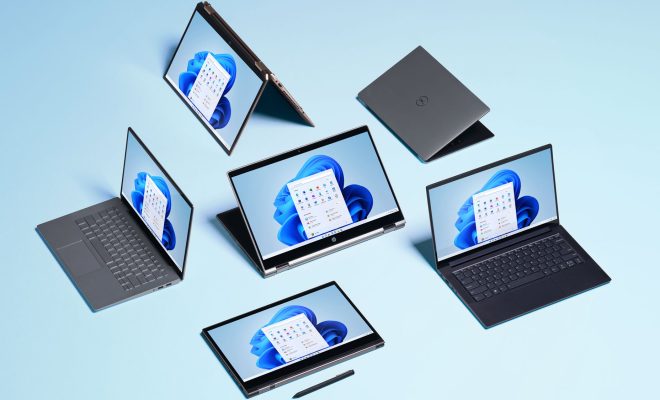
Windows 11, the latest operating system from tech giant Microsoft, has recently been unveiled. This highly anticipated release has several new features and improvements, making it a significant upgrade from its predecessor, Windows 10. It also comes in two versions, Windows 11 Home and Pro, each with its unique set of features.

If you’re in the market for a new operating system, you may be wondering which version of Windows 11 is best for you. To help you decide, let’s compare the two versions and see which one suits your needs better.

Windows 11 Home

Windows 11 Home is the standard version of the operating system, and it’s the version that comes pre-installed on most new PCs. It’s designed for general, everyday use, such as browsing the internet, streaming media, and running productivity applications. Here are some of the features that come with Windows 11 Home:

1. Start Menu – The Windows 11 Start Menu has been redesigned, making it more intuitive to use. Instead of a list of apps, it now shows your most-used apps and recent files, making it easier to access your favorite programs.

2. Snap Layouts – With Windows 11, you can now easily snap apps into specific layouts on your desktop. You can select from various templates depending on how many windows you want to have open simultaneously.

3. Virtual Desktops – You can create multiple virtual desktops, allowing you to organize your work better.

4. Microsoft Teams Integration – Windows 11 comes with Microsoft Teams integrated into the taskbar, making it easy to collaborate with coworkers.

5. Touch Screen Support – Windows 11 Home includes touch screen support, making it suitable for tablets and touchscreen laptops.

6. Xbox Game Pass – Windows 11 Home comes with a built-in Xbox app, where you can access Xbox Game Pass, allowing you to play Xbox games on your PC at no additional cost.

Windows 11 Pro

Windows 11 Pro, on the other hand, is designed for businesses, small enterprises, and advanced home users who require more advanced features than what Windows 11 Home provides. Here are some of the features that set Windows 11 Pro apart from Home:

1. Bitlocker – Windows 11 Pro comes with BitLocker, a data encryption tool that helps protect your sensitive data against theft or hacking.

2. Remote Desktop – You can remotely access your PC from another device, such as a laptop or tablet.

3. Domain Join – Windows 11 Pro can easily connect to a corporate network domain, making it easier for IT administrators to manage users, groups, and computers.

4. Windows Update for Business – Windows 11 Pro allows IT administrators to manage updates centrally, ensuring that all devices are updated but without interrupting work.

5. Hyper-V – Windows 11 Pro includes Hyper-V, a feature that lets users create and run virtual machines easily.

Which Version is Best for You?

So, which version of Windows 11 is best for you? If you’re a home user who primarily uses your PC for basic tasks such as browsing the internet, streaming media, and running productivity applications, Windows 11 Home is the best choice for you. However, if you’re a small business owner, an advanced user, or you require more advanced features, then Windows 11 Pro is the way to go.

Previous Article

How to Fix a Disk I/O Error ...

Next Article

Best Lightroom Alternatives (Free and Paid)

Matthew Lynch

Related articles More from author

  • Digital & Mobile Technology

    How to Go Live on TikTok (and How Many Followers You Need)

    June 5, 2023
    By Matthew Lynch
  • Digital & Mobile Technology

    What is Desktop Video Conferencing (DTVC)?

    May 6, 2023
    By Matthew Lynch
  • Digital & Mobile Technology

    How to Fix Your iPhone Email Not Updating

    August 5, 2023
    By Matthew Lynch
  • Digital & Mobile Technology

    How to Sync Your Xbox Controller with Your Xbox One, One S, One X or Windows PC

    June 26, 2023
    By Matthew Lynch
  • Digital & Mobile Technology

    How to Use LAV Filters on Windows, and What They Do

    August 3, 2023
    By Matthew Lynch
  • Digital & Mobile Technology

    How to Fix a USB Wi-Fi Adapter That Keeps Disconnecting

    June 4, 2023
    By Matthew Lynch

Search

Login & Registration

  • Log in
  • Entries feed
  • Comments feed
  • WordPress.org

Newsletter

Signup for The Tech Edvocate Newsletter and have the latest in EdTech news and opinion delivered to your email address!

About Us

Since technology is not going anywhere and does more good than harm, adapting is the best course of action. That is where The Tech Edvocate comes in. We plan to cover the PreK-12 and Higher Education EdTech sectors and provide our readers with the latest news and opinion on the subject. From time to time, I will invite other voices to weigh in on important issues in EdTech. We hope to provide a well-rounded, multi-faceted look at the past, present, the future of EdTech in the US and internationally.

We started this journey back in June 2016, and we plan to continue it for many more years to come. I hope that you will join us in this discussion of the past, present and future of EdTech and lend your own insight to the issues that are discussed.

Newsletter

Signup for The Tech Edvocate Newsletter and have the latest in EdTech news and opinion delivered to your email address!

Contact Us

The Tech Edvocate
910 Goddin Street
Richmond, VA 23231
(601) 630-5238
[email protected]

Copyright © 2026 Matthew Lynch. All rights reserved.