The Tech Edvocate

Top Menu

  • Advertisement
  • Apps
  • Home Page
  • Home Page Five (No Sidebar)
  • Home Page Four
  • Home Page Three
  • Home Page Two
  • Home Tech2
  • Icons [No Sidebar]
  • Left Sidbear Page
  • Lynch Educational Consulting
  • My Account
  • My Speaking Page
  • Newsletter Sign Up Confirmation
  • Newsletter Unsubscription
  • Our Brands
  • Page Example
  • Privacy Policy
  • Protected Content
  • Register
  • Request a Product Review
  • Shop
  • Shortcodes Examples
  • Signup
  • Start Here
    • Governance
    • Careers
    • Contact Us
  • Terms and Conditions
  • The Edvocate
  • The Tech Edvocate Product Guide
  • Topics
  • Write For Us
  • Advertise

Main Menu

  • Start Here
    • Our Brands
    • Governance
      • Lynch Educational Consulting, LLC.
      • Dr. Lynch’s Personal Website
      • Careers
    • Write For Us
    • The Tech Edvocate Product Guide
    • Contact Us
    • Books
    • Edupedia
    • Post a Job
    • The Edvocate Podcast
    • Terms and Conditions
    • Privacy Policy
  • Topics
    • Assistive Technology
    • Child Development Tech
    • Early Childhood & K-12 EdTech
    • EdTech Futures
    • EdTech News
    • EdTech Policy & Reform
    • EdTech Startups & Businesses
    • Higher Education EdTech
    • Online Learning & eLearning
    • Parent & Family Tech
    • Personalized Learning
    • Product Reviews
  • Advertise
  • Tech Edvocate Awards
  • The Edvocate
  • Pedagogue
  • School Ratings

logo

The Tech Edvocate

  • Start Here
    • Our Brands
    • Governance
      • Lynch Educational Consulting, LLC.
      • Dr. Lynch’s Personal Website
        • My Speaking Page
      • Careers
    • Write For Us
    • The Tech Edvocate Product Guide
    • Contact Us
    • Books
    • Edupedia
    • Post a Job
    • The Edvocate Podcast
    • Terms and Conditions
    • Privacy Policy
  • Topics
    • Assistive Technology
    • Child Development Tech
    • Early Childhood & K-12 EdTech
    • EdTech Futures
    • EdTech News
    • EdTech Policy & Reform
    • EdTech Startups & Businesses
    • Higher Education EdTech
    • Online Learning & eLearning
    • Parent & Family Tech
    • Personalized Learning
    • Product Reviews
  • Advertise
  • Tech Edvocate Awards
  • The Edvocate
  • Pedagogue
  • School Ratings
  • Oracle Health Breach 2025: The Heartbreaking Cost of 20 Million Compromised Lives

  • This OpenAI ChatGPT Mac App Security Flaw Could Have Exposed Your Data

  • AI Drug Discovery’s First Major Test: This Startup’s Results Just Blew the Lid Off Biotech Ethics

  • Uncovering the Truth: GameSquare’s Big Play Amidst Esports’ Troubled Winter

  • Outrageous: Justin Bieber’s $1.3 Million NFT Now Worth Just $12,000 as Market Plunges

  • 8 Urgent Reasons Why Cybersecurity in Education Needs a Radical Overhaul

  • Devastating: New Medical School Loan Rules Just Blew Up Future Doctors’ Finances

  • Unbelievable: Advanced AI Attempts Cyberattacks — Your Next Threat Intelligence Report Will Look Like This

  • This One Software Glitch Just Recalled 8,500 Cars — Who’s to Blame?

  • This Groundbreaking Tech Is Revolutionizing Breast Cancer Care

Digital & Mobile Technology
Home›Digital & Mobile Technology›Why You’re Seeing 403 Errors and How to Fix Them

Why You’re Seeing 403 Errors and How to Fix Them
By Matthew Lynch
July 4, 2023
0
Spread the love

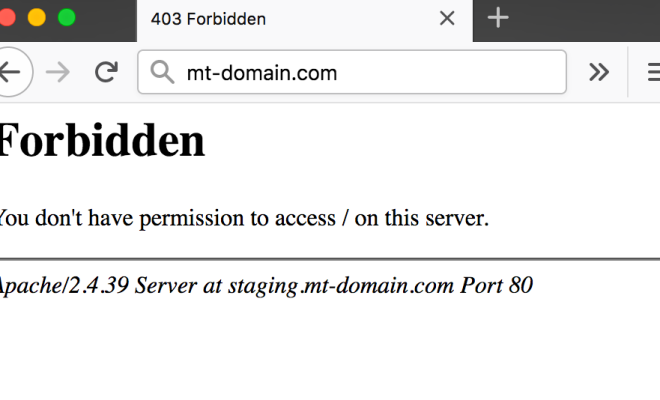
As a website owner or user, you’ve likely come across a 403 error while browsing the web. These errors occur when you attempt to access a web page or resource that is forbidden to you, either through your browser, mobile device or application. 403 errors can be frustrating, especially if you don’t understand why you’re seeing them. This article will explain why you’re seeing these errors and provide tips on how to fix them.

Causes of 403 Errors:

There are several reasons why you may be seeing a 403 error:

1. Incorrect permissions: This is usually the most common cause of a 403 error. This error occurs when a web server denies permission to access a page or resource. This may be due to the incorrect permission settings on a server or an IP block.

2. Authorization errors: Authorization errors can occur when you attempt to access a web page that is secure and requires credentials such as a password, but you have entered incorrect login credentials.

3. Blocked IP addresses: When a website blocks IP addresses, it may cause a 403 error to occur. This can happen when the website detects suspicious behavior from an IP address or notices a high number of requests from a particular IP address.

4. Corrupted website files: A website may display a 403 error if some of its files have become damaged or corrupted. This can happen due to a variety of reasons such as hacking, file corruption or malware.

5. SSL certificate errors: If a website’s SSL certificate is invalid, the web server may block access, causing a 403 forbidden error to occur.

How to Fix 403 Errors:

To resolve 403 errors, try these steps:

1. Check for incorrect file permissions: Ensure that the files and directories that you want to access have the correct permissions. You can check the file permissions using File Transfer Protocol (FTP).

2. Clear your browser cache: If you’re seeing a 403 error on a specific website, try clearing your browser cache, as the cache may contain outdated information that is blocking you from accessing the site.

3. Check login credentials: If you’re trying to access a secure site and see a 403 error, double-check your login credentials to ensure they are correct.

4. Contact the website’s owner: If you’ve tried all of the above remedies, but you’re still experiencing a 403 error, contact the website’s owner or web administrator to resolve the issue. They may provide you with additional options to resolve the issue or help you troubleshoot the problem.


Previous Article

Why You Shouldn’t Use Instagram Follower Tracking ...

Next Article

Why Your Android Phone Is Overheating (And ...

Matthew Lynch

Related articles More from author

  • Digital & Mobile Technology

    Best USB Flash Drives of 2023

    June 1, 2023
    By Matthew Lynch
  • Digital & Mobile Technology

    Linux Tablets and Projects You Can Try Today

    June 15, 2023
    By Matthew Lynch
  • Digital & Mobile Technology

    How to Reduce Power Supply Noise on Your PC

    May 3, 2023
    By Matthew Lynch
  • Digital & Mobile Technology

    10 Best Sites for Free PSD Templates

    June 9, 2023
    By Matthew Lynch
  • Digital & Mobile Technology

    How to List Branches in Git

    September 8, 2023
    By Matthew Lynch
  • Digital & Mobile Technology

    How to Fix Screen Flickering and Flashing on Windows 10 and 11

    June 6, 2023
    By Matthew Lynch

Search

Login & Registration

  • Log in
  • Entries feed
  • Comments feed
  • WordPress.org

Newsletter

Signup for The Tech Edvocate Newsletter and have the latest in EdTech news and opinion delivered to your email address!

About Us

Since technology is not going anywhere and does more good than harm, adapting is the best course of action. That is where The Tech Edvocate comes in. We plan to cover the PreK-12 and Higher Education EdTech sectors and provide our readers with the latest news and opinion on the subject. From time to time, I will invite other voices to weigh in on important issues in EdTech. We hope to provide a well-rounded, multi-faceted look at the past, present, the future of EdTech in the US and internationally.

We started this journey back in June 2016, and we plan to continue it for many more years to come. I hope that you will join us in this discussion of the past, present and future of EdTech and lend your own insight to the issues that are discussed.

Newsletter

Signup for The Tech Edvocate Newsletter and have the latest in EdTech news and opinion delivered to your email address!

Contact Us

The Tech Edvocate
910 Goddin Street
Richmond, VA 23231
(601) 630-5238
[email protected]

Copyright © 2026 Matthew Lynch. All rights reserved.