The Tech Edvocate

Top Menu

  • Advertisement
  • Apps
  • Home Page
  • Home Page Five (No Sidebar)
  • Home Page Four
  • Home Page Three
  • Home Page Two
  • Home Tech2
  • Icons [No Sidebar]
  • Left Sidbear Page
  • Lynch Educational Consulting
  • My Account
  • My Speaking Page
  • Newsletter Sign Up Confirmation
  • Newsletter Unsubscription
  • Our Brands
  • Page Example
  • Privacy Policy
  • Protected Content
  • Register
  • Request a Product Review
  • Shop
  • Shortcodes Examples
  • Signup
  • Start Here
    • Governance
    • Careers
    • Contact Us
  • Terms and Conditions
  • The Edvocate
  • The Tech Edvocate Product Guide
  • Topics
  • Write For Us
  • Advertise

Main Menu

  • Start Here
    • Our Brands
    • Governance
      • Lynch Educational Consulting, LLC.
      • Dr. Lynch’s Personal Website
      • Careers
    • Write For Us
    • The Tech Edvocate Product Guide
    • Contact Us
    • Books
    • Edupedia
    • Post a Job
    • The Edvocate Podcast
    • Terms and Conditions
    • Privacy Policy
  • Topics
    • Assistive Technology
    • Child Development Tech
    • Early Childhood & K-12 EdTech
    • EdTech Futures
    • EdTech News
    • EdTech Policy & Reform
    • EdTech Startups & Businesses
    • Higher Education EdTech
    • Online Learning & eLearning
    • Parent & Family Tech
    • Personalized Learning
    • Product Reviews
  • Advertise
  • Tech Edvocate Awards
  • The Edvocate
  • Pedagogue
  • School Ratings

logo

The Tech Edvocate

  • Start Here
    • Our Brands
    • Governance
      • Lynch Educational Consulting, LLC.
      • Dr. Lynch’s Personal Website
        • My Speaking Page
      • Careers
    • Write For Us
    • The Tech Edvocate Product Guide
    • Contact Us
    • Books
    • Edupedia
    • Post a Job
    • The Edvocate Podcast
    • Terms and Conditions
    • Privacy Policy
  • Topics
    • Assistive Technology
    • Child Development Tech
    • Early Childhood & K-12 EdTech
    • EdTech Futures
    • EdTech News
    • EdTech Policy & Reform
    • EdTech Startups & Businesses
    • Higher Education EdTech
    • Online Learning & eLearning
    • Parent & Family Tech
    • Personalized Learning
    • Product Reviews
  • Advertise
  • Tech Edvocate Awards
  • The Edvocate
  • Pedagogue
  • School Ratings
  • This Crucial Mistake Is Quietly Killing Students’ Brains, Says MIT

  • The Sneaky Truth About RTO: How to Negotiate Flexible Work Without Losing Your Job

  • Top 5 Remote Work Management Tools for Tech Companies in 2026

  • The Brutal Truth: RTO Is Fueling a New Era of Workplace Sabotage

  • The Brutal Truth: Why Your Cybersecurity Training Needs Funding NOW (And How to Get It)

  • The Cyber Gold Rush: These 8 States Are Training the Next Digital Defenders

  • This One Simple Investment Could Save Us From the Next Cyber Catastrophe

  • Why Your Tech Job Is About to Disappear (and How to Future-Proof Your Career)

  • The Brutal Truth: Your Tech Career Is Dying Without These AI Certifications

  • The Silent Revolution: How AI is Reshaping Your Tech Career (And What to Do About It)

Digital & Mobile Technology
Home›Digital & Mobile Technology›What You Should Know Before You Buy an iMac

What You Should Know Before You Buy an iMac
By Matthew Lynch
June 10, 2023
0
Spread the love

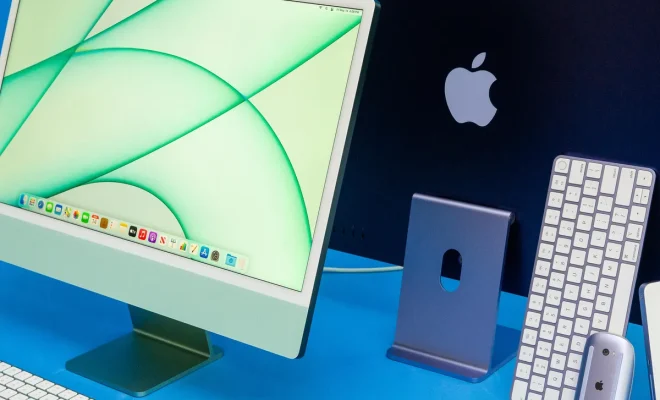
Apple’s iMac is one of the most well-known desktop computers on the market today. If you’re looking to purchase an iMac, it’s important to know what you’re getting yourself into so you can make an informed decision. Here are some things you should consider before buying an iMac:

1. Know your budget:

iMacs are high-end computers that come with a premium price. They start at around $1,099 for the 21.5-inch model and go up to $2,299 for the 27-inch model. Apple also offers build-to-order options that can increase the cost even further.

2. Screen size:

Apple offers iMacs in two screen sizes: 21.5-inch and 27-inch. The 21.5-inch iMac is great for general use, while the 27-inch iMac is better for graphic designers or other professionals who require a large display.

3. Power:

The iMac comes with a standard quad-core Intel processor, but you can upgrade to a six-core or eight-core processor with the build-to-order option. In addition to the processor, the iMac has a graphics card, which can also be upgraded.

4. Storage:

The iMac comes with a standard 1TB hard drive, but you can upgrade to a solid-state drive (SSD) for faster performance. An SSD will cost more, but it’s worth it if you need the extra speed.

5. Ports:

The iMac comes with four USB 3.0 ports, two Thunderbolt 3 ports, an SDXC card slot, and Ethernet. However, if you need more ports, you can buy a Thunderbolt 3 dock which connects to the iMac and provides additional ports.

6. RAM:

The iMac comes with 8GB of RAM, but you can upgrade to 16GB or 32GB. More RAM means better performance, particularly when running many programs simultaneously.

7. Warranty:

Apple gives a standard one-year warranty with the iMac, but you can purchase AppleCare+ for extended coverage. AppleCare+ provides three years of coverage and includes accidental damage coverage.

In conclusion, the iMac is a powerful computer that can meet the needs of most users. It’s important to know your budget and requirements before purchasing an iMac. It’s also advisable to do some research and read reviews of the different models and configurations available. Ultimately, with careful consideration, you can find the iMac that suits your needs and budget


Previous Article

How to Turn Off Package Notifications on ...

Next Article

How to Access Gmail With Thunderbird

Matthew Lynch

Related articles More from author

  • Digital & Mobile Technology

    How to Log Out of Facebook Messenger

    May 31, 2023
    By Matthew Lynch
  • Digital & Mobile Technology

    Who Owns Mastodon?

    September 7, 2023
    By Matthew Lynch
  • Digital & Mobile Technology

    How to Use Gmail on an Amazon Fire Tablet

    May 30, 2023
    By Matthew Lynch
  • Digital & Mobile Technology

    What is disruptive technology?

    May 6, 2023
    By Matthew Lynch
  • Digital & Mobile Technology

    How to Search for Text in Safari With iPhone Find on Page

    June 6, 2023
    By Matthew Lynch
  • Digital & Mobile Technology

    How to Organize Your Nintendo Switch Games Into Groups

    June 26, 2023
    By Matthew Lynch

Search

Login & Registration

  • Log in
  • Entries feed
  • Comments feed
  • WordPress.org

Newsletter

Signup for The Tech Edvocate Newsletter and have the latest in EdTech news and opinion delivered to your email address!

About Us

Since technology is not going anywhere and does more good than harm, adapting is the best course of action. That is where The Tech Edvocate comes in. We plan to cover the PreK-12 and Higher Education EdTech sectors and provide our readers with the latest news and opinion on the subject. From time to time, I will invite other voices to weigh in on important issues in EdTech. We hope to provide a well-rounded, multi-faceted look at the past, present, the future of EdTech in the US and internationally.

We started this journey back in June 2016, and we plan to continue it for many more years to come. I hope that you will join us in this discussion of the past, present and future of EdTech and lend your own insight to the issues that are discussed.

Newsletter

Signup for The Tech Edvocate Newsletter and have the latest in EdTech news and opinion delivered to your email address!

Contact Us

The Tech Edvocate
910 Goddin Street
Richmond, VA 23231
(601) 630-5238
[email protected]

Copyright © 2026 Matthew Lynch. All rights reserved.