The Tech Edvocate

Top Menu

  • Advertisement
  • Apps
  • Home Page
  • Home Page Five (No Sidebar)
  • Home Page Four
  • Home Page Three
  • Home Page Two
  • Home Tech2
  • Icons [No Sidebar]
  • Left Sidbear Page
  • Lynch Educational Consulting
  • My Account
  • My Speaking Page
  • Newsletter Sign Up Confirmation
  • Newsletter Unsubscription
  • Our Brands
  • Page Example
  • Privacy Policy
  • Protected Content
  • Register
  • Request a Product Review
  • Shop
  • Shortcodes Examples
  • Signup
  • Start Here
    • Governance
    • Careers
    • Contact Us
  • Terms and Conditions
  • The Edvocate
  • The Tech Edvocate Product Guide
  • Topics
  • Write For Us
  • Advertise

Main Menu

  • Start Here
    • Our Brands
    • Governance
      • Lynch Educational Consulting, LLC.
      • Dr. Lynch’s Personal Website
      • Careers
    • Write For Us
    • The Tech Edvocate Product Guide
    • Contact Us
    • Books
    • Edupedia
    • Post a Job
    • The Edvocate Podcast
    • Terms and Conditions
    • Privacy Policy
  • Topics
    • Assistive Technology
    • Child Development Tech
    • Early Childhood & K-12 EdTech
    • EdTech Futures
    • EdTech News
    • EdTech Policy & Reform
    • EdTech Startups & Businesses
    • Higher Education EdTech
    • Online Learning & eLearning
    • Parent & Family Tech
    • Personalized Learning
    • Product Reviews
  • Advertise
  • Tech Edvocate Awards
  • The Edvocate
  • Pedagogue
  • School Ratings

logo

The Tech Edvocate

  • Start Here
    • Our Brands
    • Governance
      • Lynch Educational Consulting, LLC.
      • Dr. Lynch’s Personal Website
        • My Speaking Page
      • Careers
    • Write For Us
    • The Tech Edvocate Product Guide
    • Contact Us
    • Books
    • Edupedia
    • Post a Job
    • The Edvocate Podcast
    • Terms and Conditions
    • Privacy Policy
  • Topics
    • Assistive Technology
    • Child Development Tech
    • Early Childhood & K-12 EdTech
    • EdTech Futures
    • EdTech News
    • EdTech Policy & Reform
    • EdTech Startups & Businesses
    • Higher Education EdTech
    • Online Learning & eLearning
    • Parent & Family Tech
    • Personalized Learning
    • Product Reviews
  • Advertise
  • Tech Edvocate Awards
  • The Edvocate
  • Pedagogue
  • School Ratings
  • This RNA Breakthrough Could Rewrite Alzheimer’s Treatment

  • This One Thing Is Silently Crushing US Consumer Inflation — And Your Wallet

  • Chilling Ransom: 38 Maritime Giants Held Hostage By Cyber Crooks

  • October 2026 Patch Tuesday: The Critical Flaws You CANNOT Ignore

  • California’s AI Overhaul: Your Job & Legal Rights Will Never Be the Same

  • 100 Best Resource Management Apps

  • The Startling Truth About Viral Weight Loss Drugs You Need to Know

  • 57% Failure Rate: The Unsettling Truth About AI Financial Advice You Need to Know

  • AI’s Quiet Takeover: 179,542 Tech Layoffs 2023 Signal a Troubling Future

  • The Billion-Dollar Race: Why U.S. Tech Giants Are Scrambling for Israeli Startups

Digital & Mobile Technology
Home›Digital & Mobile Technology›What Is Overclocking? Should You Ever Overclock Your Computer?

What Is Overclocking? Should You Ever Overclock Your Computer?
By Matthew Lynch
June 12, 2023
0
Spread the love

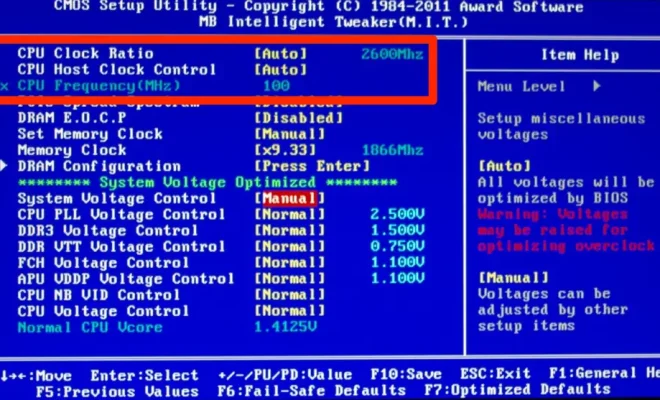
Overclocking is the process of increasing the clock speed of a computer component beyond the manufacturer’s recommended specifications. This means running your CPU, GPU, or RAM at a faster speed than it was designed to operate at.

The primary advantage of overclocking is that it can lead to improved performance. By running your components faster, you can accomplish more tasks in less time. This is particularly useful for gamers who want to achieve higher frame rates, or for people who need to render video or perform other processor-intensive tasks.

However, there are also risks associated with overclocking. The primary risk is that it can cause your components to overheat. This can lead to system instability or even permanent damage to your hardware. Additionally, overclocking can sometimes void your warranty or cause your components to wear out faster.

So, should you ever overclock your computer? The answer is that it depends. If you’re an experienced computer user who understands the risks and benefits of overclocking, and are willing to put in the time and effort to carefully tweak your settings, then it can be a worthwhile pursuit.

However, if you’re a casual user who doesn’t have much experience with computer hardware, then it’s best to avoid overclocking altogether. The risks simply outweigh the potential benefits for most people.

If you do decide to overclock your computer, there are a few things you should keep in mind. First, make sure you have adequate cooling for your components. This might mean investing in a more powerful CPU cooler, or adding more case fans to your computer.

Second, be sure to research your hardware thoroughly before overclocking. Not all components are created equal, and some may have more headroom for overclocking than others. Additionally, different components may require different settings for optimal performance.

Finally, take things slowly and carefully. Don’t try to push your components too hard too quickly. Give yourself time to adjust to each new overclocked setting before moving on to the next one. With patience and proper preparation, you can successfully overclock your computer and achieve improved performance.


Previous Article

How to Turn On/Off Narrator in Windows ...

Next Article

How to Change the Font in Windows ...

Matthew Lynch

Related articles More from author

  • Digital & Mobile Technology

    Burst Mode: What It Is and How to Use It

    July 6, 2023
    By Matthew Lynch
  • Digital & Mobile Technology

    The 5 Best Free Music Players for Windows

    June 6, 2023
    By Matthew Lynch
  • Digital & Mobile Technology

    The Complete Guide to Home Audio Systems for Beginners

    May 31, 2023
    By Matthew Lynch
  • Digital & Mobile Technology

    How to Sort Data in Excel With the SORT Function

    June 13, 2023
    By Matthew Lynch
  • Digital & Mobile Technology

    How to Completely Reinstall Chrome OS on Your Chromebook

    August 3, 2023
    By Matthew Lynch
  • Digital & Mobile Technology

    Movie and TV Related Google Easter Eggs to Find and Enjoy

    August 4, 2023
    By Matthew Lynch

Search

Login & Registration

  • Log in
  • Entries feed
  • Comments feed
  • WordPress.org

Newsletter

Signup for The Tech Edvocate Newsletter and have the latest in EdTech news and opinion delivered to your email address!

About Us

Since technology is not going anywhere and does more good than harm, adapting is the best course of action. That is where The Tech Edvocate comes in. We plan to cover the PreK-12 and Higher Education EdTech sectors and provide our readers with the latest news and opinion on the subject. From time to time, I will invite other voices to weigh in on important issues in EdTech. We hope to provide a well-rounded, multi-faceted look at the past, present, the future of EdTech in the US and internationally.

We started this journey back in June 2016, and we plan to continue it for many more years to come. I hope that you will join us in this discussion of the past, present and future of EdTech and lend your own insight to the issues that are discussed.

Newsletter

Signup for The Tech Edvocate Newsletter and have the latest in EdTech news and opinion delivered to your email address!

Contact Us

The Tech Edvocate
910 Goddin Street
Richmond, VA 23231
(601) 630-5238
[email protected]

Copyright © 2026 Matthew Lynch. All rights reserved.