The Tech Edvocate

Top Menu

  • Advertisement
  • Apps
  • Home Page
  • Home Page Five (No Sidebar)
  • Home Page Four
  • Home Page Three
  • Home Page Two
  • Home Tech2
  • Icons [No Sidebar]
  • Left Sidbear Page
  • Lynch Educational Consulting
  • My Account
  • My Speaking Page
  • Newsletter Sign Up Confirmation
  • Newsletter Unsubscription
  • Our Brands
  • Page Example
  • Privacy Policy
  • Protected Content
  • Register
  • Request a Product Review
  • Shop
  • Shortcodes Examples
  • Signup
  • Start Here
    • Governance
    • Careers
    • Contact Us
  • Terms and Conditions
  • The Edvocate
  • The Tech Edvocate Product Guide
  • Topics
  • Write For Us
  • Advertise

Main Menu

  • Start Here
    • Our Brands
    • Governance
      • Lynch Educational Consulting, LLC.
      • Dr. Lynch’s Personal Website
      • Careers
    • Write For Us
    • The Tech Edvocate Product Guide
    • Contact Us
    • Books
    • Edupedia
    • Post a Job
    • The Edvocate Podcast
    • Terms and Conditions
    • Privacy Policy
  • Topics
    • Assistive Technology
    • Child Development Tech
    • Early Childhood & K-12 EdTech
    • EdTech Futures
    • EdTech News
    • EdTech Policy & Reform
    • EdTech Startups & Businesses
    • Higher Education EdTech
    • Online Learning & eLearning
    • Parent & Family Tech
    • Personalized Learning
    • Product Reviews
  • Advertise
  • Tech Edvocate Awards
  • The Edvocate
  • Pedagogue
  • School Ratings

logo

The Tech Edvocate

  • Start Here
    • Our Brands
    • Governance
      • Lynch Educational Consulting, LLC.
      • Dr. Lynch’s Personal Website
        • My Speaking Page
      • Careers
    • Write For Us
    • The Tech Edvocate Product Guide
    • Contact Us
    • Books
    • Edupedia
    • Post a Job
    • The Edvocate Podcast
    • Terms and Conditions
    • Privacy Policy
  • Topics
    • Assistive Technology
    • Child Development Tech
    • Early Childhood & K-12 EdTech
    • EdTech Futures
    • EdTech News
    • EdTech Policy & Reform
    • EdTech Startups & Businesses
    • Higher Education EdTech
    • Online Learning & eLearning
    • Parent & Family Tech
    • Personalized Learning
    • Product Reviews
  • Advertise
  • Tech Edvocate Awards
  • The Edvocate
  • Pedagogue
  • School Ratings
  • A Visitors Guide to Pittsburgh (PA), United States

  • A Visitors Guide to Colorado Springs (CO), United States

  • 5 Pairs of Shoes That Will Instantly Step Your Shoe Game Up

  • Radiant Youthful Skin is the Perfect Christmas Gift

  • Give Your Loved One the Gift of Youthful, Radiant Skin this Christmas

  • Give Your Loved One the Gift of a Restful Night Sleep this Christmas

  • Nex Playground’s Holiday Sales Bring Active Play Indoors This Seaso

  • A Visitors Guide to Louisville (KY), United States

  • A Visitor’s Guide to Nashville-Davidson (TN), United States

  • A Visitors Guide to Portland (OR), United States

Digital & Mobile Technology
Home›Digital & Mobile Technology›What Is HKEY_LOCAL_MACHINE?

What Is HKEY_LOCAL_MACHINE?
By Matthew Lynch
June 12, 2023
0
Spread the love

HKEY_LOCAL_MACHINE is a registry hive in the Windows operating system that stores configuration information for the hardware and software components of a computer. It is the central location where Windows applications and services access critical system settings to function properly.

Simply put, the HKEY_LOCAL_MACHINE houses important keys that allow Windows to function properly, manage hardware settings, and determine which programs can run on a computer. It contains the system-wide settings and configurations for all users that log on to the computer. Furthermore, it even controls some device drivers installed on the computer.

The acronym HKEY stands for “Handle to a Key.” In Windows, a key is a container that stores information, similar to a folder in a file system. Each key contains one or more values, and these values hold data that applications can access and use.

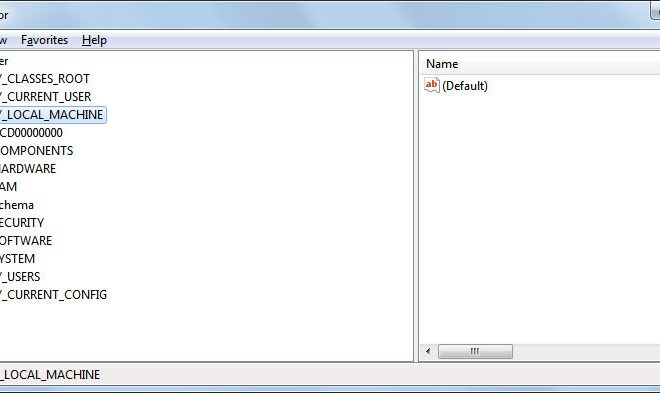
The HKEY_LOCAL_MACHINE key holds five subkeys – Hardware, SAM, Security, Software, and System. The Hardware subkey provides information about the system hardware, including devices and drivers installed on the computer. The SAM subkey stores information about the local security accounts manager. The Security subkey stores information about system security settings. The Software subkey contains information and settings for installed software. Lastly, the System subkey houses numerous settings and hardware data.

When Windows boots, it reads the HKEY_LOCAL_MACHINE registry hive to determine the hardware configuration and system settings, as well as to launch essential system services and drivers. Any program that requires system-level permissions or settings too must access the HKEY_LOCAL_MACHINE registry.

While editing the HKEY_LOCAL_MACHINE registry can improve system performance and functionality, changing the wrong settings can cause significant problems. Therefore, only experienced users should edit the registry settings. Microsoft recommends backing up the registry before making any alterations.

In conclusion, the HKEY_LOCAL_MACHINE plays a vital role in the proper functioning of Windows operating system. The registry hive houses the most critical system settings and configurations. It is not something that most users will frequently interact with directly, but understanding its importance can help users troubleshoot any issues with their computer.


Previous Article

How to Select Multiple Files in Windows

Next Article

How to Stream On Disney Plus (aka ...

Matthew Lynch

Related articles More from author

  • Digital & Mobile Technology

    How to Delete a Playlist on Spotify

    June 8, 2023
    By Matthew Lynch
  • Digital & Mobile Technology

    Tricks When Windows 10 Won’t Eject the USB Drive

    June 6, 2023
    By Matthew Lynch
  • Digital & Mobile Technology

    How to Change Notification Sounds for Each App on Your Android Phone

    August 5, 2023
    By Matthew Lynch
  • Digital & Mobile Technology

    What Is Anime?

    June 6, 2023
    By Matthew Lynch
  • Digital & Mobile Technology

    How to Make Google Maps the Default on iPhone

    June 2, 2023
    By Matthew Lynch
  • Digital & Mobile Technology

    The Best Exclusive Nintendo Switch Games

    June 4, 2023
    By Matthew Lynch

Search

Login & Registration

  • Register
  • Log in
  • Entries feed
  • Comments feed
  • WordPress.org

Newsletter

Signup for The Tech Edvocate Newsletter and have the latest in EdTech news and opinion delivered to your email address!

About Us

Since technology is not going anywhere and does more good than harm, adapting is the best course of action. That is where The Tech Edvocate comes in. We plan to cover the PreK-12 and Higher Education EdTech sectors and provide our readers with the latest news and opinion on the subject. From time to time, I will invite other voices to weigh in on important issues in EdTech. We hope to provide a well-rounded, multi-faceted look at the past, present, the future of EdTech in the US and internationally.

We started this journey back in June 2016, and we plan to continue it for many more years to come. I hope that you will join us in this discussion of the past, present and future of EdTech and lend your own insight to the issues that are discussed.

Newsletter

Signup for The Tech Edvocate Newsletter and have the latest in EdTech news and opinion delivered to your email address!

Contact Us

The Tech Edvocate
910 Goddin Street
Richmond, VA 23231
(601) 630-5238
[email protected]

Copyright © 2025 Matthew Lynch. All rights reserved.