The Tech Edvocate

Top Menu

  • Advertisement
  • Apps
  • Home Page
  • Home Page Five (No Sidebar)
  • Home Page Four
  • Home Page Three
  • Home Page Two
  • Home Tech2
  • Icons [No Sidebar]
  • Left Sidbear Page
  • Lynch Educational Consulting
  • My Account
  • My Speaking Page
  • Newsletter Sign Up Confirmation
  • Newsletter Unsubscription
  • Our Brands
  • Page Example
  • Privacy Policy
  • Protected Content
  • Register
  • Request a Product Review
  • Shop
  • Shortcodes Examples
  • Signup
  • Start Here
    • Governance
    • Careers
    • Contact Us
  • Terms and Conditions
  • The Edvocate
  • The Tech Edvocate Product Guide
  • Topics
  • Write For Us
  • Advertise

Main Menu

  • Start Here
    • Our Brands
    • Governance
      • Lynch Educational Consulting, LLC.
      • Dr. Lynch’s Personal Website
      • Careers
    • Write For Us
    • The Tech Edvocate Product Guide
    • Contact Us
    • Books
    • Edupedia
    • Post a Job
    • The Edvocate Podcast
    • Terms and Conditions
    • Privacy Policy
  • Topics
    • Assistive Technology
    • Child Development Tech
    • Early Childhood & K-12 EdTech
    • EdTech Futures
    • EdTech News
    • EdTech Policy & Reform
    • EdTech Startups & Businesses
    • Higher Education EdTech
    • Online Learning & eLearning
    • Parent & Family Tech
    • Personalized Learning
    • Product Reviews
  • Advertise
  • Tech Edvocate Awards
  • The Edvocate
  • Pedagogue
  • School Ratings

logo

The Tech Edvocate

  • Start Here
    • Our Brands
    • Governance
      • Lynch Educational Consulting, LLC.
      • Dr. Lynch’s Personal Website
        • My Speaking Page
      • Careers
    • Write For Us
    • The Tech Edvocate Product Guide
    • Contact Us
    • Books
    • Edupedia
    • Post a Job
    • The Edvocate Podcast
    • Terms and Conditions
    • Privacy Policy
  • Topics
    • Assistive Technology
    • Child Development Tech
    • Early Childhood & K-12 EdTech
    • EdTech Futures
    • EdTech News
    • EdTech Policy & Reform
    • EdTech Startups & Businesses
    • Higher Education EdTech
    • Online Learning & eLearning
    • Parent & Family Tech
    • Personalized Learning
    • Product Reviews
  • Advertise
  • Tech Edvocate Awards
  • The Edvocate
  • Pedagogue
  • School Ratings
  • This Nordstrom Fall Beauty Product Delivers a ‘Filter Effect’ — Without the Filter

  • Your Smart Devices ARE Listening: The Multi-Million Dollar Deception Revealed

  • The Shocking Truth About AquaHarvest’s Water Footprint in Our Deserts

  • MindLink’s BCI Scandal: 10 Urgent Questions About Your Brain Data

  • Level-5’s AI Apology: Why Fans Are Furious Over One Small Detail

  • This Crucial New Law Just Changed Everything for Kids Online

  • Humanity’s Reckoning? This Viral AI Extinction Warning Ignited a Firestorm

  • Unveiling the Battle: Why Teachers Unions in New York Are Fighting This Federal Program

  • Unbelievable: This Private School Twitter Challenge Is Sparking Outrage

  • Two Tankers Hacked: The Disturbing Truth About Cyberattacks on Oil Tankers

Assistive Technology
Home›Assistive Technology›What Is Hardware Acceleration and When Should You Use It?

What Is Hardware Acceleration and When Should You Use It?
By Matthew Lynch
June 9, 2023
0
Spread the love

Hardware acceleration is a technology that allows your computer to perform certain tasks faster by offloading them to specialized hardware components called accelerators. These accelerators are designed to handle specific types of computations, such as video decoding, audio processing, and 3D graphics rendering, more efficiently than the general-purpose processors (CPUs) that power your computer.

There are several hardware accelerators that you might encounter on a typical computer. These include:

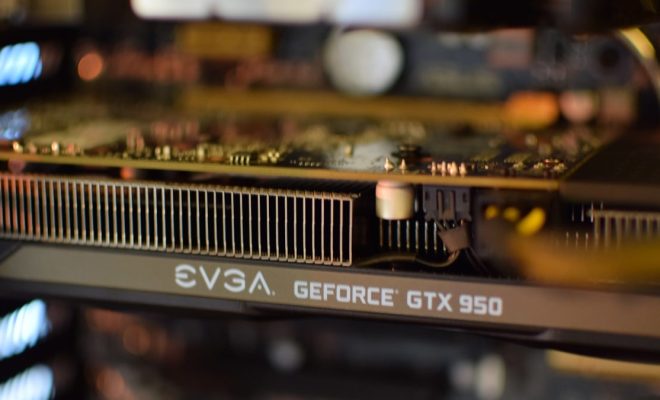
– Graphics processing units (GPUs), which are specialized processors that are designed to handle the complex computations involved in 3D graphics rendering and video encoding/decoding.

– Digital signal processors (DSPs), which are specialized processors that are designed to handle audio processing and other types of digital signal processing.

– Field-programmable gate arrays (FPGAs), which are custom-programmable chips that can be configured to perform a wide range of specialized computations.

Hardware acceleration can provide several benefits over software-based processing, including faster performance, lower power consumption, and reduced CPU usage. However, not all tasks are suitable for hardware acceleration, and some may even perform worse if offloaded to an accelerator. Here are a few guidelines to help you decide when to use hardware acceleration:

– Use hardware acceleration for compute-intensive tasks. Tasks that involve heavy computations, such as video encoding/decoding or 3D graphics rendering, can often benefit from hardware acceleration. In these cases, a specialized processor like a GPU can perform the computations much faster than a CPU, resulting in faster overall performance.

– Avoid hardware acceleration for simple tasks. Tasks that do not require much computation, such as opening a text file or browsing the web, are unlikely to benefit from hardware acceleration. In fact, offloading such tasks to an accelerator can actually slow them down, since the overhead of transferring data to and from the accelerator can outweigh the performance benefits.

– Check whether your software supports hardware acceleration. Not all software applications support hardware acceleration, so it’s important to check whether a given application can take advantage of specialized processors like GPUs or DSPs. If the software doesn’t support hardware acceleration, then it’s unlikely that you’ll see any performance benefits from using an accelerator.

– Consider the cost vs. benefit of hardware acceleration. While hardware acceleration can provide significant performance benefits for certain tasks, it can also be expensive. GPUs, for example, can be quite expensive, especially if you need a high-end model for demanding applications like gaming or video editing. Before investing in an accelerator, it’s important to weigh the potential benefits against the cost of the hardware.


Previous Article

Best Book Review Sites and Book Rating ...

Next Article

5 Best Free Christmas Music Download Sites

Matthew Lynch

Related articles More from author

  • Assistive Technology

    How to Use Windows Media Player to Copy Music From CDs

    June 8, 2023
    By Matthew Lynch
  • Assistive Technology

    How to Delete Apps on Chromebook

    June 23, 2023
    By Matthew Lynch
  • Assistive Technology

    How to Send a Friend Request on Facebook

    June 8, 2023
    By Matthew Lynch
  • Assistive Technology

    How to Fix a PS4 That Won’t Take, Read, or Eject a Disc

    June 6, 2023
    By Matthew Lynch
  • Assistive Technology

    How to Fix a Fitbit Displaying the Wrong Time

    June 6, 2023
    By Matthew Lynch
  • Assistive Technology

    How to Report Inappropriate Content on YouTube

    June 12, 2023
    By Matthew Lynch

Search

Login & Registration

  • Log in
  • Entries feed
  • Comments feed
  • WordPress.org

Newsletter

Signup for The Tech Edvocate Newsletter and have the latest in EdTech news and opinion delivered to your email address!

About Us

Since technology is not going anywhere and does more good than harm, adapting is the best course of action. That is where The Tech Edvocate comes in. We plan to cover the PreK-12 and Higher Education EdTech sectors and provide our readers with the latest news and opinion on the subject. From time to time, I will invite other voices to weigh in on important issues in EdTech. We hope to provide a well-rounded, multi-faceted look at the past, present, the future of EdTech in the US and internationally.

We started this journey back in June 2016, and we plan to continue it for many more years to come. I hope that you will join us in this discussion of the past, present and future of EdTech and lend your own insight to the issues that are discussed.

Newsletter

Signup for The Tech Edvocate Newsletter and have the latest in EdTech news and opinion delivered to your email address!

Contact Us

The Tech Edvocate
910 Goddin Street
Richmond, VA 23231
(601) 630-5238
[email protected]

Copyright © 2026 Matthew Lynch. All rights reserved.