The Tech Edvocate

Top Menu

  • Advertisement
  • Apps
  • Home Page
  • Home Page Five (No Sidebar)
  • Home Page Four
  • Home Page Three
  • Home Page Two
  • Home Tech2
  • Icons [No Sidebar]
  • Left Sidbear Page
  • Lynch Educational Consulting
  • My Account
  • My Speaking Page
  • Newsletter Sign Up Confirmation
  • Newsletter Unsubscription
  • Our Brands
  • Page Example
  • Privacy Policy
  • Protected Content
  • Register
  • Request a Product Review
  • Shop
  • Shortcodes Examples
  • Signup
  • Start Here
    • Governance
    • Careers
    • Contact Us
  • Terms and Conditions
  • The Edvocate
  • The Tech Edvocate Product Guide
  • Topics
  • Write For Us
  • Advertise

Main Menu

  • Start Here
    • Our Brands
    • Governance
      • Lynch Educational Consulting, LLC.
      • Dr. Lynch’s Personal Website
      • Careers
    • Write For Us
    • The Tech Edvocate Product Guide
    • Contact Us
    • Books
    • Edupedia
    • Post a Job
    • The Edvocate Podcast
    • Terms and Conditions
    • Privacy Policy
  • Topics
    • Assistive Technology
    • Child Development Tech
    • Early Childhood & K-12 EdTech
    • EdTech Futures
    • EdTech News
    • EdTech Policy & Reform
    • EdTech Startups & Businesses
    • Higher Education EdTech
    • Online Learning & eLearning
    • Parent & Family Tech
    • Personalized Learning
    • Product Reviews
  • Advertise
  • Tech Edvocate Awards
  • The Edvocate
  • Pedagogue
  • School Ratings

logo

The Tech Edvocate

  • Start Here
    • Our Brands
    • Governance
      • Lynch Educational Consulting, LLC.
      • Dr. Lynch’s Personal Website
        • My Speaking Page
      • Careers
    • Write For Us
    • The Tech Edvocate Product Guide
    • Contact Us
    • Books
    • Edupedia
    • Post a Job
    • The Edvocate Podcast
    • Terms and Conditions
    • Privacy Policy
  • Topics
    • Assistive Technology
    • Child Development Tech
    • Early Childhood & K-12 EdTech
    • EdTech Futures
    • EdTech News
    • EdTech Policy & Reform
    • EdTech Startups & Businesses
    • Higher Education EdTech
    • Online Learning & eLearning
    • Parent & Family Tech
    • Personalized Learning
    • Product Reviews
  • Advertise
  • Tech Edvocate Awards
  • The Edvocate
  • Pedagogue
  • School Ratings
  • A Visitor’s Guide to Fresno (CA), United States

  • A Visitors Guide to New Orleans (LA), United States

  • A Visitors Guide to Sacramento (CA), United States

  • A Visitors Guide to Lyon, France

  • JisuLife Ultra2 Portable Fan: A Powerful Multi-Function Cooling Solution

  • A Visitors Guide to Viña del Mar, Chile

  • A Visitors Guide to Århus, Denmark

  • A Visitors Guide to Bakersfield (CA), United States

  • A Visitors Guide to Aurora (CO), United States

  • A Visitor’s Guide to Toledo (OH), United States

Digital & Mobile Technology
Home›Digital & Mobile Technology›What Is an ACCDB File?

What Is an ACCDB File?
By Matthew Lynch
July 20, 2023
0
Spread the love

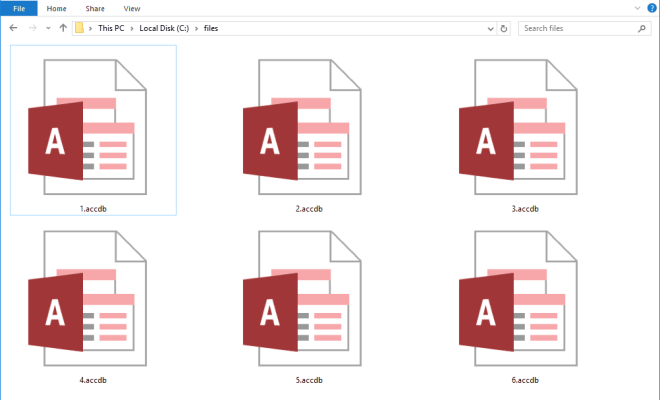
An ACCDB file is a database file created and used by Microsoft Access. Access is a database management system (DBMS) that stores and manipulates data to create customized reports and analysis. The ACCDB file is a newer version of the Microsoft Access database format, replacing the older MDB format.

An ACCDB file contains tables, queries, forms, reports, macros, and modules. Tables are the backbone of any database, and they store all the data in rows and columns. Queries are used to extract data from tables based on specific criteria or conditions. Forms are used to create and modify data in tables, while reports are used to present data in a professional manner.

Macros and modules are used to automate tasks in Access. Macros are programming commands that automate certain tasks in Access, while modules are similar to macros but are more powerful and flexible. Modules allow users to create their own custom functions and procedures in Access, which can be reused in other parts of the database application.

The ACCDB file format has many advantages over its predecessor, the MDB format. One of the main advantages is improved security features. ACCDB files are encrypted by default, whereas MDB files are not. This means that ACCDB files are less susceptible to hacking and data breaches.

Additionally, ACCDB files can handle larger amounts of data than MDB files. With the introduction of the ACCDB format, Access increased its capacity to handle up to 2GB of data, compared to only 1GB with the MDB format. This makes the ACCDB format ideal for larger databases that require more storage space.

Access also introduced new features in ACCDB files, such as the ability to add attachments to records, support for multivalued fields, and integration with SharePoint. These features make it easier to manage and manipulate large amounts of data and collaborate on database projects.

In conclusion, an ACCDB file is a database file created by Microsoft Access that stores tables, queries, forms, reports, macros, and modules. The ACCDB format has many advantages over the older MDB format, including improved security features, larger storage capacity, and new features that make it easier to manage and manipulate data. If you need to create a database application, Microsoft Access and the ACCDB format is an excellent choice.


Previous Article

The Top Hidden Features in macOS Ventura

Next Article

What Is Arduino? What Can You Do ...

Matthew Lynch

Related articles More from author

  • Digital & Mobile Technology

    How to Close Apps on iPad and iPhone

    August 5, 2023
    By Matthew Lynch
  • Digital & Mobile Technology

    What Is Lens Flare in Photography? How and Why It Happens

    June 15, 2023
    By Matthew Lynch
  • Digital & Mobile Technology

    Best Wired Earbuds of 2023

    May 31, 2023
    By Matthew Lynch
  • Digital & Mobile Technology

    How to Fix It When a PS5 Controller Won’t Connect

    May 31, 2023
    By Matthew Lynch
  • Digital & Mobile Technology

    How to Find Downloaded Files on Any Android Device

    May 28, 2023
    By Matthew Lynch
  • Digital & Mobile Technology

    How to Set Up Microsoft’s Remote Desktop Connection

    August 1, 2023
    By Matthew Lynch

Search

Login & Registration

  • Register
  • Log in
  • Entries feed
  • Comments feed
  • WordPress.org

Newsletter

Signup for The Tech Edvocate Newsletter and have the latest in EdTech news and opinion delivered to your email address!

About Us

Since technology is not going anywhere and does more good than harm, adapting is the best course of action. That is where The Tech Edvocate comes in. We plan to cover the PreK-12 and Higher Education EdTech sectors and provide our readers with the latest news and opinion on the subject. From time to time, I will invite other voices to weigh in on important issues in EdTech. We hope to provide a well-rounded, multi-faceted look at the past, present, the future of EdTech in the US and internationally.

We started this journey back in June 2016, and we plan to continue it for many more years to come. I hope that you will join us in this discussion of the past, present and future of EdTech and lend your own insight to the issues that are discussed.

Newsletter

Signup for The Tech Edvocate Newsletter and have the latest in EdTech news and opinion delivered to your email address!

Contact Us

The Tech Edvocate
910 Goddin Street
Richmond, VA 23231
(601) 630-5238
[email protected]

Copyright © 2025 Matthew Lynch. All rights reserved.