The Tech Edvocate

Top Menu

  • Advertisement
  • Apps
  • Home Page
  • Home Page Five (No Sidebar)
  • Home Page Four
  • Home Page Three
  • Home Page Two
  • Home Tech2
  • Icons [No Sidebar]
  • Left Sidbear Page
  • Lynch Educational Consulting
  • My Account
  • My Speaking Page
  • Newsletter Sign Up Confirmation
  • Newsletter Unsubscription
  • Our Brands
  • Page Example
  • Privacy Policy
  • Protected Content
  • Register
  • Request a Product Review
  • Shop
  • Shortcodes Examples
  • Signup
  • Start Here
    • Governance
    • Careers
    • Contact Us
  • Terms and Conditions
  • The Edvocate
  • The Tech Edvocate Product Guide
  • Topics
  • Write For Us
  • Advertise

Main Menu

  • Start Here
    • Our Brands
    • Governance
      • Lynch Educational Consulting, LLC.
      • Dr. Lynch’s Personal Website
      • Careers
    • Write For Us
    • The Tech Edvocate Product Guide
    • Contact Us
    • Books
    • Edupedia
    • Post a Job
    • The Edvocate Podcast
    • Terms and Conditions
    • Privacy Policy
  • Topics
    • Assistive Technology
    • Child Development Tech
    • Early Childhood & K-12 EdTech
    • EdTech Futures
    • EdTech News
    • EdTech Policy & Reform
    • EdTech Startups & Businesses
    • Higher Education EdTech
    • Online Learning & eLearning
    • Parent & Family Tech
    • Personalized Learning
    • Product Reviews
  • Advertise
  • Tech Edvocate Awards
  • The Edvocate
  • Pedagogue
  • School Ratings

logo

The Tech Edvocate

  • Start Here
    • Our Brands
    • Governance
      • Lynch Educational Consulting, LLC.
      • Dr. Lynch’s Personal Website
        • My Speaking Page
      • Careers
    • Write For Us
    • The Tech Edvocate Product Guide
    • Contact Us
    • Books
    • Edupedia
    • Post a Job
    • The Edvocate Podcast
    • Terms and Conditions
    • Privacy Policy
  • Topics
    • Assistive Technology
    • Child Development Tech
    • Early Childhood & K-12 EdTech
    • EdTech Futures
    • EdTech News
    • EdTech Policy & Reform
    • EdTech Startups & Businesses
    • Higher Education EdTech
    • Online Learning & eLearning
    • Parent & Family Tech
    • Personalized Learning
    • Product Reviews
  • Advertise
  • Tech Edvocate Awards
  • The Edvocate
  • Pedagogue
  • School Ratings
  • 100 Best Apps for Brainstorming

  • 100 Best Apps for Active Recall

  • 100 Best Apps for Spaced Repetition

  • 100 Best Apps for Building a Second Brain

  • 100 Best Apps for Second Brain

  • A Casino Bonus Is Not Its Cash Value: How to Read Reviews Clearly

  • 100 Best Apps for Zettelkasten

  • 100 Best Apps for Bullet Journaling

  • 100 Best Apps for Getting Things Done

  • 100 Best Apps for GTD Method

Digital & Mobile Technology
Home›Digital & Mobile Technology›What Is a Network Switch and How Does It Work?

What Is a Network Switch and How Does It Work?
By Matthew Lynch
June 13, 2023
0
Spread the love

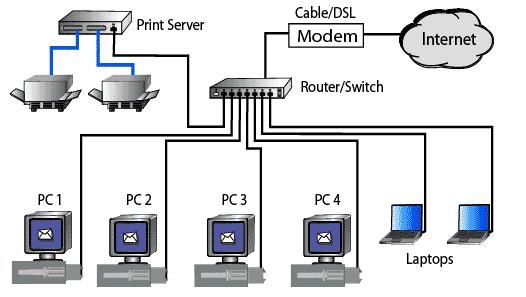
A network switch is a fundamental component of computer networks. It acts as a mediator for data transfer between devices connected to the same network. Network switches can come in various configurations, sizes, and speeds, depending on the scope of the network and how it is set up.

At its most basic, a network switch is a hardware device that connects devices using Network, Local Area Networks (LANs) and Wide Area Networks (WANs) protocols. It works by receiving data packets or signals from one device and routing them to another device located on the same network. Network switches also act as “decision-makers” by evaluating incoming data packets and deciding which device to send them to.

There are a few different types of network switches available in the market, including unmanaged switches, managed switches, and smart switches. Unmanaged switches are the most basic and easiest to use. They have a predefined number of ports and require no configuration or setup. They are best suited for small networks as they cannot be configured to prioritize data traffic, like video or voice applications, based on their importance.

Managed switches, on the other hand, provide users with more control and configuration options. They have advanced features, such as Quality of Service (QoS), Virtual Local Area Networks (VLANs), and Routing protocols, which allow users to monitor and manage network traffic more effectively. Managed switches are typically suitable for larger networks, where more fine-grained control over data is needed.

Smart switches, also known as “hybrid switches,” are a combination of managed and unmanaged switches. They provide users with some of the configuration options of a managed switch, but also come with pre-configured options that are more user-friendly. Smart switches are suitable for those who want more customizability than an unmanaged switch but don’t want to spend the extra money for a fully managed switch.

Network switches can also come in varying sizes, and the number of ports will depend on the scope of the network. Larger switches can have over 50 ports to enable the connection of more devices to the network while smaller switches usually have between 4 and 8 ports. The port speed can also differ, with some switches reaching speeds of up to 10 Gbps.

In practice, network switches work by efficiently managing data traffic between different devices connected to the same network. They evaluate incoming signals and route them to the correct device on the network, reducing latency and improving network efficiency. Their ability to prioritize traffic, either based on pre-configured settings or user-defined criteria, is what distinguishes them from other networking devices like hubs or routers.

In conclusion, network switches are critical components of computer networks that facilitate the smooth flow of data communication between devices. They play an essential role in making networks more efficient, secure, and easier to manage. When looking for a network switch, it’s essential to consider the type and configuration of your network to find the switch that best meets your needs.

Previous Article

Ways to Fix the “Attachment Failed” Error ...

Next Article

How to Use the Track Changes Tool ...

Matthew Lynch

Related articles More from author

  • Digital & Mobile Technology

    How to Add Bots to Your Discord Server

    June 12, 2023
    By Matthew Lynch
  • Digital & Mobile Technology

    5 Great Unicode Text Generators to Make Your Social Media Posts Unique

    July 31, 2023
    By Matthew Lynch
  • Digital & Mobile Technology

    What’s the Difference Between Zigbee and Z-Wave? Here’s Everything You Need to Know

    June 23, 2023
    By Matthew Lynch
  • Digital & Mobile Technology

    The History of the iPhone: from 2007 to Now

    June 6, 2023
    By Matthew Lynch
  • Digital & Mobile Technology

    Installing a CD/DVD Drive

    June 10, 2023
    By Matthew Lynch
  • Digital & Mobile Technology

    How to Prevent Rainmeter From Affecting Your Gaming Performance

    July 31, 2023
    By Matthew Lynch

Search

Login & Registration

  • Log in
  • Entries feed
  • Comments feed
  • WordPress.org

Newsletter

Signup for The Tech Edvocate Newsletter and have the latest in EdTech news and opinion delivered to your email address!

About Us

Since technology is not going anywhere and does more good than harm, adapting is the best course of action. That is where The Tech Edvocate comes in. We plan to cover the PreK-12 and Higher Education EdTech sectors and provide our readers with the latest news and opinion on the subject. From time to time, I will invite other voices to weigh in on important issues in EdTech. We hope to provide a well-rounded, multi-faceted look at the past, present, the future of EdTech in the US and internationally.

We started this journey back in June 2016, and we plan to continue it for many more years to come. I hope that you will join us in this discussion of the past, present and future of EdTech and lend your own insight to the issues that are discussed.

Newsletter

Signup for The Tech Edvocate Newsletter and have the latest in EdTech news and opinion delivered to your email address!

Contact Us

The Tech Edvocate
910 Goddin Street
Richmond, VA 23231
(601) 630-5238
[email protected]

Copyright © 2026 Matthew Lynch. All rights reserved.