The Tech Edvocate

Top Menu

  • Advertisement
  • Apps
  • Home Page
  • Home Page Five (No Sidebar)
  • Home Page Four
  • Home Page Three
  • Home Page Two
  • Home Tech2
  • Icons [No Sidebar]
  • Left Sidbear Page
  • Lynch Educational Consulting
  • My Account
  • My Speaking Page
  • Newsletter Sign Up Confirmation
  • Newsletter Unsubscription
  • Our Brands
  • Page Example
  • Privacy Policy
  • Protected Content
  • Register
  • Request a Product Review
  • Shop
  • Shortcodes Examples
  • Signup
  • Start Here
    • Governance
    • Careers
    • Contact Us
  • Terms and Conditions
  • The Edvocate
  • The Tech Edvocate Product Guide
  • Topics
  • Write For Us
  • Advertise

Main Menu

  • Start Here
    • Our Brands
    • Governance
      • Lynch Educational Consulting, LLC.
      • Dr. Lynch’s Personal Website
      • Careers
    • Write For Us
    • The Tech Edvocate Product Guide
    • Contact Us
    • Books
    • Edupedia
    • Post a Job
    • The Edvocate Podcast
    • Terms and Conditions
    • Privacy Policy
  • Topics
    • Assistive Technology
    • Child Development Tech
    • Early Childhood & K-12 EdTech
    • EdTech Futures
    • EdTech News
    • EdTech Policy & Reform
    • EdTech Startups & Businesses
    • Higher Education EdTech
    • Online Learning & eLearning
    • Parent & Family Tech
    • Personalized Learning
    • Product Reviews
  • Advertise
  • Tech Edvocate Awards
  • The Edvocate
  • Pedagogue
  • School Ratings

logo

The Tech Edvocate

  • Start Here
    • Our Brands
    • Governance
      • Lynch Educational Consulting, LLC.
      • Dr. Lynch’s Personal Website
        • My Speaking Page
      • Careers
    • Write For Us
    • The Tech Edvocate Product Guide
    • Contact Us
    • Books
    • Edupedia
    • Post a Job
    • The Edvocate Podcast
    • Terms and Conditions
    • Privacy Policy
  • Topics
    • Assistive Technology
    • Child Development Tech
    • Early Childhood & K-12 EdTech
    • EdTech Futures
    • EdTech News
    • EdTech Policy & Reform
    • EdTech Startups & Businesses
    • Higher Education EdTech
    • Online Learning & eLearning
    • Parent & Family Tech
    • Personalized Learning
    • Product Reviews
  • Advertise
  • Tech Edvocate Awards
  • The Edvocate
  • Pedagogue
  • School Ratings
  • Your Home Insurance Bill Just Exploded: 5 Reasons Why — And What Comes Next

  • Your Home Insurance Premiums Are Skyrocketing: Is Your State On This List?

  • The Brutal Truth: Why 30-Year vs. 15-Year Fixed Mortgage Rates in 2026 Could CRUSH Your Homeownership Dreams

  • 7 Things First-Time Homebuyers MUST Know About the New 6.89% Mortgage Rates

  • Your Dream Home Just Got Pricier: Why Mortgage Rates 2026 Are Soaring Toward 7%

  • Unbelievable: The True Cost of CRISPR Anti-Aging Will Absolutely Shock You

  • Your Genes Hold The Key: How CRISPR Could Restore Youthful Function

  • The Mind-Blowing Way CRISPR Could End Aging As We Know It

  • Why Millions Are Rushing to Install Home Battery Storage Now

  • Google’s €13 Billion Bet: The Unseen Renewable Energy Funds Quietly Reshaping Your Portfolio

Assistive Technology
Home›Assistive Technology›Ways to Improve Your Wi-Fi Router Speed

Ways to Improve Your Wi-Fi Router Speed
By Matthew Lynch
July 15, 2023
0
Spread the love

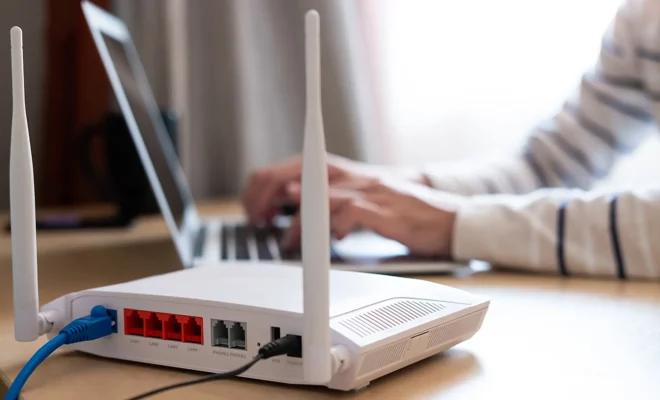
In today’s world, where the internet has become so critical for almost everything, having a fast internet connection is a must. However, the reality is that even the fastest internet connection can slow down if its router is not operating at its optimal speed. Fortunately, there are ways to improve the speed of your Wi-Fi router. Here are some tips to improve your Wi-Fi router speed:

  1. Upgrading the Firmware of the Router

One of the most effective ways of boosting the speed of your Wi-Fi router is to upgrade its firmware. Router manufacturers release regular firmware updates that include bug fixes, feature improvements, and security patches. These updates can significantly enhance the router’s performance and bring the latest standards, making it faster and efficient. Check your router’s user manual or get in touch with the manufacturer to know more about the firmware upgrade process.

  1. Finding the Right Spot for Your Router

The location of the router can have a significant impact on the speed and range of the Wi-Fi signal. Place the router in a central position in the house, avoiding metallic objects and walls if possible. Obstructions such as thick walls or furniture can block the signal, resulting in weak signals and slow speed. Placing the router high up (on a bookshelf or a closet) and away from the ground also helps in boosting the signal.

  1. Change Wi-Fi Channel Settings

The most common reason for slow Wi-Fi speeds is interference from other networks sharing the same channel. Change the channel settings of your router to avoid interference from other networks. You can use apps like Wi-Fi Analyzer to check how crowded each Wi-Fi channel is and choose the least crowded one.

  1. Use a Stronger Antenna

Most Wi-Fi routers come with an internal antenna. Using an external antenna can significantly improve signal strength and range, translating into higher speeds for your Wi-Fi network. Consider purchasing a high gain or directional antenna that can focus the signal in one direction and increase the range of your connection.

  1. Enable Quality of Service (QoS)

QoS is a feature that allows the router to give priority to specific traffic types, ultimately optimizing network performance. By enabling QoS, you can prioritize critical tasks such as video conferencing, streaming, or gaming, to ensure they receive sufficient bandwidth.

  1. Invest in a Mesh Network System

If you have a large house or a sprawling office, a mesh network system can be an excellent investment. It uses multiple nodes or access points placed at various locations to provide a seamless Wi-Fi experience across the area. Each node acts as a Wi-Fi enhancer and helps in optimizing network performance by evenly distributing the load.

Previous Article

What You Must Know About Rooting Your ...

Next Article

Best Apps for Tracking Your New Teen ...

Matthew Lynch

Related articles More from author

  • Assistive Technology

    How to Unfreeze a Mac

    June 9, 2023
    By Matthew Lynch
  • Assistive Technology

    How to Fix Windows Update Error 0x80070426

    June 12, 2023
    By Matthew Lynch
  • Assistive Technology

    How to Rebuild the BCD in Windows

    June 7, 2023
    By Matthew Lynch
  • Assistive Technology

    Is Your Network Secure? 5 Ways to Check Your Internet Connection

    June 6, 2023
    By Matthew Lynch
  • Assistive Technology

    How to Use a Trackball Mouse

    June 15, 2023
    By Matthew Lynch
  • Assistive Technology

    How Old Is Your Gmail Account? Check the Exact Date It Was Created

    June 21, 2023
    By Matthew Lynch

Search

Login & Registration

  • Log in
  • Entries feed
  • Comments feed
  • WordPress.org

Newsletter

Signup for The Tech Edvocate Newsletter and have the latest in EdTech news and opinion delivered to your email address!

About Us

Since technology is not going anywhere and does more good than harm, adapting is the best course of action. That is where The Tech Edvocate comes in. We plan to cover the PreK-12 and Higher Education EdTech sectors and provide our readers with the latest news and opinion on the subject. From time to time, I will invite other voices to weigh in on important issues in EdTech. We hope to provide a well-rounded, multi-faceted look at the past, present, the future of EdTech in the US and internationally.

We started this journey back in June 2016, and we plan to continue it for many more years to come. I hope that you will join us in this discussion of the past, present and future of EdTech and lend your own insight to the issues that are discussed.

Newsletter

Signup for The Tech Edvocate Newsletter and have the latest in EdTech news and opinion delivered to your email address!

Contact Us

The Tech Edvocate
910 Goddin Street
Richmond, VA 23231
(601) 630-5238
[email protected]

Copyright © 2026 Matthew Lynch. All rights reserved.