The Tech Edvocate

Top Menu

  • Advertisement
  • Apps
  • Home Page
  • Home Page Five (No Sidebar)
  • Home Page Four
  • Home Page Three
  • Home Page Two
  • Home Tech2
  • Icons [No Sidebar]
  • Left Sidbear Page
  • Lynch Educational Consulting
  • My Account
  • My Speaking Page
  • Newsletter Sign Up Confirmation
  • Newsletter Unsubscription
  • Our Brands
  • Page Example
  • Privacy Policy
  • Protected Content
  • Register
  • Request a Product Review
  • Shop
  • Shortcodes Examples
  • Signup
  • Start Here
    • Governance
    • Careers
    • Contact Us
  • Terms and Conditions
  • The Edvocate
  • The Tech Edvocate Product Guide
  • Topics
  • Write For Us
  • Advertise

Main Menu

  • Start Here
    • Our Brands
    • Governance
      • Lynch Educational Consulting, LLC.
      • Dr. Lynch’s Personal Website
      • Careers
    • Write For Us
    • The Tech Edvocate Product Guide
    • Contact Us
    • Books
    • Edupedia
    • Post a Job
    • The Edvocate Podcast
    • Terms and Conditions
    • Privacy Policy
  • Topics
    • Assistive Technology
    • Child Development Tech
    • Early Childhood & K-12 EdTech
    • EdTech Futures
    • EdTech News
    • EdTech Policy & Reform
    • EdTech Startups & Businesses
    • Higher Education EdTech
    • Online Learning & eLearning
    • Parent & Family Tech
    • Personalized Learning
    • Product Reviews
  • Advertise
  • Tech Edvocate Awards
  • The Edvocate
  • Pedagogue
  • School Ratings

logo

The Tech Edvocate

  • Start Here
    • Our Brands
    • Governance
      • Lynch Educational Consulting, LLC.
      • Dr. Lynch’s Personal Website
        • My Speaking Page
      • Careers
    • Write For Us
    • The Tech Edvocate Product Guide
    • Contact Us
    • Books
    • Edupedia
    • Post a Job
    • The Edvocate Podcast
    • Terms and Conditions
    • Privacy Policy
  • Topics
    • Assistive Technology
    • Child Development Tech
    • Early Childhood & K-12 EdTech
    • EdTech Futures
    • EdTech News
    • EdTech Policy & Reform
    • EdTech Startups & Businesses
    • Higher Education EdTech
    • Online Learning & eLearning
    • Parent & Family Tech
    • Personalized Learning
    • Product Reviews
  • Advertise
  • Tech Edvocate Awards
  • The Edvocate
  • Pedagogue
  • School Ratings
  • The Brutal Truth: Why 12 Million Users Couldn’t Save Character.AI From Bankruptcy

  • Unbelievable: AI Agent Swarms Are Hacking Half the Internet — Here’s What You Need to Know

  • The Chilling Truth: AI Cyber Attacks Are Here, And We’re Not Ready

  • Unveiling the Hidden Threat: How AI Disruption in Banking Could Reshape Your Financial Future

  • Cazinourile online nou lansate: cum sunt prezentate și actualizate informațiile despre promoții

  • Autonomous Ransomware AI Agents Are Here — And They’re Targeting Your Power Grid

  • Unprecedented: This One Thing Is Crushing Major AI Investments

  • Rotirile gratuite fără depunere: activarea rundelor și creditarea câștigurilor

  • The Astonishing Reason Millions Are Ditching Old Finance Education for This New Method

  • Why Your Bank Account Needs These 7 Gamified Money Apps Right Now

Early Childhood & K-12 EdTechGoogle ClassroomHigher EducationHigher Education EdTech
Home›Early Childhood & K-12 EdTech›Using the Google Classroom Comment Bank

Using the Google Classroom Comment Bank
By Matthew Lynch
September 14, 2018
0
Spread the love

Providing feedback to students is an important part of teaching and learning. Students must receive feedback in a timely manner in order to work towards achieving a learning goal. Providing feedback through the Google Classroom grading tool streamlines the feedback process for teachers and students. Within the grading tool, teachers are able to switch between grades, comments, and submitted work as well as save frequently used comments in the comment bank for future use. This is a huge time saver, especially when the same comment is used for more than one student or for more than one assignment.

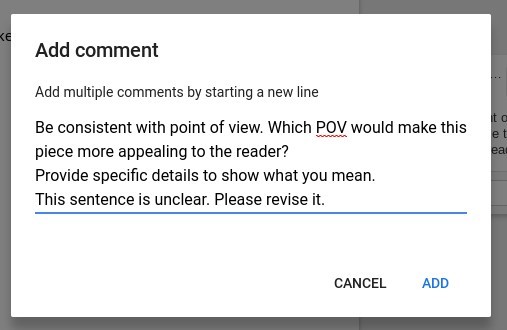
Comments can be added to the comment bank in two ways. The first method allows teachers to copy a comment which was previously added to a student’s work to the comment bank. The second method allows teachers to create comments directly in the comment bank for future use. The initial step for both methods is to access a student assignment with the grading tool.

Method 1 – Copy Comments from Student Work

All Google tools allow the user to insert a comment using the Insert menu; therefore, teachers can also use this feature to insert comments into work submitted by students in Google Classroom. After inserting a comment into student work, the comment can be added to the comment bank for use when grading other assignments in the future. Simply click the triple dot menu in the comment box and select “add to comment bank” from the dropdown menu.
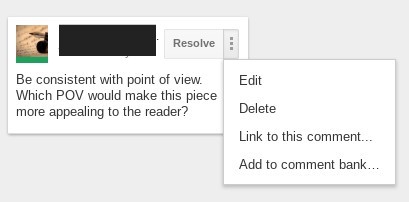
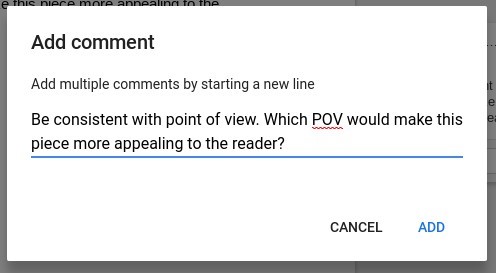
At the Add Comment dialogue box, click “add” for the comment to appear in the comment bank.
Method 2 – Enter Comment Directly

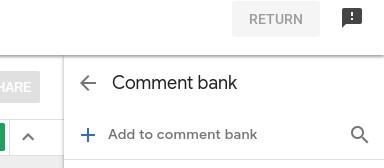
Comments can also be directly added to the comment bank. Once a student assignment has been opened in the grading tool, open the comment bank from the top right-hand corner of the screen.
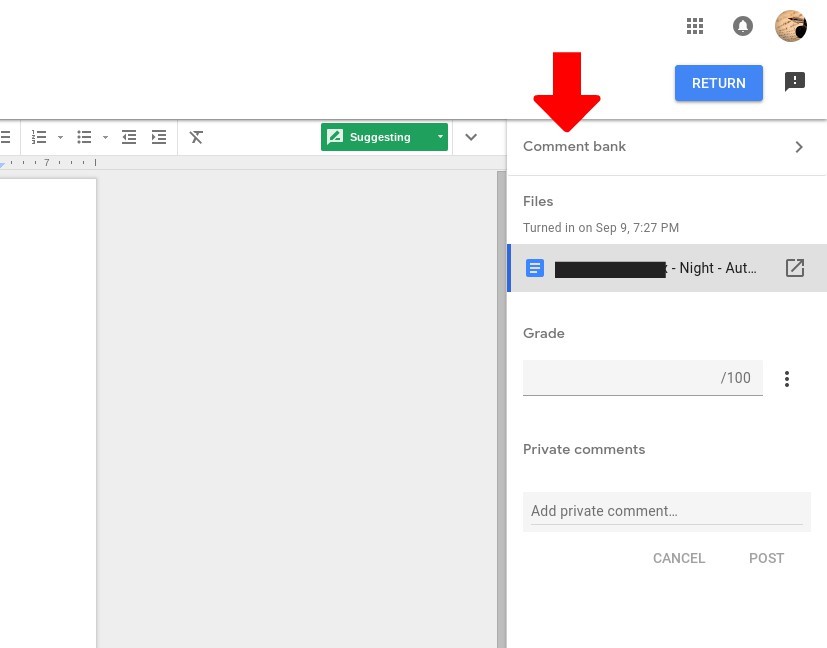
Click the plus sign to add a comment to the bank from the Add Comment dialogue box. Multiple comments can be added by hitting the enter key between comments.
 

Inserting Comments from the Comment Bank

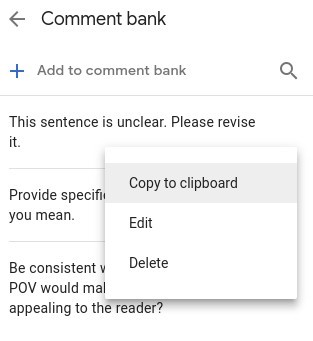
To insert comments from the comment bank, click the triple dot menu next to the chosen comment, and copy it to the clipboard. Place the cursor in the area of the student assignment where the comment should be inserted. Access the Insert comment feature either from the main menu or by right-clicking. Paste the comment into the dialogue box.
Other Comment Bank Features

  • Search Bar – After several comments are added to the comment bank, users may find it difficult to locate specific comments. Type key words into the search bar to access the comment needed.
  • Edit or Delete Comments – Accessing the triple dot menu next to comments allows the user to edit or delete comments. Comments can also be edited or deleted from the Comment Manager.
  • Comment Manager – Users can access the Comment Manager by navigating to https://classroom.google.com/g/cm.
  • Private Comments – Users can add private comments to assignments. The private comment option is located under the comment bank at the bottom right-hand corner of the grading tool.




Previous Article

We Need to End the War Between ...

Next Article

Using Twitter Chats for Teacher Professional Development

Matthew Lynch

Related articles More from author

  • Early Childhood & K-12 EdTech

    STEM to STEAM: More Than Just a Good Idea

    December 25, 2016
    By Matthew Lynch
  • Early Childhood & K-12 EdTechEdTech Policy & ReformHigher Education EdTechOnline Learning & eLearning

    Online students need more face-to-face time, not less

    June 23, 2016
    By Matthew Lynch
  • Early Childhood & K-12 EdTechEdTech Startups & Businesses

    Plagiarism Concerns Are Prevalent Among US Students

    July 12, 2016
    By Matthew Lynch
  • EdTech NewsHigher Education EdTech

    Schools must get the basics right before splashing out on technology

    June 27, 2016
    By Matthew Lynch
  • Early Childhood & K-12 EdTech

    8 Attributes of Successful Schools in the Digital Age

    July 22, 2018
    By Matthew Lynch
  • Adaptive LearningCurriculum & InstructionDigital & Mobile TechnologyDigital Age TeachersEarly Childhood & K-12 EdTechEdTech & InnovationEdTech Policy & ReformInstructional Technology

    Exploring New Ideas: Student-Driven Remote Learning

    July 21, 2021
    By Matthew Lynch

Search

Login & Registration

  • Log in
  • Entries feed
  • Comments feed
  • WordPress.org

Newsletter

Signup for The Tech Edvocate Newsletter and have the latest in EdTech news and opinion delivered to your email address!

About Us

Since technology is not going anywhere and does more good than harm, adapting is the best course of action. That is where The Tech Edvocate comes in. We plan to cover the PreK-12 and Higher Education EdTech sectors and provide our readers with the latest news and opinion on the subject. From time to time, I will invite other voices to weigh in on important issues in EdTech. We hope to provide a well-rounded, multi-faceted look at the past, present, the future of EdTech in the US and internationally.

We started this journey back in June 2016, and we plan to continue it for many more years to come. I hope that you will join us in this discussion of the past, present and future of EdTech and lend your own insight to the issues that are discussed.

Newsletter

Signup for The Tech Edvocate Newsletter and have the latest in EdTech news and opinion delivered to your email address!

Contact Us

The Tech Edvocate
910 Goddin Street
Richmond, VA 23231
(601) 630-5238
[email protected]

Copyright © 2026 Matthew Lynch. All rights reserved.