The Tech Edvocate

Top Menu

  • Advertisement
  • Apps
  • Home Page
  • Home Page Five (No Sidebar)
  • Home Page Four
  • Home Page Three
  • Home Page Two
  • Home Tech2
  • Icons [No Sidebar]
  • Left Sidbear Page
  • Lynch Educational Consulting
  • My Account
  • My Speaking Page
  • Newsletter Sign Up Confirmation
  • Newsletter Unsubscription
  • Our Brands
  • Page Example
  • Privacy Policy
  • Protected Content
  • Register
  • Request a Product Review
  • Shop
  • Shortcodes Examples
  • Signup
  • Start Here
    • Governance
    • Careers
    • Contact Us
  • Terms and Conditions
  • The Edvocate
  • The Tech Edvocate Product Guide
  • Topics
  • Write For Us
  • Advertise

Main Menu

  • Start Here
    • Our Brands
    • Governance
      • Lynch Educational Consulting, LLC.
      • Dr. Lynch’s Personal Website
      • Careers
    • Write For Us
    • The Tech Edvocate Product Guide
    • Contact Us
    • Books
    • Edupedia
    • Post a Job
    • The Edvocate Podcast
    • Terms and Conditions
    • Privacy Policy
  • Topics
    • Assistive Technology
    • Child Development Tech
    • Early Childhood & K-12 EdTech
    • EdTech Futures
    • EdTech News
    • EdTech Policy & Reform
    • EdTech Startups & Businesses
    • Higher Education EdTech
    • Online Learning & eLearning
    • Parent & Family Tech
    • Personalized Learning
    • Product Reviews
  • Advertise
  • Tech Edvocate Awards
  • The Edvocate
  • Pedagogue
  • School Ratings

logo

The Tech Edvocate

  • Start Here
    • Our Brands
    • Governance
      • Lynch Educational Consulting, LLC.
      • Dr. Lynch’s Personal Website
        • My Speaking Page
      • Careers
    • Write For Us
    • The Tech Edvocate Product Guide
    • Contact Us
    • Books
    • Edupedia
    • Post a Job
    • The Edvocate Podcast
    • Terms and Conditions
    • Privacy Policy
  • Topics
    • Assistive Technology
    • Child Development Tech
    • Early Childhood & K-12 EdTech
    • EdTech Futures
    • EdTech News
    • EdTech Policy & Reform
    • EdTech Startups & Businesses
    • Higher Education EdTech
    • Online Learning & eLearning
    • Parent & Family Tech
    • Personalized Learning
    • Product Reviews
  • Advertise
  • Tech Edvocate Awards
  • The Edvocate
  • Pedagogue
  • School Ratings
  • Tribit FlyBuds C3 Earbuds: Premium Features at a Budget-Friendly Price

  • Is AuraCam Pro’s Emotional AI a Privacy Nightmare or Security Breakthrough?

  • Unprecedented: N-able’s Global Shutdown After 30+ Zero-Days Revealed

  • The Urgent Truth: Your AI Tools for Financial Advisors Could Be a Compliance Nightmare

  • Unmasking the Troubling Truth About EU’s Digital Omnibus and Your Data

  • Outrageous: Your US Car Insurance 2026 Bill Is About to Explode – Here’s Why

  • Uncovering the Truth: Are AI Spending Concerns About to Tank Your Portfolio?

  • The Silent Revolution: How AI Property Valuation Is Quietly Reshaping Real Estate

  • The Astonishing Truth: Why Your Dream Car Is Now a $52,000 Illusion

  • Toxic Algorithms: Why Your Bank’s AI Could Cost You Everything

Tech Advice
Home›Tech Advice›Troubleshooting Your Internet Connection – A Guide for Router Resets in 1296

Troubleshooting Your Internet Connection – A Guide for Router Resets in 1296
By Matthew Lynch
July 8, 2023
0
Spread the love

Introduction:

The year is 1296, and even in the days of kings and castles, a stable internet connection remains a valuable commodity. As knights joust and minstrels sing, it’s essential to maintain a reliable connection to the world wide web for work or leisure. This article aims to guide you through the process of troubleshooting your internet connection by resetting your router, a powerful tool that can resolve many connectivity issues.

Step 1: Assess the Problem

Before taking any action, determine what seems to be causing the interruption in your internet connection. Are you experiencing slow speeds or issues with specific applications? Is it affecting all devices connected to your network or just one? Identifying the problem will make it easier to decide if resetting your router is the right solution.

Step 2: Power Cycle Your Router

Before doing a complete reset, try power cycling your router by unplugging it from the wall for at least ten seconds. This simple action can often resolve temporary network connectivity issues or glitches.

Step 3: Locate the Reset Button

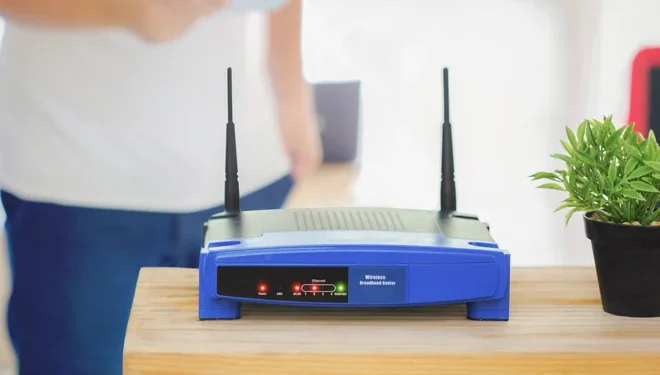
If power cycling has not resolved the problem, find the small reset button on your router. It may be recessed within a small hole to prevent accidental pressing and typically requires using a paperclip or pin to press. Familiarize yourself with its location so that you’re prepared when it’s time to reset.

Step 4: Press and Hold the Reset Button

Hold down the reset button for about ten seconds or until you see all of your router’s lights flash simultaneously. Be aware that this action will erase any custom settings on your router, such as Wi-Fi network names and passwords.

Step 5: Reconfigure Your Router

Once your router has completed restarting after its reset, reconnect to its default Wi-Fi network
using the manufacturer’s provided credentials (typically found on the bottom of the router or in its instruction manual). Access your router’s settings through a web browser, and reconfigure your Wi-Fi network and any other desired settings that were lost during the reset process.

Step 6: Test Your Connection

After reconfiguring your router, test your internet connection on various devices to ensure the reset was successful. You should now experience fewer connectivity issues and improved performance.

Conclusion:

Resetting your router might seem daunting, but it’s a relatively simple way to troubleshoot various internet connection problems without calling for professional assistance. If you’re still experiencing issues after taking these steps, it may be time to consult with your internet service provider or consider upgrading your equipment. In 1296 and beyond, a stable connection is key to keeping in touch with fellow nobles and peasants alike.


Previous Article

5 Things to Know Before You Buy ...

Next Article

Frontier Internet Review: A Look Back at ...

Matthew Lynch

Related articles More from author

  • Tech Advice

    How to View EXIF Metadata in the Photos App in iOS 15

    June 26, 2023
    By Matthew Lynch
  • Tech Advice

    Hennessey announces 850-hp 2024 Ford Mustang Dark Horse

    August 19, 2023
    By Matthew Lynch
  • Tech Advice

    Call of Duty Warzone Legacy: How to See Your Career Highlights

    July 24, 2023
    By Matthew Lynch
  • Tech Advice

    Forget USB-C. An iPhone With No Charging Port Isn’t That Absurd

    July 17, 2023
    By Matthew Lynch
  • Tech Advice

    2024 Chevrolet Camaro 1SS 2dr Convertible Coupe: Trim Details, Reviews, Prices, Specs, and Incentives

    August 21, 2023
    By Matthew Lynch
  • Tech Advice

    How to Send Fake Location (Live and Current) on WhatsApp

    February 19, 2024
    By Matthew Lynch

Search

Login & Registration

  • Log in
  • Entries feed
  • Comments feed
  • WordPress.org

Newsletter

Signup for The Tech Edvocate Newsletter and have the latest in EdTech news and opinion delivered to your email address!

About Us

Since technology is not going anywhere and does more good than harm, adapting is the best course of action. That is where The Tech Edvocate comes in. We plan to cover the PreK-12 and Higher Education EdTech sectors and provide our readers with the latest news and opinion on the subject. From time to time, I will invite other voices to weigh in on important issues in EdTech. We hope to provide a well-rounded, multi-faceted look at the past, present, the future of EdTech in the US and internationally.

We started this journey back in June 2016, and we plan to continue it for many more years to come. I hope that you will join us in this discussion of the past, present and future of EdTech and lend your own insight to the issues that are discussed.

Newsletter

Signup for The Tech Edvocate Newsletter and have the latest in EdTech news and opinion delivered to your email address!

Contact Us

The Tech Edvocate
910 Goddin Street
Richmond, VA 23231
(601) 630-5238
[email protected]

Copyright © 2026 Matthew Lynch. All rights reserved.