The Tech Edvocate

Top Menu

  • Advertisement
  • Apps
  • Home Page
  • Home Page Five (No Sidebar)
  • Home Page Four
  • Home Page Three
  • Home Page Two
  • Home Tech2
  • Icons [No Sidebar]
  • Left Sidbear Page
  • Lynch Educational Consulting
  • My Account
  • My Speaking Page
  • Newsletter Sign Up Confirmation
  • Newsletter Unsubscription
  • Our Brands
  • Page Example
  • Privacy Policy
  • Protected Content
  • Register
  • Request a Product Review
  • Shop
  • Shortcodes Examples
  • Signup
  • Start Here
    • Governance
    • Careers
    • Contact Us
  • Terms and Conditions
  • The Edvocate
  • The Tech Edvocate Product Guide
  • Topics
  • Write For Us
  • Advertise

Main Menu

  • Start Here
    • Our Brands
    • Governance
      • Lynch Educational Consulting, LLC.
      • Dr. Lynch’s Personal Website
      • Careers
    • Write For Us
    • The Tech Edvocate Product Guide
    • Contact Us
    • Books
    • Edupedia
    • Post a Job
    • The Edvocate Podcast
    • Terms and Conditions
    • Privacy Policy
  • Topics
    • Assistive Technology
    • Child Development Tech
    • Early Childhood & K-12 EdTech
    • EdTech Futures
    • EdTech News
    • EdTech Policy & Reform
    • EdTech Startups & Businesses
    • Higher Education EdTech
    • Online Learning & eLearning
    • Parent & Family Tech
    • Personalized Learning
    • Product Reviews
  • Advertise
  • Tech Edvocate Awards
  • The Edvocate
  • Pedagogue
  • School Ratings

logo

The Tech Edvocate

  • Start Here
    • Our Brands
    • Governance
      • Lynch Educational Consulting, LLC.
      • Dr. Lynch’s Personal Website
        • My Speaking Page
      • Careers
    • Write For Us
    • The Tech Edvocate Product Guide
    • Contact Us
    • Books
    • Edupedia
    • Post a Job
    • The Edvocate Podcast
    • Terms and Conditions
    • Privacy Policy
  • Topics
    • Assistive Technology
    • Child Development Tech
    • Early Childhood & K-12 EdTech
    • EdTech Futures
    • EdTech News
    • EdTech Policy & Reform
    • EdTech Startups & Businesses
    • Higher Education EdTech
    • Online Learning & eLearning
    • Parent & Family Tech
    • Personalized Learning
    • Product Reviews
  • Advertise
  • Tech Edvocate Awards
  • The Edvocate
  • Pedagogue
  • School Ratings
  • Philippines Sees 1% Drop in External Debt Amid Rising Fuel Prices and Global Economic Tensions

  • Stability in Fuel Prices Amid Global Turmoil: What You Need to Know

  • Nifty 50 Plummets Amid Escalating Middle East Tensions and Oil Price Volatility

  • Crude Oil Prices Surge as Tensions Rise Over Iran Threats

  • China’s Economic Resilience in Early 2026 Amid Global Turbulence

  • Revolutionizing Entrepreneurship: The Rise of One-Person Startups in China Using AI

  • Bold Secures $40 Million to Revolutionize AI-Driven Cybersecurity Solutions

  • Breaking Through the Noise: Google and Accel India Select Promising Startups Beyond AI ‘Wrappers’

  • Accel and Google’s AI Futures Fund Highlights Innovation with 2026 Atoms AI Cohort

  • Capital Shifts: The New Wave of Startup Investments in AI and Robotics

Online Learning & eLearning
Home›Online Learning & eLearning›Top 8 Ways to Fix Process System Isn’t Responding on Android

Top 8 Ways to Fix Process System Isn’t Responding on Android
By Matthew Lynch
May 28, 2023
0
Spread the love

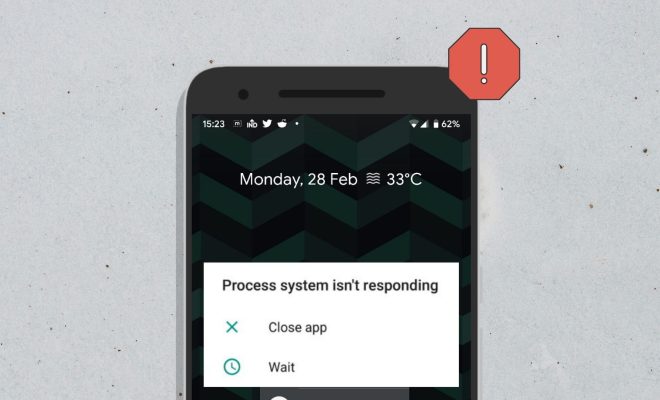
Android users may have experienced the issue of “process system isn’t responding” at least once while using their phones. This error message indicates that the Android system has crashed, and the phone is unable to function correctly, including running apps or accessing important files or data. There are several reasons why the process system isn’t responding message pops up, including the overheating of the phone or a software glitch. However, this error is fixable, and in this article, we’ll be looking at the top 8 ways to fix process system isn’t responding on Android.

1. Restart Your Phone:

The easiest and most effective way to fix the process system isn’t responding on Android is by restarting your phone. Press and hold the power button until your phone turns off, and then turn it back on.

2. Clear Cache:

Clearing your phone’s cache can also help fix the process system isn’t responding error. To do this, go to “Settings,” then “Storage,” and tap on “Cache.” A prompt will come up, and you can select “OK” to clear the cache.

3. Uninstall Third-Party Apps:

The process system isn’t responding error could be caused by a glitch in a third-party app. Try uninstalling any recently installed apps or apps that you don’t use often to see if the error resolves.

4. Turn Off Background Processes:

Another way to fix this error is by turning off background processes. This can be done by going to “Settings,” and then selecting “Developer Options.” Look for the option to “Limit Background Processes,” and select “No Background Processes.”

5. Check For App Updates:

Sometimes, the process system isn’t responding issue can be caused by outdated apps. Make sure all your apps are up-to-date by going to the Google Play Store and checking for updates.

6. Reset App Preferences:

Resetting app preferences can help fix the process system isn’t responding error. To do this, go to “Settings,” then “Apps.” Select the three-dot menu, and then select “Reset App Preferences.”

7. Factory Reset:

If none of the previous solutions work, consider doing a factory reset. This will erase all data from your phone and restore it to its original settings. Always make sure to back up your data before doing a factory reset.

8. Contact Customer Support:

If you’ve tried all the above solutions and still experience the process system isn’t responding error, contact your phone’s customer support. They may have further solutions or suggest that you bring your phone in for repairs.

In conclusion, the process system isn’t responding error can be frustrating, but it is fixable. Try the above solutions to get your phone back to functioning correctly. It’s essential to always back up your data and take your time to ensure that the solutions you try are safe for your phone.


Previous Article

Top 8 Ways to Fix Outlook Not ...

Next Article

How to Enable “Stereo Mix” in Windows ...

Matthew Lynch

Related articles More from author

  • Online Learning & eLearning

    Top 6 Ways to Fix Google App Battery Drain on Android

    April 2, 2023
    By Matthew Lynch
  • Online Learning & eLearning

    6 Elements That Hinder The User-Friendliness Of Your Online Training

    December 27, 2019
    By Matthew Lynch
  • Online Learning & eLearning

    How Community Colleges Solve Remote Learning Challenges

    December 15, 2020
    By Matthew Lynch
  • Online Learning & eLearning

    Top 7 Ways to Fix YouTube Not Working on a Samsung TV

    April 3, 2023
    By Matthew Lynch
  • Online Learning & eLearning

    7 Benefits of Cloud Based Elearning

    March 11, 2018
    By Matthew Lynch
  • Online Learning & eLearning

    Online Classes that Teach Science, Technology, Engineering, and Math Skills

    August 25, 2022
    By Matthew Lynch

Search

Login & Registration

  • Register
  • Log in
  • Entries feed
  • Comments feed
  • WordPress.org

Newsletter

Signup for The Tech Edvocate Newsletter and have the latest in EdTech news and opinion delivered to your email address!

About Us

Since technology is not going anywhere and does more good than harm, adapting is the best course of action. That is where The Tech Edvocate comes in. We plan to cover the PreK-12 and Higher Education EdTech sectors and provide our readers with the latest news and opinion on the subject. From time to time, I will invite other voices to weigh in on important issues in EdTech. We hope to provide a well-rounded, multi-faceted look at the past, present, the future of EdTech in the US and internationally.

We started this journey back in June 2016, and we plan to continue it for many more years to come. I hope that you will join us in this discussion of the past, present and future of EdTech and lend your own insight to the issues that are discussed.

Newsletter

Signup for The Tech Edvocate Newsletter and have the latest in EdTech news and opinion delivered to your email address!

Contact Us

The Tech Edvocate
910 Goddin Street
Richmond, VA 23231
(601) 630-5238
[email protected]

Copyright © 2025 Matthew Lynch. All rights reserved.