The Tech Edvocate

Top Menu

  • Advertisement
  • Apps
  • Home Page
  • Home Page Five (No Sidebar)
  • Home Page Four
  • Home Page Three
  • Home Page Two
  • Home Tech2
  • Icons [No Sidebar]
  • Left Sidbear Page
  • Lynch Educational Consulting
  • My Account
  • My Speaking Page
  • Newsletter Sign Up Confirmation
  • Newsletter Unsubscription
  • Our Brands
  • Page Example
  • Privacy Policy
  • Protected Content
  • Register
  • Request a Product Review
  • Shop
  • Shortcodes Examples
  • Signup
  • Start Here
    • Governance
    • Careers
    • Contact Us
  • Terms and Conditions
  • The Edvocate
  • The Tech Edvocate Product Guide
  • Topics
  • Write For Us
  • Advertise

Main Menu

  • Start Here
    • Our Brands
    • Governance
      • Lynch Educational Consulting, LLC.
      • Dr. Lynch’s Personal Website
      • Careers
    • Write For Us
    • The Tech Edvocate Product Guide
    • Contact Us
    • Books
    • Edupedia
    • Post a Job
    • The Edvocate Podcast
    • Terms and Conditions
    • Privacy Policy
  • Topics
    • Assistive Technology
    • Child Development Tech
    • Early Childhood & K-12 EdTech
    • EdTech Futures
    • EdTech News
    • EdTech Policy & Reform
    • EdTech Startups & Businesses
    • Higher Education EdTech
    • Online Learning & eLearning
    • Parent & Family Tech
    • Personalized Learning
    • Product Reviews
  • Advertise
  • Tech Edvocate Awards
  • The Edvocate
  • Pedagogue
  • School Ratings

logo

The Tech Edvocate

  • Start Here
    • Our Brands
    • Governance
      • Lynch Educational Consulting, LLC.
      • Dr. Lynch’s Personal Website
        • My Speaking Page
      • Careers
    • Write For Us
    • The Tech Edvocate Product Guide
    • Contact Us
    • Books
    • Edupedia
    • Post a Job
    • The Edvocate Podcast
    • Terms and Conditions
    • Privacy Policy
  • Topics
    • Assistive Technology
    • Child Development Tech
    • Early Childhood & K-12 EdTech
    • EdTech Futures
    • EdTech News
    • EdTech Policy & Reform
    • EdTech Startups & Businesses
    • Higher Education EdTech
    • Online Learning & eLearning
    • Parent & Family Tech
    • Personalized Learning
    • Product Reviews
  • Advertise
  • Tech Edvocate Awards
  • The Edvocate
  • Pedagogue
  • School Ratings
  • A Visitor’s Guide to Fresno (CA), United States

  • A Visitors Guide to New Orleans (LA), United States

  • A Visitors Guide to Sacramento (CA), United States

  • A Visitors Guide to Lyon, France

  • JisuLife Ultra2 Portable Fan: A Powerful Multi-Function Cooling Solution

  • A Visitors Guide to Viña del Mar, Chile

  • A Visitors Guide to Århus, Denmark

  • A Visitors Guide to Bakersfield (CA), United States

  • A Visitors Guide to Aurora (CO), United States

  • A Visitor’s Guide to Toledo (OH), United States

Online Learning & eLearning
Home›Online Learning & eLearning›Top 7 Ways to Fix Outlook Not Receiving Emails from Gmail on Windows

Top 7 Ways to Fix Outlook Not Receiving Emails from Gmail on Windows
By Matthew Lynch
April 3, 2023
0
Spread the love

Outlook is one of the most popular email clients used by people all around the world. It is a powerful and feature-rich application that enables users to manage their emails, contacts, and calendars in one place. However, sometimes Outlook may encounter issues and fail to receive emails from Gmail on Windows. If you are facing this problem, then here are some of the top ways to fix it:

1. Check Gmail Server Status

The first thing you should do is to check the Gmail server status. Sometimes, there may be an outage in the Gmail server that can cause email delivery issues. You can check the Gmail status by visiting the Google Workspace Status Dashboard.

2. Verify IMAP Settings

Make sure that the IMAP settings in your Gmail account are correct. IMAP is the protocol used for email retrieval by Outlook. If the IMAP settings are incorrect, then it may cause issues with email delivery. To verify the IMAP settings, go to Gmail settings, and then click on Forwarding and POP/IMAP.

3. Check Outlook Settings

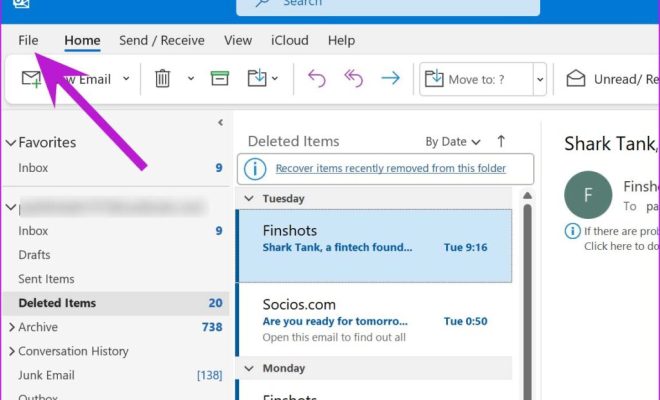
Make sure that the Outlook settings are configured correctly. You can check the settings by going to File > Account Settings > Account Settings > Email > Change. Make sure that the incoming and outgoing mail servers are set to imap.gmail.com and smtp.gmail.com respectively.

4. Check Antivirus and Firewall Settings

Sometimes, the antivirus and firewall settings on your computer can block the incoming emails. You can try disabling the antivirus and firewall temporarily and check if the emails are being received in Outlook.

5. Remove and Re-add Gmail Account

If the above methods do not work, you can try removing and re-adding your Gmail account in Outlook. To do this, go to File > Account Settings > Account Settings > Email > Remove. After removing the account, add it back in by clicking on the New button.

6. Use Webmail Interface

If none of the above methods work, then you can try using the webmail interface to check your Gmail account. You can log in to your Gmail account using the webmail interface and check if the emails are being received.

7. Contact Gmail Support

If you are still unable to receive emails from Gmail on Outlook, then you can contact Gmail support for further assistance. Google has an excellent customer support team that can help you resolve any issues related to Gmail.

Final Words

Outlook is a powerful email client that is used by millions of people worldwide. However, sometimes it may encounter issues and fail to receive emails from Gmail on Windows. The above methods are some of the top ways to fix this problem. If you are still unable to resolve the issue, then contact Gmail support for further assistance.


Previous Article

Top 7 Ways to Fix Microsoft Store ...

Next Article

Top 7 Ways to Fix SSL Connection ...

Matthew Lynch

Related articles More from author

  • Elementary EducationOnline Learning & eLearning

    Spotify Free vs. Premium: Is Spotify Premium Worth It

    March 30, 2023
    By Matthew Lynch
  • Online Learning & eLearning

    Online Learning Technologies: 5 Transformative Trends

    March 10, 2023
    By Matthew Lynch
  • Online Learning & eLearning

    Videos to Help Learners Understand the Importance of Their Digital Footprint

    October 28, 2020
    By Matthew Lynch
  • Online Learning & eLearning

    YouTube Channels for the History Classroom

    October 14, 2020
    By Matthew Lynch
  • Online Learning & eLearning

    New features in demand for collaboration technology

    March 28, 2023
    By Matthew Lynch
  • Elementary EducationOnline Learning & eLearning

    The Advantages & Disadvantages of Internet Cafes

    March 19, 2023
    By Matthew Lynch

Search

Login & Registration

  • Register
  • Log in
  • Entries feed
  • Comments feed
  • WordPress.org

Newsletter

Signup for The Tech Edvocate Newsletter and have the latest in EdTech news and opinion delivered to your email address!

About Us

Since technology is not going anywhere and does more good than harm, adapting is the best course of action. That is where The Tech Edvocate comes in. We plan to cover the PreK-12 and Higher Education EdTech sectors and provide our readers with the latest news and opinion on the subject. From time to time, I will invite other voices to weigh in on important issues in EdTech. We hope to provide a well-rounded, multi-faceted look at the past, present, the future of EdTech in the US and internationally.

We started this journey back in June 2016, and we plan to continue it for many more years to come. I hope that you will join us in this discussion of the past, present and future of EdTech and lend your own insight to the issues that are discussed.

Newsletter

Signup for The Tech Edvocate Newsletter and have the latest in EdTech news and opinion delivered to your email address!

Contact Us

The Tech Edvocate
910 Goddin Street
Richmond, VA 23231
(601) 630-5238
[email protected]

Copyright © 2025 Matthew Lynch. All rights reserved.