The Tech Edvocate

Top Menu

  • Advertisement
  • Apps
  • Home Page
  • Home Page Five (No Sidebar)
  • Home Page Four
  • Home Page Three
  • Home Page Two
  • Home Tech2
  • Icons [No Sidebar]
  • Left Sidbear Page
  • Lynch Educational Consulting
  • My Account
  • My Speaking Page
  • Newsletter Sign Up Confirmation
  • Newsletter Unsubscription
  • Our Brands
  • Page Example
  • Privacy Policy
  • Protected Content
  • Register
  • Request a Product Review
  • Shop
  • Shortcodes Examples
  • Signup
  • Start Here
    • Governance
    • Careers
    • Contact Us
  • Terms and Conditions
  • The Edvocate
  • The Tech Edvocate Product Guide
  • Topics
  • Write For Us
  • Advertise

Main Menu

  • Start Here
    • Our Brands
    • Governance
      • Lynch Educational Consulting, LLC.
      • Dr. Lynch’s Personal Website
      • Careers
    • Write For Us
    • The Tech Edvocate Product Guide
    • Contact Us
    • Books
    • Edupedia
    • Post a Job
    • The Edvocate Podcast
    • Terms and Conditions
    • Privacy Policy
  • Topics
    • Assistive Technology
    • Child Development Tech
    • Early Childhood & K-12 EdTech
    • EdTech Futures
    • EdTech News
    • EdTech Policy & Reform
    • EdTech Startups & Businesses
    • Higher Education EdTech
    • Online Learning & eLearning
    • Parent & Family Tech
    • Personalized Learning
    • Product Reviews
  • Advertise
  • Tech Edvocate Awards
  • The Edvocate
  • Pedagogue
  • School Ratings

logo

The Tech Edvocate

  • Start Here
    • Our Brands
    • Governance
      • Lynch Educational Consulting, LLC.
      • Dr. Lynch’s Personal Website
        • My Speaking Page
      • Careers
    • Write For Us
    • The Tech Edvocate Product Guide
    • Contact Us
    • Books
    • Edupedia
    • Post a Job
    • The Edvocate Podcast
    • Terms and Conditions
    • Privacy Policy
  • Topics
    • Assistive Technology
    • Child Development Tech
    • Early Childhood & K-12 EdTech
    • EdTech Futures
    • EdTech News
    • EdTech Policy & Reform
    • EdTech Startups & Businesses
    • Higher Education EdTech
    • Online Learning & eLearning
    • Parent & Family Tech
    • Personalized Learning
    • Product Reviews
  • Advertise
  • Tech Edvocate Awards
  • The Edvocate
  • Pedagogue
  • School Ratings
  • How to create estimates in Buildertrend

  • How to use Bluebeam for punch lists

  • Procore vs Viewpoint features

  • How to submit invoices in Procore

  • How to set up Monday.com for contractors

  • Can PlanGrid track punch lists

  • How to create selections in CoConstruct

  • How to markup drawings in PlanGrid

  • How to use PlanGrid for blueprints

  • How to create custom tools in Bluebeam

Online Learning & eLearning
Home›Online Learning & eLearning›Top 6 Ways to Fix Unable to Capture Screenshots on Android

Top 6 Ways to Fix Unable to Capture Screenshots on Android
By Matthew Lynch
April 3, 2023
0
Spread the love

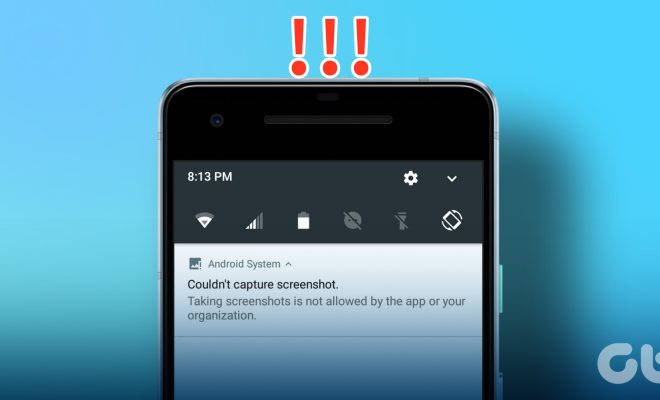
Screenshots are a vital feature of any smartphone since they allow users to capture images or information that they need to save or share with others. However, there are times when users may encounter issues when trying to capture screenshots on their Android devices. If you are facing difficulties with your device not being able to capture screenshots, consider the following six ways to fix it:

1. Restart your device

One of the simplest and most effective ways to resolve most technical issues with Android devices is to restart the phone or tablet. Restarting your device can help resolve temporary bugs, solve glitches with apps running in the background or free up memory to allow you to capture screenshots.

2. Clear the cache of the screenshot app

If you are using an app to take screenshots, then it might keep a cache of previous image captures that might be interfering with your current attempts at taking screenshots. Try clearing the cache of the app in question and see if that resolves the issue.

3. Use the hardware buttons to take screenshots

Most Android devices allow users to capture screenshots by pressing a combination of hardware buttons. Try using your device’s hardware buttons to take screenshots as this might help avoid any software or app-related glitches that are causing the issue.

4. Make sure that the screenshot feature is enabled

Sometimes, users may disable the screenshot feature intentionally or accidentally. If the screenshot feature is not enabled on your device, you will not be able to take screenshots. Go to your device’s settings menu and ensure that the screenshot feature is enabled.

5. Check the storage space on your device

If your device is running low on storage space, you may experience difficulties taking screenshots, among other issues. Check to ensure that your device has sufficient storage space and clear unnecessary files to free up space if necessary.

6. Update your device’s software

Sometimes, issues with taking screenshots can occur due to outdated software. Check to see if there is a new update available for your device and install it if possible. An updated operating system can often fix bugs and glitches and improve device performance, including screenshot functionality.

In conclusion, experiencing issues capturing screenshots on your Android device can be frustrating, but there are various ways to resolve the issue. Try the above-listed solutions one by one until you find the one that works for you. If you still cannot take screenshots after trying these fixes, consider seeking help from a professional or contacting the device manufacturer for further assistance.


Previous Article

Top 6 Ways to Fix There Was ...

Next Article

Top 6 Ways to Fix Unable to ...

Matthew Lynch

Related articles More from author

  • Online Learning & eLearning

    Using Instagram In Your Online Training Program

    January 2, 2024
    By Matthew Lynch
  • Online Learning & eLearning

    How Does a Breadboard Work?

    June 23, 2023
    By Matthew Lynch
  • Online Learning & eLearning

    How to Verify MD5, SHA-1, and SHA-256 Checksum in Windows

    March 26, 2023
    By Matthew Lynch
  • Online Learning & eLearning

    15 Best Online Workout Classes of 2024

    March 13, 2024
    By Matthew Lynch
  • Online Learning & eLearning

    Enlightening Online Tai Chi Classes You Need To Join Right Now

    June 23, 2023
    By Matthew Lynch
  • Online Learning & eLearning

    Online Learning Development Project Plan: 6 Steps To Start Planning

    March 13, 2023
    By Matthew Lynch

Search

Login & Registration

  • Log in
  • Entries feed
  • Comments feed
  • WordPress.org

Newsletter

Signup for The Tech Edvocate Newsletter and have the latest in EdTech news and opinion delivered to your email address!

About Us

Since technology is not going anywhere and does more good than harm, adapting is the best course of action. That is where The Tech Edvocate comes in. We plan to cover the PreK-12 and Higher Education EdTech sectors and provide our readers with the latest news and opinion on the subject. From time to time, I will invite other voices to weigh in on important issues in EdTech. We hope to provide a well-rounded, multi-faceted look at the past, present, the future of EdTech in the US and internationally.

We started this journey back in June 2016, and we plan to continue it for many more years to come. I hope that you will join us in this discussion of the past, present and future of EdTech and lend your own insight to the issues that are discussed.

Newsletter

Signup for The Tech Edvocate Newsletter and have the latest in EdTech news and opinion delivered to your email address!

Contact Us

The Tech Edvocate
910 Goddin Street
Richmond, VA 23231
(601) 630-5238
[email protected]

Copyright © 2026 Matthew Lynch. All rights reserved.