The Tech Edvocate

Top Menu

  • Advertisement
  • Apps
  • Home Page
  • Home Page Five (No Sidebar)
  • Home Page Four
  • Home Page Three
  • Home Page Two
  • Home Tech2
  • Icons [No Sidebar]
  • Left Sidbear Page
  • Lynch Educational Consulting
  • My Account
  • My Speaking Page
  • Newsletter Sign Up Confirmation
  • Newsletter Unsubscription
  • Our Brands
  • Page Example
  • Privacy Policy
  • Protected Content
  • Register
  • Request a Product Review
  • Shop
  • Shortcodes Examples
  • Signup
  • Start Here
    • Governance
    • Careers
    • Contact Us
  • Terms and Conditions
  • The Edvocate
  • The Tech Edvocate Product Guide
  • Topics
  • Write For Us
  • Advertise

Main Menu

  • Start Here
    • Our Brands
    • Governance
      • Lynch Educational Consulting, LLC.
      • Dr. Lynch’s Personal Website
      • Careers
    • Write For Us
    • The Tech Edvocate Product Guide
    • Contact Us
    • Books
    • Edupedia
    • Post a Job
    • The Edvocate Podcast
    • Terms and Conditions
    • Privacy Policy
  • Topics
    • Assistive Technology
    • Child Development Tech
    • Early Childhood & K-12 EdTech
    • EdTech Futures
    • EdTech News
    • EdTech Policy & Reform
    • EdTech Startups & Businesses
    • Higher Education EdTech
    • Online Learning & eLearning
    • Parent & Family Tech
    • Personalized Learning
    • Product Reviews
  • Advertise
  • Tech Edvocate Awards
  • The Edvocate
  • Pedagogue
  • School Ratings

logo

The Tech Edvocate

  • Start Here
    • Our Brands
    • Governance
      • Lynch Educational Consulting, LLC.
      • Dr. Lynch’s Personal Website
        • My Speaking Page
      • Careers
    • Write For Us
    • The Tech Edvocate Product Guide
    • Contact Us
    • Books
    • Edupedia
    • Post a Job
    • The Edvocate Podcast
    • Terms and Conditions
    • Privacy Policy
  • Topics
    • Assistive Technology
    • Child Development Tech
    • Early Childhood & K-12 EdTech
    • EdTech Futures
    • EdTech News
    • EdTech Policy & Reform
    • EdTech Startups & Businesses
    • Higher Education EdTech
    • Online Learning & eLearning
    • Parent & Family Tech
    • Personalized Learning
    • Product Reviews
  • Advertise
  • Tech Edvocate Awards
  • The Edvocate
  • Pedagogue
  • School Ratings
  • Šalutiniai statymai internetiniame kazino: nuo mažos piktogramos iki žaidimo scenos

  • Ko manj podob pove več: kako preprostejša vizualna zgodba spreminja takojšnje igralne igre v spletnih igralnicah

  • Ko domišljija zavrti kolute: fantazijski svetovi sodobnih slotov

  • Πώς τα λογότυπα οργανώνουν την ανακάλυψη στα διαδικτυακά παιχνίδια καζίνο

  • Όταν η ρουλέτα απέκτησε ρυθμό: η εξέλιξη του ζωντανού καζίνο

  • Από το μπόνους στο μεγάλο θέαμα: πώς τα προοδευτικά τζακποτ αλλάζουν τις κουλοχέρηδες του διαδικτυακού καζίνο

  • Keď sa roztočia valce a spustí bonus: dve zvukové tváre online kasín

  • Od tichých valcov k hlasným bonusovým kolám: ako online kasíno rozpráva zvukom

  • Ko se koluti umaknejo bonusu: vizualna hierarhija v spletnih igralnih avtomatih

Online Learning & eLearning
Home›Online Learning & eLearning›Top 6 Ways to Fix Google Nest Hub Not Connecting to Wi-Fi

Top 6 Ways to Fix Google Nest Hub Not Connecting to Wi-Fi
By Matthew Lynch
April 2, 2023
0
Spread the love

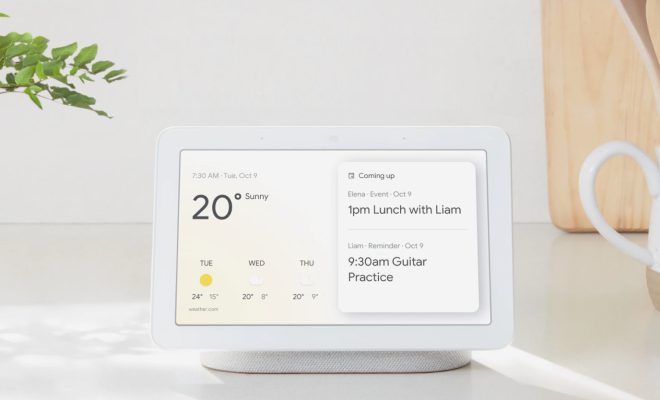
Google Nest Hub is an excellent smart home device that helps users control various home appliances with their voices. However, like any other technological device, it is susceptible to connectivity problems. One of the most common issues users face with the Google Nest Hub is connecting it to Wi-Fi.

The following are the Top 6 ways to fix Google Nest Hub not connecting to Wi-Fi.

1. Check Wi-Fi Network

One of the primary things to do when your Google Nest Hub is not connecting to Wi-Fi is to check the Wi-Fi network. Ensure that the Wi-Fi network is turned on, and the device is within range. Also, ensure that the Wi-Fi network name and password are correctly entered.

2. Ensure Good Wi-Fi Signal

The Google Nest Hub requires a stable Wi-Fi signal to function correctly. Ensure that the signal strength is strong enough to support the device. If the signal strength is poor, try moving the device closer to the router or consider using a Wi-Fi range extender.

3. Restart the Google Nest Hub and Router

Restarting the Google Nest Hub and router is an effective way of resolving connectivity issues. Turn off the Google Nest Hub and unplug it from the power source, then turn off the router and unplug it from the power source for a few minutes. After a few minutes, plug in the router and turn it on, then plug in the Google Nest Hub and turn it on.

4. Forget Wi-Fi Network and Reconnect

In some cases, the Google Nest Hub may not connect to Wi-Fi due to an incorrect Wi-Fi password or other network-related issues. Forgetting the Wi-Fi network on the Google Nest Hub and attempting to reconnect again may help resolve this issue. To forget the Wi-Fi network, select the Wi-Fi network from the Google Nest Hub settings, click “Forget,” and then reconnect again.

5. Reset Google Nest Hub

If all other methods fail to connect the Google Nest Hub to Wi-Fi, consider resetting the device. Resetting the Google Nest Hub will erase all the settings and restore it to the default settings. To reset the device, press and hold the volume down button and the mute button simultaneously for 10 seconds.

6. Contact Google Support

If all the above methods fail to resolve the connectivity issue, contact Google support for further assistance. Google support will help troubleshoot the device and provide solutions to fix the problem.

In conclusion, the Google Nest Hub is a fantastic device that helps make smart homes smarter. However, connection issues may occur from time to time. The Top 6 ways to fix the Google Nest Hub not connecting to Wi-Fi are to check Wi-Fi network, ensure good Wi-Fi signal, restart the Google Nest Hub and router, forget Wi-Fi network and reconnect, reset the Google Nest Hub, and contact Google support. These methods should help fix any connectivity issue and restore the Google Nest Hub to its full functionality.


Previous Article

Top 6 Ways to Fix Facebook Messenger ...

Next Article

Top 6 Ways to Fix Google App ...

Matthew Lynch

Related articles More from author

  • Online Learning & eLearning

    Online Video Teaching And Microlearning Trends

    March 22, 2023
    By Matthew Lynch
  • Online Learning & eLearning

    Things You Can Do With a Broken LCD TV

    April 1, 2023
    By Matthew Lynch
  • Higher EducationOnline Learning & eLearning

    Why Your College Shouldn’t Outsource Its Online Programs

    July 23, 2019
    By Matthew Lynch
  • Online Learning & eLearning

    The Ultimate List Of Free Stock Photos Sites For Online Learning

    March 9, 2023
    By Matthew Lynch
  • AssessmentOnline Learning & eLearning

    Transforming Assessment and Feedback with Technology

    July 4, 2022
    By Matthew Lynch
  • Elementary EducationOnline Learning & eLearning

    The Best Xbox Series X Headset

    March 31, 2023
    By Matthew Lynch

Search

Login & Registration

  • Log in
  • Entries feed
  • Comments feed
  • WordPress.org

Newsletter

Signup for The Tech Edvocate Newsletter and have the latest in EdTech news and opinion delivered to your email address!

About Us

Since technology is not going anywhere and does more good than harm, adapting is the best course of action. That is where The Tech Edvocate comes in. We plan to cover the PreK-12 and Higher Education EdTech sectors and provide our readers with the latest news and opinion on the subject. From time to time, I will invite other voices to weigh in on important issues in EdTech. We hope to provide a well-rounded, multi-faceted look at the past, present, the future of EdTech in the US and internationally.

We started this journey back in June 2016, and we plan to continue it for many more years to come. I hope that you will join us in this discussion of the past, present and future of EdTech and lend your own insight to the issues that are discussed.

Newsletter

Signup for The Tech Edvocate Newsletter and have the latest in EdTech news and opinion delivered to your email address!

Contact Us

The Tech Edvocate
910 Goddin Street
Richmond, VA 23231
(601) 630-5238
[email protected]

Copyright © 2026 Matthew Lynch. All rights reserved.