The Tech Edvocate

Top Menu

  • Advertisement
  • Apps
  • Home Page
  • Home Page Five (No Sidebar)
  • Home Page Four
  • Home Page Three
  • Home Page Two
  • Home Tech2
  • Icons [No Sidebar]
  • Left Sidbear Page
  • Lynch Educational Consulting
  • My Account
  • My Speaking Page
  • Newsletter Sign Up Confirmation
  • Newsletter Unsubscription
  • Our Brands
  • Page Example
  • Privacy Policy
  • Protected Content
  • Register
  • Request a Product Review
  • Shop
  • Shortcodes Examples
  • Signup
  • Start Here
    • Governance
    • Careers
    • Contact Us
  • Terms and Conditions
  • The Edvocate
  • The Tech Edvocate Product Guide
  • Topics
  • Write For Us
  • Advertise

Main Menu

  • Start Here
    • Our Brands
    • Governance
      • Lynch Educational Consulting, LLC.
      • Dr. Lynch’s Personal Website
      • Careers
    • Write For Us
    • The Tech Edvocate Product Guide
    • Contact Us
    • Books
    • Edupedia
    • Post a Job
    • The Edvocate Podcast
    • Terms and Conditions
    • Privacy Policy
  • Topics
    • Assistive Technology
    • Child Development Tech
    • Early Childhood & K-12 EdTech
    • EdTech Futures
    • EdTech News
    • EdTech Policy & Reform
    • EdTech Startups & Businesses
    • Higher Education EdTech
    • Online Learning & eLearning
    • Parent & Family Tech
    • Personalized Learning
    • Product Reviews
  • Advertise
  • Tech Edvocate Awards
  • The Edvocate
  • Pedagogue
  • School Ratings

logo

The Tech Edvocate

  • Start Here
    • Our Brands
    • Governance
      • Lynch Educational Consulting, LLC.
      • Dr. Lynch’s Personal Website
        • My Speaking Page
      • Careers
    • Write For Us
    • The Tech Edvocate Product Guide
    • Contact Us
    • Books
    • Edupedia
    • Post a Job
    • The Edvocate Podcast
    • Terms and Conditions
    • Privacy Policy
  • Topics
    • Assistive Technology
    • Child Development Tech
    • Early Childhood & K-12 EdTech
    • EdTech Futures
    • EdTech News
    • EdTech Policy & Reform
    • EdTech Startups & Businesses
    • Higher Education EdTech
    • Online Learning & eLearning
    • Parent & Family Tech
    • Personalized Learning
    • Product Reviews
  • Advertise
  • Tech Edvocate Awards
  • The Edvocate
  • Pedagogue
  • School Ratings
  • A Visitors Guide to Long Beach (CA), United States

  • A Visitor’s Guide to Fresno (CA), United States

  • A Visitors Guide to New Orleans (LA), United States

  • A Visitors Guide to Sacramento (CA), United States

  • A Visitors Guide to Lyon, France

  • JisuLife Ultra2 Portable Fan: A Powerful Multi-Function Cooling Solution

  • A Visitors Guide to Viña del Mar, Chile

  • A Visitors Guide to Århus, Denmark

  • A Visitors Guide to Bakersfield (CA), United States

  • A Visitors Guide to Aurora (CO), United States

Digital & Mobile Technology
Home›Digital & Mobile Technology›The Pros and Cons of Using Time Machine on Mac

The Pros and Cons of Using Time Machine on Mac
By Matthew Lynch
June 23, 2023
0
Spread the love

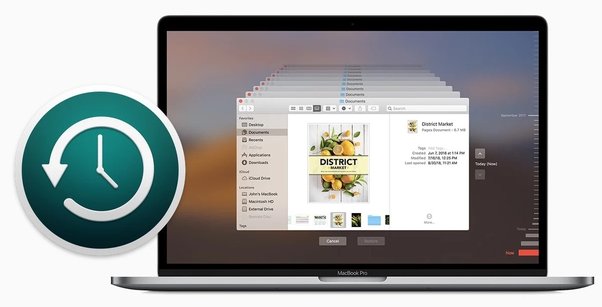
Time Machine is a popular backup software that comes pre-installed on Mac computers. It is designed to help Mac users easily back up, restore, and recover their data in the event of a system failure or accidental deletion. However, like any software, Time Machine has its pros and cons, and it’s essential to evaluate them before deciding whether to use it.

Pros of Using Time Machine on Mac

1. Automatic and Easy To Use: Time Machine is designed to be easy to use and require little to no setup, making it a great choice for users who don’t want to deal with complicated backup procedures. Once you set up Time Machine, it automatically backs up your data at scheduled intervals, allowing you to restore your data quickly.

2. Multiple Backup Options: Time Machine allows you to back up your data to an external hard drive, Time Capsule, or over the network. This flexibility means that you can choose to back up your data the way that suits you best.

3. Historical File Versions: Time Machine creates a historical record of your files, allowing you to restore older versions of your data. This feature can be beneficial in case of accidental deletion or overwrite of a file.

4. Data Recovery: With Time Machine, you can quickly restore your data and settings after a system failure or upgrade. You can choose to restore all your files, specific files, or even individual folders.

Cons of Using Time Machine on Mac

1. Slows Down Backup Time: Time Machine can significantly slow down your Mac’s performance, especially during the backup process. This slowdown may persist even after the backup process is complete, as Time Machine constantly runs in the background.

2. Lack of Control: Time Machine doesn’t offer the same level of control as some third-party backup software. It’s not possible to schedule different backup intervals for different folders or select specific files to back up. This limitation can be frustrating for users who need more control over their backup process.

3. Limited Options for Network Backup: Time Machine only supports network-based backups via Apple’s Time Capsule. This limitation means that if you want to use a non-Apple network drive, you will have to use third-party software or purchase Apple’s Time Capsule.

4. Data Storage Limitations: Time Machine’s backup capability is limited by the storage capacity of your backup destination. If your backup destination is full, Time Machine will start to remove old backups to make space for new ones, potentially resulting in data loss.

Final Verdict

While Time Machine is a reliable and straightforward backup solution for Mac users, it does have its limitations. The software’s auto-backup feature and historical file versions make it a great choice for users looking for ease of use and convenience. However, its lack of control over specific files and folders and issues with backup time and storage limitations could be deal-breakers for some users.


Previous Article

Stuck With the “Getting Windows Ready” Error? ...

Next Article

How to Remove a File from Commit ...

Matthew Lynch

Related articles More from author

  • Digital & Mobile Technology

    Can I Play Nintendo 3DS Games on the Wii U?

    June 4, 2023
    By Matthew Lynch
  • Digital & Mobile Technology

    Reasons to Switch From Google Chrome to Mozilla Firefox

    June 22, 2023
    By Matthew Lynch
  • Digital & Mobile Technology

    What’s the Best Browser for Android TV?

    September 8, 2023
    By Matthew Lynch
  • Digital & Mobile Technology

    Reasons Why You Shouldn’t Use Spotify

    June 14, 2023
    By Matthew Lynch
  • Digital & Mobile Technology

    What is Co-location (Colo)?

    May 6, 2023
    By Matthew Lynch
  • Digital & Mobile Technology

    How to Log Into Facebook If You Lost Access to Code Generator

    August 5, 2023
    By Matthew Lynch

Search

Login & Registration

  • Register
  • Log in
  • Entries feed
  • Comments feed
  • WordPress.org

Newsletter

Signup for The Tech Edvocate Newsletter and have the latest in EdTech news and opinion delivered to your email address!

About Us

Since technology is not going anywhere and does more good than harm, adapting is the best course of action. That is where The Tech Edvocate comes in. We plan to cover the PreK-12 and Higher Education EdTech sectors and provide our readers with the latest news and opinion on the subject. From time to time, I will invite other voices to weigh in on important issues in EdTech. We hope to provide a well-rounded, multi-faceted look at the past, present, the future of EdTech in the US and internationally.

We started this journey back in June 2016, and we plan to continue it for many more years to come. I hope that you will join us in this discussion of the past, present and future of EdTech and lend your own insight to the issues that are discussed.

Newsletter

Signup for The Tech Edvocate Newsletter and have the latest in EdTech news and opinion delivered to your email address!

Contact Us

The Tech Edvocate
910 Goddin Street
Richmond, VA 23231
(601) 630-5238
[email protected]

Copyright © 2025 Matthew Lynch. All rights reserved.