The Tech Edvocate

Top Menu

  • Advertisement
  • Apps
  • Home Page
  • Home Page Five (No Sidebar)
  • Home Page Four
  • Home Page Three
  • Home Page Two
  • Home Tech2
  • Icons [No Sidebar]
  • Left Sidbear Page
  • Lynch Educational Consulting
  • My Account
  • My Speaking Page
  • Newsletter Sign Up Confirmation
  • Newsletter Unsubscription
  • Our Brands
  • Page Example
  • Privacy Policy
  • Protected Content
  • Register
  • Request a Product Review
  • Shop
  • Shortcodes Examples
  • Signup
  • Start Here
    • Governance
    • Careers
    • Contact Us
  • Terms and Conditions
  • The Edvocate
  • The Tech Edvocate Product Guide
  • Topics
  • Write For Us
  • Advertise

Main Menu

  • Start Here
    • Our Brands
    • Governance
      • Lynch Educational Consulting, LLC.
      • Dr. Lynch’s Personal Website
      • Careers
    • Write For Us
    • The Tech Edvocate Product Guide
    • Contact Us
    • Books
    • Edupedia
    • Post a Job
    • The Edvocate Podcast
    • Terms and Conditions
    • Privacy Policy
  • Topics
    • Assistive Technology
    • Child Development Tech
    • Early Childhood & K-12 EdTech
    • EdTech Futures
    • EdTech News
    • EdTech Policy & Reform
    • EdTech Startups & Businesses
    • Higher Education EdTech
    • Online Learning & eLearning
    • Parent & Family Tech
    • Personalized Learning
    • Product Reviews
  • Advertise
  • Tech Edvocate Awards
  • The Edvocate
  • Pedagogue
  • School Ratings

logo

The Tech Edvocate

  • Start Here
    • Our Brands
    • Governance
      • Lynch Educational Consulting, LLC.
      • Dr. Lynch’s Personal Website
        • My Speaking Page
      • Careers
    • Write For Us
    • The Tech Edvocate Product Guide
    • Contact Us
    • Books
    • Edupedia
    • Post a Job
    • The Edvocate Podcast
    • Terms and Conditions
    • Privacy Policy
  • Topics
    • Assistive Technology
    • Child Development Tech
    • Early Childhood & K-12 EdTech
    • EdTech Futures
    • EdTech News
    • EdTech Policy & Reform
    • EdTech Startups & Businesses
    • Higher Education EdTech
    • Online Learning & eLearning
    • Parent & Family Tech
    • Personalized Learning
    • Product Reviews
  • Advertise
  • Tech Edvocate Awards
  • The Edvocate
  • Pedagogue
  • School Ratings
  • 100 Best Apps for Data Backup

  • 100 Best Apps for Data Migration

  • 100 Best Apps for Data Transformation

  • 100 Best Apps for Data Cleaning

  • 100 Best Apps for Data Entry

  • 100 Best Apps for Business Process Automation

  • 100 Best Apps for Operational Efficiency

  • 100 Best Apps for Improving Processes

  • 100 Best Apps for Scaling Operations

  • 100 Best Apps for Community-Led Growth

Digital & Mobile Technology
Home›Digital & Mobile Technology›The iPad’s Screen Resolution for Different Models

The iPad’s Screen Resolution for Different Models
By Matthew Lynch
June 10, 2023
0
Spread the love

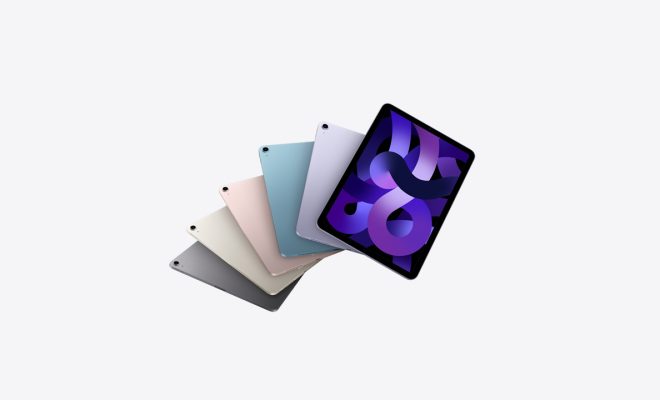
The iPad is one of the most popular tablets in the market. It has come a long way from its initial release in 2010. The iPad’s screen resolution has improved significantly with every new model. The screen resolution on an iPad refers to the total number of pixels that are displayed on the screen. A higher resolution means that the image on the screen is sharper and clearer. In this article, we will look at the screen resolution of different iPad models.

iPad 1– The first-generation iPad had a screen resolution of 1024 x 768. This was considered to be good at the time of its release, but it quickly became outdated.

iPad 2- The second-generation iPad had the same screen resolution as the first-generation model. However, the new model had improved graphics and processing power.

iPad 3- The third-generation iPad was a significant upgrade from its predecessor. It had a Retina display with a resolution of 2048 x 1536, which was four times higher than the second-generation model. The Retina display made the images on the screen appear more lifelike and sharper.

iPad 4- The fourth-generation iPad was an incremental update to the third-generation model. It had the same Retina display as its predecessor.

iPad Air- The iPad Air was the first model in the iPad Air line. It was thinner and lighter than the previous models. It had the same Retina display as the fourth-generation iPad.

iPad Air 2- The iPad Air 2 had the same Retina display as its predecessor. However, it had a new antireflective coating that made it easier to use in bright sunlight.

iPad (5th generation)– The fifth-generation iPad was a budget-friendly model. It had a Retina display with a resolution of 2048 x 1536.

iPad (6th generation)- The sixth-generation iPad was another budget-friendly model. It had a Retina display with the same resolution as the fifth-generation model.

iPad (7th generation)- The seventh-generation iPad had a bigger 10.2-inch screen. It had a Retina display with a resolution of 2160 x 1620, which was slightly higher than the previous models.

iPad (8th generation)- The eighth-generation iPad had the same screen size and resolution as the seventh-generation model.

iPad Pro (1st and 2nd generation)- The first and second-generation iPad Pro tablets had a bigger screen size and higher resolution than any other iPad model. The first-generation model had a 12.9-inch screen with a resolution of 2732 x 2048, while the second-generation model had a 10.5-inch screen with a resolution of 2224 x 1668.

iPad Pro (3rd generation)- The third-generation iPad Pro had a slightly bigger 11-inch screen with a resolution of 2388 x 1668.

iPad Pro (4th generation)- The fourth-generation iPad Pro had the same screen size and resolution as the third-generation model.

In conclusion, the iPad’s screen resolution has improved significantly with every new model. The Retina display has been the most significant upgrade in recent years. The iPad Pro has the highest screen resolution of any iPad model. If you want the best screen resolution, the iPad Pro is the way to go. However, budget-friendly models like the iPad (7th and 8th generation) still offer good screen resolution at a more affordable price.

Previous Article

The Difference Between Graphic and Parametric Equalizers

Next Article

How to Watch Live TV on Kodi

Matthew Lynch

Related articles More from author

  • Digital & Mobile Technology

    How to Use the Equalizer in VLC Media Player

    June 4, 2023
    By Matthew Lynch
  • Digital & Mobile Technology

    How to Use the Free Prime Gaming (Twitch Prime) Subscription

    June 9, 2023
    By Matthew Lynch
  • Digital & Mobile Technology

    Best Sites to Find Free Online Books for Kids

    April 11, 2023
    By Matthew Lynch
  • Digital & Mobile Technology

    How to Delete PS4 User Accounts

    June 30, 2023
    By Matthew Lynch
  • Digital & Mobile Technology

    The 5 Best Private Web Browsers of 2023

    June 9, 2023
    By Matthew Lynch
  • Digital & Mobile Technology

    How to Use IIS to Host a Website Locally on Windows

    August 1, 2023
    By Matthew Lynch

Search

Login & Registration

  • Log in
  • Entries feed
  • Comments feed
  • WordPress.org

Newsletter

Signup for The Tech Edvocate Newsletter and have the latest in EdTech news and opinion delivered to your email address!

About Us

Since technology is not going anywhere and does more good than harm, adapting is the best course of action. That is where The Tech Edvocate comes in. We plan to cover the PreK-12 and Higher Education EdTech sectors and provide our readers with the latest news and opinion on the subject. From time to time, I will invite other voices to weigh in on important issues in EdTech. We hope to provide a well-rounded, multi-faceted look at the past, present, the future of EdTech in the US and internationally.

We started this journey back in June 2016, and we plan to continue it for many more years to come. I hope that you will join us in this discussion of the past, present and future of EdTech and lend your own insight to the issues that are discussed.

Newsletter

Signup for The Tech Edvocate Newsletter and have the latest in EdTech news and opinion delivered to your email address!

Contact Us

The Tech Edvocate
910 Goddin Street
Richmond, VA 23231
(601) 630-5238
[email protected]

Copyright © 2026 Matthew Lynch. All rights reserved.