The Tech Edvocate

Top Menu

  • Advertisement
  • Apps
  • Home Page
  • Home Page Five (No Sidebar)
  • Home Page Four
  • Home Page Three
  • Home Page Two
  • Home Tech2
  • Icons [No Sidebar]
  • Left Sidbear Page
  • Lynch Educational Consulting
  • My Account
  • My Speaking Page
  • Newsletter Sign Up Confirmation
  • Newsletter Unsubscription
  • Our Brands
  • Page Example
  • Privacy Policy
  • Protected Content
  • Register
  • Request a Product Review
  • Shop
  • Shortcodes Examples
  • Signup
  • Start Here
    • Governance
    • Careers
    • Contact Us
  • Terms and Conditions
  • The Edvocate
  • The Tech Edvocate Product Guide
  • Topics
  • Write For Us
  • Advertise

Main Menu

  • Start Here
    • Our Brands
    • Governance
      • Lynch Educational Consulting, LLC.
      • Dr. Lynch’s Personal Website
      • Careers
    • Write For Us
    • The Tech Edvocate Product Guide
    • Contact Us
    • Books
    • Edupedia
    • Post a Job
    • The Edvocate Podcast
    • Terms and Conditions
    • Privacy Policy
  • Topics
    • Assistive Technology
    • Child Development Tech
    • Early Childhood & K-12 EdTech
    • EdTech Futures
    • EdTech News
    • EdTech Policy & Reform
    • EdTech Startups & Businesses
    • Higher Education EdTech
    • Online Learning & eLearning
    • Parent & Family Tech
    • Personalized Learning
    • Product Reviews
  • Advertise
  • Tech Edvocate Awards
  • The Edvocate
  • Pedagogue
  • School Ratings

logo

The Tech Edvocate

  • Start Here
    • Our Brands
    • Governance
      • Lynch Educational Consulting, LLC.
      • Dr. Lynch’s Personal Website
        • My Speaking Page
      • Careers
    • Write For Us
    • The Tech Edvocate Product Guide
    • Contact Us
    • Books
    • Edupedia
    • Post a Job
    • The Edvocate Podcast
    • Terms and Conditions
    • Privacy Policy
  • Topics
    • Assistive Technology
    • Child Development Tech
    • Early Childhood & K-12 EdTech
    • EdTech Futures
    • EdTech News
    • EdTech Policy & Reform
    • EdTech Startups & Businesses
    • Higher Education EdTech
    • Online Learning & eLearning
    • Parent & Family Tech
    • Personalized Learning
    • Product Reviews
  • Advertise
  • Tech Edvocate Awards
  • The Edvocate
  • Pedagogue
  • School Ratings
  • A Visitors Guide to Long Beach (CA), United States

  • A Visitor’s Guide to Fresno (CA), United States

  • A Visitors Guide to New Orleans (LA), United States

  • A Visitors Guide to Sacramento (CA), United States

  • A Visitors Guide to Lyon, France

  • JisuLife Ultra2 Portable Fan: A Powerful Multi-Function Cooling Solution

  • A Visitors Guide to Viña del Mar, Chile

  • A Visitors Guide to Århus, Denmark

  • A Visitors Guide to Bakersfield (CA), United States

  • A Visitors Guide to Aurora (CO), United States

Digital & Mobile Technology
Home›Digital & Mobile Technology›The Difference Between Software Updates and Upgrades

The Difference Between Software Updates and Upgrades
By Matthew Lynch
June 6, 2023
0
Spread the love

In the world of technology, software updates and upgrades are terms that are used interchangeably. However, there is a significant difference between the two. In this article, we will explore the difference between software updates and upgrades.

Software Updates

Software updates are routine changes made to existing software to fix bugs, improve functionality, and enhance security. They are smaller and more frequent changes that happen over time. Software updates are generally free and can be downloaded and installed automatically or manually.

Software updates can include bug fixes, performance improvements, security patches, and minor feature enhancements. These updates address issues that arise after the original release of the software. They correct any critical problems that were not caught during testing and can help to resolve common issues for the end-user.

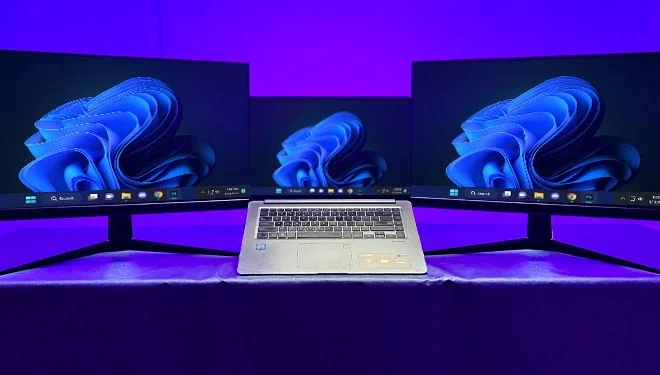
For example, updates to an operating system like Windows or macOS may include stability improvements, security patches, and bug fixes. An update to a mobile app might add new features, improve performance or fix a critical bug.

Software Upgrades

Software upgrades, on the other hand, are more major changes to the software, which improve functionality, add new features, or significantly modify the user interface. A software upgrade is a new version of the software that is installed by the user, and may or may not have a cost attached to it.

Software upgrades usually involve significant changes to the software architecture, user interface, and overall functionality. These changes can affect the system in a more profound way than a simple update. An example of a software upgrade is upgrading from Windows 7 to Windows 10.

The upgrade process converts all the data from the previous software version and then installs the new version of the software. The new software may require a new license or may have licensing costs associated with it. Upgrades can sometimes create compatibility issues, causing some devices or software to no longer work correctly.

Why Software Updates and Upgrades are Important

Software updates and upgrades are essential for keeping your devices and software secure and functioning correctly. Updates and upgrades ensure that the software you use is running efficiently and that any vulnerabilities are patched.

Updates and upgrades can improve the user experience by increasing the speed, performance, and features of software. For business users, software updates and upgrades can improve productivity and efficiency in the workplace, leading to better bottom-line results.

In conclusion, software updates and upgrades are crucial for maintaining the security, function, and stability of your devices and software. Understanding the difference between these two terms will help you know when it’s time to upgrade a software application or install an update. Knowing the difference between software updates and upgrades can help you make informed decisions on when to upgrade and which updates to install.

Previous Article

How to Put Money on a Cash ...

Next Article

How to Manually Test a Power Supply ...

Matthew Lynch

Related articles More from author

  • Digital & Mobile Technology

    5G? 5G+? How to Tell Which Version of 5G Your Phone Is Connected To

    August 5, 2023
    By Matthew Lynch
  • Digital & Mobile Technology

    How to Find People With Zabasearch

    June 1, 2023
    By Matthew Lynch
  • Digital & Mobile Technology

    What is Interactivity?

    May 23, 2023
    By Matthew Lynch
  • Digital & Mobile Technology

    Is LinkedIn Premium Worth Paying For? 3 Things to Consider

    June 8, 2023
    By Matthew Lynch
  • Digital & Mobile Technology

    The Best Smart Tape Measure for Your Body

    August 5, 2023
    By Matthew Lynch
  • Digital & Mobile Technology

    Cellphones vs. Smartphones

    June 9, 2023
    By Matthew Lynch

Search

Login & Registration

  • Register
  • Log in
  • Entries feed
  • Comments feed
  • WordPress.org

Newsletter

Signup for The Tech Edvocate Newsletter and have the latest in EdTech news and opinion delivered to your email address!

About Us

Since technology is not going anywhere and does more good than harm, adapting is the best course of action. That is where The Tech Edvocate comes in. We plan to cover the PreK-12 and Higher Education EdTech sectors and provide our readers with the latest news and opinion on the subject. From time to time, I will invite other voices to weigh in on important issues in EdTech. We hope to provide a well-rounded, multi-faceted look at the past, present, the future of EdTech in the US and internationally.

We started this journey back in June 2016, and we plan to continue it for many more years to come. I hope that you will join us in this discussion of the past, present and future of EdTech and lend your own insight to the issues that are discussed.

Newsletter

Signup for The Tech Edvocate Newsletter and have the latest in EdTech news and opinion delivered to your email address!

Contact Us

The Tech Edvocate
910 Goddin Street
Richmond, VA 23231
(601) 630-5238
[email protected]

Copyright © 2025 Matthew Lynch. All rights reserved.