The Tech Edvocate

Top Menu

  • Advertisement
  • Apps
  • Home Page
  • Home Page Five (No Sidebar)
  • Home Page Four
  • Home Page Three
  • Home Page Two
  • Home Tech2
  • Icons [No Sidebar]
  • Left Sidbear Page
  • Lynch Educational Consulting
  • My Account
  • My Speaking Page
  • Newsletter Sign Up Confirmation
  • Newsletter Unsubscription
  • Our Brands
  • Page Example
  • Privacy Policy
  • Protected Content
  • Register
  • Request a Product Review
  • Shop
  • Shortcodes Examples
  • Signup
  • Start Here
    • Governance
    • Careers
    • Contact Us
  • Terms and Conditions
  • The Edvocate
  • The Tech Edvocate Product Guide
  • Topics
  • Write For Us
  • Advertise

Main Menu

  • Start Here
    • Our Brands
    • Governance
      • Lynch Educational Consulting, LLC.
      • Dr. Lynch’s Personal Website
      • Careers
    • Write For Us
    • The Tech Edvocate Product Guide
    • Contact Us
    • Books
    • Edupedia
    • Post a Job
    • The Edvocate Podcast
    • Terms and Conditions
    • Privacy Policy
  • Topics
    • Assistive Technology
    • Child Development Tech
    • Early Childhood & K-12 EdTech
    • EdTech Futures
    • EdTech News
    • EdTech Policy & Reform
    • EdTech Startups & Businesses
    • Higher Education EdTech
    • Online Learning & eLearning
    • Parent & Family Tech
    • Personalized Learning
    • Product Reviews
  • Advertise
  • Tech Edvocate Awards
  • The Edvocate
  • Pedagogue
  • School Ratings

logo

The Tech Edvocate

  • Start Here
    • Our Brands
    • Governance
      • Lynch Educational Consulting, LLC.
      • Dr. Lynch’s Personal Website
        • My Speaking Page
      • Careers
    • Write For Us
    • The Tech Edvocate Product Guide
    • Contact Us
    • Books
    • Edupedia
    • Post a Job
    • The Edvocate Podcast
    • Terms and Conditions
    • Privacy Policy
  • Topics
    • Assistive Technology
    • Child Development Tech
    • Early Childhood & K-12 EdTech
    • EdTech Futures
    • EdTech News
    • EdTech Policy & Reform
    • EdTech Startups & Businesses
    • Higher Education EdTech
    • Online Learning & eLearning
    • Parent & Family Tech
    • Personalized Learning
    • Product Reviews
  • Advertise
  • Tech Edvocate Awards
  • The Edvocate
  • Pedagogue
  • School Ratings
  • A Visitors Guide to Long Beach (CA), United States

  • A Visitor’s Guide to Fresno (CA), United States

  • A Visitors Guide to New Orleans (LA), United States

  • A Visitors Guide to Sacramento (CA), United States

  • A Visitors Guide to Lyon, France

  • JisuLife Ultra2 Portable Fan: A Powerful Multi-Function Cooling Solution

  • A Visitors Guide to Viña del Mar, Chile

  • A Visitors Guide to Århus, Denmark

  • A Visitors Guide to Bakersfield (CA), United States

  • A Visitors Guide to Aurora (CO), United States

Digital & Mobile Technology
Home›Digital & Mobile Technology›The Best Windows Notepad Alternatives

The Best Windows Notepad Alternatives
By Matthew Lynch
June 23, 2023
0
Spread the love

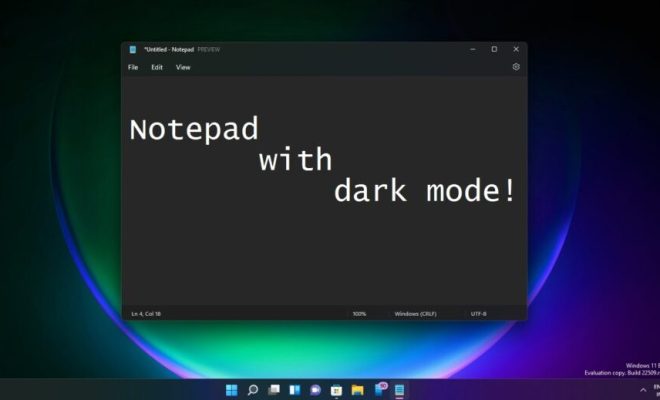
For any computer user, notepad is a fundamental tool that lets you quickly take down notes, sneak in a few lines of codes, or make quick edits to text files. However, the default Windows Notepad app, albeit lightweight, lacks many features that users desire. Fortunately, there are several alternatives available in the market that extend notepad’s functionality and offer advanced features for your comfort. Here are the top picks for the best Windows Notepad alternatives:

1. Notepad++

Notepad++ is a widely used free and open-source code editor that’s popular among developers. It supports various programming languages and comes with features like syntax highlighting, line numbering, macros, and regular expression search and replace. Notepad++ also allows you to edit multiple documents simultaneously, split-screen view, bookmark lines, and add plug-ins for additional functionality.

2. Atom

Atom is another modern, feature-packed text editor that supports various programming languages and is customizable. It offers syntax highlighting, integrated Git and GitHub support, split-screen view, a built-in package manager, and extensive customization options. Atom is highly versatile, and with its plug-in and themes, users can tailor the interface and functionality to meet their needs.

3. Sublime Text

Sublime Text is a powerful, lightweight text editor designed for speed and ease of use. It offers syntax highlighting, powerful search and replace using regular expressions, multi-line select and editing, and snippets, which are pre-made templates to speed up repetitive tasks. Sublime Text also supports plug-ins and is customizable, and the cross-platform compatibility lets users use it on different systems.

4. EmEditor

EmEditor is a feature-rich, yet simple text editor that allows users to work with large files and switch between different modes. It supports syntax highlighting, Unicode support for multiple languages, a powerful search and replace, macro recording, parallel editing, and shortcut keys customization. EmEditor also features plug-ins support, and with its configurable external tool integration, you can run external programs on the editor’s contents.

5. Visual Studio Code

Visual Studio Code is a powerful, open-source text editor that integrates with many programming languages, debuggers, and tools. It’s highly configurable, supports syntax highlighting and autocompletion, and allows users to work with multiple files and projects simultaneously. Visual Studio Code supports Git and GitHub integration, provides interactive debugging capability, and offers various plug-ins to extend its functionality.

Conclusion

In conclusion, while the default Windows Notepad app might be sufficient for some, advanced computer users require more. These five text editors provide different sets of features and individual strengths that can cater to varying levels of users, from beginner to experienced developer alike. Whether simplicity and speed are your priority, or you require advanced features like macros, version control, and debugging, the above-listed alternatives have got you covered.


Previous Article

How to Get Apple TV+ on Your ...

Next Article

Tesla Model S Plaid vs. F1: Which ...

Matthew Lynch

Related articles More from author

  • Digital & Mobile Technology

    The 7 Best RC Drift Cars for Beginners

    July 31, 2023
    By Matthew Lynch
  • Digital & Mobile Technology

    How to Download Music to Apple Watch

    June 4, 2023
    By Matthew Lynch
  • Digital & Mobile Technology

    How to Reinstall Windows 11 Without Deleting Any Apps

    June 14, 2023
    By Matthew Lynch
  • Digital & Mobile Technology

    How to Access AOL Email for Mac

    June 9, 2023
    By Matthew Lynch
  • Digital & Mobile Technology

    What Is A Phablet?

    June 2, 2023
    By Matthew Lynch
  • Digital & Mobile Technology

    The Best Lightweight Web Browsers for Linux

    June 15, 2023
    By Matthew Lynch

Search

Login & Registration

  • Register
  • Log in
  • Entries feed
  • Comments feed
  • WordPress.org

Newsletter

Signup for The Tech Edvocate Newsletter and have the latest in EdTech news and opinion delivered to your email address!

About Us

Since technology is not going anywhere and does more good than harm, adapting is the best course of action. That is where The Tech Edvocate comes in. We plan to cover the PreK-12 and Higher Education EdTech sectors and provide our readers with the latest news and opinion on the subject. From time to time, I will invite other voices to weigh in on important issues in EdTech. We hope to provide a well-rounded, multi-faceted look at the past, present, the future of EdTech in the US and internationally.

We started this journey back in June 2016, and we plan to continue it for many more years to come. I hope that you will join us in this discussion of the past, present and future of EdTech and lend your own insight to the issues that are discussed.

Newsletter

Signup for The Tech Edvocate Newsletter and have the latest in EdTech news and opinion delivered to your email address!

Contact Us

The Tech Edvocate
910 Goddin Street
Richmond, VA 23231
(601) 630-5238
[email protected]

Copyright © 2025 Matthew Lynch. All rights reserved.