The Tech Edvocate

Top Menu

  • Advertisement
  • Apps
  • Home Page
  • Home Page Five (No Sidebar)
  • Home Page Four
  • Home Page Three
  • Home Page Two
  • Home Tech2
  • Icons [No Sidebar]
  • Left Sidbear Page
  • Lynch Educational Consulting
  • My Account
  • My Speaking Page
  • Newsletter Sign Up Confirmation
  • Newsletter Unsubscription
  • Our Brands
  • Page Example
  • Privacy Policy
  • Protected Content
  • Register
  • Request a Product Review
  • Shop
  • Shortcodes Examples
  • Signup
  • Start Here
    • Governance
    • Careers
    • Contact Us
  • Terms and Conditions
  • The Edvocate
  • The Tech Edvocate Product Guide
  • Topics
  • Write For Us
  • Advertise

Main Menu

  • Start Here
    • Our Brands
    • Governance
      • Lynch Educational Consulting, LLC.
      • Dr. Lynch’s Personal Website
      • Careers
    • Write For Us
    • The Tech Edvocate Product Guide
    • Contact Us
    • Books
    • Edupedia
    • Post a Job
    • The Edvocate Podcast
    • Terms and Conditions
    • Privacy Policy
  • Topics
    • Assistive Technology
    • Child Development Tech
    • Early Childhood & K-12 EdTech
    • EdTech Futures
    • EdTech News
    • EdTech Policy & Reform
    • EdTech Startups & Businesses
    • Higher Education EdTech
    • Online Learning & eLearning
    • Parent & Family Tech
    • Personalized Learning
    • Product Reviews
  • Advertise
  • Tech Edvocate Awards
  • The Edvocate
  • Pedagogue
  • School Ratings

logo

The Tech Edvocate

  • Start Here
    • Our Brands
    • Governance
      • Lynch Educational Consulting, LLC.
      • Dr. Lynch’s Personal Website
        • My Speaking Page
      • Careers
    • Write For Us
    • The Tech Edvocate Product Guide
    • Contact Us
    • Books
    • Edupedia
    • Post a Job
    • The Edvocate Podcast
    • Terms and Conditions
    • Privacy Policy
  • Topics
    • Assistive Technology
    • Child Development Tech
    • Early Childhood & K-12 EdTech
    • EdTech Futures
    • EdTech News
    • EdTech Policy & Reform
    • EdTech Startups & Businesses
    • Higher Education EdTech
    • Online Learning & eLearning
    • Parent & Family Tech
    • Personalized Learning
    • Product Reviews
  • Advertise
  • Tech Edvocate Awards
  • The Edvocate
  • Pedagogue
  • School Ratings
  • Viaim Opennote Review: The AI Note-Taker That Disappears Into Your Daily Routine

  • A Visitors Guide to Long Beach (CA), United States

  • A Visitor’s Guide to Fresno (CA), United States

  • A Visitors Guide to New Orleans (LA), United States

  • A Visitors Guide to Sacramento (CA), United States

  • A Visitors Guide to Lyon, France

  • JisuLife Ultra2 Portable Fan: A Powerful Multi-Function Cooling Solution

  • A Visitors Guide to Viña del Mar, Chile

  • A Visitors Guide to Århus, Denmark

  • A Visitors Guide to Bakersfield (CA), United States

Elementary EducationOnline Learning & eLearning
Home›Elementary Education›The Best Gaming Browsers for Windows

The Best Gaming Browsers for Windows
By Matthew Lynch
March 31, 2023
0
Spread the love

As a gamer, you know that the browser you use can make all the difference when it comes to online gaming. A browser that’s light on system resources and optimized for gaming can help minimize lag and provide a smooth, enjoyable gaming experience.

Here are the best gaming browsers for Windows that will help boost your gaming performance:

1. Opera GX:

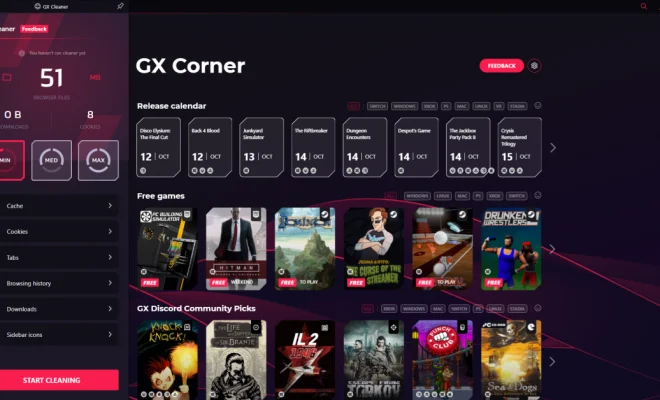
Opera GX is specifically designed for gamers, and it shows. The browser has a number of features that make it a top choice for gamers, including a customizable interface, built-in ad blocker, and a gaming mode that limits the browser’s resource usage to ensure that your games run smoothly. It also has a feature that allows you to set a network limit for the browser, ensuring that other apps or devices on your network don’t interfere with your game.

2. Mozilla Firefox:

Firefox is a popular browser for many reasons, and one of them is its ability to be customized with a variety of add-ons and extensions. There are several extensions available that can help boost your gaming performance by reducing lag, improving page load times, and blocking ads. Additionally, Firefox’s Quantum engine and multi-process architecture make it one of the fastest and most reliable browsers for gaming.

3. Google Chrome:

Chrome has long been a popular browser among gamers, thanks to its speed and reliability. While it doesn’t have as many gaming-specific features as Opera GX, it is still a top choice for many gamers. Chrome’s built-in task manager also allows you to see which tabs or extensions are using the most resources, allowing you to free up system resources and improve your gaming performance.

4. Microsoft Edge:

Microsoft Edge has come a long way in recent years, and it’s now a solid choice for gaming. Its Chakra JavaScript engine and new Chromium-based architecture have made the browser faster and more reliable than ever. It also has built-in tracking protection, which helps prevent websites from tracking your browsing activity and potentially slowing down your games.

5. Vivaldi:

Vivaldi is a relative newcomer to the browser scene, but it’s quickly gained a following among power users and gamers. The browser is highly customizable, allowing you to tweak settings and features to your heart’s content. It also has a built-in ad blocker and a feature that allows you to easily take screenshots of web pages, which can be useful for gaming forums or social media.

In conclusion, all these browsers have their own strengths and weaknesses when it comes to gaming. However, by using any of these browsers, you’re likely to see an improvement in your gaming performance thanks to their speed, reliability, and various features tailored for gamers.


Previous Article

The Best HDMI Cable

Next Article

The Best Internal Hard Drives

Matthew Lynch

Related articles More from author

  • Online Learning & eLearning

    Oura Ring 3 at 6 Months: Life With a Wearable That Knows When I’m Sick

    March 29, 2023
    By Matthew Lynch
  • Online Learning & eLearning

    7 Questions to Ask When Choosing an LMS

    September 16, 2017
    By Matthew Lynch
  • Online Learning & eLearning

    Dual-Motor EVs vs. Single-Motor EVs: Which Is Best?

    June 14, 2023
    By Matthew Lynch
  • Online Learning & eLearning

    How to Implement Your LMS (Learning Management System) Effectively

    December 16, 2020
    By Matthew Lynch
  • Online Learning & eLearning

    Bible Paper Is Used for Printing Many Kinds of Books

    June 14, 2023
    By Matthew Lynch
  • Online Learning & eLearning

    Top 15 Free Horror Games on Steam That Will Give You Chills

    April 1, 2023
    By Matthew Lynch

Search

Login & Registration

  • Register
  • Log in
  • Entries feed
  • Comments feed
  • WordPress.org

Newsletter

Signup for The Tech Edvocate Newsletter and have the latest in EdTech news and opinion delivered to your email address!

About Us

Since technology is not going anywhere and does more good than harm, adapting is the best course of action. That is where The Tech Edvocate comes in. We plan to cover the PreK-12 and Higher Education EdTech sectors and provide our readers with the latest news and opinion on the subject. From time to time, I will invite other voices to weigh in on important issues in EdTech. We hope to provide a well-rounded, multi-faceted look at the past, present, the future of EdTech in the US and internationally.

We started this journey back in June 2016, and we plan to continue it for many more years to come. I hope that you will join us in this discussion of the past, present and future of EdTech and lend your own insight to the issues that are discussed.

Newsletter

Signup for The Tech Edvocate Newsletter and have the latest in EdTech news and opinion delivered to your email address!

Contact Us

The Tech Edvocate
910 Goddin Street
Richmond, VA 23231
(601) 630-5238
[email protected]

Copyright © 2025 Matthew Lynch. All rights reserved.