The Tech Edvocate

Top Menu

  • Advertisement
  • Apps
  • Home Page
  • Home Page Five (No Sidebar)
  • Home Page Four
  • Home Page Three
  • Home Page Two
  • Home Tech2
  • Icons [No Sidebar]
  • Left Sidbear Page
  • Lynch Educational Consulting
  • My Account
  • My Speaking Page
  • Newsletter Sign Up Confirmation
  • Newsletter Unsubscription
  • Our Brands
  • Page Example
  • Privacy Policy
  • Protected Content
  • Register
  • Request a Product Review
  • Shop
  • Shortcodes Examples
  • Signup
  • Start Here
    • Governance
    • Careers
    • Contact Us
  • Terms and Conditions
  • The Edvocate
  • The Tech Edvocate Product Guide
  • Topics
  • Write For Us
  • Advertise

Main Menu

  • Start Here
    • Our Brands
    • Governance
      • Lynch Educational Consulting, LLC.
      • Dr. Lynch’s Personal Website
      • Careers
    • Write For Us
    • The Tech Edvocate Product Guide
    • Contact Us
    • Books
    • Edupedia
    • Post a Job
    • The Edvocate Podcast
    • Terms and Conditions
    • Privacy Policy
  • Topics
    • Assistive Technology
    • Child Development Tech
    • Early Childhood & K-12 EdTech
    • EdTech Futures
    • EdTech News
    • EdTech Policy & Reform
    • EdTech Startups & Businesses
    • Higher Education EdTech
    • Online Learning & eLearning
    • Parent & Family Tech
    • Personalized Learning
    • Product Reviews
  • Advertise
  • Tech Edvocate Awards
  • The Edvocate
  • Pedagogue
  • School Ratings

logo

The Tech Edvocate

  • Start Here
    • Our Brands
    • Governance
      • Lynch Educational Consulting, LLC.
      • Dr. Lynch’s Personal Website
        • My Speaking Page
      • Careers
    • Write For Us
    • The Tech Edvocate Product Guide
    • Contact Us
    • Books
    • Edupedia
    • Post a Job
    • The Edvocate Podcast
    • Terms and Conditions
    • Privacy Policy
  • Topics
    • Assistive Technology
    • Child Development Tech
    • Early Childhood & K-12 EdTech
    • EdTech Futures
    • EdTech News
    • EdTech Policy & Reform
    • EdTech Startups & Businesses
    • Higher Education EdTech
    • Online Learning & eLearning
    • Parent & Family Tech
    • Personalized Learning
    • Product Reviews
  • Advertise
  • Tech Edvocate Awards
  • The Edvocate
  • Pedagogue
  • School Ratings
  • A Visitors Guide to Long Beach (CA), United States

  • A Visitor’s Guide to Fresno (CA), United States

  • A Visitors Guide to New Orleans (LA), United States

  • A Visitors Guide to Sacramento (CA), United States

  • A Visitors Guide to Lyon, France

  • JisuLife Ultra2 Portable Fan: A Powerful Multi-Function Cooling Solution

  • A Visitors Guide to Viña del Mar, Chile

  • A Visitors Guide to Århus, Denmark

  • A Visitors Guide to Bakersfield (CA), United States

  • A Visitors Guide to Aurora (CO), United States

Digital & Mobile Technology
Home›Digital & Mobile Technology›The Best (Free) Speech-to-Text Software for Windows

The Best (Free) Speech-to-Text Software for Windows

By Matthew Lynch
June 14, 2023
0
Spread the love

As the world grows increasingly digital, the need for efficient and accurate speech-to-text software has become essential. Whether you’re a writer, student, or professional, speech recognition software can come in handy for fast and accurate transcription of audio recordings.

In this article, we will take a look at some of the best free speech-to-text software for Windows.

1. Google Docs Voice Typing

Google Docs Voice Typing is a free speech-to-text tool that comes with Google Docs. It is entirely free, and you don’t need to download any additional software to use it. Google Docs Voice Typing allows you to convert spoken words into text with ease. Once you open a new Google document, click on the “Tools” tab, then click “Voice Typing.” The tool will be activated, and the microphone icon will appear. You can then begin speaking, and the program will automatically transcribe your words.

2. Windows Speech Recognition

Windows Speech Recognition is another free and easy-to-use speech-to-text application that comes with Windows 10. It allows users to dictate text into any application that accepts text. Simply activate the tool by typing “Windows Speech Recognition” into the search bar, then click on the “Start Speech Recognition” option. Once the tool is activated, you can begin dictating.

3. Dictation.io

Dictation.io is a free online speech-to-text tool that requires no downloads or installations. You can simply open it in your web browser and start dictating. The tool supports several languages and works smoothly with most browsers. The interface is user-friendly, and you can even use voice commands to add punctuation marks and formatting to your text.

4. Speechlogger

Speechlogger is another free online speech-to-text tool that supports over 60 languages. It has a clean and straightforward interface that makes it easy to use. The tool also allows you to control the speed of the transcription process and make corrections on the go.

5. Windows Dictation

Windows Dictation is another speech-to-text tool that comes with Windows 10. It can be activated by pressing the “Windows + H” key. Once activated, the tool transcribes your speech automatically and allows you to customize voice commands to perform specific actions.

In conclusion, if you’re looking for free and easy-to-use speech-to-text software for Windows, any of the above-mentioned options will get the job done. Whether you’re a student, writer, or professional, speech recognition software will save you time and increase your productivity. Try them out and see which one works best for you!


Previous Article

How to Change Your PayPal Password

Next Article

Is the Fitbit Versa Waterproof?

Matthew Lynch

Related articles More from author

  • Digital & Mobile Technology

    How to Get Samsung Keyboard Back to Normal

    April 26, 2023
    By Matthew Lynch
  • Digital & Mobile Technology

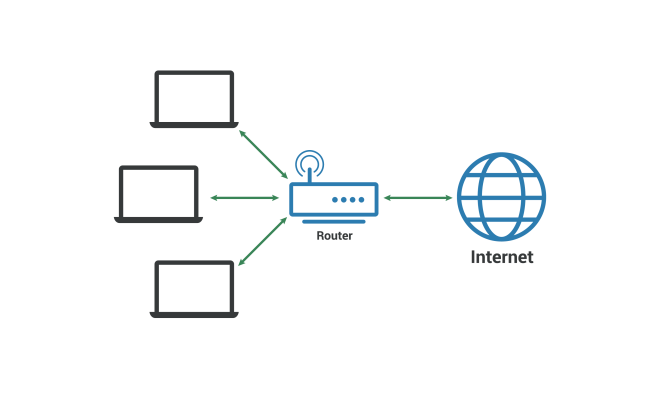
    What Is a LAN (Local Area Network)?

    June 1, 2023
    By Matthew Lynch
  • Digital & Mobile Technology

    Sleeping With Earbuds: Benefits, Dangers, and Alternatives

    September 7, 2023
    By Matthew Lynch
  • Digital & Mobile Technology

    Why Is Netflix Looking to Buy Roku? And What Happens If It Does?

    June 23, 2023
    By Matthew Lynch
  • Digital & Mobile Technology

    Everything You Can Do With Force Touch on the Apple Watch

    July 30, 2023
    By Matthew Lynch
  • Digital & Mobile Technology

    Android Guide: How to Use Android Effectively

    April 4, 2023
    By Matthew Lynch

Search

Login & Registration

  • Register
  • Log in
  • Entries feed
  • Comments feed
  • WordPress.org

Newsletter

Signup for The Tech Edvocate Newsletter and have the latest in EdTech news and opinion delivered to your email address!

About Us

Since technology is not going anywhere and does more good than harm, adapting is the best course of action. That is where The Tech Edvocate comes in. We plan to cover the PreK-12 and Higher Education EdTech sectors and provide our readers with the latest news and opinion on the subject. From time to time, I will invite other voices to weigh in on important issues in EdTech. We hope to provide a well-rounded, multi-faceted look at the past, present, the future of EdTech in the US and internationally.

We started this journey back in June 2016, and we plan to continue it for many more years to come. I hope that you will join us in this discussion of the past, present and future of EdTech and lend your own insight to the issues that are discussed.

Newsletter

Signup for The Tech Edvocate Newsletter and have the latest in EdTech news and opinion delivered to your email address!

Contact Us

The Tech Edvocate
910 Goddin Street
Richmond, VA 23231
(601) 630-5238
[email protected]

Copyright © 2025 Matthew Lynch. All rights reserved.