The Tech Edvocate

Top Menu

  • Advertisement
  • Apps
  • Home Page
  • Home Page Five (No Sidebar)
  • Home Page Four
  • Home Page Three
  • Home Page Two
  • Home Tech2
  • Icons [No Sidebar]
  • Left Sidbear Page
  • Lynch Educational Consulting
  • My Account
  • My Speaking Page
  • Newsletter Sign Up Confirmation
  • Newsletter Unsubscription
  • Our Brands
  • Page Example
  • Privacy Policy
  • Protected Content
  • Register
  • Request a Product Review
  • Shop
  • Shortcodes Examples
  • Signup
  • Start Here
    • Governance
    • Careers
    • Contact Us
  • Terms and Conditions
  • The Edvocate
  • The Tech Edvocate Product Guide
  • Topics
  • Write For Us
  • Advertise

Main Menu

  • Start Here
    • Our Brands
    • Governance
      • Lynch Educational Consulting, LLC.
      • Dr. Lynch’s Personal Website
      • Careers
    • Write For Us
    • The Tech Edvocate Product Guide
    • Contact Us
    • Books
    • Edupedia
    • Post a Job
    • The Edvocate Podcast
    • Terms and Conditions
    • Privacy Policy
  • Topics
    • Assistive Technology
    • Child Development Tech
    • Early Childhood & K-12 EdTech
    • EdTech Futures
    • EdTech News
    • EdTech Policy & Reform
    • EdTech Startups & Businesses
    • Higher Education EdTech
    • Online Learning & eLearning
    • Parent & Family Tech
    • Personalized Learning
    • Product Reviews
  • Advertise
  • Tech Edvocate Awards
  • The Edvocate
  • Pedagogue
  • School Ratings

logo

The Tech Edvocate

  • Start Here
    • Our Brands
    • Governance
      • Lynch Educational Consulting, LLC.
      • Dr. Lynch’s Personal Website
        • My Speaking Page
      • Careers
    • Write For Us
    • The Tech Edvocate Product Guide
    • Contact Us
    • Books
    • Edupedia
    • Post a Job
    • The Edvocate Podcast
    • Terms and Conditions
    • Privacy Policy
  • Topics
    • Assistive Technology
    • Child Development Tech
    • Early Childhood & K-12 EdTech
    • EdTech Futures
    • EdTech News
    • EdTech Policy & Reform
    • EdTech Startups & Businesses
    • Higher Education EdTech
    • Online Learning & eLearning
    • Parent & Family Tech
    • Personalized Learning
    • Product Reviews
  • Advertise
  • Tech Edvocate Awards
  • The Edvocate
  • Pedagogue
  • School Ratings
  • A Visitors Guide to Colorado Springs (CO), United States

  • 5 Pairs of Shoes That Will Instantly Step Your Shoe Game Up

  • Radiant Youthful Skin is the Perfect Christmas Gift

  • Give Your Loved One the Gift of Youthful, Radiant Skin this Christmas

  • Give Your Loved One the Gift of a Restful Night Sleep this Christmas

  • Nex Playground’s Holiday Sales Bring Active Play Indoors This Seaso

  • A Visitors Guide to Louisville (KY), United States

  • A Visitor’s Guide to Nashville-Davidson (TN), United States

  • A Visitors Guide to Portland (OR), United States

  • 7 Men’s Bruno Marc Shoes That Are the Perfect Christmas Gift

Elementary EducationOnline Learning & eLearning
Home›Elementary Education›The Best File Extraction and Compression Tool for Windows

The Best File Extraction and Compression Tool for Windows
By Matthew Lynch
March 31, 2023
0
Spread the love

When it comes to working with files on a Windows computer, there are times when you need to compress or extract files to save space, share them online, or simply organize them. But with so many file extraction and compression tools available, it can be challenging to decide on the best one. In this article, we’ll share some of the best file extraction and compression tools for Windows.

WinZip

WinZip is one of the most popular file compression tools for Windows. It has been in use for over 30 years and is widely used because of its user-friendly interface and ease of use. WinZip is compatible with 32-bit and 64-bit Windows operating systems and supports various file formats, including Zip, Zipx, RAR, 7Z, TAR, GZIP, VHD, XZ, and more. It also integrates with cloud services, including Dropbox, Google Drive, OneDrive, and more.

7-Zip

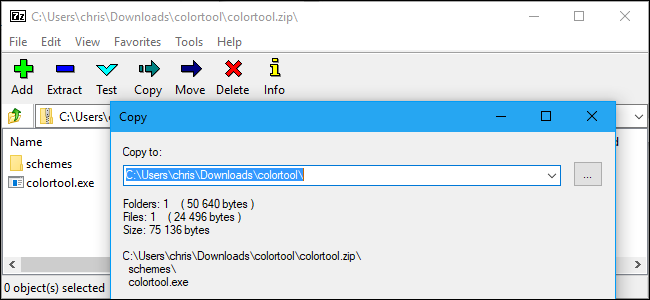
7-Zip is an open-source compression tool that supports a wide range of file formats, including 7Z, ZIP, GZIP, BZIP2, TAR, and more. It’s free to use and compatible with both 32-bit and 64-bit Windows operating systems. 7-Zip also has a command-line version for advanced users who prefer to use the command-line interface. One of the notable features of 7-Zip is that it can compress files to a smaller size than most other compression tools.

Bandizip

Bandizip is another popular compression tool for Windows that is free to use. It supports a wide range of files formats, including ZIP, RAR, 7Z, ARJ, ALZ, EGG, TAR, BH, LZH, GZ, BZ2, ISO, CAB, WIM, XZ, Z, and more. Bandizip also has a built-in password manager, which allows you to protect your compressed files with passwords. It also supports Unicode file names, which means you can compress files with non-Latin characters.

PeaZip

PeaZip is an open-source compression tool that supports both 32-bit and 64-bit Windows operating systems. It supports a wide range of file formats, including 7Z, ZIP, GZIP, BZIP2, TAR, and more. PeaZip also has a built-in file manager that allows you to browse and manage your compressed files. It also supports strong encryption algorithms, making it an ideal choice for protecting your important files.

WinRAR

WinRAR has been in use for over 25 years and is one of the most popular file compression tools for Windows. It supports various file formats, including RAR, ZIP, 7Z, ARJ, CAB, ISO, and more. WinRAR also has a built-in repair feature, which allows you to repair corrupted archives. It’s free to use for a trial period of 40 days, after which you’ll need to purchase a license to continue using it.

Conclusion

There are plenty of file extraction and compression tools available for Windows, and choosing the right one depends on your specific needs. Whether you’re looking for a user-friendly interface, advanced compression algorithms, or open-source alternatives, there’s something for everyone. The tools listed above are some of the best options available that offer a balance of functionality, ease of use, and affordability.


Previous Article

Top Online Dictionaries For K12 Pupils

Next Article

The Best Mobile Apps to Create a ...

Matthew Lynch

Related articles More from author

  • Online Learning & eLearning

    How to Watch Netflix, Hulu, and Amazon Prime on Linux

    March 27, 2023
    By Matthew Lynch
  • Online Learning & eLearning

    PS5 Pro: Release date, price, specs and more rumors

    March 29, 2023
    By Matthew Lynch
  • Online Learning & eLearning

    Digital Badges: The New Digital Education Currency

    April 1, 2023
    By Matthew Lynch
  • Online Learning & eLearning

    What Is a Car Power Inverter? 3 Reasons You Might Need One

    June 21, 2023
    By Matthew Lynch
  • Mobile LearningOnline Learning & eLearning

    How M-Learning is Transforming Online Education

    April 8, 2021
    By Matthew Lynch
  • Online Learning & eLearning

    Top 8 Ways to Fix Fire TV Stick Remote Volume Not Working

    April 3, 2023
    By Matthew Lynch

Search

Login & Registration

  • Register
  • Log in
  • Entries feed
  • Comments feed
  • WordPress.org

Newsletter

Signup for The Tech Edvocate Newsletter and have the latest in EdTech news and opinion delivered to your email address!

About Us

Since technology is not going anywhere and does more good than harm, adapting is the best course of action. That is where The Tech Edvocate comes in. We plan to cover the PreK-12 and Higher Education EdTech sectors and provide our readers with the latest news and opinion on the subject. From time to time, I will invite other voices to weigh in on important issues in EdTech. We hope to provide a well-rounded, multi-faceted look at the past, present, the future of EdTech in the US and internationally.

We started this journey back in June 2016, and we plan to continue it for many more years to come. I hope that you will join us in this discussion of the past, present and future of EdTech and lend your own insight to the issues that are discussed.

Newsletter

Signup for The Tech Edvocate Newsletter and have the latest in EdTech news and opinion delivered to your email address!

Contact Us

The Tech Edvocate
910 Goddin Street
Richmond, VA 23231
(601) 630-5238
[email protected]

Copyright © 2025 Matthew Lynch. All rights reserved.