
The Tech Edvocate

Top Menu

  • Advertisement
  • Apps
  • Home Page
  • Home Page Five (No Sidebar)
  • Home Page Four
  • Home Page Three
  • Home Page Two
  • Home Tech2
  • Icons [No Sidebar]
  • Left Sidbear Page
  • Lynch Educational Consulting
  • My Account
  • My Speaking Page
  • Newsletter Sign Up Confirmation
  • Newsletter Unsubscription
  • Our Brands
  • Page Example
  • Privacy Policy
  • Protected Content
  • Register
  • Request a Product Review
  • Shop
  • Shortcodes Examples
  • Signup
  • Start Here
    • Governance
    • Careers
    • Contact Us
  • Terms and Conditions
  • The Edvocate
  • The Tech Edvocate Product Guide
  • Topics
  • Write For Us
  • Advertise

Main Menu

  • Start Here
    • Our Brands
    • Governance
      • Lynch Educational Consulting, LLC.
      • Dr. Lynch’s Personal Website
      • Careers
    • Write For Us
    • The Tech Edvocate Product Guide
    • Contact Us
    • Books
    • Edupedia
    • Post a Job
    • The Edvocate Podcast
    • Terms and Conditions
    • Privacy Policy
  • Topics
    • Assistive Technology
    • Child Development Tech
    • Early Childhood & K-12 EdTech
    • EdTech Futures
    • EdTech News
    • EdTech Policy & Reform
    • EdTech Startups & Businesses
    • Higher Education EdTech
    • Online Learning & eLearning
    • Parent & Family Tech
    • Personalized Learning
    • Product Reviews
  • Advertise
  • Tech Edvocate Awards
  • The Edvocate
  • Pedagogue
  • School Ratings

logo

The Tech Edvocate

  • Start Here
    • Our Brands
    • Governance
      • Lynch Educational Consulting, LLC.
      • Dr. Lynch’s Personal Website
        • My Speaking Page
      • Careers
    • Write For Us
    • The Tech Edvocate Product Guide
    • Contact Us
    • Books
    • Edupedia
    • Post a Job
    • The Edvocate Podcast
    • Terms and Conditions
    • Privacy Policy
  • Topics
    • Assistive Technology
    • Child Development Tech
    • Early Childhood & K-12 EdTech
    • EdTech Futures
    • EdTech News
    • EdTech Policy & Reform
    • EdTech Startups & Businesses
    • Higher Education EdTech
    • Online Learning & eLearning
    • Parent & Family Tech
    • Personalized Learning
    • Product Reviews
  • Advertise
  • Tech Edvocate Awards
  • The Edvocate
  • Pedagogue
  • School Ratings
  • Mind-Blowing: These Viral Amazon Products Are NOT What You Expect

  • Bizarre: AI-Generated Fake Health Influencers Are Invading Your Feed – Here’s How to Spot Them

  • Six Startups Launch IPOs in One Day: Is This India’s Most Audacious Bet Yet?

  • The Baffling Twitter Startup Name Change: Why ‘Bluebird’ Had to Die

  • The PlayStation Trump Tariff Refunds You Won’t Get: Why Sony’s Silence Is Infuriating Gamers

  • The White House ‘Arcade’ Scandal: Why the Tetris Controversy Is Just the Beginning

  • The Billion-Dollar Battle: Seattle Times’ AI Lawsuit Could Redefine Digital Rights

  • This OpenAI Pause Reveals a Disturbing Truth About AI’s Future

  • Stunning: Feds Quietly Erase Data on Gender-Based Bullying – What It Means for Vulnerable Students

  • The Raw Truth About the Colorado Student Walkout You Haven’t Heard

Technology
Home›Technology›The Best Alternatives to Default Windows 11 Apps

The Best Alternatives to Default Windows 11 Apps
By Matthew Lynch
March 3, 2024
0
Spread the love

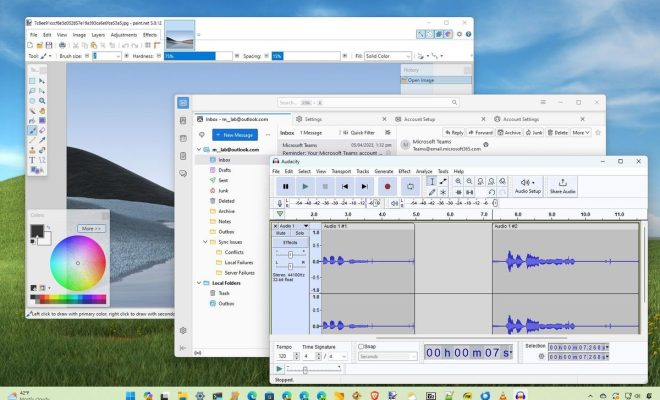
Windows 11, the latest operating system from Microsoft, comes packed with a suite of default apps designed to cover the basic needs of the majority of users. However, not everyone may find these applications to their liking or may seek additional features. Here is a list of alternative applications that offer a different experience or enhanced functionality compared to the default Windows 11 apps.

1. Browser Alternative: Mozilla Firefox

While Microsoft Edge is deeply integrated into Windows 11, Mozilla Firefox stands out as a privacy-focused alternative. It offers extensive customization options, powerful ad-blocking features, and is known for protecting user data.

2. Mail Client Alternative: Thunderbird

For those looking for an alternative to the Mail app in Windows 11, Thunderbird by Mozilla is a great choice. It’s a free and open-source email client that boasts powerful filters, extensive plugin support, and strong security features.

3. Office Suite Alternative: LibreOffice

Microsoft Office has been the go-to office suite for many users. However, LibreOffice is a robust free alternative that includes equivalents to Word, Excel, PowerPoint, and more. It is fully compatible with Microsoft Office file formats as well.

4. Photos App Alternative: Google Photos

While the Windows 11 Photos app allows basic viewing and editing of images, Google Photos offers cloud storage as well as automatic backup and synchronization across devices, alongside powerful searching capabilities and editing tools.

5. Music Player Alternative: Spotify

Groove Music is the default music app on Windows 11; however, Spotify offers access to a massive library of songs on demand and provides personalized playlists with its user-friendly interface.

6. Video Player Alternative: VLC Media Player

The Movies & TV app handles video playback in Windows 11 but lacks some advanced features. VLC Media Player is an excellent replacement that can play virtually any video format you throw at it and supports streaming as well.

7. Calendar App Alternative: Google Calendar

Users seeking more functionality than the default Calendar app can make use of Google Calendar’s sharing features, event integration from Gmail, reminders, tasks, and more—and all of it syncs across devices effortlessly.

8. Storage Solution Alternative: Dropbox

OneDrive is seamlessly integrated into Windows 11 for online storage; however, Dropbox provides similar features with a strong emphasis on easy sharing and collaboration tools that are appreciated by team users.

9. Maps Alternative: Google Maps

While Windows Maps provides basic navigation features, Google Maps offers comprehensive navigational tools like real-time traffic updates, street view mode, detailed business information and reviews which make it a better option for many users.

In conclusion, while Windows 11 offers capable default apps for various tasks ranging from web browsing to media playback and productivity workloads—the above-listed alternatives provide various advantages such as enhanced privacy features, greater file-format support, cloud integration or simply different user experiences that may better fit your needs.


Previous Article

How to Mix Grout: 15 Steps

Next Article

The Best Home Gym Equipment for Under ...

Matthew Lynch

Related articles More from author

  • Technology

    The 5 Best Privacy-Focused Operating Systems

    March 16, 2024
    By Matthew Lynch
  • Technology

    VGHF, Libraries Lose Again On DMCA Exemption Request To Preserve Old Video Games

    November 1, 2024
    By Matthew Lynch
  • Technology

    6 Best Surround Sound Systems of 2024

    March 21, 2024
    By Matthew Lynch
  • Technology

    How to watch the 2024 MotoGP Thailand Grand Prix online for free

    October 24, 2024
    By Matthew Lynch
  • Technology

    The Modern CLI Renaissance

    September 12, 2024
    By Matthew Lynch
  • Technology

    FIDO Alliance publishes new spec to let users move passkeys across providers

    October 16, 2024
    By Matthew Lynch

Search

Login & Registration

  • Log in
  • Entries feed
  • Comments feed
  • WordPress.org

Newsletter

Signup for The Tech Edvocate Newsletter and have the latest in EdTech news and opinion delivered to your email address!

About Us

Since technology is not going anywhere and does more good than harm, adapting is the best course of action. That is where The Tech Edvocate comes in. We plan to cover the PreK-12 and Higher Education EdTech sectors and provide our readers with the latest news and opinion on the subject. From time to time, I will invite other voices to weigh in on important issues in EdTech. We hope to provide a well-rounded, multi-faceted look at the past, present, the future of EdTech in the US and internationally.

We started this journey back in June 2016, and we plan to continue it for many more years to come. I hope that you will join us in this discussion of the past, present and future of EdTech and lend your own insight to the issues that are discussed.

Newsletter

Signup for The Tech Edvocate Newsletter and have the latest in EdTech news and opinion delivered to your email address!

Contact Us

The Tech Edvocate
910 Goddin Street
Richmond, VA 23231
(601) 630-5238
[email protected]

Copyright © 2026 Matthew Lynch. All rights reserved.