The Tech Edvocate

Top Menu

  • Advertisement
  • Apps
  • Home Page
  • Home Page Five (No Sidebar)
  • Home Page Four
  • Home Page Three
  • Home Page Two
  • Home Tech2
  • Icons [No Sidebar]
  • Left Sidbear Page
  • Lynch Educational Consulting
  • My Account
  • My Speaking Page
  • Newsletter Sign Up Confirmation
  • Newsletter Unsubscription
  • Our Brands
  • Page Example
  • Privacy Policy
  • Protected Content
  • Register
  • Request a Product Review
  • Shop
  • Shortcodes Examples
  • Signup
  • Start Here
    • Governance
    • Careers
    • Contact Us
  • Terms and Conditions
  • The Edvocate
  • The Tech Edvocate Product Guide
  • Topics
  • Write For Us
  • Advertise

Main Menu

  • Start Here
    • Our Brands
    • Governance
      • Lynch Educational Consulting, LLC.
      • Dr. Lynch’s Personal Website
      • Careers
    • Write For Us
    • The Tech Edvocate Product Guide
    • Contact Us
    • Books
    • Edupedia
    • Post a Job
    • The Edvocate Podcast
    • Terms and Conditions
    • Privacy Policy
  • Topics
    • Assistive Technology
    • Child Development Tech
    • Early Childhood & K-12 EdTech
    • EdTech Futures
    • EdTech News
    • EdTech Policy & Reform
    • EdTech Startups & Businesses
    • Higher Education EdTech
    • Online Learning & eLearning
    • Parent & Family Tech
    • Personalized Learning
    • Product Reviews
  • Advertise
  • Tech Edvocate Awards
  • The Edvocate
  • Pedagogue
  • School Ratings

logo

The Tech Edvocate

  • Start Here
    • Our Brands
    • Governance
      • Lynch Educational Consulting, LLC.
      • Dr. Lynch’s Personal Website
        • My Speaking Page
      • Careers
    • Write For Us
    • The Tech Edvocate Product Guide
    • Contact Us
    • Books
    • Edupedia
    • Post a Job
    • The Edvocate Podcast
    • Terms and Conditions
    • Privacy Policy
  • Topics
    • Assistive Technology
    • Child Development Tech
    • Early Childhood & K-12 EdTech
    • EdTech Futures
    • EdTech News
    • EdTech Policy & Reform
    • EdTech Startups & Businesses
    • Higher Education EdTech
    • Online Learning & eLearning
    • Parent & Family Tech
    • Personalized Learning
    • Product Reviews
  • Advertise
  • Tech Edvocate Awards
  • The Edvocate
  • Pedagogue
  • School Ratings
  • 100 Best Apps for Internal Wikis

  • 100 Best Apps for Chiropractors

  • 100 Best Apps for Animators

  • 100 Best Movie Tracking Apps

  • 100 Best Mockup Apps

  • 100 Best Apps for Knowledge Base Creation

  • 100 Best Apps for Speech Therapists

  • 100 Best Apps for Illustrators

  • 100 Best Family Organization Apps

  • 100 Best UI/UX Design Apps

Elementary EducationOnline Learning & eLearning
Home›Elementary Education›The Beginner’s Guide to Using Cron in Linux

The Beginner’s Guide to Using Cron in Linux
By Matthew Lynch
March 31, 2023
0
Spread the love

If you are a Linux user, then you have probably heard of Cron. Cron stands for “Command Run On” and is a time-based automation tool that allows you to schedule and automate commands or scripts on your system. Cron is extremely powerful and can help you automate much of your system admin tasks like running backups, sending emails, and updating databases automatically. In this beginner’s guide, we will show you how to use Cron in Linux to schedule tasks.

Step 1 – Understanding the Cron syntax

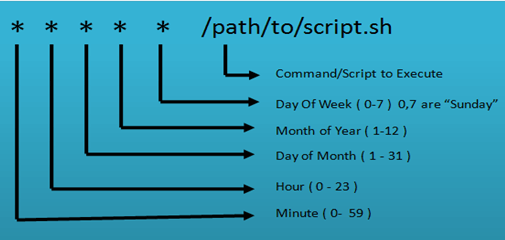
Before we start scheduling tasks, it is essential to understand the Cron syntax. Cron syntax follows a specific format as shown below.

* * * * * command to be executed

– – – – –

| | | | |

| | | | +—– day of the week (0 – 6) (Sunday=0)

| | | +——- month (1 – 12)

| | +——— day of the month (1 – 31)

| +———– hour (0 – 23)

+————- min (0 – 59)

The syntax includes five fields: minute, hour, day of the month, month, and day of the week. Each field can contain a single value which represents that field, or it can be a list of values or a range of values separated by commas. The asterisk symbol (*) represents all possible values, while hyphens represent a range of values. For example, if you want to schedule a task to run every day at midnight, you would use the following syntax: 0 0 * * * command to be executed.

Step 2 – Scheduling Tasks

Now that you understand the syntax let’s schedule a few tasks. Let’s say you want to schedule a shell script to run automatically every day at 5 am. Here’s how you would do that:

1. Open your terminal and enter the following command: “`crontab -e“`

2. This will open up your crontab in your default text editor. Add the following line: “`0 5 * * * /path/to/your/script.sh“`

3. Save and exit the crontab file.

This command will run your shell script every day at 5 am. You can customize the timing by changing the numbers in the syntax.

Step 3 – Troubleshooting

Once you have scheduled your cron jobs, it’s essential to verify that they’re running correctly. Here are some ways to troubleshoot:

1. Use the “`tail“` command to examine the syslog file: The syslog file contains system messages, including messages from cron jobs. You can open the syslog file with the following command: “`tail -f /var/log/syslog“`. This command will show the most recent syslog entries, including messages from your cron jobs.

2. Run Cron with the “`test“` command: You can run the test command to simulate a cron job and see if it works. For example, if your cron job is scheduled to run every day at 5 am, you can use the following command to test it: “`/usr/bin/sudo -u username /path/to/command“`. Replace the username and path with the actual values of your cron job.

Conclusion

In conclusion, Cron is a powerful tool that can help you automate many of your daily tasks in Linux. With the examples and tips provided in this guide, you should now be able to schedule and run your own cron jobs. Remember to be careful when scheduling tasks and ensure that your commands are tested and working correctly before scheduling them.

Previous Article

The Beginner’s Guide to NIST Penetration Testing

Next Article

The benefits of clustered storage

Matthew Lynch

Related articles More from author

  • Online Learning & eLearning

    Top 6 Ways to Restore the Missing Google Chrome Toolbar

    March 19, 2023
    By Matthew Lynch
  • Assistive TechnologyDigital & Mobile TechnologyEdTech & InnovationHigher EducationOnline Learning & eLearning

    Flipping the Classroom with Screencasting

    October 23, 2020
    By Matthew Lynch
  • Online Learning & eLearning

    The Top 10 Non-Coding Web3 Jobs You Should Know About

    June 23, 2023
    By Matthew Lynch
  • Elementary EducationOnline Learning & eLearning

    Switching Phone Carriers : What to Know Before You Switch Providers

    March 30, 2023
    By Matthew Lynch
  • Online Learning & eLearning

    How To Track Attendance During Virtual Learning

    February 1, 2021
    By Matthew Lynch
  • Online Learning & eLearning

    Top 7 Ways to Fix Auto Brightness Not Working on iPhone

    April 3, 2023
    By Matthew Lynch

Search

Login & Registration

  • Log in
  • Entries feed
  • Comments feed
  • WordPress.org

Newsletter

Signup for The Tech Edvocate Newsletter and have the latest in EdTech news and opinion delivered to your email address!

About Us

Since technology is not going anywhere and does more good than harm, adapting is the best course of action. That is where The Tech Edvocate comes in. We plan to cover the PreK-12 and Higher Education EdTech sectors and provide our readers with the latest news and opinion on the subject. From time to time, I will invite other voices to weigh in on important issues in EdTech. We hope to provide a well-rounded, multi-faceted look at the past, present, the future of EdTech in the US and internationally.

We started this journey back in June 2016, and we plan to continue it for many more years to come. I hope that you will join us in this discussion of the past, present and future of EdTech and lend your own insight to the issues that are discussed.

Newsletter

Signup for The Tech Edvocate Newsletter and have the latest in EdTech news and opinion delivered to your email address!

Contact Us

The Tech Edvocate
910 Goddin Street
Richmond, VA 23231
(601) 630-5238
[email protected]

Copyright © 2026 Matthew Lynch. All rights reserved.