The Tech Edvocate

Top Menu

  • Advertisement
  • Apps
  • Home Page
  • Home Page Five (No Sidebar)
  • Home Page Four
  • Home Page Three
  • Home Page Two
  • Home Tech2
  • Icons [No Sidebar]
  • Left Sidbear Page
  • Lynch Educational Consulting
  • My Account
  • My Speaking Page
  • Newsletter Sign Up Confirmation
  • Newsletter Unsubscription
  • Our Brands
  • Page Example
  • Privacy Policy
  • Protected Content
  • Register
  • Request a Product Review
  • Shop
  • Shortcodes Examples
  • Signup
  • Start Here
    • Governance
    • Careers
    • Contact Us
  • Terms and Conditions
  • The Edvocate
  • The Tech Edvocate Product Guide
  • Topics
  • Write For Us
  • Advertise

Main Menu

  • Start Here
    • Our Brands
    • Governance
      • Lynch Educational Consulting, LLC.
      • Dr. Lynch’s Personal Website
      • Careers
    • Write For Us
    • The Tech Edvocate Product Guide
    • Contact Us
    • Books
    • Edupedia
    • Post a Job
    • The Edvocate Podcast
    • Terms and Conditions
    • Privacy Policy
  • Topics
    • Assistive Technology
    • Child Development Tech
    • Early Childhood & K-12 EdTech
    • EdTech Futures
    • EdTech News
    • EdTech Policy & Reform
    • EdTech Startups & Businesses
    • Higher Education EdTech
    • Online Learning & eLearning
    • Parent & Family Tech
    • Personalized Learning
    • Product Reviews
  • Advertise
  • Tech Edvocate Awards
  • The Edvocate
  • Pedagogue
  • School Ratings

logo

The Tech Edvocate

  • Start Here
    • Our Brands
    • Governance
      • Lynch Educational Consulting, LLC.
      • Dr. Lynch’s Personal Website
        • My Speaking Page
      • Careers
    • Write For Us
    • The Tech Edvocate Product Guide
    • Contact Us
    • Books
    • Edupedia
    • Post a Job
    • The Edvocate Podcast
    • Terms and Conditions
    • Privacy Policy
  • Topics
    • Assistive Technology
    • Child Development Tech
    • Early Childhood & K-12 EdTech
    • EdTech Futures
    • EdTech News
    • EdTech Policy & Reform
    • EdTech Startups & Businesses
    • Higher Education EdTech
    • Online Learning & eLearning
    • Parent & Family Tech
    • Personalized Learning
    • Product Reviews
  • Advertise
  • Tech Edvocate Awards
  • The Edvocate
  • Pedagogue
  • School Ratings
  • A Visitors Guide to Pittsburgh (PA), United States

  • A Visitors Guide to Colorado Springs (CO), United States

  • 5 Pairs of Shoes That Will Instantly Step Your Shoe Game Up

  • Radiant Youthful Skin is the Perfect Christmas Gift

  • Give Your Loved One the Gift of Youthful, Radiant Skin this Christmas

  • Give Your Loved One the Gift of a Restful Night Sleep this Christmas

  • Nex Playground’s Holiday Sales Bring Active Play Indoors This Seaso

  • A Visitors Guide to Louisville (KY), United States

  • A Visitor’s Guide to Nashville-Davidson (TN), United States

  • A Visitors Guide to Portland (OR), United States

Tech Advice
Home›Tech Advice›Stop Using Your Hands to Type on a Mac. Use Your Voice Instead

Stop Using Your Hands to Type on a Mac. Use Your Voice Instead
By Matthew Lynch
July 24, 2023
0
Spread the love

Imagine a world where you can effortlessly type without ever touching the keyboard. With advancements in technology, this dream is becoming a reality. If you’re tired of typing or need an alternative due to physical limitations, using your voice to dictate text on your Mac can be a game-changer. In this article, we explore how you can leverage the voice dictation feature on macOS and bid farewell to manual typing.

Enabling Voice Dictation:

1. Open “System Preferences” from the Apple menu.

2. Click on “Keyboard” and navigate to the “Dictation” tab.

3. Enable dictation by toggling it on and select your preferred language.

Getting Started with Voice Dictation:

1. Activate dictation mode: Press fn (function) key twice or press fn + ⎇ (option) key together if you’ve set that as your shortcut.

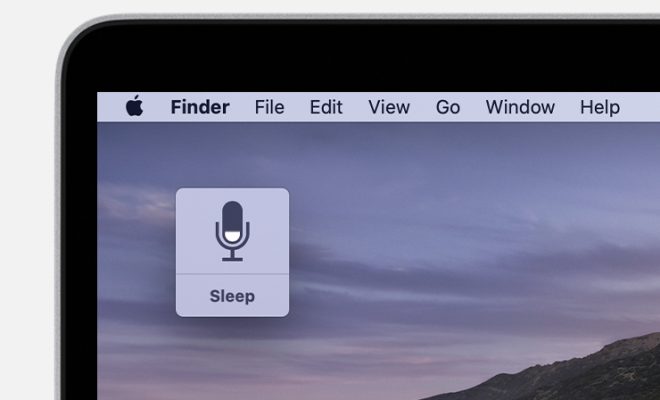
2. A small microphone icon will appear; start speaking after it turns into a sound wave icon.

Tips for Efficient Voice Dictation:

1. Speak clearly: Ensure proper articulation and speak at a moderate pace for accurate recognition.

2. Punctuation: Include punctuation commands like “period,” “comma,” or “question mark” when needed.

3. Editing Text: Utilize spoken commands such as “delete” or “select all” for easy editing.

Advanced Commands:

Voice dictation offers more than just basic transcription capabilities – here are some advanced commands worth exploring:

• Application-specific shortcuts: Many apps have their own unique voice commands that allow specific actions within those applications.

• Navigation: Use phrases like “click file,” “scroll down,” or “go back” to navigate through windows or browsers hands-free.

• Emoticons/emojis: Say phrases like “smiley face,” “thumbs up,” or “heart emoji” to insert emoticons or emojis into your text.

Optimizing Voice Dictation:

To make the most out of voice dictation on your Mac, consider these additional tips:

1. Internet connection: Ensure a stable internet connection for improved accuracy and faster processing.

2. Quiet environment: Minimize background noise to enhance speech recognition quality.

3. Practice makes perfect: The more you use voice dictation, the better it becomes at understanding your unique speech patterns.

Privacy and Security Considerations:

When using voice dictation, it’s essential to be mindful of privacy and security concerns. Here are a few key points:

• Your spoken words are sent to Apple’s servers to process the transcription; however, they are not associated with your Apple ID.

• To safeguard sensitive information, avoid speaking private data like passwords or financial details during dictation.

Embrace a Hands-Free Typing Experience:

Voice dictation on macOS offers an exciting alternative for typing that can save time and provide convenience in various scenarios. Whether you have physical limitations or simply want to give your hands a break from typing, this feature enables you to effortlessly convert thoughts into text using the power of your voice. So why not explore this incredible capability on your Mac today? Start talking instead of typing – it might just revolutionize how you interact with your computer!


Previous Article

How to Download YouTube Videos: A Step-by-Step ...

Next Article

Your YouTube Videos Are Too Slow. Here’s ...

Matthew Lynch

Related articles More from author

  • Tech Advice

    Smart Home Privacy Guide: Keep Amazon, Google, and Apple From Listening In

    July 10, 2023
    By Matthew Lynch
  • Tech Advice

    Game of Thrones Language Lessons: Learn High Valyrian in 5 Easy Steps

    July 4, 2023
    By Matthew Lynch
  • Tech Advice

    Where to Find Downloaded Files on Your Android Phone

    July 24, 2023
    By Matthew Lynch
  • Tech Advice

    The Best Nikon Z Mirrorless Lenses for 2023

    July 19, 2023
    By Matthew Lynch
  • Tech Advice

    A Us Olympic Athlete Couldn’t Pay Her Rent, So Flavor Flav and Reddit Cofounder Alexis Ohanian Stepped in to Help

    August 5, 2024
    By Matthew Lynch
  • Tech Advice

    Urbanista Los Angeles Review

    July 20, 2023
    By Matthew Lynch

Search

Login & Registration

  • Register
  • Log in
  • Entries feed
  • Comments feed
  • WordPress.org

Newsletter

Signup for The Tech Edvocate Newsletter and have the latest in EdTech news and opinion delivered to your email address!

About Us

Since technology is not going anywhere and does more good than harm, adapting is the best course of action. That is where The Tech Edvocate comes in. We plan to cover the PreK-12 and Higher Education EdTech sectors and provide our readers with the latest news and opinion on the subject. From time to time, I will invite other voices to weigh in on important issues in EdTech. We hope to provide a well-rounded, multi-faceted look at the past, present, the future of EdTech in the US and internationally.

We started this journey back in June 2016, and we plan to continue it for many more years to come. I hope that you will join us in this discussion of the past, present and future of EdTech and lend your own insight to the issues that are discussed.

Newsletter

Signup for The Tech Edvocate Newsletter and have the latest in EdTech news and opinion delivered to your email address!

Contact Us

The Tech Edvocate
910 Goddin Street
Richmond, VA 23231
(601) 630-5238
[email protected]

Copyright © 2025 Matthew Lynch. All rights reserved.