The Tech Edvocate

Top Menu

  • Advertisement
  • Apps
  • Home Page
  • Home Page Five (No Sidebar)
  • Home Page Four
  • Home Page Three
  • Home Page Two
  • Home Tech2
  • Icons [No Sidebar]
  • Left Sidbear Page
  • Lynch Educational Consulting
  • My Account
  • My Speaking Page
  • Newsletter Sign Up Confirmation
  • Newsletter Unsubscription
  • Our Brands
  • Page Example
  • Privacy Policy
  • Protected Content
  • Register
  • Request a Product Review
  • Shop
  • Shortcodes Examples
  • Signup
  • Start Here
    • Governance
    • Careers
    • Contact Us
  • Terms and Conditions
  • The Edvocate
  • The Tech Edvocate Product Guide
  • Topics
  • Write For Us
  • Advertise

Main Menu

  • Start Here
    • Our Brands
    • Governance
      • Lynch Educational Consulting, LLC.
      • Dr. Lynch’s Personal Website
      • Careers
    • Write For Us
    • The Tech Edvocate Product Guide
    • Contact Us
    • Books
    • Edupedia
    • Post a Job
    • The Edvocate Podcast
    • Terms and Conditions
    • Privacy Policy
  • Topics
    • Assistive Technology
    • Child Development Tech
    • Early Childhood & K-12 EdTech
    • EdTech Futures
    • EdTech News
    • EdTech Policy & Reform
    • EdTech Startups & Businesses
    • Higher Education EdTech
    • Online Learning & eLearning
    • Parent & Family Tech
    • Personalized Learning
    • Product Reviews
  • Advertise
  • Tech Edvocate Awards
  • The Edvocate
  • Pedagogue
  • School Ratings

logo

The Tech Edvocate

  • Start Here
    • Our Brands
    • Governance
      • Lynch Educational Consulting, LLC.
      • Dr. Lynch’s Personal Website
        • My Speaking Page
      • Careers
    • Write For Us
    • The Tech Edvocate Product Guide
    • Contact Us
    • Books
    • Edupedia
    • Post a Job
    • The Edvocate Podcast
    • Terms and Conditions
    • Privacy Policy
  • Topics
    • Assistive Technology
    • Child Development Tech
    • Early Childhood & K-12 EdTech
    • EdTech Futures
    • EdTech News
    • EdTech Policy & Reform
    • EdTech Startups & Businesses
    • Higher Education EdTech
    • Online Learning & eLearning
    • Parent & Family Tech
    • Personalized Learning
    • Product Reviews
  • Advertise
  • Tech Edvocate Awards
  • The Edvocate
  • Pedagogue
  • School Ratings
  • Why Millions Are Ditching Degrees for These Microcredential Programs

  • The Astonishing Truth: Why Microcredentials Could Be Your Career’s Secret Weapon

  • Why Employers Are Paying 15% More for This One Credential – Not Your Degree

  • 7 Critical Steps to Safeguard Students When Implementing AI in Your Classroom

  • The Astonishing Truth: Your School’s Data Security Might Be a Time Bomb – 7 LMS Platforms That Are Actually Safe for K-12

  • The Troubling Truth: AI in Education Could Be Compromising Your Child’s Privacy

  • Revealed: The Brutal Truth About IronCircle vs Other Cybersecurity Boot Camps

  • This One Thing About University Boot Camps Is Infuriating — Don’t Fall For It

  • Revealed: The Brutal Truth About University Boot Camp Debt

  • Revealed: The 7 Tools EdTech Pros Are Using to Dominate Remote Work in 2026

EdTech & Innovation
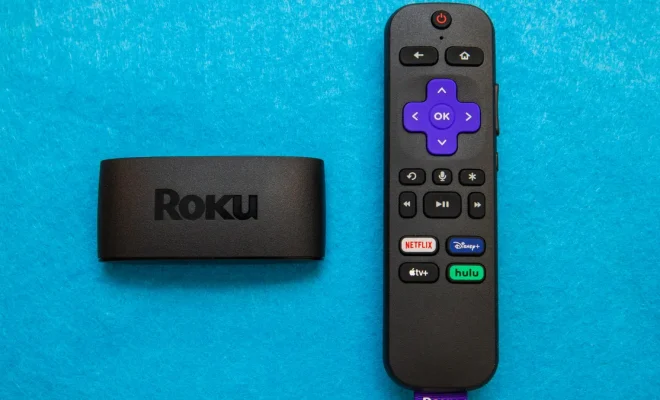
Home›EdTech & Innovation›Set up your Roku and connect it to the TV in just 4 steps

Set up your Roku and connect it to the TV in just 4 steps
By Matthew Lynch
March 29, 2023
0
Spread the love

If you are looking for an easy way to stream your favorite TV shows, movies, and music, Roku is an excellent option. Set up is simple, and just about anyone can do it in four easy steps.

Step 1: Connect your Roku to your TV.

The first step in setting up your Roku is to connect it to your TV. Connect one end of an HDMI cable to your Roku device and the other end to an open HDMI port on your TV. If your TV does not have an HDMI port, you can use a composite video cable instead. Plug the cable into the corresponding ports on both the Roku and the TV.

Step 2: Connect to the internet.

To connect your Roku to the internet, you must use an active internet connection (either wired or wireless). Roku supports both Ethernet and Wi-Fi connections, so choose the one that works best for you. If you opt for an Ethernet cable, connect it to your Roku device and your router. For a wireless connection, go to Settings > Network > Set up connection.

Step 3: Create a Roku account.

Once your Roku is connected to the TV and the internet, you can activate it. A unique code should be displayed on your TV screen during the activation process; use this code to set up your account. If you already have a Roku account, enter your login credentials instead. To create an account, you will need to provide some basic personal information and set up a payment method.

Step 4: Start streaming!

After completing the previous steps, your Roku will take you to the home screen, where you can start streaming your favorite content. To find channels and programs that interest you, go to Streaming Channels and browse through the extensive selection of free and paid channels. You can also add channels directly from the home screen or the My Channels section in the Roku Channel Store. In conclusion, setting up a Roku and connecting it to your TV is a quick and easy process that anyone can do. Whether you want to watch movies, TV shows, or live sports, Roku offers a robust streaming experience that’ll add entertainment to your life. Enjoy your Roku!


Previous Article

Set up your new Apple Watch in ...

Next Article

Setup a Free Online Database with Sodadb

Matthew Lynch

Related articles More from author

  • EdTech & InnovationEdTech Startups & BusinessesFeaturedFresh

    Which Country Is Leading the Edtech Movement?

    October 18, 2018
    By Matthew Lynch
  • EdTech & Innovation

    Amazon’s Doctor Will See You: What to Know About One Medical

    January 31, 2024
    By Matthew Lynch
  • Digital & Mobile TechnologyEdTech & Innovation

    The Digital Revolution in Schools: It’s Not Just Remote Learning

    February 16, 2021
    By Greg Copeland
  • EdTech & Innovation

    What Is SaaS Video Marketing, Best Practices, and Why It Works?

    March 19, 2024
    By Matthew Lynch
  • EdTech & Innovation

    How to Get More Women in Edtech

    March 27, 2018
    By Matthew Lynch
  • EdTech & Innovation

    8 Best Shopify Apps For Social Login [Free & Premium]

    March 9, 2024
    By Matthew Lynch

Search

Login & Registration

  • Log in
  • Entries feed
  • Comments feed
  • WordPress.org

Newsletter

Signup for The Tech Edvocate Newsletter and have the latest in EdTech news and opinion delivered to your email address!

About Us

Since technology is not going anywhere and does more good than harm, adapting is the best course of action. That is where The Tech Edvocate comes in. We plan to cover the PreK-12 and Higher Education EdTech sectors and provide our readers with the latest news and opinion on the subject. From time to time, I will invite other voices to weigh in on important issues in EdTech. We hope to provide a well-rounded, multi-faceted look at the past, present, the future of EdTech in the US and internationally.

We started this journey back in June 2016, and we plan to continue it for many more years to come. I hope that you will join us in this discussion of the past, present and future of EdTech and lend your own insight to the issues that are discussed.

Newsletter

Signup for The Tech Edvocate Newsletter and have the latest in EdTech news and opinion delivered to your email address!

Contact Us

The Tech Edvocate
910 Goddin Street
Richmond, VA 23231
(601) 630-5238
[email protected]

Copyright © 2026 Matthew Lynch. All rights reserved.