The Tech Edvocate

Top Menu

  • Advertisement
  • Apps
  • Home Page
  • Home Page Five (No Sidebar)
  • Home Page Four
  • Home Page Three
  • Home Page Two
  • Home Tech2
  • Icons [No Sidebar]
  • Left Sidbear Page
  • Lynch Educational Consulting
  • My Account
  • My Speaking Page
  • Newsletter Sign Up Confirmation
  • Newsletter Unsubscription
  • Our Brands
  • Page Example
  • Privacy Policy
  • Protected Content
  • Register
  • Request a Product Review
  • Shop
  • Shortcodes Examples
  • Signup
  • Start Here
    • Governance
    • Careers
    • Contact Us
  • Terms and Conditions
  • The Edvocate
  • The Tech Edvocate Product Guide
  • Topics
  • Write For Us
  • Advertise

Main Menu

  • Start Here
    • Our Brands
    • Governance
      • Lynch Educational Consulting, LLC.
      • Dr. Lynch’s Personal Website
      • Careers
    • Write For Us
    • The Tech Edvocate Product Guide
    • Contact Us
    • Books
    • Edupedia
    • Post a Job
    • The Edvocate Podcast
    • Terms and Conditions
    • Privacy Policy
  • Topics
    • Assistive Technology
    • Child Development Tech
    • Early Childhood & K-12 EdTech
    • EdTech Futures
    • EdTech News
    • EdTech Policy & Reform
    • EdTech Startups & Businesses
    • Higher Education EdTech
    • Online Learning & eLearning
    • Parent & Family Tech
    • Personalized Learning
    • Product Reviews
  • Advertise
  • Tech Edvocate Awards
  • The Edvocate
  • Pedagogue
  • School Ratings

logo

The Tech Edvocate

  • Start Here
    • Our Brands
    • Governance
      • Lynch Educational Consulting, LLC.
      • Dr. Lynch’s Personal Website
        • My Speaking Page
      • Careers
    • Write For Us
    • The Tech Edvocate Product Guide
    • Contact Us
    • Books
    • Edupedia
    • Post a Job
    • The Edvocate Podcast
    • Terms and Conditions
    • Privacy Policy
  • Topics
    • Assistive Technology
    • Child Development Tech
    • Early Childhood & K-12 EdTech
    • EdTech Futures
    • EdTech News
    • EdTech Policy & Reform
    • EdTech Startups & Businesses
    • Higher Education EdTech
    • Online Learning & eLearning
    • Parent & Family Tech
    • Personalized Learning
    • Product Reviews
  • Advertise
  • Tech Edvocate Awards
  • The Edvocate
  • Pedagogue
  • School Ratings
  • A Visitors Guide to Pittsburgh (PA), United States

  • A Visitors Guide to Colorado Springs (CO), United States

  • 5 Pairs of Shoes That Will Instantly Step Your Shoe Game Up

  • Radiant Youthful Skin is the Perfect Christmas Gift

  • Give Your Loved One the Gift of Youthful, Radiant Skin this Christmas

  • Give Your Loved One the Gift of a Restful Night Sleep this Christmas

  • Nex Playground’s Holiday Sales Bring Active Play Indoors This Seaso

  • A Visitors Guide to Louisville (KY), United States

  • A Visitor’s Guide to Nashville-Davidson (TN), United States

  • A Visitors Guide to Portland (OR), United States

Digital & Mobile Technology
Home›Digital & Mobile Technology›Samsung Chromebook 3 Review

Samsung Chromebook 3 Review
By Matthew Lynch
July 31, 2023
0
Spread the love

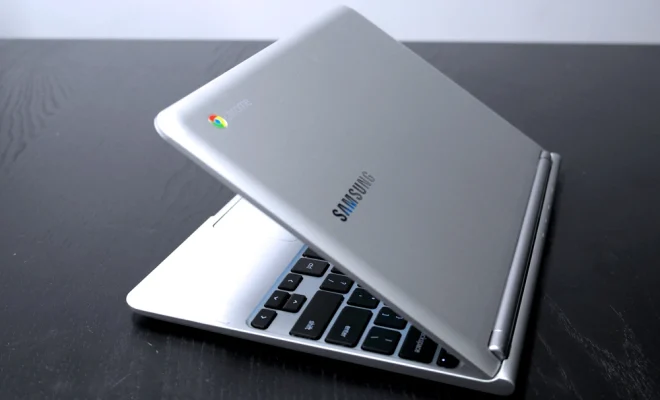
The Samsung Chromebook 3 is a budget-friendly laptop that provides its users with a fast and efficient computing experience. Released in 2016, this laptop has quickly become a popular option for those who need a reliable and affordable device for everyday use.

The Chromebook 3 is designed with a slim and lightweight build, weighing just 2.54 pounds. The device’s excellent build quality makes it a durable option for people who travel frequently. Its compact size and long battery life, up to 11 hours, make it ideal for students, who can carry it around campus without worrying about power shortages.

Powered by an Intel Celeron N3060 processor and 4GB of RAM, the Chromebook 3 can handle basic computing tasks such as web browsing, streaming, and document editing. It comes with Chrome OS, which is a lightweight operating system designed by Google that runs smoothly on low-end hardware. Chrome OS is easy to use, and its interface is similar to that of Google’s Chrome browser, with the added convenience of seamless integration with Google services such as Google Drive, Gmail, and Google Docs.

The laptop’s 11.6-inch display with a resolution of 1366 x 768 provides sharp images with vibrant colors, and its anti-glare technology enables users to enjoy their content even in bright sunlight. The Chromebook 3 features a built-in 720p HD camera that supports video conferencing and comes with two USB ports (one USB 2.0 and one USB 3.0), an HDMI port, an SD card reader, and a headphone/mic jack.

One of the standout features of the Chromebook 3 is its keyboard, which is comfortable to type on and has a decent amount of key travel, making it an excellent choice for heavy typists. The touchpad is also responsive and well-sized, making it easy to navigate the operating system.

Another feature that sets the Chromebook 3 apart is its security. It receives automatic updates to the operating system and has multiple layers of security built-in. It also supports the use of a Google account to log in, which provides additional security and protection against hacks and phishing attacks.

Priced at under $300, the Samsung Chromebook 3 is an excellent choice for users looking for a budget-friendly laptop that serves as an efficient and reliable companion for everyday use. While it might not be a powerhouse for heavy computing tasks, it excels in functionality and portability, making it a perfect option for students, professionals who frequently travel, or anyone who needs a basic laptop for everyday use.

Previous Article

HP Stream 11 Review

Next Article

Is T-Mobile Down… Or Is It Just ...

Matthew Lynch

Related articles More from author

  • Digital & Mobile TechnologyOnline Learning & eLearning

    The Best JBL Bluetooth Speakers

    June 13, 2023
    By Matthew Lynch
  • Digital & Mobile Technology

    How to Change the Clock on Your iPhone Lock Screen

    August 5, 2023
    By Matthew Lynch
  • Digital & Mobile Technology

    Easy Ways to Stop Spotify Automatically Opening on a Mac

    June 22, 2023
    By Matthew Lynch
  • Digital & Mobile Technology

    How to Select Multiple Files in Windows

    June 12, 2023
    By Matthew Lynch
  • Digital & Mobile Technology

    How to Find The TV Device Code For Your Cable Remote

    May 28, 2023
    By Matthew Lynch
  • Digital & Mobile Technology

    How to Change the Playback Speed in Windows Media Player

    June 12, 2023
    By Matthew Lynch

Search

Login & Registration

  • Register
  • Log in
  • Entries feed
  • Comments feed
  • WordPress.org

Newsletter

Signup for The Tech Edvocate Newsletter and have the latest in EdTech news and opinion delivered to your email address!

About Us

Since technology is not going anywhere and does more good than harm, adapting is the best course of action. That is where The Tech Edvocate comes in. We plan to cover the PreK-12 and Higher Education EdTech sectors and provide our readers with the latest news and opinion on the subject. From time to time, I will invite other voices to weigh in on important issues in EdTech. We hope to provide a well-rounded, multi-faceted look at the past, present, the future of EdTech in the US and internationally.

We started this journey back in June 2016, and we plan to continue it for many more years to come. I hope that you will join us in this discussion of the past, present and future of EdTech and lend your own insight to the issues that are discussed.

Newsletter

Signup for The Tech Edvocate Newsletter and have the latest in EdTech news and opinion delivered to your email address!

Contact Us

The Tech Edvocate
910 Goddin Street
Richmond, VA 23231
(601) 630-5238
[email protected]

Copyright © 2025 Matthew Lynch. All rights reserved.