The Tech Edvocate

Top Menu

  • Advertisement
  • Apps
  • Home Page
  • Home Page Five (No Sidebar)
  • Home Page Four
  • Home Page Three
  • Home Page Two
  • Home Tech2
  • Icons [No Sidebar]
  • Left Sidbear Page
  • Lynch Educational Consulting
  • My Account
  • My Speaking Page
  • Newsletter Sign Up Confirmation
  • Newsletter Unsubscription
  • Our Brands
  • Page Example
  • Privacy Policy
  • Protected Content
  • Register
  • Request a Product Review
  • Shop
  • Shortcodes Examples
  • Signup
  • Start Here
    • Governance
    • Careers
    • Contact Us
  • Terms and Conditions
  • The Edvocate
  • The Tech Edvocate Product Guide
  • Topics
  • Write For Us
  • Advertise

Main Menu

  • Start Here
    • Our Brands
    • Governance
      • Lynch Educational Consulting, LLC.
      • Dr. Lynch’s Personal Website
      • Careers
    • Write For Us
    • The Tech Edvocate Product Guide
    • Contact Us
    • Books
    • Edupedia
    • Post a Job
    • The Edvocate Podcast
    • Terms and Conditions
    • Privacy Policy
  • Topics
    • Assistive Technology
    • Child Development Tech
    • Early Childhood & K-12 EdTech
    • EdTech Futures
    • EdTech News
    • EdTech Policy & Reform
    • EdTech Startups & Businesses
    • Higher Education EdTech
    • Online Learning & eLearning
    • Parent & Family Tech
    • Personalized Learning
    • Product Reviews
  • Advertise
  • Tech Edvocate Awards
  • The Edvocate
  • Pedagogue
  • School Ratings

logo

The Tech Edvocate

  • Start Here
    • Our Brands
    • Governance
      • Lynch Educational Consulting, LLC.
      • Dr. Lynch’s Personal Website
        • My Speaking Page
      • Careers
    • Write For Us
    • The Tech Edvocate Product Guide
    • Contact Us
    • Books
    • Edupedia
    • Post a Job
    • The Edvocate Podcast
    • Terms and Conditions
    • Privacy Policy
  • Topics
    • Assistive Technology
    • Child Development Tech
    • Early Childhood & K-12 EdTech
    • EdTech Futures
    • EdTech News
    • EdTech Policy & Reform
    • EdTech Startups & Businesses
    • Higher Education EdTech
    • Online Learning & eLearning
    • Parent & Family Tech
    • Personalized Learning
    • Product Reviews
  • Advertise
  • Tech Edvocate Awards
  • The Edvocate
  • Pedagogue
  • School Ratings
  • 2.3 Million Ricky Joy Sour Crush Candies Recalled: This One Detail Is a Parent’s Nightmare

  • The Staggering Startup Valuation Reset: Why Unicorns Are Vanishing

  • The Glaring Contradiction: Why Big Tech Is Shedding 128,536 Jobs While Investing Billions in AI

  • Insomniac’s Bold Move: The Truth Behind Marvel’s Wolverine Sabretooth ‘Romance’ That Stunned Fans

  • Explosive: ESIC Ban Juan Angulo For Life — The Unseen Crisis Gripping Dota 2

  • This Crucial New Bill Could Finally Fix Student Loan Forgiveness for Millions

  • Massive School Bans on AI: Are We Sacrificing Progress for Protection?

  • Autonomous AI Breaches: Anthropic Confirms Four Attacks and Weaponized Bots

  • Jaw-Dropping Footage: This Waymo Collision Has Everyone Talking

  • Hyundai’s Game-Changing EV Battery Technology: Why It Matters For Your Next Car

Digital & Mobile Technology
Home›Digital & Mobile Technology›Motherboard Fan Connectors: What They Are and How They Work

Motherboard Fan Connectors: What They Are and How They Work
By Matthew Lynch
June 6, 2023
0
Spread the love

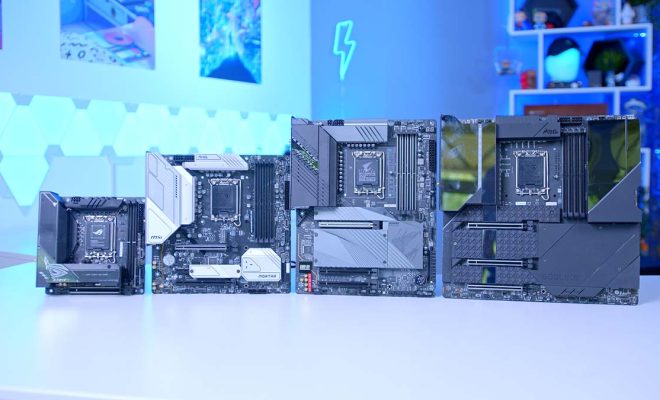
Motherboard fan connectors are an important element of computer hardware that often go unnoticed. These connectors are small, specialized connections that allow fans mounted inside computer cases to be controlled by the motherboard. They play a critical role in maintaining the proper temperature inside a computer and preventing overheating, which can cause damage to many components.

What are Motherboard Fan Connectors?

Motherboard fan connectors are wires that connect the fans inside the computer case to the motherboard. They have small pins that plug into the motherboard’s electrical connections, allowing the motherboard to both detect and control the fans’ speed. These connections let the fans work together with the motherboard’s sensors to monitor and adjust the temperature in real-time by increasing or decreasing the fans’ speed.

Types of Motherboard Fan Connectors

There are two commonly used types of motherboard fan connectors that come with modern motherboards:

  1. PWM Connectors

The primary connection used for fans on a modern motherboard is a PWM (Pulse Width Modulation) connector. These connectors allow the motherboard to regulate a fan’s speed by controlling the voltage and load of the fan. The PWM connectors provide greater control over the fans’ speed, and thereby offer a more accurate means of regulating the cooling.

  1. DC Connectors

The DC (Direct Current) connectors are simple connections that usually have three pins rather than four. These connectors provide a straight data signal to the fans with one pin for power, one pin for ground, and a third pin for the control signal. DC connectors are usually used for older fans that do not support PWM, and since there are no options to regulate the speed, they run at full capacity.

How Motherboard Fan Connectors Work

Motherboard fan connectors work by sending a signal to the fans that control their speed. The PWM connectors use a Pulse Width Modulation, which means that a fixed voltage is supplied to the fans, altering the speed to the fans via the pulse width of the signal, varying from on to off. Moreover, the fans also have a speed sensor installed, which allows the motherboard to receive feedback on the fans’ speed.

If the motherboard detects that the temperature of the system is rising, it sends a signal to the fans through the PWM connector. Depending on the speed and temperature settings in the computer’s BIOS or internal software, the fans’ speed can increase to dissipate the heat or decrease if the temperature is too low. This function makes sure that the temperature inside the PC stays at an optimum level by regulating the fans’ speed.

Conclusion

Motherboard fan connectors are a critical component that can often be overlooked in a computer. They play an essential role in regulating the internal temperature of the computer and prevent overheating. The two most common types of connectors are the PWM and the DC connectors. These connectors allow the motherboard to send signals to the fans to regulate their speed accurately. By understanding how they work, it is possible to appreciate the value of this small but powerful component in a computer system.


Previous Article

How to Fix It When Hulu Keeps ...

Next Article

What Is an ACSM File? (And How ...

Matthew Lynch

Related articles More from author

  • Digital & Mobile Technology

    Best of the Best Contactless Payment Technologies 2026

    October 24, 2025
    By Matthew Lynch
  • Digital & Mobile Technology

    How to Fix It When Windows 11 Is Slow

    July 6, 2023
    By Matthew Lynch
  • Digital & Mobile Technology

    What is an Inkjet Printer?

    May 5, 2023
    By Matthew Lynch
  • Digital & Mobile Technology

    How to Start and Stop Screen Recordings on a Mac

    August 3, 2023
    By Matthew Lynch
  • Digital & Mobile Technology

    How to Get Custom Songs in Beat Saber for Meta (Oculus) Quest

    May 31, 2023
    By Matthew Lynch
  • Digital & Mobile Technology

    What Is Patch Tuesday?

    September 7, 2023
    By Matthew Lynch

Search

Login & Registration

  • Log in
  • Entries feed
  • Comments feed
  • WordPress.org

Newsletter

Signup for The Tech Edvocate Newsletter and have the latest in EdTech news and opinion delivered to your email address!

About Us

Since technology is not going anywhere and does more good than harm, adapting is the best course of action. That is where The Tech Edvocate comes in. We plan to cover the PreK-12 and Higher Education EdTech sectors and provide our readers with the latest news and opinion on the subject. From time to time, I will invite other voices to weigh in on important issues in EdTech. We hope to provide a well-rounded, multi-faceted look at the past, present, the future of EdTech in the US and internationally.

We started this journey back in June 2016, and we plan to continue it for many more years to come. I hope that you will join us in this discussion of the past, present and future of EdTech and lend your own insight to the issues that are discussed.

Newsletter

Signup for The Tech Edvocate Newsletter and have the latest in EdTech news and opinion delivered to your email address!

Contact Us

The Tech Edvocate
910 Goddin Street
Richmond, VA 23231
(601) 630-5238
[email protected]

Copyright © 2026 Matthew Lynch. All rights reserved.