The Tech Edvocate

Top Menu

  • Advertisement
  • Apps
  • Home Page
  • Home Page Five (No Sidebar)
  • Home Page Four
  • Home Page Three
  • Home Page Two
  • Home Tech2
  • Icons [No Sidebar]
  • Left Sidbear Page
  • Lynch Educational Consulting
  • My Account
  • My Speaking Page
  • Newsletter Sign Up Confirmation
  • Newsletter Unsubscription
  • Our Brands
  • Page Example
  • Privacy Policy
  • Protected Content
  • Register
  • Request a Product Review
  • Shop
  • Shortcodes Examples
  • Signup
  • Start Here
    • Governance
    • Careers
    • Contact Us
  • Terms and Conditions
  • The Edvocate
  • The Tech Edvocate Product Guide
  • Topics
  • Write For Us
  • Advertise

Main Menu

  • Start Here
    • Our Brands
    • Governance
      • Lynch Educational Consulting, LLC.
      • Dr. Lynch’s Personal Website
      • Careers
    • Write For Us
    • The Tech Edvocate Product Guide
    • Contact Us
    • Books
    • Edupedia
    • Post a Job
    • The Edvocate Podcast
    • Terms and Conditions
    • Privacy Policy
  • Topics
    • Assistive Technology
    • Child Development Tech
    • Early Childhood & K-12 EdTech
    • EdTech Futures
    • EdTech News
    • EdTech Policy & Reform
    • EdTech Startups & Businesses
    • Higher Education EdTech
    • Online Learning & eLearning
    • Parent & Family Tech
    • Personalized Learning
    • Product Reviews
  • Advertise
  • Tech Edvocate Awards
  • The Edvocate
  • Pedagogue
  • School Ratings

logo

The Tech Edvocate

  • Start Here
    • Our Brands
    • Governance
      • Lynch Educational Consulting, LLC.
      • Dr. Lynch’s Personal Website
        • My Speaking Page
      • Careers
    • Write For Us
    • The Tech Edvocate Product Guide
    • Contact Us
    • Books
    • Edupedia
    • Post a Job
    • The Edvocate Podcast
    • Terms and Conditions
    • Privacy Policy
  • Topics
    • Assistive Technology
    • Child Development Tech
    • Early Childhood & K-12 EdTech
    • EdTech Futures
    • EdTech News
    • EdTech Policy & Reform
    • EdTech Startups & Businesses
    • Higher Education EdTech
    • Online Learning & eLearning
    • Parent & Family Tech
    • Personalized Learning
    • Product Reviews
  • Advertise
  • Tech Edvocate Awards
  • The Edvocate
  • Pedagogue
  • School Ratings
  • Urgent Warning: How AI is Fueling Rampant Skincare Scams Right Now

  • Urgent: This Skincare Trend Is Exploiting Children — And It’s Spreading Fast

  • Seattle Times sues Microsoft and OpenAI, alleging they trained their AI on its journalism

  • Astonishing: Anthropic Axed $6 Billion Deal for Decart — Why?

  • Sega cancelled its “risky” Super Game project as it “would have to grow enormously to match the scale of the service” | GamesIndustry.biz

  • Devastating: Don’t Nod’s €8M Cash Crisis Threatens Studio Future

  • OpenAI Accused of Shocking Attempt to Hijack Euler Proof — The Truth Revealed

  • Meta Child Sexual Abuse Ads: A Disturbing Investigation Unveils Shocking Truths

  • Unveiling the Quiet Crisis: Why Two Mega-Districts Just Banned AI in Education

  • Unveiling the Controversial New Texas Curriculum: A Battle Over History and Identity

Digital & Mobile Technology
Home›Digital & Mobile Technology›Microsoft Access GROUP BY Query

Microsoft Access GROUP BY Query
By Matthew Lynch
June 10, 2023
0
Spread the love

Microsoft Access is a relational database management system that is widely used in various organizations, businesses, and institutions. One of the crucial features of Access is the GROUP BY query. It refers to a powerful and essential SQL command that is used to group data based on particular criteria.

Essentially, the GROUP BY query enables users to group data based on common values, such as sums, counts, averages, or other mathematical operations. This query is helpful when it comes to organizing data into more manageable sections, allowing for more effective analysis and reporting. By grouping data in this way, users can quickly identify trends, patterns, and outliers that might be difficult to spot when examining raw data.

One of the primary benefits of using the GROUP BY query is that it allows users to summarize data quickly and easily. Rather than looking at long lists of data, users can group data by particular fields and then display summaries of each group. For example, if an organization wants to know how many customers it has in each state or province, they can group customer data by state or province field and then use the COUNT function to determine the total number of customers in each category.

In addition to providing summaries of data, the GROUP BY query is also useful for identifying trends and patterns in data. Organizations can use this query to determine the most popular products or services, the busiest times of day, or the customers with the highest revenue. By grouping data based on different criteria, it is possible to identify patterns and trends that might have otherwise gone unnoticed.

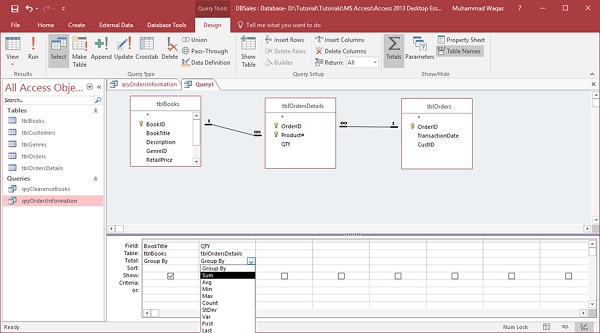
When implementing the GROUP BY query in Access, the user must specify which fields should be used for grouping the data. This query can be used with any kind of data in Access, whether it is from a single table or multiple tables. However, it is important to note that the query can become more complex when working with multiple tables, and it is vital to ensure that tables are related correctly.

In summary, the GROUP BY query is a powerful tool that can help organizations better understand their data. It allows users to organize data into more manageable sections and to identify patterns and trends that may be difficult to detect otherwise. By mastering this query, organizations can leverage the power of their data to make more informed decisions and gain a competitive advantage.


Previous Article

What Is an ASL File?

Next Article

How to Play Blu-Rays on Windows 11

Matthew Lynch

Related articles More from author

  • Digital & Mobile Technology

    Can You Split Screen on iPhone?

    April 3, 2023
    By Matthew Lynch
  • Digital & Mobile Technology

    How to Unlock a Secured Wi-Fi Connection

    June 9, 2023
    By Matthew Lynch
  • Digital & Mobile Technology

    What is Voice over Internet Protocol (VoIP)?

    May 14, 2023
    By Matthew Lynch
  • Digital & Mobile Technology

    How to Download and Play The Sims 4 for Free

    June 23, 2023
    By Matthew Lynch
  • Digital & Mobile Technology

    How to Uninstall and Remove Google Drive From Your PC or Mac

    September 8, 2023
    By Matthew Lynch
  • Digital & Mobile Technology

    How to Troubleshoot Apex Legends Crashing on Windows 11

    June 15, 2023
    By Matthew Lynch

Search

Login & Registration

  • Log in
  • Entries feed
  • Comments feed
  • WordPress.org

Newsletter

Signup for The Tech Edvocate Newsletter and have the latest in EdTech news and opinion delivered to your email address!

About Us

Since technology is not going anywhere and does more good than harm, adapting is the best course of action. That is where The Tech Edvocate comes in. We plan to cover the PreK-12 and Higher Education EdTech sectors and provide our readers with the latest news and opinion on the subject. From time to time, I will invite other voices to weigh in on important issues in EdTech. We hope to provide a well-rounded, multi-faceted look at the past, present, the future of EdTech in the US and internationally.

We started this journey back in June 2016, and we plan to continue it for many more years to come. I hope that you will join us in this discussion of the past, present and future of EdTech and lend your own insight to the issues that are discussed.

Newsletter

Signup for The Tech Edvocate Newsletter and have the latest in EdTech news and opinion delivered to your email address!

Contact Us

The Tech Edvocate
910 Goddin Street
Richmond, VA 23231
(601) 630-5238
[email protected]

Copyright © 2026 Matthew Lynch. All rights reserved.