The Tech Edvocate

Top Menu

  • Advertisement
  • Apps
  • Home Page
  • Home Page Five (No Sidebar)
  • Home Page Four
  • Home Page Three
  • Home Page Two
  • Home Tech2
  • Icons [No Sidebar]
  • Left Sidbear Page
  • Lynch Educational Consulting
  • My Account
  • My Speaking Page
  • Newsletter Sign Up Confirmation
  • Newsletter Unsubscription
  • Our Brands
  • Page Example
  • Privacy Policy
  • Protected Content
  • Register
  • Request a Product Review
  • Shop
  • Shortcodes Examples
  • Signup
  • Start Here
    • Governance
    • Careers
    • Contact Us
  • Terms and Conditions
  • The Edvocate
  • The Tech Edvocate Product Guide
  • Topics
  • Write For Us
  • Advertise

Main Menu

  • Start Here
    • Our Brands
    • Governance
      • Lynch Educational Consulting, LLC.
      • Dr. Lynch’s Personal Website
      • Careers
    • Write For Us
    • The Tech Edvocate Product Guide
    • Contact Us
    • Books
    • Edupedia
    • Post a Job
    • The Edvocate Podcast
    • Terms and Conditions
    • Privacy Policy
  • Topics
    • Assistive Technology
    • Child Development Tech
    • Early Childhood & K-12 EdTech
    • EdTech Futures
    • EdTech News
    • EdTech Policy & Reform
    • EdTech Startups & Businesses
    • Higher Education EdTech
    • Online Learning & eLearning
    • Parent & Family Tech
    • Personalized Learning
    • Product Reviews
  • Advertise
  • Tech Edvocate Awards
  • The Edvocate
  • Pedagogue
  • School Ratings

logo

The Tech Edvocate

  • Start Here
    • Our Brands
    • Governance
      • Lynch Educational Consulting, LLC.
      • Dr. Lynch’s Personal Website
        • My Speaking Page
      • Careers
    • Write For Us
    • The Tech Edvocate Product Guide
    • Contact Us
    • Books
    • Edupedia
    • Post a Job
    • The Edvocate Podcast
    • Terms and Conditions
    • Privacy Policy
  • Topics
    • Assistive Technology
    • Child Development Tech
    • Early Childhood & K-12 EdTech
    • EdTech Futures
    • EdTech News
    • EdTech Policy & Reform
    • EdTech Startups & Businesses
    • Higher Education EdTech
    • Online Learning & eLearning
    • Parent & Family Tech
    • Personalized Learning
    • Product Reviews
  • Advertise
  • Tech Edvocate Awards
  • The Edvocate
  • Pedagogue
  • School Ratings
  • The Brutal Truth: 8 Lies Scammers Tell About Your Student Loans

  • New Student Loan Rules: The Shocking Truth About 2026 Relief Programs

  • New Repayment Plan Changes Trigger Student Loan Scam Epidemic

  • Why Millions Are Ditching Degrees for This One Skill-Boosting Secret

  • The Quiet Revolution: How Micro-Credentials Are Reshaping Tech Careers

  • Why 96% of Employers Are Now Demanding Micro-Credentials

  • This One Incident Exposed How Vulnerable Your Student Data Really Is

  • The Brutal Truth About EdTech Security: 10 Solutions to Prevent Another Canvas LMS Disaster

  • The Billion-User Data Heist: Why Your Child’s School Data Is Under Attack

  • This Crucial Mistake Is Killing Your Tech Career (It’s Not What You Think)

Digital & Mobile Technology
Home›Digital & Mobile Technology›Learn How to Join Strings in Java

Learn How to Join Strings in Java
By Matthew Lynch
June 12, 2023
0
Spread the love

Java is a popular programming language with diverse applications. One of the essential tasks that a programmer needs to perform is to concatenate or join strings in Java. String concatenation simply means combining two or more strings into a single string. String concatenation is a significant step for all programmers because it is a basic skill that enables programmers to build and manipulate sentences, paragraphs and whole documents.

Java has several ways of joining strings, each with its advantages and disadvantages. This article will explore the different ways of joining strings in Java and how you can choose the best method for your program.

String Concatenation with the + Operator

The simplest way to concatenate strings in Java is by using the + operator. The + operator joins two or more strings and returns a new string. For example.

“`
String firstName = “John”;
String lastName = “Doe”;
String fullName = firstName + ” ” + lastName;
“`

This code will concatenate the strings firstName and lastName together with a space and then return a new string that has the value “John Doe”.

Although this method is simple, it is not efficient for long strings or when you need to concatenate many strings. The + operator creates a new string object every time you concatenate, and if you have many strings, this creates a lot of overhead.

Using StringBuffer

A more efficient way of joining strings in Java is by using a StringBuffer object. A StringBuffer object is a mutable sequence of characters. This means you can append characters to the object, and it will keep on growing.

“`
String firstName = “John”;
String lastName = “Doe”;
StringBuffer sb = new StringBuffer();
sb.append(firstName);
sb.append(” “);
sb.append(lastName);
String fullName = sb.toString();
“`

In this example, we have created a new StringBuffer object called sb. We then append the firstName and lastName strings, using the append() method. Finally, we convert the StringBuffer object to a string using the toString() method.

This method is efficient because it only creates a single string object when you call toString(). This technique is useful, especially when you have many strings to join.

Using StringBuilder

Another way to concatenate strings more efficiently is to use the StringBuilder class. The StringBuilder class is almost the same as the StringBuffer class, except that it is not thread-safe. This means that it is faster than StringBuffer, but it is not useful in a multi-threaded environment.

“`
String firstName = “John”;
String lastName = “Doe”;
StringBuilder sb = new StringBuilder();
sb.append(firstName);
sb.append(” “);
sb.append(lastName);
String fullName = sb.toString();
“`

This code is almost the same as the previous example using StringBuffer. The only difference is that we have used StringBuilder instead of StringBuffer.

Using String.join() Method

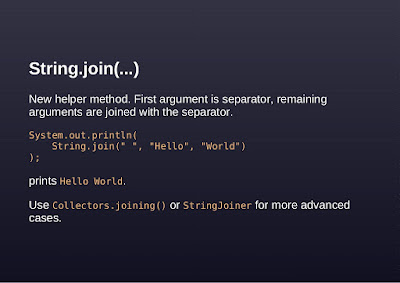
Java 8 introduced a new method for joining strings called String.join(). This method is very simple and effective for joining strings. The String.join() method takes a delimiter and an array of strings and joins them using the delimiter.

“`
String[] names = {“John”, “Doe”};
String fullName = String.join(” “, names);
“`

This code creates an array of strings called names and then joins them using the space delimiter.

Conclusion

In conclusion, joining strings in Java is a fundamental task for all programmers. The + operator, StringBuffer, StringBuilder, and String.join() are different ways of concatenating strings in Java. The method you choose will depend on the specific task and the number of strings you need to join. It is essential to choose the most efficient method, especially when working with many strings. With these methods, you can write effective and optimized programs that can handle many strings with ease.


Previous Article

Easy Ways to Transfer Data to a ...

Next Article

The Best Apps for Finance and Investing ...

Matthew Lynch

Related articles More from author

  • Digital & Mobile Technology

    The Top Financial Functions in Excel

    June 13, 2023
    By Matthew Lynch
  • Digital & Mobile Technology

    How to Pay Someone With Apple Pay on Your iPhone

    August 5, 2023
    By Matthew Lynch
  • Digital & Mobile Technology

    What Is Patch Tuesday for Windows, and When Is It?

    May 25, 2023
    By Matthew Lynch
  • Digital & Mobile Technology

    What Is the Nintendo Switch?

    June 26, 2023
    By Matthew Lynch
  • Digital & Mobile Technology

    How to Ping a Website in Windows

    May 1, 2023
    By Matthew Lynch
  • Digital & Mobile Technology

    Best Cheap Wireless Earbuds Under $50

    April 10, 2023
    By Matthew Lynch

Search

Login & Registration

  • Log in
  • Entries feed
  • Comments feed
  • WordPress.org

Newsletter

Signup for The Tech Edvocate Newsletter and have the latest in EdTech news and opinion delivered to your email address!

About Us

Since technology is not going anywhere and does more good than harm, adapting is the best course of action. That is where The Tech Edvocate comes in. We plan to cover the PreK-12 and Higher Education EdTech sectors and provide our readers with the latest news and opinion on the subject. From time to time, I will invite other voices to weigh in on important issues in EdTech. We hope to provide a well-rounded, multi-faceted look at the past, present, the future of EdTech in the US and internationally.

We started this journey back in June 2016, and we plan to continue it for many more years to come. I hope that you will join us in this discussion of the past, present and future of EdTech and lend your own insight to the issues that are discussed.

Newsletter

Signup for The Tech Edvocate Newsletter and have the latest in EdTech news and opinion delivered to your email address!

Contact Us

The Tech Edvocate
910 Goddin Street
Richmond, VA 23231
(601) 630-5238
[email protected]

Copyright © 2026 Matthew Lynch. All rights reserved.