The Tech Edvocate

Top Menu

  • Advertisement
  • Apps
  • Home Page
  • Home Page Five (No Sidebar)
  • Home Page Four
  • Home Page Three
  • Home Page Two
  • Home Tech2
  • Icons [No Sidebar]
  • Left Sidbear Page
  • Lynch Educational Consulting
  • My Account
  • My Speaking Page
  • Newsletter Sign Up Confirmation
  • Newsletter Unsubscription
  • Our Brands
  • Page Example
  • Privacy Policy
  • Protected Content
  • Register
  • Request a Product Review
  • Shop
  • Shortcodes Examples
  • Signup
  • Start Here
    • Governance
    • Careers
    • Contact Us
  • Terms and Conditions
  • The Edvocate
  • The Tech Edvocate Product Guide
  • Topics
  • Write For Us
  • Advertise

Main Menu

  • Start Here
    • Our Brands
    • Governance
      • Lynch Educational Consulting, LLC.
      • Dr. Lynch’s Personal Website
      • Careers
    • Write For Us
    • The Tech Edvocate Product Guide
    • Contact Us
    • Books
    • Edupedia
    • Post a Job
    • The Edvocate Podcast
    • Terms and Conditions
    • Privacy Policy
  • Topics
    • Assistive Technology
    • Child Development Tech
    • Early Childhood & K-12 EdTech
    • EdTech Futures
    • EdTech News
    • EdTech Policy & Reform
    • EdTech Startups & Businesses
    • Higher Education EdTech
    • Online Learning & eLearning
    • Parent & Family Tech
    • Personalized Learning
    • Product Reviews
  • Advertise
  • Tech Edvocate Awards
  • The Edvocate
  • Pedagogue
  • School Ratings

logo

The Tech Edvocate

  • Start Here
    • Our Brands
    • Governance
      • Lynch Educational Consulting, LLC.
      • Dr. Lynch’s Personal Website
        • My Speaking Page
      • Careers
    • Write For Us
    • The Tech Edvocate Product Guide
    • Contact Us
    • Books
    • Edupedia
    • Post a Job
    • The Edvocate Podcast
    • Terms and Conditions
    • Privacy Policy
  • Topics
    • Assistive Technology
    • Child Development Tech
    • Early Childhood & K-12 EdTech
    • EdTech Futures
    • EdTech News
    • EdTech Policy & Reform
    • EdTech Startups & Businesses
    • Higher Education EdTech
    • Online Learning & eLearning
    • Parent & Family Tech
    • Personalized Learning
    • Product Reviews
  • Advertise
  • Tech Edvocate Awards
  • The Edvocate
  • Pedagogue
  • School Ratings
  • Baffling: CrowdStrike’s $500 Million AI Bet Reshapes Cybersecurity

  • This Crucial Autonomous Driving Rule Could Cost You Everything

  • Baffling: Microsoft AI CEO Demands Halt to Conscious AI Development

  • O seară în ritmul tău: atmosfera divertismentului de cazinou pe internet

  • Outrageous: AppLovin Hit With Lawsuit Over AI Claims — What Investors Need to Know

  • 9 Critical Ways AI Investment Fraud Is Quietly Draining Your Bank Account

  • Is the AI Bubble Bursting? OpenAI’s Funding Woes Revealed

  • Why Millions Are Skipping College for These 7 Online Courses Right Now

  • The Astonishing Truth About PS5 Pro vs Xbox Ally X Financing

  • The Urgent Truth About 2026 Privacy Laws: Why Your Business Could Face Catastrophic Fines

Digital & Mobile Technology
Home›Digital & Mobile Technology›iPhone 4S Hardware, Ports, and Buttons Explained

iPhone 4S Hardware, Ports, and Buttons Explained
By Matthew Lynch
June 21, 2023
0
Spread the love

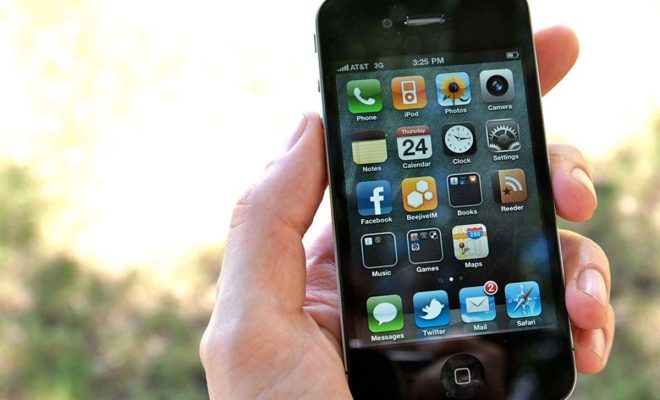
The iPhone 4S was released in October 2011 and quickly became a popular device due to its sleek design and advanced features. In this article, we will take a closer look at the hardware, ports, and buttons of the iPhone 4S.

Hardware

The iPhone 4S features a 3.5-inch Retina display with a resolution of 960 x 640 pixels. It is powered by a dual-core A5 chip, which provides lightning-fast performance and improved graphics. The device comes with either 16GB, 32GB, or 64GB of internal storage and has 512MB of RAM. It also features a 1432mAh battery, which provides up to 8 hours of talk time and up to 200 hours of standby time.

The iPhone 4S also features two cameras. The rear-facing camera is an 8-megapixel camera with autofocus and LED flash. It is capable of recording 1080p HD video at 30 frames per second. The front-facing camera is a 0.3-megapixel VGA camera that is capable of recording 480p video.

Ports

The iPhone 4S features several ports, including a 30-pin dock connector, a 3.5mm headphone jack, and a microphone. The 30-pin dock connector is used for syncing and charging the device. It can also be used to connect the iPhone 4S to various accessories, such as speakers, docks, and car kits.

The 3.5mm headphone jack is used for connecting headphones or earbuds to the device. It also supports audio output to external speakers and other audio devices.

Buttons

The iPhone 4S features several buttons, including the Home button, the Sleep/Wake button, and the Volume buttons. The Home button is located on the front of the device and is used to return to the Home screen from any app or screen.

The Sleep/Wake button is located on the top of the device and is used to turn the device on or off. It can also be used to lock or unlock the device, as well as to put it to sleep or wake it up.

The Volume buttons are located on the left side of the device and are used to adjust the volume of the device’s ringer and alerts, as well as the volume of media playback.

In conclusion, the iPhone 4S is a powerful and feature-packed device that offers a range of hardware, ports, and buttons to enhance the user experience. Whether you are using it to check your email, browse the web, take photos, or listen to music, the iPhone 4S has everything you need to stay connected and entertained on the go.

Previous Article

Pac-Man — The Most Important and Iconic ...

Next Article

How to Turn Off iCloud for Apple ...

Matthew Lynch

Related articles More from author

  • Digital & Mobile Technology

    How to Install Android Studio and SDK Tools in Windows

    April 27, 2023
    By Matthew Lynch
  • Digital & Mobile Technology

    Easily Configure Conky Setup With Conky Manager

    March 19, 2023
    By Matthew Lynch
  • Digital & Mobile Technology

    How to Enable Nvidia G-Sync on AMD FreeSync Monitors

    June 22, 2023
    By Matthew Lynch
  • Digital & Mobile Technology

    Best Free Apps to Turn Selfies Into Emojis, Stickers, and More

    June 21, 2023
    By Matthew Lynch
  • Digital & Mobile Technology

    Xeon vs. Core: Are Intel’s Expensive CPUs Worth a Premium?

    May 29, 2023
    By Matthew Lynch
  • Digital & Mobile Technology

    How to Download Apps on a Samsung Smart TV

    June 12, 2023
    By Matthew Lynch

Search

Login & Registration

  • Log in
  • Entries feed
  • Comments feed
  • WordPress.org

Newsletter

Signup for The Tech Edvocate Newsletter and have the latest in EdTech news and opinion delivered to your email address!

About Us

Since technology is not going anywhere and does more good than harm, adapting is the best course of action. That is where The Tech Edvocate comes in. We plan to cover the PreK-12 and Higher Education EdTech sectors and provide our readers with the latest news and opinion on the subject. From time to time, I will invite other voices to weigh in on important issues in EdTech. We hope to provide a well-rounded, multi-faceted look at the past, present, the future of EdTech in the US and internationally.

We started this journey back in June 2016, and we plan to continue it for many more years to come. I hope that you will join us in this discussion of the past, present and future of EdTech and lend your own insight to the issues that are discussed.

Newsletter

Signup for The Tech Edvocate Newsletter and have the latest in EdTech news and opinion delivered to your email address!

Contact Us

The Tech Edvocate
910 Goddin Street
Richmond, VA 23231
(601) 630-5238
[email protected]

Copyright © 2026 Matthew Lynch. All rights reserved.