The Tech Edvocate

Top Menu

  • Advertisement
  • Apps
  • Home Page
  • Home Page Five (No Sidebar)
  • Home Page Four
  • Home Page Three
  • Home Page Two
  • Home Tech2
  • Icons [No Sidebar]
  • Left Sidbear Page
  • Lynch Educational Consulting
  • My Account
  • My Speaking Page
  • Newsletter Sign Up Confirmation
  • Newsletter Unsubscription
  • Our Brands
  • Page Example
  • Privacy Policy
  • Protected Content
  • Register
  • Request a Product Review
  • Shop
  • Shortcodes Examples
  • Signup
  • Start Here
    • Governance
    • Careers
    • Contact Us
  • Terms and Conditions
  • The Edvocate
  • The Tech Edvocate Product Guide
  • Topics
  • Write For Us
  • Advertise

Main Menu

  • Start Here
    • Our Brands
    • Governance
      • Lynch Educational Consulting, LLC.
      • Dr. Lynch’s Personal Website
      • Careers
    • Write For Us
    • The Tech Edvocate Product Guide
    • Contact Us
    • Books
    • Edupedia
    • Post a Job
    • The Edvocate Podcast
    • Terms and Conditions
    • Privacy Policy
  • Topics
    • Assistive Technology
    • Child Development Tech
    • Early Childhood & K-12 EdTech
    • EdTech Futures
    • EdTech News
    • EdTech Policy & Reform
    • EdTech Startups & Businesses
    • Higher Education EdTech
    • Online Learning & eLearning
    • Parent & Family Tech
    • Personalized Learning
    • Product Reviews
  • Advertise
  • Tech Edvocate Awards
  • The Edvocate
  • Pedagogue
  • School Ratings

logo

The Tech Edvocate

  • Start Here
    • Our Brands
    • Governance
      • Lynch Educational Consulting, LLC.
      • Dr. Lynch’s Personal Website
        • My Speaking Page
      • Careers
    • Write For Us
    • The Tech Edvocate Product Guide
    • Contact Us
    • Books
    • Edupedia
    • Post a Job
    • The Edvocate Podcast
    • Terms and Conditions
    • Privacy Policy
  • Topics
    • Assistive Technology
    • Child Development Tech
    • Early Childhood & K-12 EdTech
    • EdTech Futures
    • EdTech News
    • EdTech Policy & Reform
    • EdTech Startups & Businesses
    • Higher Education EdTech
    • Online Learning & eLearning
    • Parent & Family Tech
    • Personalized Learning
    • Product Reviews
  • Advertise
  • Tech Edvocate Awards
  • The Edvocate
  • Pedagogue
  • School Ratings
  • Medicube PDRN Pink Collagen Cream: Is It Safe to Use Now?

  • Tarte’s ‘Snatch Sticks’ Spark Unprecedented Backlash — Here’s Why Everyone’s Talking

  • This AI-Designed Drug Just Entered Phase III Trials — And It Might Reverse Your Biological Age

  • Unbelievable: Top AI Startups Caught Faking Revenue, Rocking Silicon Valley

  • Xbox Cloud Gaming’s Urgent Problem: Microsoft’s Brutal Truth Revealed

  • The Hypocrisy That’s Quietly Reshaping Gaming Journalism

  • Anthropic Insider: Why AI Could End Humanity by 2036

  • Unbelievable: OpenAI Claims AI Solved Million-Dollar Math Problem – But the Credit Battle Just Began

  • Heartbreaking: 93 Million Kids’ Futures Stolen by Surging Attacks on Education

  • Unsettling: The Cat in the Hat Trend That’s Causing Mass Panic in Schools

Digital & Mobile Technology
Home›Digital & Mobile Technology›How to Use Vim: A Guide to the Basics

How to Use Vim: A Guide to the Basics
By Matthew Lynch
June 21, 2023
0
Spread the love

Vim is a highly customizable text editor used for editing plain text files and programming code. It is considered one of the most powerful and popular text editors available. Vim has a unique interface and can be intimidating for beginners. However, with some practice and patience, you can become familiar with Vim and use its rich features to your advantage.

Here’s a guide to the basics of using Vim:

  1. Modes of Vim

Vim has two modes: insert and normal. Insert mode is where you type the text, while normal mode is used for editing. To switch between the two modes, press the Escape key. You should always return to normal mode when not typing to use editing commands.

  1. Navigation

In normal mode, you can navigate through text using a range of commands to move in the required direction. For example, ‘h’, ‘j’, ‘k’ and ‘l’ arrows or the ‘Page Up’, and ‘Page Down’ keys can be used to move in left, down, up, right and to move up or down the file respectively. You can also search for text using the ‘/’ command followed by the text to search for.

  1. Editing Text

The basic editing commands consist of deleting, copying and pasting text. In Vim, you can delete a single character using the ‘x’ command, or a whole word or line by using the ‘dw’ or ‘dd’ commands respectively. To copy text, highlight the text in visual mode by pressing ‘v’ then proceed by pressing ‘y’ and thereafter the movement command such as ‘y2y’.

  1. Saving and Exiting Vim

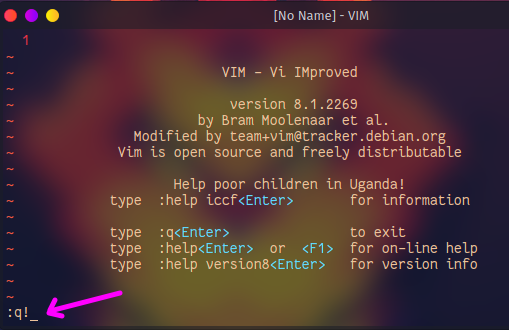
To exit Vim, you need to save the changes made, then exit the application. In normal mode, type ‘:wq’ to write the changes then quit. If you want to exit without saving, you can type ‘:q!’, and press enter. To save without exiting, type ‘:w’ and press enter.

  1. Vim Tricks

There are a lot of tricks to make your experience with Vim more efficient. For instance, setting up your own shortcut keys suits your typing speed. Also, Vim has a built-in spell checker which can be activated in normal mode by typing ‘z=!’.

Previous Article

Liquid Metal vs. Thermal Paste: What’s the ...

Next Article

Which Company Has the Best iPad Data ...

Matthew Lynch

Related articles More from author

  • Digital & Mobile Technology

    Top Android Secret Security Codes You Need to Know

    August 5, 2023
    By Matthew Lynch
  • Digital & Mobile Technology

    The Definition of a Candidate Key

    July 24, 2023
    By Matthew Lynch
  • Digital & Mobile Technology

    Best Android Emulators for Mac in 2023

    May 31, 2023
    By Matthew Lynch
  • Digital & Mobile Technology

    How to Find Contacts on Instagram

    July 6, 2023
    By Matthew Lynch
  • Digital & Mobile Technology

    Best Free Movie Download Sites for 2023

    May 30, 2023
    By Matthew Lynch
  • Digital & Mobile Technology

    How to Fix Binkw32.dll Is Missing Errors

    June 3, 2023
    By Matthew Lynch

Search

Login & Registration

  • Log in
  • Entries feed
  • Comments feed
  • WordPress.org

Newsletter

Signup for The Tech Edvocate Newsletter and have the latest in EdTech news and opinion delivered to your email address!

About Us

Since technology is not going anywhere and does more good than harm, adapting is the best course of action. That is where The Tech Edvocate comes in. We plan to cover the PreK-12 and Higher Education EdTech sectors and provide our readers with the latest news and opinion on the subject. From time to time, I will invite other voices to weigh in on important issues in EdTech. We hope to provide a well-rounded, multi-faceted look at the past, present, the future of EdTech in the US and internationally.

We started this journey back in June 2016, and we plan to continue it for many more years to come. I hope that you will join us in this discussion of the past, present and future of EdTech and lend your own insight to the issues that are discussed.

Newsletter

Signup for The Tech Edvocate Newsletter and have the latest in EdTech news and opinion delivered to your email address!

Contact Us

The Tech Edvocate
910 Goddin Street
Richmond, VA 23231
(601) 630-5238
[email protected]

Copyright © 2026 Matthew Lynch. All rights reserved.